Table of contents
39
Read this in 30 seconds: The XHack AI API lets you run XHack AI from your own scripts, agents and coding tools for a few cents a call, but only if you know how API credits, keys and the two models behave.
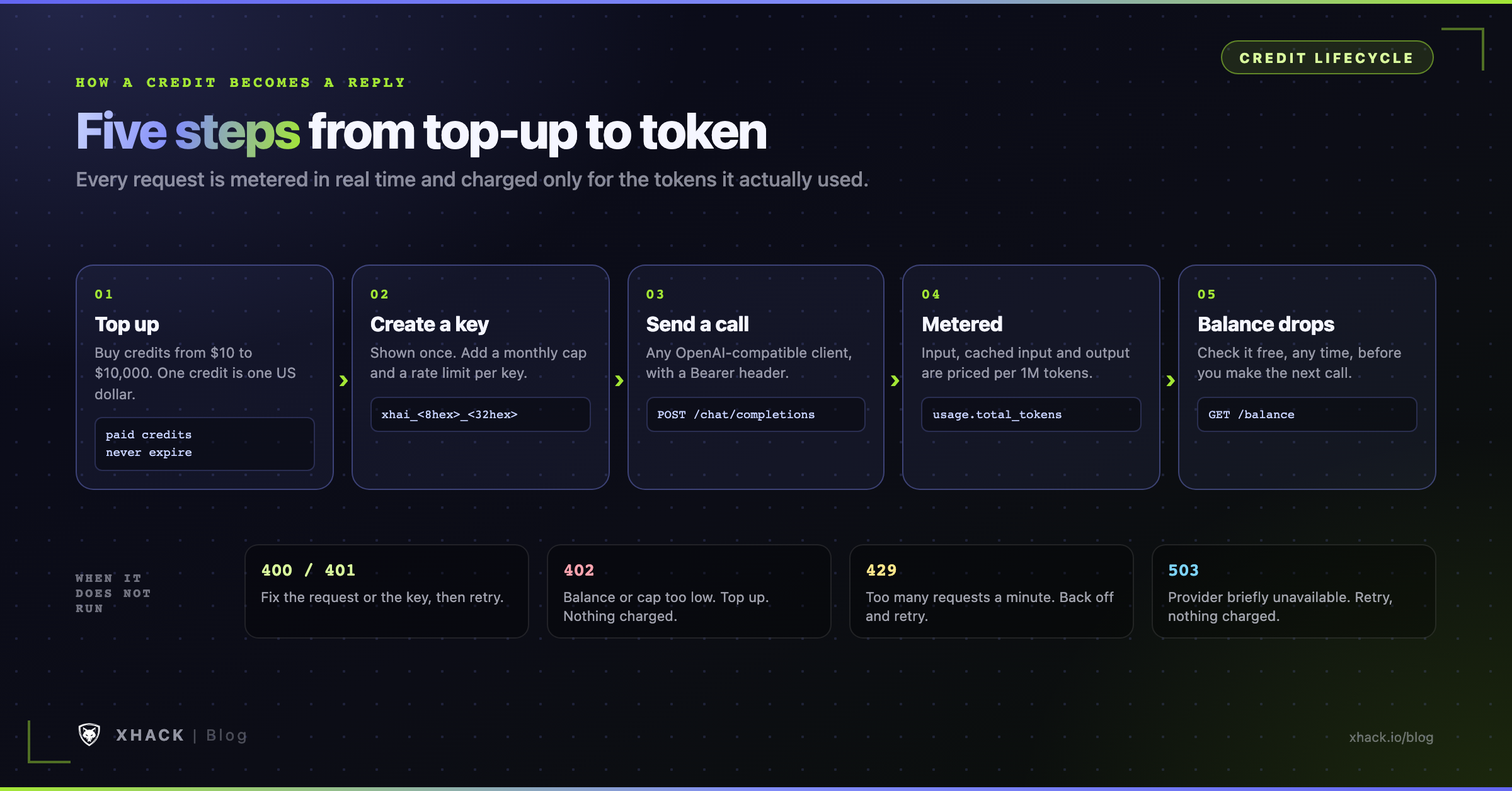
- API credits are dollars, and the ones you buy never expire. One credit is US$1, top-ups run from $10 to $10,000, and gift API credits expire and are spent first.
- The XHack AI API is OpenAI-compatible, but only for Chat Completions. Point the official SDK at
https://api.xhack.io/v1/xhack-aiand swap in anxhai_key. Codex and Claude Code speak other protocols, so they need a small LiteLLM bridge in between.- A typical call costs under half a cent. On
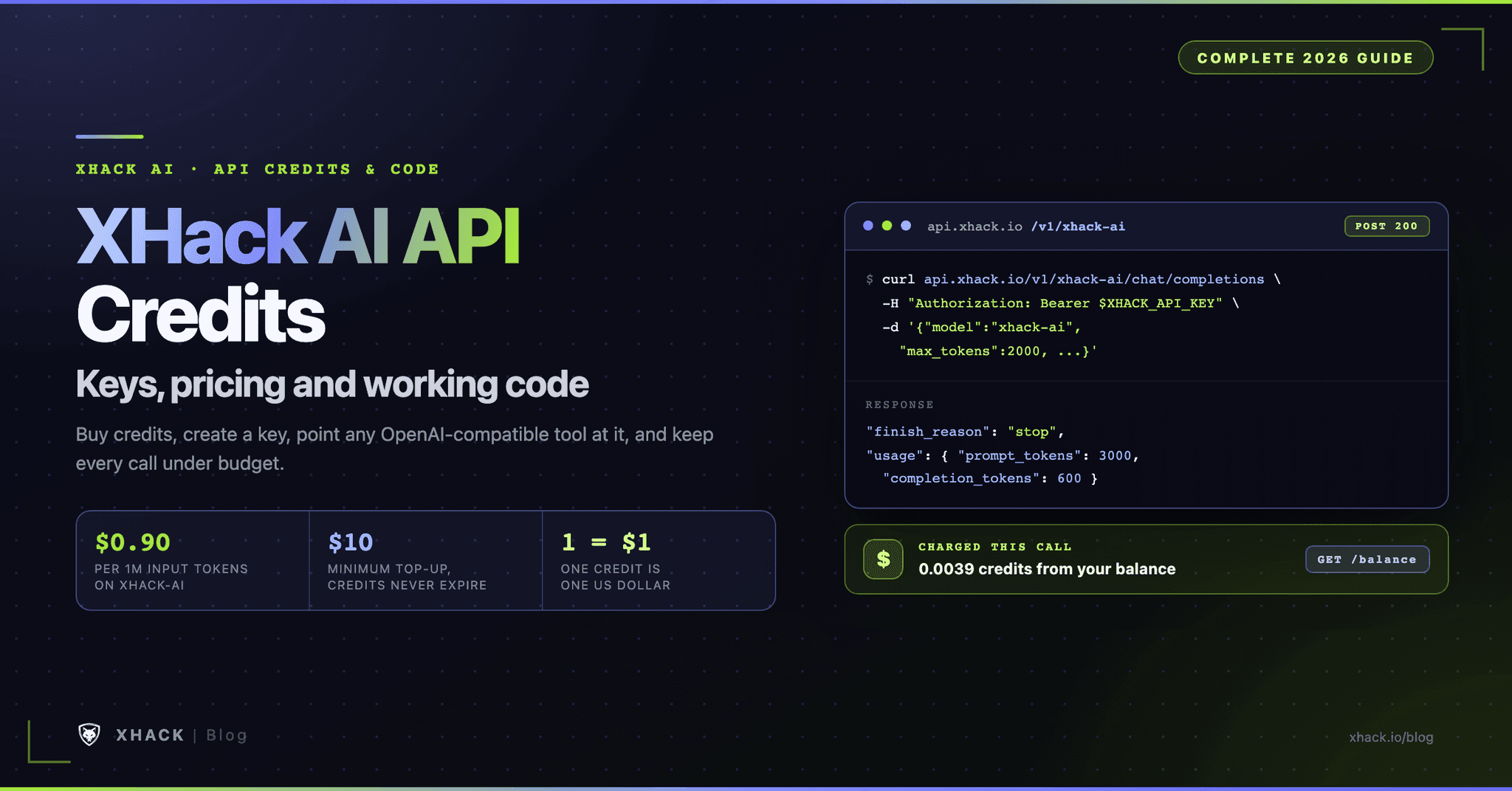
xhack-ai($0.90 in, $2.00 out per 1M tokens), 3,000 tokens in and 600 out cost $0.0039, so $10 of API credits covers about 2,564 of them.- Both models think before they answer, so give them room. Reasoning tokens are billed as output, which is why you should set
max_tokensto 2,000 or more and checkfinish_reason.- It is unrestricted for security work, but you stay responsible for authorization. Test only what you are cleared to test, and the same API credits work inside the XHack AI agent once your plan allowance runs out.
API credits turn a prepaid balance into model calls you can make from any OpenAI-compatible client, with no SDK of ours to install and no subscription tier to fit inside.
That sentence is the whole idea of the XHack AI API. The rest of this guide shows how to buy API credits, create a key, make your first call, price every request, wire the API into Codex, Claude Code and other tools, and keep the key and the balance safe.
Most API guides stop at a single curl command. A security workflow needs more than that, because the same endpoint will end up inside a triage script, a scheduled scan summarizer and a coding agent, and each one can quietly spend your API credits or leak a key. I ran the curl, Python, streaming, tool-calling and bridge examples against the live XHack AI API before they went into this page, and where I did not run something myself the text says so. Last checked October 8, 2026.
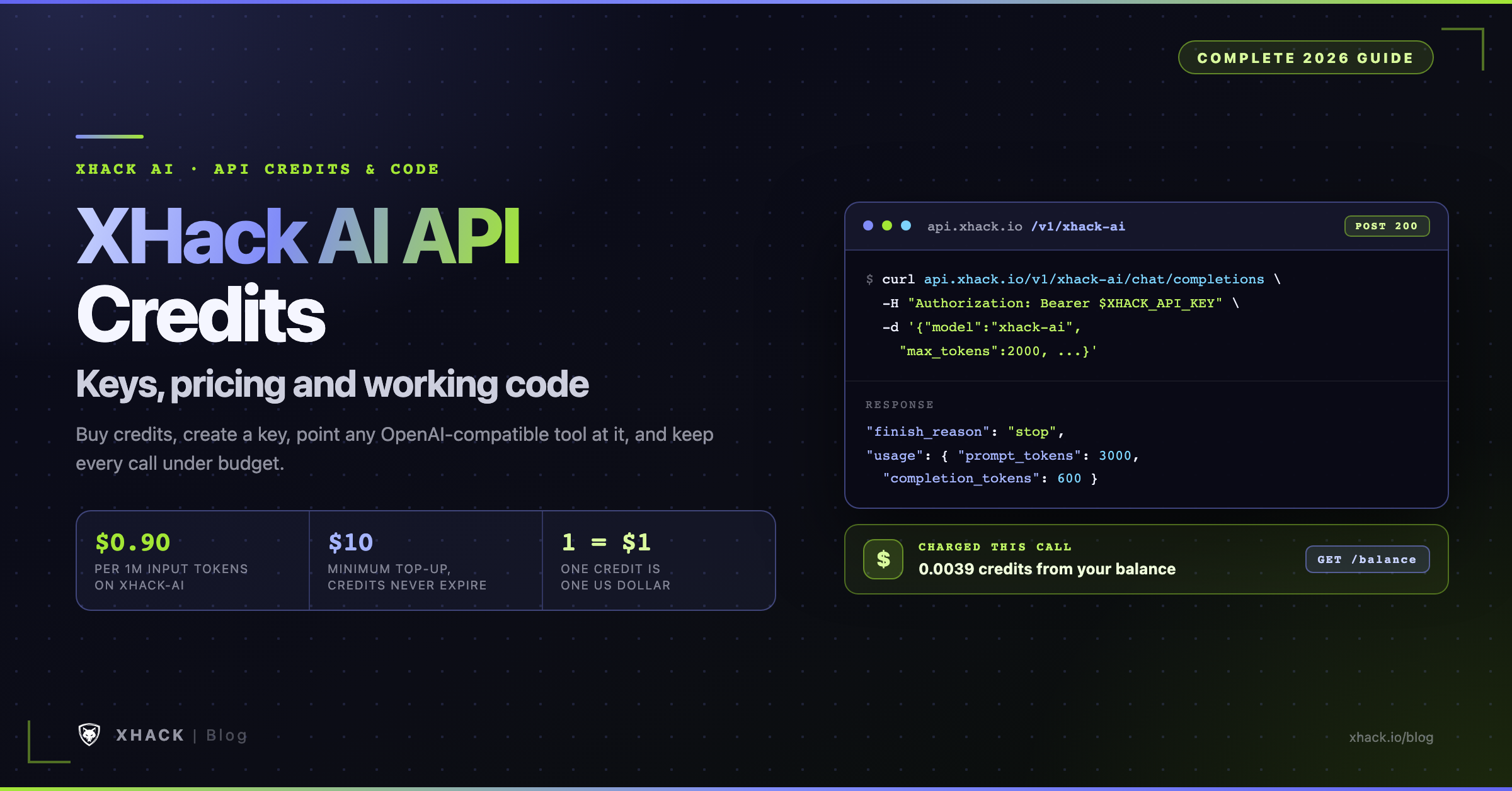
The XHack AI API is a hosted endpoint at https://api.xhack.io/v1/xhack-ai that speaks the OpenAI Chat Completions protocol. You send a list of messages and get a reply, either all at once or streamed token by token. Tool calling, usage reporting and the standard error shape all work the way the OpenAI Python SDK expects.
You can pick the standard model or the pro model per request, and you pay per token from prepaid API credits.
That prepaid balance is separate from your monthly plan. XHack plans come with an allowance, and XHack describes the pay-per-use API key as the credential that keeps work going when that allowance is spent. API credits are what that key draws from.
| Thing | How it works |
|---|---|
| Base URL | https://api.xhack.io/v1/xhack-ai |
| Chat endpoint | POST /chat/completions (a bare POST /completions also works) |
| Other endpoints | GET /balance, GET /models |
| Auth | Authorization: Bearer xhai_... |
| Models | xhack-ai and xhack-ai-pro |
| API credits | 1 credit = US$1, shown to 6 decimal places |
| Charged | API credits are deducted in real time, per request, for the tokens actually used |
| Purchased API credits | Never expire |
| Gift API credits | Expire on their date, spent first, only on the models they cover |
| Top-up | Any amount from $10 to $10,000 |
The OpenAI standard path GET /v1/models does not exist on this host. The model list lives under the XHack prefix, at https://api.xhack.io/v1/xhack-ai/models, so set the base URL with the /v1/xhack-ai part included.
Everything starts in the XHack app at app.xhack.io. The menu names below follow XHack’s own API documentation, so if a label has moved in your version of the app, look for the closest match.
xhai_.Two options on each key deserve a moment, because they are the cheapest insurance you will ever buy.
Use one key per service. If a scanner script leaks its key, you revoke that one key and nothing else stops.
Then store the key in an environment variable. The examples below all read XHACK_API_KEY.
export XHACK_API_KEY="xhai_..."The fastest check is curl. It confirms the key, the endpoint and your balance in a single step.
curl https://api.xhack.io/v1/xhack-ai/chat/completions \
  -H "Authorization: Bearer $XHACK_API_KEY" \
  -H "Content-Type: application/json" \
  -d '{
    "model": "xhack-ai",
    "messages": [
      {"role": "system", "content": "You are a concise security assistant."},
      {"role": "user", "content": "In two sentences, what is an IDOR vulnerability?"}
    ],
    "max_tokens": 2000
  }'
The reply follows the standard Chat Completions shape. The text sits in choices[0].message.content, and usage tells you exactly what you were charged for.
{
  "id": "chatcmpl-77c12e191982b5093af54781",
  "object": "chat.completion",
  "model": "xhack-ai",
  "choices": [{
    "index": 0,
    "message": { "role": "assistant", "content": "IDOR (Insecure Direct Object Reference) is an access control flaw where..." },
    "finish_reason": "stop"
  }],
  "usage": {
    "prompt_tokens": 255,
    "completion_tokens": 160,
    "total_tokens": 415,
    "prompt_tokens_details": { "cached_tokens": 255 },
    "completion_tokens_details": { "reasoning_tokens": 61 }
  }
}
Two fields in that response matter more than they look.
finish_reason says why the model stopped: stop for a finished answer, length for a hit token limit, and tool_calls when it wants you to run a function.reasoning_tokens is the share of completion_tokens the model spent thinking before it wrote the visible answer. You pay for them at the output rate.Install the official SDK with pip install openai, then change two lines: the base URL and the key.
import os
from openai import OpenAI

client = OpenAI(
    base_url="https://api.xhack.io/v1/xhack-ai",
    api_key=os.environ["XHACK_API_KEY"],
)

resp = client.chat.completions.create(
    model="xhack-ai",
    messages=[
        {"role": "system", "content": "You are a concise security assistant."},
        {"role": "user", "content": "List three checks for a JWT misconfiguration."},
    ],
    max_tokens=2000,
)

print(resp.choices[0].message.content)
print(resp.choices[0].finish_reason, resp.usage.total_tokens)Install with npm install openai. The same two settings apply.
import OpenAI from "openai";

const client = new OpenAI({
  baseURL: "https://api.xhack.io/v1/xhack-ai",
  apiKey: process.env.XHACK_API_KEY,
});

const resp = await client.chat.completions.create({
  model: "xhack-ai",
  messages: [{ role: "user", content: "Explain SSRF in one paragraph." }],
  max_tokens: 2000,
});

console.log(resp.choices[0].message.content);
Any other client works the same way. If it lets you set a base URL and an API key for an OpenAI-compatible provider, it can use the XHack AI API.
The XHack AI API serves two models, and model must be xhack-ai or xhack-ai-pro. Any other name returns a 404 model_not_found. Both share the same endpoint and the same request format. The differences are price and, in practice, how much headroom you want on hard problems.
xhack-ai | xhack-ai-pro | |
|---|---|---|
| Input per 1M tokens | $0.90 | $1.50 |
| Output per 1M tokens | $2.00 | $5.00 |
| Cached input per 1M tokens | $0.90 | $1.00 |
| Context window | 1,000,000 tokens | 1,000,000 tokens |
| Max output | 128,000 tokens | 256,000 tokens |
Default output (when you omit max_tokens) | 32,000 tokens | 64,000 tokens |
| Streaming | Yes | Yes |
Note on prices: The prices, limits and model names in this guide are the ones in force on October 8, 2026. They tend to change as XHack ships upgrades, new model versions and new capabilities, so your API credits may buy more or less later. The
/balanceendpoint always returns the current rates, and the pricing page covers the plans.
Those limits are the ones XHack lists at the time of writing. Read them from there in your own code instead of hard-coding them, because the response always reflects the rates and limits in force right now.
Start with xhack-ai. It stretches your API credits further, at 40% less on input and 60% less on output, and it handled every example in this guide. Move a task to xhack-ai-pro when the cheaper model gives answers you have to rework, such as long multi-step analysis or code that needs a second look. On the same 250-token answers, the pro model took about a second longer in my runs, so factor that in for interactive tools.
xhack-ai and xhack-ai-pro are reasoning models. Before they write the visible answer they spend tokens thinking, and the API does not return that thinking. You only see it as reasoning_tokens in the usage object.
This has one practical consequence. If you set max_tokens to 20, the model can use the entire budget on thinking and have nothing left to say, so you get a normal 200 response with empty content and finish_reason: "length".
The rule of thumb is simple.
xhack-ai and 256,000 on xhack-ai-pro.max_tokens out entirely to get the default of 32,000 on xhack-ai or 64,000 on xhack-ai-pro.finish_reason. If it says length, raise the limit and retry.A bigger max_tokens does not cost more by itself. You pay only for the tokens the model actually produces.
The cost of a request is input tokens times the input rate, plus output tokens times the output rate, divided by one million. Cached input tokens are charged at the lower cache rate instead of the input rate.
cost = (fresh_input x input_rate + cached_input x cache_rate + output x output_rate) / 1,000,000Input means everything you send: the system message, the conversation and the tool definitions. Output means everything the model generates, including its reasoning and any tool-call arguments.
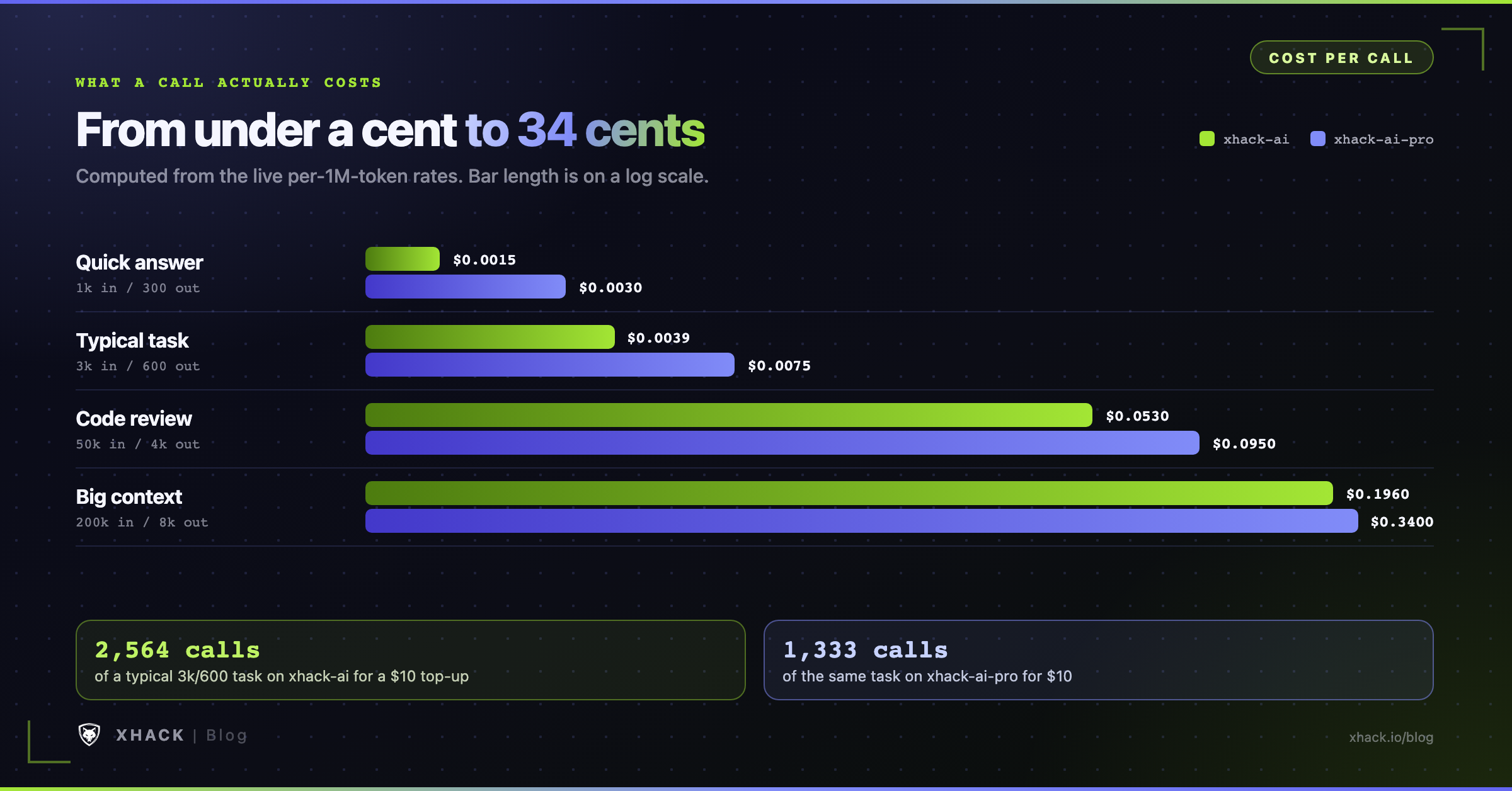
| Request | Tokens (in / out) | xhack-ai | xhack-ai-pro |
|---|---|---|---|
| Quick answer | 1,000 / 300 | $0.0015 | $0.0030 |
| Typical task | 3,000 / 600 | $0.0039 | $0.0075 |
| Code review | 50,000 / 4,000 | $0.0530 | $0.0950 |
| Big context | 200,000 / 8,000 | $0.1960 | $0.3400 |
A $10 top-up of API credits covers about 2,564 typical tasks on xhack-ai or about 1,333 on xhack-ai-pro. The fastest way to burn through API credits is to run a loop that resends a large context on every turn, and the table shows why. That one call costs as much as about 130 quick answers, and a full 1,000,000-token prompt costs $0.90 on xhack-ai before the model writes a word.
These figures use today’s rates, and rates can change with model updates, so rerun the cost script below before you budget a large job.
The /balance endpoint returns the live rates for both models, so your code can price a request in API credits without any hard-coded numbers. This script reads your balance, then works out what a call would cost from its token counts.
import os, requests

BASE = "https://api.xhack.io/v1/xhack-ai"
bal = requests.get(
    f"{BASE}/balance",
    headers={"Authorization": f"Bearer {os.environ['XHACK_API_KEY']}"},
    timeout=30,
).json()
print("available credits:", bal["available_credits"])

def cost(model, prompt_tokens, completion_tokens, cached_tokens=0):
    p = next(m["pricing"] for m in bal["models"] if m["id"] == model)
    fresh = prompt_tokens - cached_tokens
    return (fresh * float(p["input_credits_per_1m"])
            + cached_tokens * float(p["cache_read_credits_per_1m"])
            + completion_tokens * float(p["output_credits_per_1m"])) / 1_000_000

print(round(cost("xhack-ai", 3000, 600), 4))                          # 0.0039
print(round(cost("xhack-ai-pro", 120_000, 8_000, cached_tokens=100_000), 4)) # 0.17When a model supports caching, the stable start of your prompt, usually the system message and the opening turns, can be reused across requests. Reused tokens use fewer API credits, because they are billed at the cache rate, and they also reduce latency.
You get the benefit by keeping the front of the prompt identical between calls and putting the part that changes at the end.
The saving depends on the model. At the time of writing, xhack-ai-pro charges $1.00 per 1M cached tokens against $1.50 for fresh input, so caching 100,000 tokens of a 120,000-token prompt turns a $0.22 call into a $0.17 one. On xhack-ai the cache rate equals the input rate, so you gain latency but not price. The usage.prompt_tokens_details.cached_tokens field tells you how much of each call was served from cache.
Some models can have peak-hour pricing during defined windows. The peak flag in each model’s pricing object turns true while it applies, and the rates in the same object are the ones in force. It was false for both models when I checked, but read it in code before a big batch job.
Set stream: true and the reply arrives as Server-Sent Events. Each data: line carries a chunk, choices[0].delta.content holds the next piece of text, and the stream ends with a literal data: [DONE]. If you are new to the format, the MDN guide to server-sent events covers it well.
Streaming spends the same API credits as a normal call. You pay for the tokens produced either way.
Ask for a usage chunk if you want the token counts on a streamed reply. It arrives last, with an empty choices list, which is why the loop below checks both fields.
import os
from openai import OpenAI

client = OpenAI(base_url="https://api.xhack.io/v1/xhack-ai", api_key=os.environ["XHACK_API_KEY"])

stream = client.chat.completions.create(
    model="xhack-ai",
    messages=[{"role": "user", "content": "Explain SSRF in three short bullet points."}],
    max_tokens=2000,
    stream=True,
    stream_options={"include_usage": True},
)

for chunk in stream:
    if chunk.choices and chunk.choices[0].delta.content:
        print(chunk.choices[0].delta.content, end="", flush=True)
    if chunk.usage:
        print(f"\n\ntokens: {chunk.usage.total_tokens}")
The raw version with curl uses -N so the terminal prints chunks as they land.
curl -N https://api.xhack.io/v1/xhack-ai/chat/completions \
  -H "Authorization: Bearer $XHACK_API_KEY" \
  -H "Content-Type: application/json" \
  -d '{"model": "xhack-ai", "stream": true, "max_tokens": 2000,
       "messages": [{"role": "user", "content": "Hello"}]}'
In my runs the first token of a streamed answer arrived in well under a second, and short answers finished in one to three seconds. Because the model reasons first, a long think can mean a pause before the first visible token, so show a spinner rather than a blank screen.
Pass your own tools and the model decides when to call one. The XHack AI API executes nothing on your behalf. It returns tool_calls with finish_reason: "tool_calls", your code runs the function, and you send the result back as a role: "tool" message. That is the standard client-side loop, so it drops straight into agent frameworks.
The script below gives the model one tool, a CVE lookup, and loops until it has a final answer. The lookup_cve function is a stub, so swap in a call to your own database or to NVD.
import json, os
from openai import OpenAI

client = OpenAI(base_url="https://api.xhack.io/v1/xhack-ai", api_key=os.environ["XHACK_API_KEY"])

def lookup_cve(cve_id: str) -> dict:
    # Your code runs here. XHack never executes tools for you.
    return {"id": cve_id, "cvss": 10.0, "summary": "Log4j JNDI remote code execution"}

tools = [{
    "type": "function",
    "function": {
        "name": "lookup_cve",
        "description": "Fetch a CVE record by ID",
        "parameters": {
            "type": "object",
            "properties": {"cve_id": {"type": "string"}},
            "required": ["cve_id"],
        },
    },
}]

messages = [{"role": "user", "content": "How severe is CVE-2021-44228?"}]

while True:
    resp = client.chat.completions.create(
        model="xhack-ai", messages=messages, tools=tools, max_tokens=2000
    )
    msg = resp.choices[0].message
    messages.append(msg)
    if not msg.tool_calls:
        print(msg.content)
        break
    for call in msg.tool_calls:
        args = json.loads(call.function.arguments)
        result = lookup_cve(**args)
        messages.append({
            "role": "tool",
            "tool_call_id": call.id,
            "content": json.dumps(result),
        })
Some details that keep the loop honest.
tool_calls, not just the first.tool_choice: "auto", which is the default, and let the model decide. Describe each tool clearly, because the description is what the model reads when it chooses.This is the same pattern the XHack agent builds on, and it is why the API suits agentic pentesting workflows: the model plans, your code holds the tools and the scope.
Your API credits work with the common Chat Completions fields. Anything outside the list returns a clear 400 that names the field, so you find out on the first call and not in production.
| Parameter | Notes |
|---|---|
model | Required. xhack-ai or xhack-ai-pro |
messages | Required. Roles: system, developer, user, assistant, tool |
max_tokens or max_completion_tokens | Cap on generated tokens, including reasoning. Never exceeds the model’s maximum output |
temperature | 0 to 2. Default 0.7 |
top_p | 0 to 1. Change this or temperature, not both |
stream and stream_options | include_usage adds a final usage chunk |
stop | A string or up to 8 strings |
seed | Accepted, for repeat-friendly sampling |
frequency_penalty, presence_penalty | -2 to 2 |
tools and tool_choice | Function tools. Use auto or none |
Three practical notes follow from the table.
This script turns raw scan output into a ranked list of findings. It sets the engagement context in the system prompt, asks for JSON only, and parses the result.
import json, os, sys
from openai import OpenAI

client = OpenAI(base_url="https://api.xhack.io/v1/xhack-ai", api_key=os.environ["XHACK_API_KEY"])

SYSTEM = (
    "You support an authorized penetration test with a signed scope. "
    "Turn raw scan output into findings. Reply with JSON only: a list of objects "
    "with keys title, severity (low|medium|high|critical), evidence, next_step."
)

scan = open(sys.argv[1]).read()
resp = client.chat.completions.create(
    model="xhack-ai",
    messages=[{"role": "system", "content": SYSTEM}, {"role": "user", "content": scan}],
    max_tokens=4000,
    temperature=0.2,
)

text = resp.choices[0].message.content.strip().removeprefix("```json").removesuffix("```").strip()
for f in json.loads(text):
    print(f"[{f['severity'].upper():8}] {f['title']}")
    print(f"           next: {f['next_step']}")
I ran it on a five-line Nmap result for a staging host. It flagged Apache 2.4.49 as critical, an exposed MySQL 5.7 as critical and a Jetty manager page as high, and each finding came with a concrete next check. That is a lead, not a verdict. Treat the output the way you would treat a junior tester’s notes and confirm each item yourself, as covered in the guide on how XHack AI can make mistakes.
GET /balance is free, read-only and never cached. It returns how many API credits you can spend, how that splits between purchased and gift API credits, and every model with its current price.
curl https://api.xhack.io/v1/xhack-ai/balance \
  -H "Authorization: Bearer $XHACK_API_KEY"
The fields worth knowing:
| Field | Meaning |
|---|---|
available_credits | What a new request can use right now: purchased plus gift credits, minus what running requests are holding |
paid_credits | Purchased API credits. They never expire |
gift_credits | Gift API credits still valid |
gifts[] | Each gift’s remaining_credits, expires_at (Unix seconds) and the models it covers, or null for all |
models[] | Each model’s id, limits, pricing and available_credits for that model |
The per-model available_credits exists because gift API credits count only for the models they cover. If you hold a gift that applies to xhack-ai only, the pro model shows a lower number.
A balance check counts toward your key’s requests-per-minute limit, so call it before a batch job or on a timer, not before every request.
usage from every response next to the job that caused it. The token counts are exactly what you were charged for.Errors use the OpenAI shape, so existing client error handling keeps working. A 402 or a 503 does not spend any API credits.
{ "error": { "message": "Invalid API key.", "type": "invalid_request_error", "code": "invalid_api_key" } }| Status | Meaning | What to do |
|---|---|---|
| 400 | Malformed body, unknown field or unsupported parameter | Fix the request. Retrying will not help |
| 401 or 403 | Missing, invalid, revoked or unauthorized key | Check the key and its status in the Keys tab |
| 402 | Not enough API credits, or a monthly key or workspace cap reached. Nothing charged | Top up your API credits or raise the cap |
| 404 | Unknown model, such as model_not_found | Use xhack-ai or xhack-ai-pro |
| 429 | Per-key requests-per-minute limit exceeded | Back off and retry |
| 503 | Provider briefly unavailable. No API credits charged | Back off and retry |
Two behaviours are worth building around.
You cannot overspend. The API refuses a request with a 402 before it runs if your balance cannot cover the worst case. In practice, a request with a very large max_tokens can be refused on a nearly empty balance even though the real answer would be short. Keep max_tokens close to what you need.
429 and 503 are safe to retry with exponential backoff, and 4xx errors will fail again until you fix the cause. The helper below does that and also warns when a reply was cut off.
import os, random, time
import requests

URL = "https://api.xhack.io/v1/xhack-ai/chat/completions"
HEADERS = {"Authorization": f"Bearer {os.environ['XHACK_API_KEY']}"}

def ask(prompt, model="xhack-ai", max_tokens=2000, tries=5):
    for attempt in range(tries):
        r = requests.post(URL, headers=HEADERS, timeout=120, json={
            "model": model,
            "messages": [{"role": "user", "content": prompt}],
            "max_tokens": max_tokens,
        })
        if r.status_code in (429, 500, 503):
            time.sleep(min(30, 2 ** attempt) + random.random())
            continue
        r.raise_for_status()
        data = r.json()
        choice = data["choices"][0]
        if choice["finish_reason"] == "length":
            print("Hit max_tokens, raise it or shorten the prompt")
        return choice["message"]["content"], data["usage"]
    raise RuntimeError("API still unavailable after retries")

text, usage = ask("Give one sentence on why CSRF tokens matter.")
print(text, usage["total_tokens"])
Set a client timeout of at least 120 seconds. A long answer from a reasoning model is a long request, and a short timeout will cut off a call you are about to be charged for.
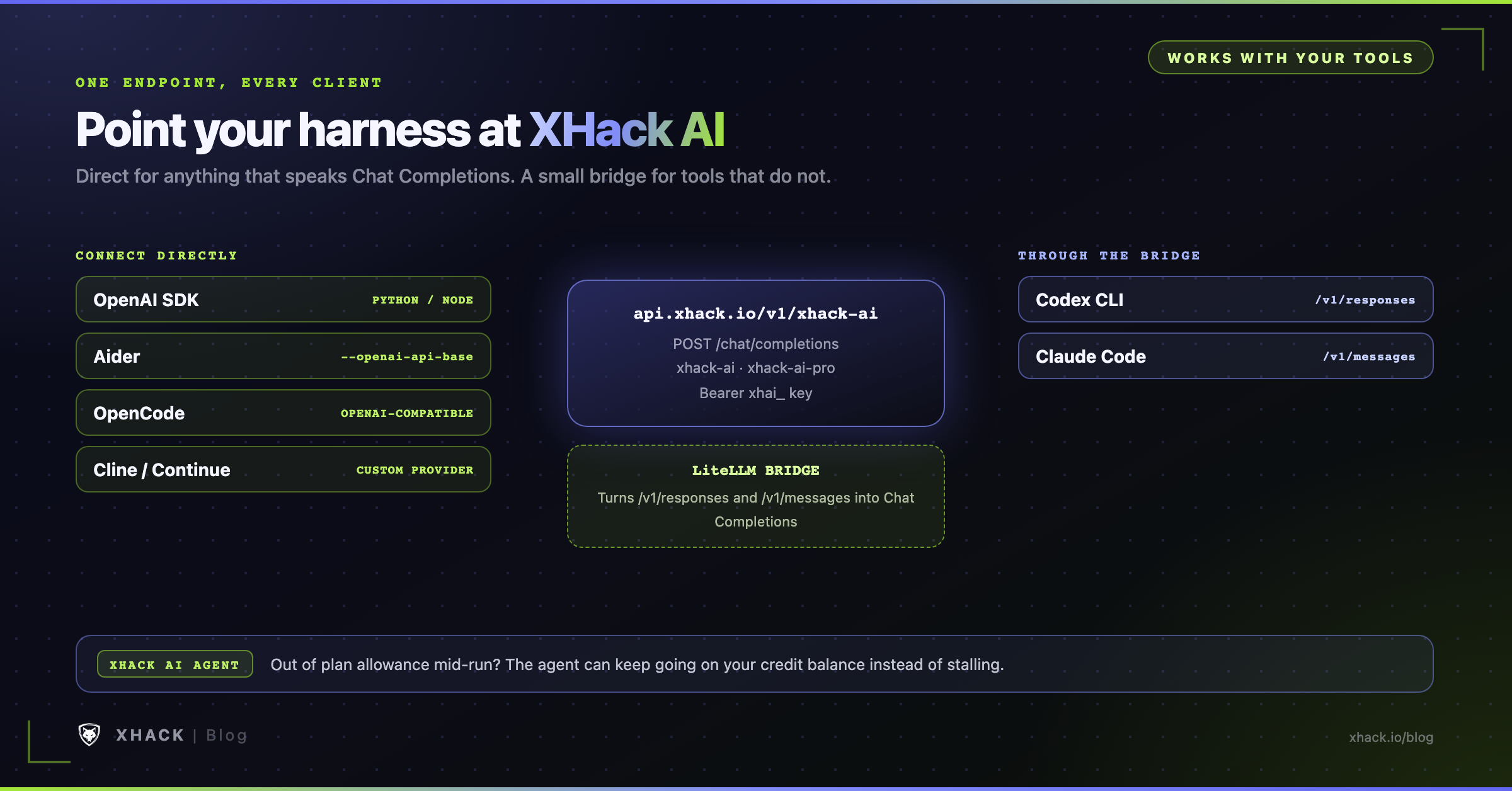
Every coding agent that can talk to an OpenAI-compatible endpoint can use XHack AI as its model. I ran the LiteLLM bridge and Claude Code against the live API. Aider, OpenCode, Cline, Continue and Codex are set up from their official documentation, which I checked but did not run. The catch is the protocol. The XHack AI API implements Chat Completions, and it does not implement the newer OpenAI Responses API or the Anthropic Messages API. That splits the tools into two groups.
| Tool | Connects directly | Why |
|---|---|---|
| OpenAI SDKs, LangChain | Yes | They call Chat Completions |
| Aider | Yes | OpenAI-compatible base URL |
| OpenCode | Yes | @ai-sdk/openai-compatible provider |
| Cline, Continue | Yes | Custom OpenAI provider |
| Codex CLI | No, bridge | It only sends /responses |
| Claude Code | No, bridge | It only sends /v1/messages |
Spend your API credits in Aider by installing it with python -m pip install aider-install and then aider-install. Aider treats any OpenAI-compatible endpoint as a model named openai/<model>.
export XHACK_API_KEY="xhai_..."
aider --model openai/xhack-ai \
      --openai-api-base https://api.xhack.io/v1/xhack-ai \
      --openai-api-key "$XHACK_API_KEY"
Aider may warn that it does not know the model’s limits. That is cosmetic, and the Aider OpenAI-compatible guide explains the options.
Install with npm install -g opencode-ai, then add a custom provider to opencode.json. List the models explicitly, because the XHack host has no root /v1/models for the tool to discover. The OpenCode provider docs cover the format.
{
  "$schema": "https://opencode.ai/config.json",
  "provider": {
    "xhack": {
      "npm": "@ai-sdk/openai-compatible",
      "name": "XHack AI",
      "options": {
        "baseURL": "https://api.xhack.io/v1/xhack-ai",
        "apiKey": "{env:XHACK_API_KEY}"
      },
      "models": {
        "xhack-ai": { "name": "XHack AI" },
        "xhack-ai-pro": { "name": "XHack AI Pro" }
      }
    }
  }
}In Cline, open the settings and choose OpenAI Compatible as the provider. Set the base URL to https://api.xhack.io/v1/xhack-ai, paste your key and enter xhack-ai as the model. The Cline guide lists the fields.
In Continue, add the models to your config.yaml. The Continue docs describe the OpenAI provider.
name: XHack
version: 0.0.1
schema: v1
models:
  - name: XHack AI
    provider: openai
    model: xhack-ai
    apiBase: https://api.xhack.io/v1/xhack-ai
    apiKey: <YOUR_XHACK_API_KEY>
  - name: XHack AI Pro
    provider: openai
    model: xhack-ai-pro
    apiBase: https://api.xhack.io/v1/xhack-ai
apiKey: <YOUR_XHACK_API_KEY>Codex and Claude Code do not call Chat Completions, so they need a translator. LiteLLM is an open-source proxy that accepts the Responses and Messages protocols and forwards them to any OpenAI-compatible endpoint. Run it on your own machine, and both tools talk to it while it talks to XHack.
Install it, then save this as config.yaml. The additional_drop_params line removes optional fields that these tools send and the XHack AI API does not accept, so they never reach the endpoint.
pip install 'litellm[proxy]'model_list:
- model_name: xhack-ai
litellm_params:
model: openai/xhack-ai
api_base: https://api.xhack.io/v1/xhack-ai
api_key: os.environ/XHACK_API_KEY
use_chat_completions_api: true
additional_drop_params: ["prompt_cache_key", "reasoning_effort", "top_k", "user", "response_format", "parallel_tool_calls"]
- model_name: xhack-ai-pro
litellm_params:
model: openai/xhack-ai-pro
api_base: https://api.xhack.io/v1/xhack-ai
api_key: os.environ/XHACK_API_KEY
use_chat_completions_api: true
additional_drop_params: ["prompt_cache_key", "reasoning_effort", "top_k", "user", "response_format", "parallel_tool_calls"]
litellm_settings:
drop_params: true
use_chat_completions_url_for_anthropic_messages: true
general_settings:
master_key: os.environ/LITELLM_MASTER_KEYStart the proxy in one terminal.
export XHACK_API_KEY="xhai_..."
export LITELLM_MASTER_KEY="sk-pick-a-long-random-string"
litellm --config ./config.yaml --port 4000
LiteLLM’s own pages describe the Responses API bridge and the Anthropic-format /v1/messages endpoint in detail.
Install Codex with npm install -g @openai/codex. Current Codex versions only speak the Responses protocol, and the maintainers removed the Chat Completions option, which is why the bridge is required. Point Codex at the proxy in ~/.codex/config.toml:
model = "xhack-ai"
model_provider = "litellm"

[model_providers.litellm]
name = "LiteLLM"
base_url = "http://localhost:4000/v1"
env_key = "LITELLM_API_KEY"
wire_api = "responses"
Then run it with the proxy’s key.
export LITELLM_API_KEY="$LITELLM_MASTER_KEY"
codex --model xhack-ai
I verified the bridge by sending a /v1/responses request through the proxy to the live API and getting the right answer back, and I built the Codex settings from its documentation. I did not run the Codex CLI itself, so run a trivial prompt first.
Claude Code sends Anthropic-format requests to ANTHROPIC_BASE_URL, so aim it at the proxy. Anthropic does not support routing Claude Code to non-Claude models, as its gateway documentation says, so treat this as a community setup that you try before relying on it.
export ANTHROPIC_BASE_URL="http://localhost:4000"
export ANTHROPIC_API_KEY="$LITELLM_MASTER_KEY"
export ANTHROPIC_DEFAULT_SONNET_MODEL="xhack-ai"
export ANTHROPIC_DEFAULT_OPUS_MODEL="xhack-ai-pro"
export ANTHROPIC_DEFAULT_HAIKU_MODEL="xhack-ai"
export CLAUDE_CODE_DISABLE_EXPERIMENTAL_BETAS=1
claude --model xhack-ai
I ran Claude Code this way against the live API. A plain prompt returned the right answer, and a task that read a local file and summarized it worked too. Claude Code prints a notice that it does not know the xhack-ai model and assumes a 200,000-token window. That is safe, and you can raise it with CLAUDE_CODE_MAX_CONTEXT_TOKENS if you want Claude Code to use more of the 1,000,000-token window. If your shell already has other ANTHROPIC_ or Claude variables set, clear them first, because they can override the proxy settings.
Three cautions for either tool.
xhai_ key so you can revoke it without touching anything else.You do not need to write any code to use API credits. The XHack AI agent can run on the same pay-per-use credit balance when your plan allowance is used up.
XHack’s own description of the feature is plain. Plans come with a monthly allowance, busy weeks can run past it, and the pay-per-use key keeps the agent working so a long engagement does not stop because you hit a limit. When the allowance runs out mid-run, the agent can fall back to the key automatically, and the overflow is billed from your API credits.
The agent shows your plan usage right in its context line, and a Usage tab in settings gives the full picture, so you can see how much allowance is left before you rely on the fallback.
That makes API credits useful in two ways.
| You want to… | Use |
|---|---|
| Run your own scripts, pipelines and coding tools on XHack AI | The API directly, with a key |
| Keep the XHack agent running after the plan allowance ends | The same API credits, as the pay-per-use fallback |
Menu names change between releases, so if you cannot find where to attach the key in your agent, ask XHack support, which helps with API key setup.
XHack AI is built for cybersecurity professionals, and that shapes how the API behaves. XHack describes it as having no refusal wall on legitimate, in-scope security work. Ask it to explain an exploit chain, write a proof of concept for a system you are authorized to test, or analyze a payload, and it answers instead of lecturing.
If you have been refused by general-purpose assistants on routine pentest tasks, that is the gap this closes. The background is covered in why AI refuses hacking requests and what unrestricted AI means for penetration testing.
Unrestricted does not mean unaccountable, and a few rules come with the key and your API credits.
XHack lists what is off limits, and the list is not a gray area. In summary, the restrictions cover:
| Category | Examples from the list |
|---|---|
| Illegal activity | Testing without permission, data theft, malware creation, DoS, fraud, extortion |
| Phishing and social engineering | Live phishing campaigns, credential harvesting, account takeover, impersonation |
| Education abuse | Solving active CTFs, exam cheating, passing off AI solutions as your own |
| Business and compliance | Testing healthcare or payment systems without authorization, corporate espionage |
| Other | Harassment, privacy violations, data destruction, service disruption, supply chain attacks |
| Scope violations | Testing out-of-scope, third-party or shared systems, or live production without approval |
Read the full prohibited-use list before you automate anything, and keep your written authorization next to the code that uses the key. For the bug bounty side of the same rules, see the guide to the XHack AI agent for bug bounty.
A hosted API sends your prompt to XHack’s servers, which is different from a local model. XHack’s Privacy Policy states that it does not use your data, prompts, outputs or engagement findings to train AI models. It also lists usage metering, request counts and token consumption as operational data it processes for billing.
So send what the job needs and nothing more. Scrub client secrets and personal data from prompts when the task does not require them, and use the agent’s local-model option for the most sensitive work. The Privacy Policy is the authority on retention, so read it before you send regulated data.
An xhai_ key spends your API credits, which are real money, and anyone holding it can spend them. The rules are the same ones that protect any paid API key. OWASP lists broken authentication as a top API risk, and leaked keys are the most common form of it.
xhai_ prefix to your CI.If you give an agent tools, protect the key from the agent as well. A model should never see a secret it does not need, a principle laid out in the guide to MCP server security. Call the API from code you control, and keep the key out of prompts and tool outputs.
If a key leaks, revoke it in the Keys tab first, then check how many API credits it spent.
Most problems with the XHack AI API come down to the same handful of habits.
max_tokens too low. A reasoning model can use a small budget on thinking and return nothing visible. Use 2,000 or more.finish_reason. A length result means the answer was cut off. Check it on every call./v1/xhack-ai, so https://api.xhack.io/v1 alone gives you a 404.So yeah, here is where we talk about what XHack brings, and I am biased because it is my company.
Most AI APIs are built for general chat and bolt a refusal layer on top. The XHack AI API comes from a firm that does offensive security for a living. XHack combines three things most providers offer separately: expert human penetration testing, an autonomous AI pentesting agent and a continuous security operations platform. The API is how you plug the AI part into your own workflow.
The individual plans run $20, $49 and $150 a month, and the pricing page has the current allowances and a 7-day free trial for the agent and platform once your identity is verified. If you want a human-led test instead, XHack’s VAPT service is scoped per engagement, starting from $2,500.
If you want a cheap one-time scan with a cover page, we are not the right fit. If you want an AI that works inside a signed scope, with a person you can talk to, we are.
Prefer to talk it through first? Book a free consultation, even if that turns out not to be us. Brutal honesty is kind of our thing.
API credits you purchase never expire. Gift API credits expire on their stated date, and they are spent first, only on the models they cover. The /balance endpoint lists each gift with its remaining API credits and expiry time, so you can see what is about to lapse.
Start with $10 of API credits, the minimum. A typical 3,000-token-in, 600-token-out task costs $0.0039 on xhack-ai, so $10 covers about 2,564 of them. Run your real workflow for a day, read the usage objects and then decide how much to add. Top-ups go up to $10,000.
Use xhack-ai by default, since your API credits go furthest there at $0.90 per 1M input tokens and $2.00 per 1M output tokens. Move to xhack-ai-pro ($1.50 and $5.00) for harder analysis where a second pass on the cheaper model costs you time. Both have a 1,000,000-token context window, with a maximum output of 128,000 tokens on xhack-ai and 256,000 on xhack-ai-pro.
Yes, through a LiteLLM proxy running on your machine. Codex sends only Responses-protocol requests and Claude Code sends only Anthropic-format requests, and the XHack AI API speaks Chat Completions, so the proxy translates between them. Aider, OpenCode, Cline, Continue, LangChain and the OpenAI SDKs connect directly without a proxy.
The API refuses a request before it runs if your balance cannot cover the worst case, returning a 402 with nothing charged. Charges are deducted per request for the tokens actually used, so your balance never goes negative. Set low-balance reminders so a long job does not hit the wall unexpectedly, and top up at any time.
It has no refusal wall on authorized, in-scope security work, and you do not need identity verification to use the API. The Terms and the prohibited-use list still apply to you, access can be ended if you break the rules, and authorization is your job. Unrestricted means you get answers on legitimate offensive security work, not that anything goes.
The XHack AI API is simple on purpose, and so are its API credits. You buy API credits, create a key, set the base URL to https://api.xhack.io/v1/xhack-ai, and every OpenAI-compatible tool you already use can call XHack AI, priced to the token in API credits and capped by you.
The parts that decide whether it goes smoothly are small. Give the reasoning models enough max_tokens, check finish_reason, cap every key, and put a LiteLLM bridge between the API and the two tools that speak other protocols. Keep the key server-side and keep your authorization written down.
Your next step takes five minutes. Sign in, top up $10 of API credits, run the curl command from this guide, and read the usage object. Then move one real task over, such as scan triage, and compare the cost to the time it saves. If you want the agent to keep going after your plan allowance, the same API credits already cover that.
Create your account at app.xhack.io, and see current plans and the 7-day trial if you want the full agent as well.
Categories
Related articles