Table of contents
24
By Salman Khan, OSCP+, Founder of XHack, SRT (Synack Red Team member)
Read this in 30 seconds: An AI agent that runs shell commands and drives a browser can go wrong in two ways, it can leave the scope you gave it, and the pages and tools it reads can try to redirect it. AI agent safety for pentesting is a stack of seven layers, and most of them are yours to set before the first run.
- Agent safety starts with scope, the control most tools leave to the prompt. A written scope costs nothing, but an agent only respects it if it is stored somewhere it reloads every session and checked by something that is not the model.
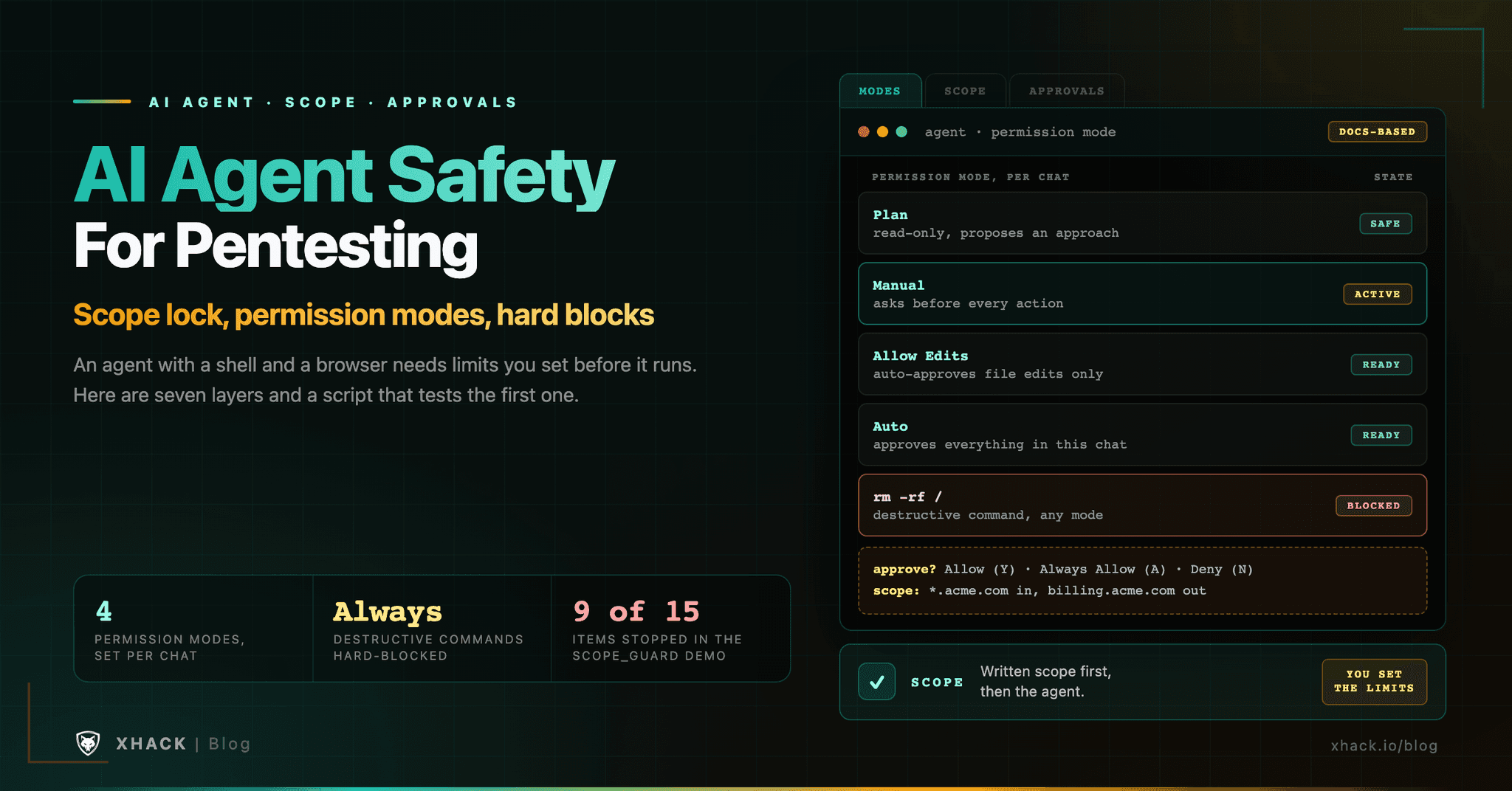
- Agent safety settings change who approves, not what is possible. Permission modes are the example. XHack has four (Plan, Manual, Allow Edits, Auto), set per chat, and destructive commands are hard-blocked in every one of them.
- A timeout is an agent safety decision. An XHack question card closes after 2 minutes and the agent carries on with its default, so the default has to be the safe answer.
- The agent’s inputs are untrusted. In one XHack assessment, a community MCP server hid an instruction in a tool description that made an assistant call an unrelated tool and send CRM data out, and the fix was pinning, sandboxing and an allowlist, not a better prompt.
- The first layer is a script. I include
scope_guard.py, tested with 13 passing tests, which stopped 9 of 15 items in a demo that looked routine.
An agent with a shell and a browser does what its permissions allow, not what you meant, and the part nobody tells you is that the model is the one component you cannot audit line by line. So agent safety cannot live in the prompt. It lives in the settings, files and checks around the model, and you set them before the agent runs.
This guide to agent safety lays out seven layers, shows which ones XHack provides and which are yours, and includes a small script that checks planned targets and commands against a written scope. I run XHack, so I say where our own limits are too. For the wider picture of what these agents can do, see our guides to autonomous AI hacking agents and unrestricted AI agents.
It contains no attack techniques. It is written for testing systems you own or are authorised in writing to test.
An agent fails in four ways, and each one needs a different control. The first three come from the agent doing too much. The fourth comes from the agent being told to.
These failures are documented, and standards bodies now name them. OWASP’s LLM Top 10 (2025 edition) lists Excessive Agency as LLM06:2025 and gives three root causes: excessive functionality, excessive permissions and excessive autonomy. Its mitigations include requiring a human to approve high-impact actions and “complete mediation”, which means authorisation is enforced in downstream systems and not left to the LLM to decide. The OWASP Top 10 for Agentic Applications for 2026, published on 9 December 2025, adds ten agent-specific risks, among them Agent Goal Hijack, Tool Misuse, Identity and Privilege Abuse and Unexpected Code Execution.
The fourth failure has been measured. In a NIST CAISI red-teaming competition (23 March 2026), more than 250,000 attack attempts from over 400 participants found at least one successful attack against every frontier model targeted. Anthropic wrote in November 2025 that “no browser agent is immune to prompt injection”.
The first three have a press record, and every account below is reported by the people involved, not independently audited. In July 2025 a founder said Replit’s agent deleted a production database during a code freeze (The Register). In late November 2025 a user reported that a cache-clear command run by Google’s Antigravity in its no-approval Turbo mode hit the root of a D: drive (The Register). In April 2026 a Cursor agent was reported to have deleted a production volume and its backups in about nine seconds (Information Age). The details differ, and in each case the action was allowed and no check stood between the agent and the damage.
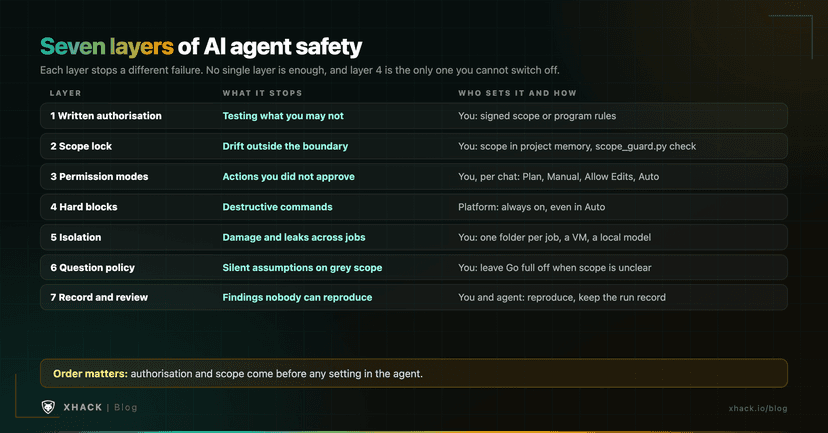
Only one of the seven agent safety layers, the hard block on destructive commands, is always on in XHack. The other six depend on you, which is the point of the list. The rest of this guide takes them in order.
No agent safety setting replaces permission to test. The agent cannot tell a system you own from one you do not, so the decision is yours and it comes first.
XHack’s restrictions page lists what the product is not for, and the first entries are unauthorised testing, data theft, denial of service and out-of-scope testing. It asks for a signed contract or authorisation from the system owner, a documented scope, and confirmation that the person who gave permission has the authority to do so.
In the US, the Justice Department’s charging policy for the Computer Fraud and Abuse Act (Justice Manual 9-48.000, updated May 2022) tells prosecutors to decline cases that consist of good-faith security research, meaning access solely for good-faith testing, investigation or correction of a security flaw, carried out to avoid harm. It is a charging policy, not a safe harbour, and it says nothing about client scope or written permission.
In the UK, section 1 of the Computer Misuse Act 1990 makes it an offence to cause a computer to perform a function with intent to secure unauthorised access, where you know the access is unauthorised. The section does not define “unauthorised”, which is why a written scope matters. This is not legal advice.
For bug bounty work, the program’s published scope and rules are the authorisation. Read them before the agent does, and put the rules you rely on, including the out-of-scope list, into the agent’s own record (layer 2).
Agent safety depends on scope, a list of what is in, what is out, and which one wins when they overlap, and it has to live outside the conversation. A scope that exists only in the first message of a chat is gone when the context fills up.
XHack stores it in two places. Project memory keeps a per-project record of the target, scope and decisions, tied to the chat’s working folder, and the agent loads it back at the start of every session. The documentation’s own example is a plain sentence: scope is *.acme.com only, billing.acme.com is out of scope, auth is a bearer token, priority is IDOR and auth bypass. For bug bounty, Programs keeps each program’s scope, out-of-scope list and rules, and recon only looks inside the in-scope root domains. When you start a full hunt, the agent reads the scope, the out-of-scope list and the rules before it starts.
That protects the agent’s plan. It does not check what the agent is about to do. OWASP calls the fix complete mediation: authorisation enforced outside the model, not left to the LLM to decide. So I also use a check that does not depend on the model at all.
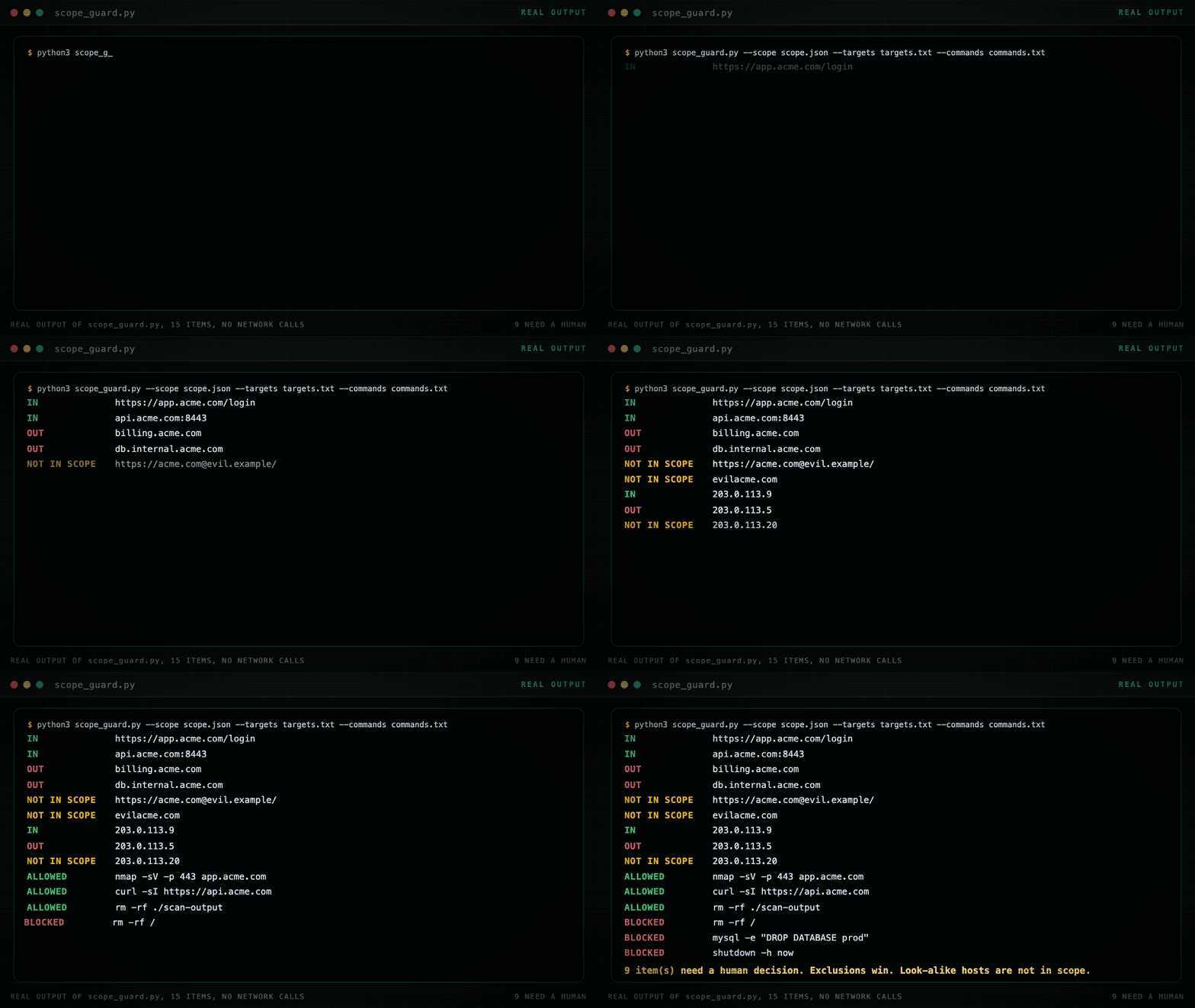
scope_guard.py is a small agent safety tool in standard library Python. You give it a scope file and a list of planned targets or commands, and it answers IN, OUT, NOT IN SCOPE, ALLOWED or BLOCKED. It never touches the network, and it exits non-zero if anything needs a human.
The rules are the ones that cause incidents:
billing.acme.com matches *.acme.com, and it is still out.acme.com separately if it is in scope.evilacme.com and acme.com.evil.example are not in *.acme.com.https://acme.com@evil.example/ has the host evil.example.#!/usr/bin/env python3
"""scope_guard.py: pre-flight check of planned targets and shell commands against a written scope. Standard library only.
Usage: python3 scope_guard.py --scope scope.json --targets targets.txt [--commands commands.txt]
scope.json: {"in": ["*.acme.com", "acme.com", "203.0.113.0/28"], "out": ["billing.acme.com", "203.0.113.5"]}
Exit code 1 if anything is not IN scope or a command is blocked. It never touches the network (hostnames are not resolved)."""
import argparse, ipaddress, json, re, sys
from urllib.parse import urlsplit
def host_of(item):
"""lower-case ASCII host or IP from a URL, host:port, bare host or IP; None if unusable"""
s = item.strip()
if not s: return None
h = urlsplit(s if "://" in s else "//" + s).hostname # hostname drops userinfo, so https://acme.com@evil.test is evil.test
if not h: return None
h = h.rstrip(".").lower()
try: return ipaddress.ip_address(h)
except ValueError: pass
try: return h.encode("idna").decode("ascii")
except UnicodeError: return None
def matches(rule, host):
rule = rule.strip().lower().rstrip(".")
if isinstance(host, (ipaddress.IPv4Address, ipaddress.IPv6Address)):
try: return host in ipaddress.ip_network(rule, strict=False)
except ValueError: return False # a hostname rule never matches an IP
if rule.startswith("*."): return host.endswith(rule[1:]) and host != rule[2:] # subdomains only, not the apex
try: ipaddress.ip_network(rule, strict=False); return False # an IP rule never matches a hostname
except ValueError: return host == rule
def check(scope, item):
h = host_of(item)
if h is None: return "INVALID"
if any(matches(r, h) for r in scope["out"]): return "OUT" # exclusions always win
if any(matches(r, h) for r in scope["in"]): return "IN"
return "NOT IN SCOPE"
BLOCK = [r"\brm\s+(-\w*\s+)*-\w*[rf]\w*\s+(--no-preserve-root\s+)?/(\s|$|\*)", r"\bmkfs(\.\w+)?\b", r"\bdd\s+[^|;]*\bof=/dev/", r"\b(shutdown|reboot|halt|poweroff)\b",
r"\bdrop\s+(database|table|schema)\b", r"\btruncate\s+table\b", r":\(\)\s*\{\s*:\s*\|\s*:\s*&\s*\}\s*;", r"\bformat\s+[a-z]:", r">\s*/dev/sd[a-z]"]
def blocked(cmd): return any(re.search(p, cmd, re.I) for p in BLOCK)
def load_scope(path):
s = json.load(open(path))
if any(r.strip() in ("*", "*.*", "0.0.0.0/0", "::/0") for r in s.get("in", [])): sys.exit("refusing a scope that allows everything")
s.setdefault("out", []); return s
def main():
ap = argparse.ArgumentParser(); ap.add_argument("--scope", required=True); ap.add_argument("--targets"); ap.add_argument("--commands")
a = ap.parse_args(); scope = load_scope(a.scope); bad = 0
if a.targets:
for line in open(a.targets):
if line.strip() and not line.startswith("#"):
r = check(scope, line); bad += r != "IN"; print(f"{r:13s} {line.strip()}")
if a.commands:
for line in open(a.commands):
if line.strip() and not line.startswith("#"):
b = blocked(line); bad += b; print(f"{'BLOCKED' if b else 'ALLOWED':13s} {line.strip()}")
print(f"{bad} item(s) need a human decision" if bad else "all items pass")
sys.exit(1 if bad else 0)
if __name__ == "__main__": main()I ran it on a scope of .acme.com, acme.com and 203.0.113.0/28 with billing.acme.com, .internal.acme.com and 203.0.113.5 excluded.
IN            https://app.acme.com/login
IN            api.acme.com:8443
OUT           billing.acme.com
OUT           db.internal.acme.com
NOT IN SCOPE  https://acme.com@evil.example/
NOT IN SCOPE  evilacme.com
IN            203.0.113.9
OUT           203.0.113.5
NOT IN SCOPE  203.0.113.20
ALLOWED       nmap -sV -p 443 app.acme.com
ALLOWED       curl -sI https://api.acme.com
ALLOWED       rm -rf ./scan-output
BLOCKED       rm -rf /
BLOCKED       mysql -e "DROP DATABASE prod"
BLOCKED       shutdown -h now
9 item(s) need a human decision
Nine of 15 items needed a human: the excluded billing host, an internal database, a userinfo trick, a look-alike domain, an excluded IP, an IP outside the range, and three destructive commands. The block list is a small demonstration, not XHack’s list and not complete, and a real guard should be an allowlist of what the job needs.
A permission mode is the agent safety setting you will touch most, because it decides how much the agent may do without asking. XHack sets it per chat, with one click on the mode chip in the status bar or Shift+Tab, so one conversation can run open while another stays locked down.
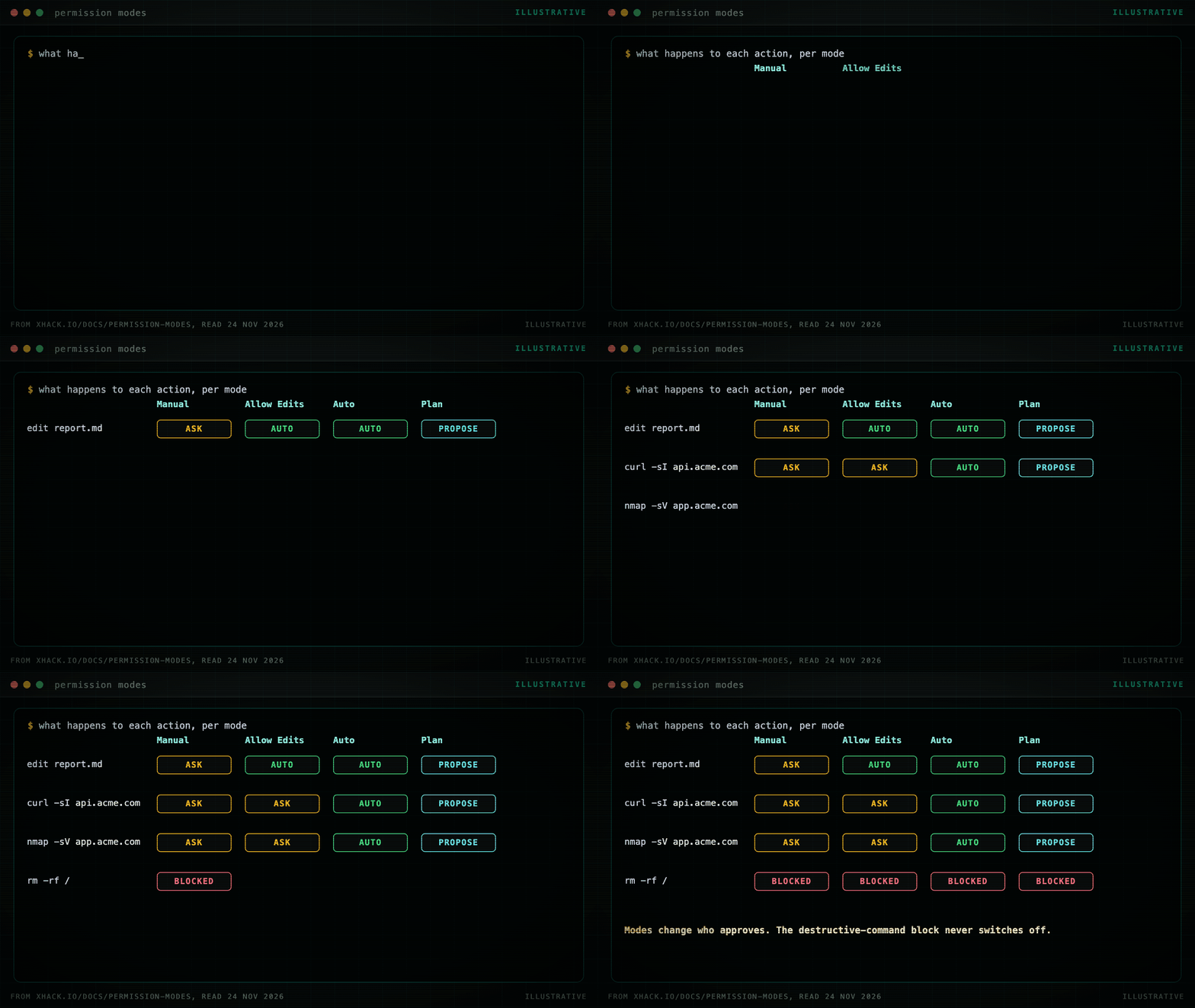
When an action needs approval, a card offers Allow (Y) for this one action, Always Allow (A) for this kind of action from now on, and Deny (N), after which the agent tries something else.
Always Allow is the setting that quietly turns Manual into Auto. Treat it like a firewall rule: grant it for a specific kind of action you have reviewed, not as a way to stop being interrupted. Review what you have allowed at the end of each engagement.
The image below turns the documentation into a choice by job.
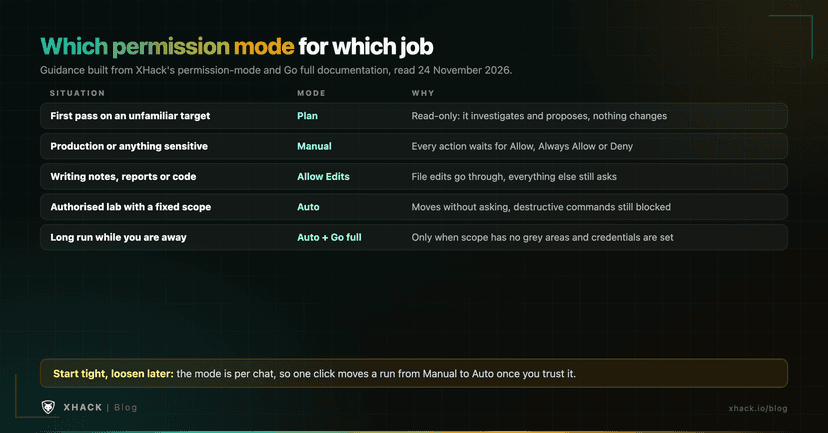
A hard block is the one agent safety control the model cannot talk its way past, because it is enforced by the software and not requested in a prompt. XHack’s documentation is specific: even in Auto, and in the fully hands-off autonomous run, destructive commands are hard-blocked. It names wiping disks, dropping databases and shutting machines down. The agent’s file tools also stay inside the chat’s working folder, so reads and writes cannot wander into the rest of the machine.
That is a narrow guarantee, and it is worth saying what it is not. It stops a class of damaging commands. It does not stop an in-scope but noisy scan against a fragile production system, a request that is legal and harmful anyway, or data copied out through an allowed tool. Those are for layers 2, 3 and 6.
Isolation is the agent safety layer that limits what a mistake can reach. Three habits cover most of it.
For agent safety and privacy, XHack’s agent runs on your machine and keeps prompts, responses, tool output and files there, and does not store your agent chats. That helps privacy. It also means the run’s record is yours to keep, which is the next layer’s problem.
An agent that asks you questions is an agent safety control, and an agent told to stop asking is a different risk. XHack separates the two: permission modes decide which actions need your approval, and a separate setting decides whether the AI asks questions at all.
When the AI needs something only you know, such as test credentials or whether a host is in scope, a question card appears. You have 2 minutes. If you do not answer, the card closes and the AI carries on with the default shown on the card. The run never waits for you.
Two consequences follow.
Go full mode tells the AI not to ask anything. It decides and notes its assumptions in the chat. XHack’s own guidance is to use it for a long run while you are away, on a program you have already set up in full with a clear scope. It recommends leaving it off when the scope has grey areas or the AI needs test credentials only you have.
The last agent safety layer is evidence, and it is what lets you trust the other six after the fact. Two habits matter.
While a run is going, watch it. XHack’s Agents panel shows a card per sub-agent with its status, progress, findings and running cost, and lets you pause, resume, stop or steer each one. The documentation’s own example of when to stop one is a sub-agent that has wandered off scope.
One more control belongs here. OWASP lists Human-Agent Trust Exploitation among its agentic risks, and the MCP project’s guidance for clients is blunt: show the exact command that will run, without truncation, and highlight patterns such as sudo and rm -rf. Approve only what you can read.
Agent safety has to assume the agent reads untrusted text all day, and the model cannot reliably tell data from instructions. That is the fourth failure mode, and the controls for it are not prompts.
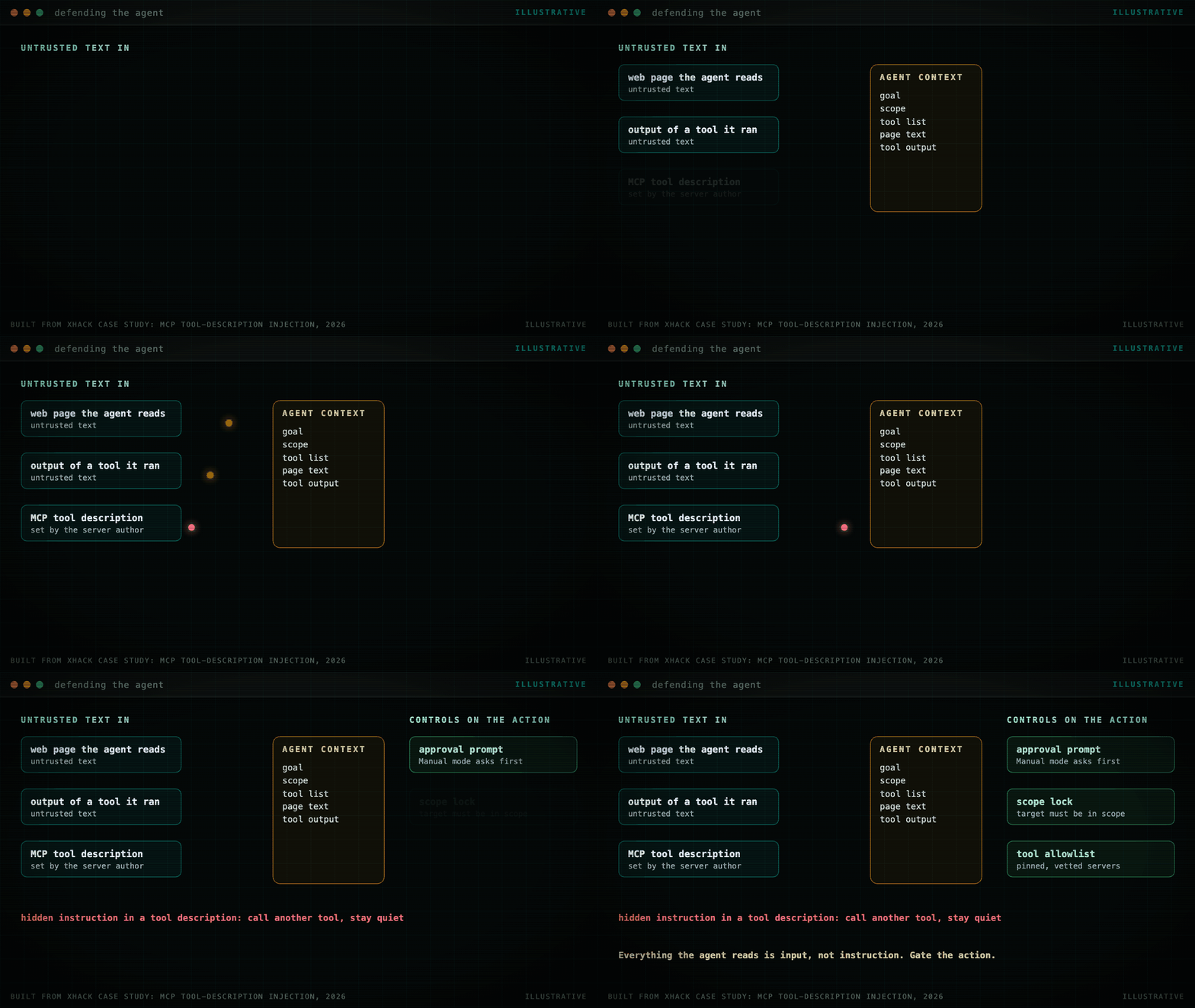
Simon Willison’s “lethal trifecta” describes when this is dangerous: an agent with access to private data, exposure to untrusted content and the ability to communicate externally. A pentest agent has all three by design. It holds credentials and findings, it reads hostile pages and responses, and it makes network requests. So you cannot remove the exposure, and the controls go on the actions.
Vendors say the same. Anthropic’s engineering team writes that effective sandboxing requires both filesystem and network isolation, because without network isolation a compromised agent could exfiltrate files such as SSH keys. The MCP project’s security best practices say clients must show the exact command without truncation, require explicit approval and run local servers in a sandbox with minimal default privileges. Invariant Labs showed tool poisoning in April 2025: instructions in a tool description, invisible to users and visible to the model, made an agent read and pass on configuration and SSH key files.
XHack’s own case study makes it concrete. In a one-week assessment of an internal AI assistant at a marketing agency, the weakness was not in the agency’s code. A community-maintained MCP server returned a tool description with a hidden instruction. The assistant read it as part of its task, invoked an unrelated tool and sent CRM data toward an outside address, without telling the user. A person asking a routine question about campaign performance saw a normal answer. No client data left the environment and the server was removed the same day.
The fixes were pinning the community servers to vetted versions, sandboxing them, routing tool descriptions through a sanitiser and adding an allowlist of permitted tool calls. Read the full case.
The agent safety lesson for a pentest agent is the same. Every connected tool server is part of the attack surface. Pin versions, review tool descriptions as you would code, and keep the permission mode tight when you add a new server. Our guide to MCP server vulnerabilities for bug hunters goes deeper.
For agent safety on production, the answer is not unattended, and not in Auto, unless you have written approval and have tested the same steps on a copy first. The search query “are autonomous AI pentesting agents safe to run on production” has no single answer, because it depends on the layers above.
A reasonable setup for production, using only the controls above:
scope_guard.py;If you cannot supply those agent safety conditions, run the agent against a staging copy.
Agent safety controls reduce risk and do not remove it, and you should know where each one stops.
So yeah, here is where I tell you what XHack brings, with the bias of someone who built it.
XHack combines three things most providers sell separately: expert human penetration testing, an autonomous AI agent and a continuous security operations platform. For agent safety, that shows up in a few concrete ways, and each one is documented.
The agent safety controls are in the product, per chat. Four permission modes, an approval card with Allow, Always Allow and Deny, a destructive-command block that stays on in every mode, file tools confined to the working folder, project memory for scope, and questions that time out to a stated default. The documentation says what each agent safety control does, including what it does not.
Access is verified. XHack’s agent can find vulnerabilities from the start, and exploitation unlocks once your identity is verified with a government ID and a professional credential. That is a control on who runs the agent, which no prompt can give you.
Privacy is a design choice. XHack does not store your user data and is privacy-focused by design. Agent chats, session data and tool output stay on your own computer, you can delete them any time, and with a local model nothing leaves the machine. XHack’s own audit logs cover account and security events such as sign-ins and plan changes, and do not contain your chats.
The limits of our agent safety are stated. Auto is autonomy, the hard block is a list, and a question timeout runs the default. If you want an agent that never asks you anything and never gets blocked, we are not the right fit.
Individual plans run from $20 a month (Starter $20, Professional $49, Elite $150), with a 7-day free trial, one per person. Exploitation unlocks after identity verification. You can try it on a target you own and judge its agent safety, and what it finds, for yourself. If you would rather have our testers run the work, managed engagements start at $2,500 with fixed prices on the page. Book a free consultation, even if the answer turns out not to be us. Brutal honesty is kind of our thing.
AI agent safety is the set of controls that keep an AI agent with real tools inside the limits you set. For pentesting that means written authorisation, a scope the agent cannot ignore, permission modes, hard blocks on destructive actions, isolation, a policy for its questions and a reviewable record. The controls sit around the model, not inside the prompt.
Yes, if scope exists only as an instruction. An agent can follow a lead to a host you never listed. For agent safety, reduce the risk by storing the scope outside the chat, checking planned targets with a script that does not use the model, and keeping the chat in Manual mode until the agent has behaved on this target.
A permission mode is an agent safety setting that decides how much the agent may do without your approval. XHack has four, set per chat. Plan is read-only, Manual asks before every action, Allow Edits auto-approves file edits only, and Auto approves everything. In XHack, destructive commands are hard-blocked in every mode.
For agent safety on production, only with written approval, a defined window, Manual mode and a human watching, after you have tested the same steps on a copy. Do not leave an agent on production in Auto, and do not rely on a question timeout, because the agent continues with its default when you are away.
Agent safety cannot stop prompt injection completely, so you limit what an injected instruction can do. Treat every page, tool output and tool description as untrusted input, keep approvals on high-impact actions, check targets against the scope, and pin and allowlist every connected tool server.
No. For agent safety and privacy, XHack does not store your agent chats. The agent runs on your machine and keeps prompts, responses, tool output and files there, and you can delete them. With the hosted model, prompts pass through XHack’s systems to generate a response and are not stored, and with a local model nothing leaves your machine.
Agent safety comes down to the limits around an agent with real tools, and most of those limits are yours to set before the first run. Get the written scope, store it where the agent reloads it, check it with something that is not the model, start in Plan or Manual, and treat everything the agent reads as input and not instruction.
Agent safety is a habit as much as a setting. If you hunt on bounty programs, our guide to the XHack AI agent for bug bounty shows where scope enters the workflow, and is uncensored AI safe covers the risk on the other side. Then run scope_guard.py against your own scope and your own target list. If something you expected to be OUT comes back IN, you found the problem before the agent did.
Categories
Related articles