Table of contents
64
By Salman Khan, OSCP+, Founder of XHack, SRT (Synack Red Team member)
Read this in 30 seconds: Product pages list the XHack AI agent’s features as bullets, and a bullet cannot tell you which ones fix your problem or where each one stops. This guide goes through them one at a time, from XHack’s own documentation, and checks the surrounding claims against primary sources.
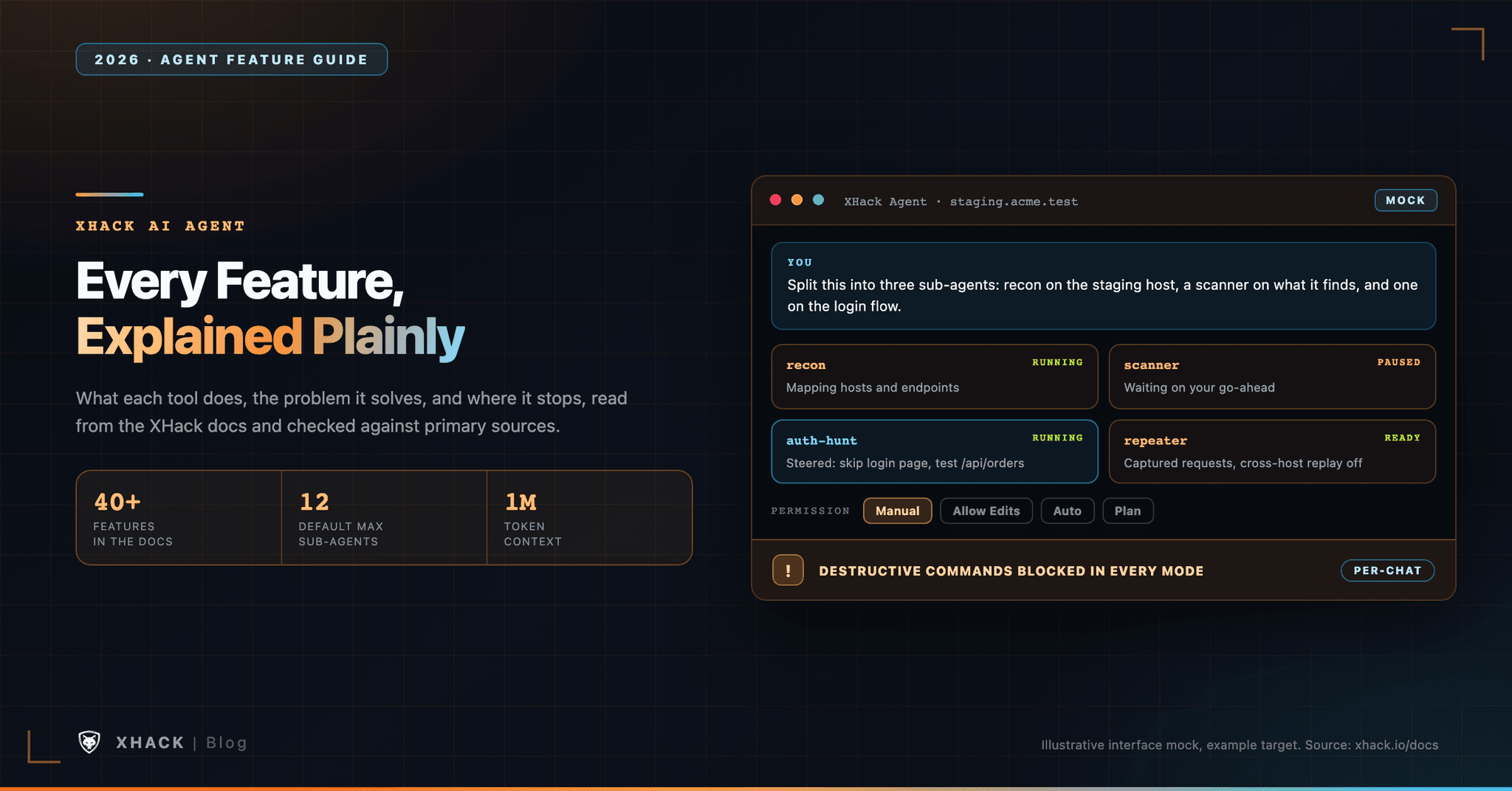
- The docs and feature pages describe more than 40 agent features, but five do most of the work in a typical session. Permission modes, sub-agents, project memory, the HTTP Repeater and the findings panel are the ones you touch every session.
- The XHack AI agent runs wherever you tell it to stop. There are four permission modes per chat (Manual, Allow Edits, Auto and Plan), and destructive commands such as wiping disks are blocked in all of them.
- Twelve sub-agents run in parallel by default, but each one costs money and hardware. The Agents panel shows status, findings and running cost per sub-agent, and you can raise the limit if your machine supports it.
- Agent chats stay on your computer. XHack cannot store or access them, but if you bring your own model key, that provider sees the traffic and the data risk is yours.
- AI agents still miss bugs. PentestEval reports 31% end-to-end success and BountyBench’s top agents scored 12.5% on detection, so every finding needs your eyes before it leaves your machine.
The XHack AI agent is a desktop app that plans, runs and documents security tests against targets you are authorized to test, and you decide how much it does without asking.
I build it, so weigh everything here as a founder’s account. What I can promise is that each feature below comes from XHack’s documentation or from a fact the team confirmed, and that the limits are written down next to the strengths.
Most feature lists fail the same way. They tell you a thing exists, and never say what problem it removes or what it will not do for you. A sub-agent sounds great until you ask what it costs. An autonomous mode sounds great until your bug bounty program bans autonomous tools.
So each feature here gets the same questions. What does the XHack AI agent do, what pain does it remove, how do you use it, and where does it stop? The last section collects the edge cases that cut across features, such as scope, billing, privacy and platform rules.
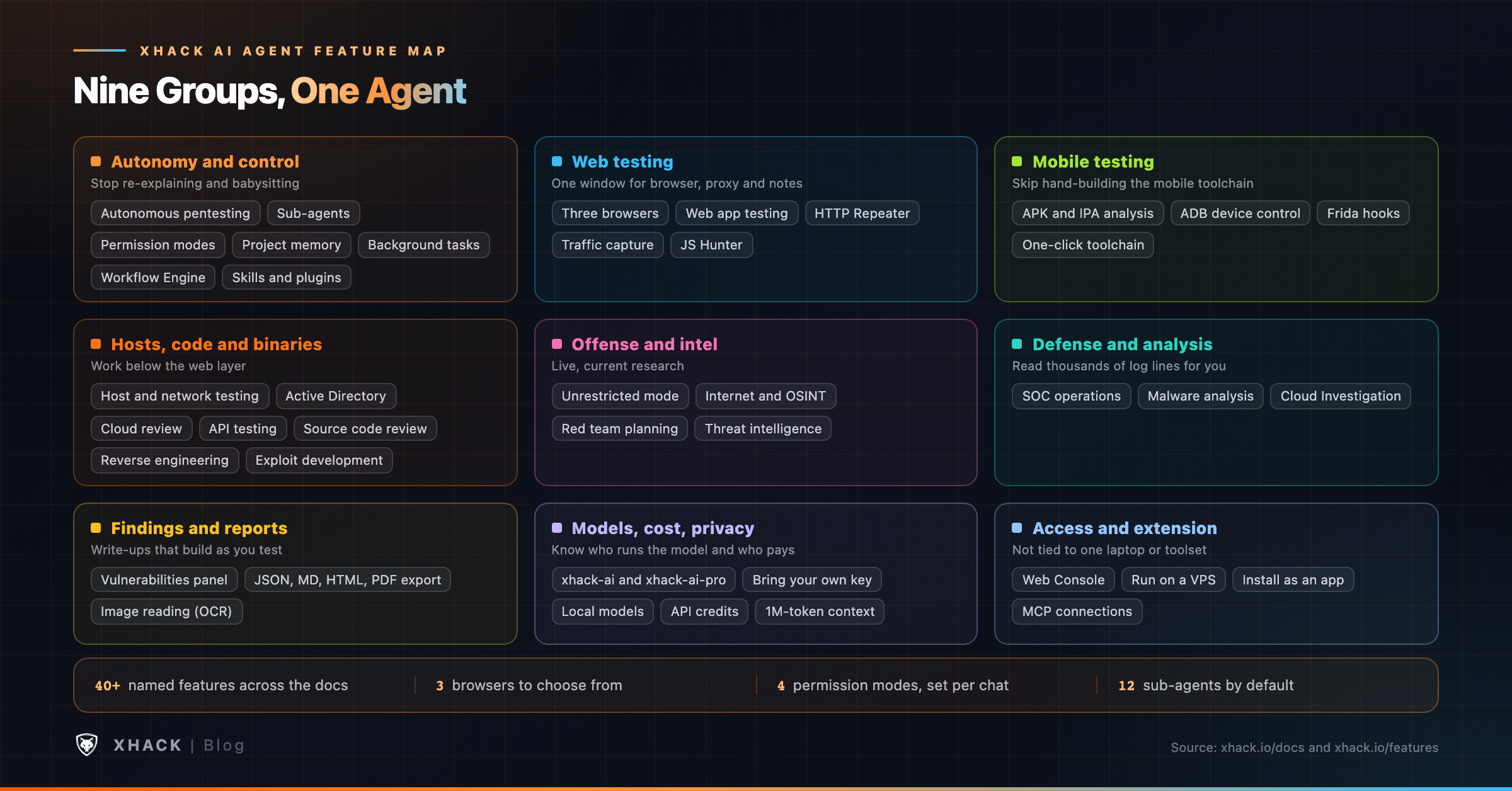
Nine groups cover everything the XHack AI agent does. The table is a map, and the sections after it explain each feature in the order shown.
| Group | What is in it | The problem it removes |
|---|---|---|
| Autonomy and control | Autonomous pentesting, sub-agents, permission modes, project memory, background tasks, workflow engine, skills, plugins | Re-explaining the job, babysitting long scans, and losing control of a fast tool |
| Web testing | Three browsers, HTTP Repeater, traffic capture, JS Hunter, web application testing | Switching between a browser, a proxy and a notes file |
| Mobile testing | APK and IPA analysis, ADB, Frida | Hand-assembling a mobile toolchain |
| Hosts, code and binaries | Host and network testing, Active Directory, cloud review, API testing, source code review, reverse engineering, exploit development | Slow, repetitive work below the web layer |
| Offense and intelligence | Unrestricted mode, internet access, red team planning, threat intelligence | Refusals from general-purpose AI and stale model knowledge |
| Defense and analysis | SOC operations, malware analysis, Cloud Investigation | Reading tens of thousands of log lines by hand |
| Findings and reports | Vulnerabilities panel, report export, image reading | Writing up findings at midnight |
| Models, cost and privacy | xhack-ai, xhack-ai-pro, your own key, local models, API credits, usage meters, 1M-token context | Surprise bills and data leaving the building |
| Access and extension | Web console, VPS hosting, installable app, MCP connections, desktop apps | Being tied to one laptop and one toolset |
You cannot open the XHack AI agent and point it anywhere on day one. XHack checks who is holding offensive tooling first.
According to the Getting Started guide, researchers upload a government ID and at least one security credential, such as OSCP, CEH, CISSP or a security degree. Companies verify the owner’s identity plus business details, and colleagues invited later inherit that verification. Verification happens before any payment, and the guide says most decisions arrive within one business day.
Then you install the desktop app. It runs on Windows 10 or newer, macOS 12 or newer and Ubuntu 20.04 or newer, with a 4 GB RAM minimum and about 500 MB of disk. The docs list a native build for Apple Silicon Macs and keep an Intel build that runs through Rosetta 2. Internet is required unless you run a local model.
The edge case people miss is scope. The XHack AI agent will test what you point it at, and its documentation says plainly that you need written authorization for anything you do not own. The restrictions page also lists active CTF competitions, certification exams and testing production systems without approval as prohibited uses. Treat that list like a seat belt, because the XHack AI agent’s guardrails are not a substitute for a signed scope document.
This group decides how much work the XHack AI agent does without you and how easily you can take the wheel back. It is also where most of the cost and risk sits, so it comes first.
Classic scanners run fixed checks, and a person reads the output and decides what to try next. That decision loop is the slow part of any test.
The XHack AI agent does the loop itself. According to the docs it maps the attack surface, analyzes what it finds, crafts and tests exploits, uses initial access to look deeper, and writes the report. It reads tool output and chooses the next step, so a strange service or an unexpected defense changes the plan instead of ending the run.
The documented scope is wide: network pentesting, web applications, APIs, Active Directory, cloud configuration review, containers and firewall rules. Every step is logged for the report.
The limit is accuracy. The docs describe how the loop works, not how often it is right, and I am not quoting a score for it. Treat each result as a lead until you have reproduced it.
Some jobs should run while you sleep. The XHack AI agent accepts a high-level objective, plans, executes, adapts and reports, and its session state is saved so an interrupted assessment resumes where it stopped.
The web console adds a time-boxed autonomous mode, from 15 minutes to 24 hours, with a live countdown. The run continues with no browser tab open, and you can stop it from whichever device is in your hand.
Here is the edge case. A fully autonomous tool and a bug bounty program can disagree. HackerOne’s hackbot rules say hackbots “must not operate in a fully autonomous manner,” with the word “yet” closing the sentence, and that operators are responsible for what their hackbots do. On your own infrastructure, Auto mode is a good fit. On a bounty program, read the policy first and consider staying in Manual or Allow Edits.
One worker cannot map a large target and dig into a promising bug at the same time. Sub-agents split that work.
You describe the roles in plain English, for example “one for recon on acme.com, one to scan the hosts it finds, and one to hunt the login flow.” The XHack AI agent starts a sub-agent for each role (recon, scanner, exploit, full-hunt, or a custom goal), and each works in its own workspace while your main chat stays free.
Open the Agents panel from the status bar (Ctrl+B) and you get one card per sub-agent with its status, progress, findings and running cost. Inside a card you can pause, resume or stop it, or type a redirect in the Steer box, such as “skip the login page and focus on the /api/orders endpoint.” Sub-agents survive a restart of the app, and finished results are summarized back into your main chat.
By default the XHack AI agent runs up to 12 sub-agents in parallel, and you can force more if your hardware supports it. More workers means a bigger bill and more load on your machine, and the cost on each card is there so you notice before the invoice does.
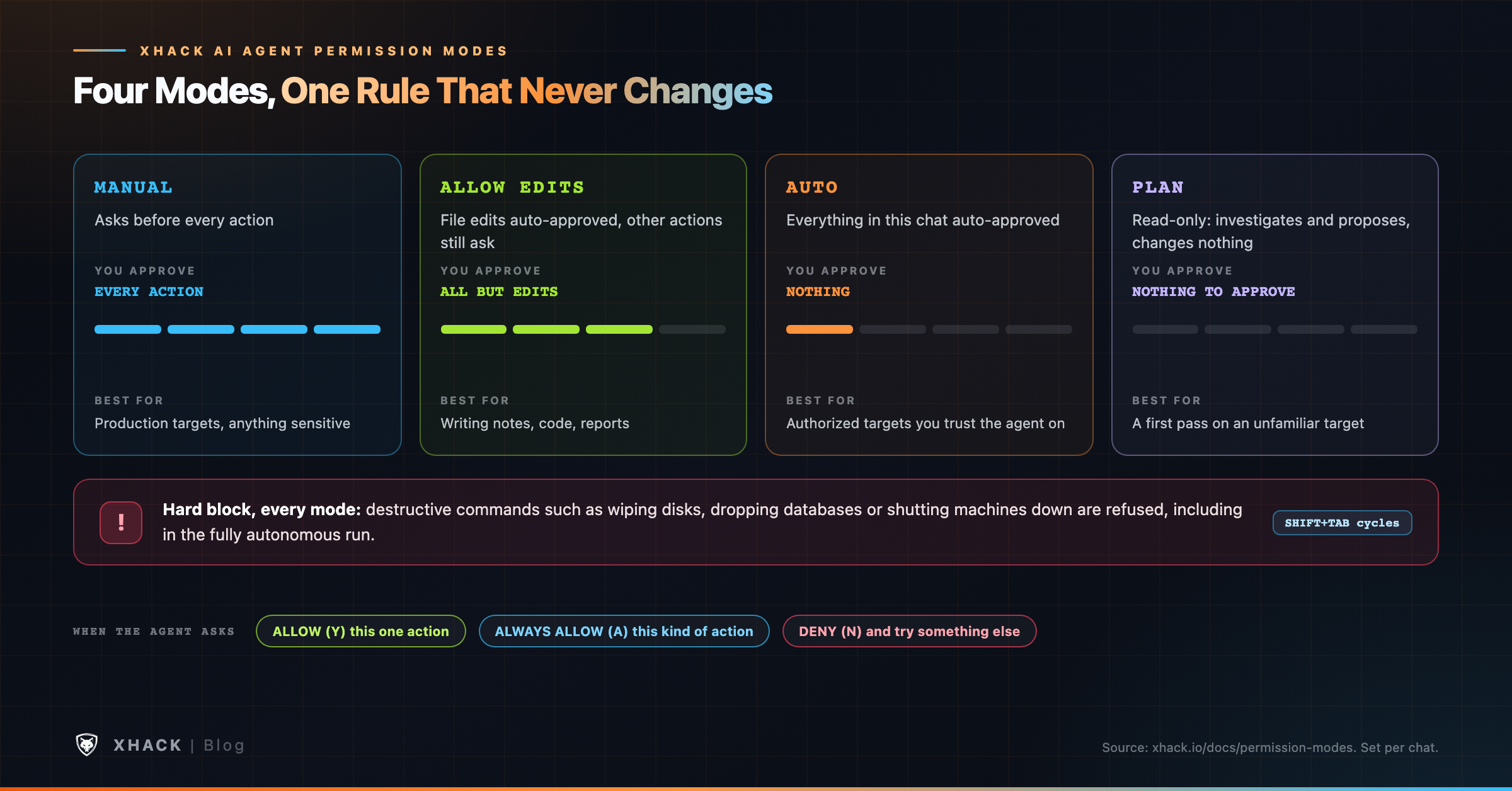
A fast agent is only useful if you can slow it down. Permission modes set how much the XHack AI agent does without asking, and you set them per chat, so one engagement can run wide open while another stays locked down.
| Mode | What it does | Best for |
|---|---|---|
| Manual | Asks before every action | Production targets and anything sensitive |
| Allow Edits | Auto-approves file edits, asks about everything else | Writing notes, code or reports |
| Auto | Approves everything in this chat | Authorized targets when you trust the run |
| Plan | Read-only: investigates and proposes, changes nothing | A first pass on an unfamiliar target |
Click the mode chip in the status bar, or press Shift+Tab to cycle. When the XHack AI agent asks, you choose Allow (Y), Always Allow (A) or Deny (N).
One guardrail never switches off. Even in Auto, and in the fully hands-off autonomous run, destructive commands are hard-blocked. The docs say actions that could wipe data or damage a system are refused in every mode.
That design matches what standards bodies ask of agentic tools. The Model Context Protocol specification says there “SHOULD always be a human in the loop with the ability to deny tool invocations”, and OWASP lists Excessive Agency among its top risks for LLM applications. Neither is a guarantee. A block list catches the obvious disasters, and it cannot know that a harmless-looking command is out of scope for your engagement.
Nobody enjoys re-explaining the scope every Monday. The XHack AI agent keeps a memory for each project, tied to the working folder you select: the target, the scope, your decisions, and what worked or failed.
You seed it in plain language, for example “scope is *.acme.com only, billing.acme.com is out of scope, priority is IDOR and auth bypass.” The XHack AI agent updates it as the job goes on, notes confirmed findings and dead ends, and loads it before it does anything in the next session. You can ask what it remembers and correct it in a sentence.
Because memory follows the folder, two clients never share a memory. That is also the edge case: put each engagement in its own folder, or the XHack AI agent will happily carry one client’s scope into another’s work.
Full port scans and fuzzers take a long time, and a chat that waits on them is a chat you cannot use. The XHack AI agent runs them in the background.
When it starts a long command, a Terminal dock opens with one tab per command. Each tab streams output line by line, carries a status badge, and has its own cancel button, so you can stop one fuzzer without touching the scan next to it. You keep chatting the whole time, and when a task finishes the XHack AI agent reads the output and acts on it.
The feature page adds a reliability detail: shell commands that time out move to the background instead of being killed. That helps long jobs survive, and it also means a stuck command can keep running, so check the dock before you close a session.
Every tester has a routine, and most of us retype it into a chat every engagement. The Workflow Engine turns it into something the XHack AI agent runs.
You build the methodology as a drag-and-drop node graph. Each node is a step, you connect them in the order you want, and you describe what each step should do in plain language. Once saved, the XHack AI agent learns the workflow and runs it step by step inside a normal chat, with a live page showing which step is running, what it found and what comes next. It works on the desktop app and in the web console.
The point is adaptation. The XHack AI agent follows your process instead of its own default, so your checklist for a login flow or a mobile client becomes the baseline. A workflow is only as good as the method you draw, so build one for a job you already do well, and keep separate graphs for web apps, APIs and individual clients.
A general model knows a little about everything, and a specialist knows what to do next. Skills are reusable packs of expert instruction, such as “act as a SQL-injection specialist” or “run an Active Directory attack path.”
Open Settings, then AI Skills, browse the catalogue (offensive AD, cloud, mobile, IoT, exploit development, recon, web, wireless and more), import what you need and flip the toggle. Active skills apply to both your chat and the XHack AI agent. The XHack AI agent keeps a light catalog and loads a full playbook only when a task matches.
Three details matter. Active skills share a token budget, you always see how much of it they use, and nothing is silently dropped. Skills arrive as your input, never as system authority, so they cannot override XHack’s guardrails. And every skill is scanned for injection content before it can activate.
A plugin is a bundle of skills you can install in one move. You manage them from the Skills and Plugins panel (the book button in the left sidebar), using Install from folder or Install from .zip.
They are built to be safe to bring in. Nothing executes on install, and every plugin arrives disabled until you turn it on. Each row has a toggle, a Details link and a delete button.
The edge case is trust. A zip from a stranger is still a zip from a stranger, so read Details before you enable anything, and prefer packs you can inspect.
Web testing means driving a browser, reading traffic and replaying requests. This group puts all three in one window, so you stop juggling a browser, a proxy and a notes file.
Browser automation breaks in different ways on different targets, so one engine is rarely enough. The XHack AI agent ships with three, and you pick any of them independently.
In the web console, the Playwright browser can be streamed live into your tab, so you can watch what the XHack AI agent is doing from a laptop or a phone. That is useful when the XHack AI agent runs on a server and you are somewhere else.
The edge case is the stealth option. A browser built to defeat bot detection is still only for targets you are authorized to test. If a WAF blocks an in-scope test, the polite fix is to ask the owner to allow-list your testing IP, not to disguise the XHack AI agent.
Scanners fire blind requests at a URL, while a human clicks through the app and thinks about what they see. The XHack AI agent works the second way.
You describe what you are worried about, for example “test staging.myapp.com for injection and access-control bugs and screenshot anything you find.” It navigates pages, fills forms, runs JavaScript in the page, handles several tabs and reads page source and network traffic as it goes. It fuzzes inputs for SQL injection, XSS, SSRF and command injection, and takes screenshots as proof.
Access control deserves a mention because it is the hardest class for scanners. The docs say the XHack AI agent compares what a logged-in user sees with what an anonymous visitor sees, which is how broken access control and IDOR show up. OWASP ranks broken access control first in its 2021 Top 10, so this is the right place to spend time.
Two edge cases. The docs say that when a page shows a CAPTCHA, the XHack AI agent can attempt it or hand control back to you, and on a real target I would hand it back. And authenticated tests need credentials: use a test account created for the engagement, never a real customer’s.
Manual testing is mostly “change one thing, send it again, read the response.” PortSwigger describes Burp’s Repeater as a tool for modifying and sending an interesting HTTP or WebSocket message “over and over.” The XHack Repeater is a built-in version of that idea.
Click the Repeater pill above the input box and you get three panes: a site tree of every host and captured request, a request editor, and the exact response. Every request and response the XHack AI agent makes is captured with real headers, cookies and bodies, so you can replay anything it did. Swap a user ID to test IDOR, drop the auth token to test authentication bypass, or put a payload in a field to test injection.
Right-click a request to Send to AI, which hands it to the XHack AI agent for follow-up such as “test this request for IDOR across user IDs 1 to 50,” or to Save .req and reload it later.
Cross-host replay is off by default. The Repeater will not fire an edited request at a host different from the one it came from unless you turn that on, so a captured token cannot wander out of scope by accident. This is the kind of bug the OWASP API Security Top 10 lists first, broken object level authorization, and it is a good first test to run in the Repeater.
The most useful clues are often in the JavaScript a site already sent you. JS Hunter goes there first.
It pulls in every script the site loads and reads large files in chunks so nothing is cut off. A large rule set flags API keys, cloud credentials, tokens, database connection strings and webhooks, and it extracts hidden API endpoints from the code and the network log. Results land in a findings table, with sensitive values redacted, and a host-to-endpoint map of the surface.
One click sends a finding to the AI or opens a discovered request in the Repeater. MITRE’s CWE-798 covers hard-coded credentials, and notes that client-side systems with hard-coded passwords pose an even bigger threat, which is why this scan earns its place in recon.
Redaction protects your report, and it also means you must copy the real value from the source when you write the finding. Also remember that finding a key is not the same as proving it works. Test a key only if your scope says you may.
A mobile test needs a decompiler, a device bridge and an instrumentation tool, and installing them is half the job. The XHack AI agent offers a one-click toolchain setup, then takes an app file and a plain-English question.
Attach an APK or IPA with the paperclip, drag and drop, or paste. For static analysis, Android work covers the manifest, permissions, signing certificates, exported components, hardcoded secrets, embedded URLs and native libraries. iOS work covers Info.plist, entitlements, App Transport Security settings, URL schemes and the Mach-O binary.
For dynamic analysis, the XHack AI agent can drive a connected Android device or emulator over Android Debug Bridge and hook a running app with Frida, which describes itself as a dynamic instrumentation toolkit. A typical request is “install this on the connected device, use Frida to bypass SSL pinning, then capture the login traffic.” Certificate pinning means the app trusts only certificates matching a set of public-key hashes, so bypassing it is how you see traffic the app would otherwise refuse to send through your proxy.
The edge cases are specific. The docs describe live device control over ADB, which is Android, so on iOS plan around static analysis. Test builds you are allowed to modify, because a pinning bypass changes how the app behaves at runtime. If you need a checklist for what to test, OWASP’s MASTG is the standard manual for mobile app security testing.
The web and mobile features cover applications. This group covers everything underneath them: the hosts and networks they run on, the code they are built from, and the compiled files nobody gave you source for.
One note on sourcing. XHack’s Capabilities page lists network penetration testing, source code review, reverse engineering and exploit development as supported work, and the autonomous pentesting and malware analysis pages describe them in more detail. None of these has its own step-by-step docs page the way sub-agents or the Repeater do, so what follows is what those pages say plus my own reading, labeled as such.
A network test is a long chain of small decisions: which hosts are alive, which services answer, which versions are old, which weakness is worth a closer look. Doing that by hand across a /24 is slow, and a scanner alone does not decide what to try next.
The XHack AI agent does the decision part. According to the docs, its network testing covers port scanning and service enumeration, vulnerability identification across network services, credential testing, lateral movement and privilege escalation, and network segmentation checks. The Capabilities page adds that it can run or guide you through tools such as Nuclei and Nmap, and the Prompting Guide shows a typical request: ask for reconnaissance on a range, then a list of active hosts, open ports, service versions and potential attack paths.
In practice the features from earlier sections do the heavy lifting. A full port scan runs as a background task with its own terminal tab, sub-agents can split the work (one per subnet or per role), Plan mode gives you a read-only first pass, and each confirmed issue lands in the Vulnerabilities panel with the evidence attached.
The edge cases are the ones that hurt real networks:
Most internal compromises are not a clever exploit, they are a chain of ordinary misconfigurations. The docs list Active Directory assessment, privilege escalation path discovery and lateral movement simulation under network testing, and credential spraying and brute force among the checks.
The XHack AI agent’s value here is stitching steps together: a low-privilege account, an over-permissioned group, a reachable file share and a path to something valuable. A human still decides what the engagement allows.
Credential testing carries a business risk that web testing does not. Guessing passwords against real accounts can lock real people out. Windows controls this with an account lockout threshold, so a spray that ignores the policy can lock out dozens of employees on a Monday morning. Agree on attempt limits in the rules of engagement, run authentication attempts in Manual mode, and keep the spray list short.
A cloud account can be wide open without a single vulnerable server. A public bucket, an over-broad IAM role or an exposed Kubernetes dashboard is a configuration problem, and a scanner for hosts will never see it.
The Capabilities page lists cloud infrastructure assessment for AWS, Azure and GCP, Kubernetes and container security, infrastructure-as-code review, container image scanning, firewall rule assessment and cloud misconfiguration discovery. The XHack AI agent’s threat list also names open buckets, IAM over-privilege, public databases and Kubernetes among the things it looks for in parallel.
This is different from Cloud Investigation. Review looks for weaknesses before an incident, and Cloud Investigation reads logs after one. Use read-only credentials for a review where you can, test only accounts you own, and check your cloud provider’s own testing policy before you start.
APIs are where much of the real data lives, and they do not have a page to click through. The feature pages describe API-level testing next to browser testing, including GraphQL APIs, WebSocket endpoints and microservices, and the Prompting Guide’s API example walks through endpoint mapping, authorization testing on every object ID, JWT checks, input validation and business logic.
Authorization is the part to test hardest, because that is where the Repeater earns its place: change the object ID, replay the request and read the response. You need valid test credentials for at least two users, so the XHack AI agent can check that one cannot read the other’s data. Watch rate limits too, because a fast loop against a small API looks a lot like an attack to the people running it.
Reading code for security bugs is slow, and the bugs hide in the boring files. The Capabilities page lists security analysis of source code in Python, JavaScript, PHP, Java, Go, Rust and more, plus architecture review and configuration audit.
The Prompting Guide shows the shape of a good request: name the language, list what to look for (SQL injection, hardcoded secrets, insecure serialization, command injection, path traversal, weak cryptography, error messages that leak detail), and ask for four things per finding: an explanation, the vulnerable lines, a secure fix and a severity. The result lands in the same findings panel as everything else.
The edge cases matter more than the feature. Your source code goes to whichever model you chose, so for proprietary code decide on purpose between XHack’s models, your own provider key and a local model. AI review is also a second pair of eyes and not a replacement for your static analysis tools or a human reviewer, and it will miss things and flag harmless code. Treat each finding as a lead you confirm by reading the code yourself.
Compiled code is the case where you cannot just read the source, and assembly is slow to read. The docs mention reverse engineering in several places, so here is what they actually say.
The Capabilities page lists “Reverse Engineering – Binary analysis, decompilation” and mobile reverse engineering. The malware analysis page describes static analysis of file headers, imports, exports, strings and embedded resources, and says the XHack AI agent helps with reverse engineering by analyzing disassembly output, identifying key functions, explaining what the code does and mapping its capabilities. For Android, the XHack AI agent page lists jadx and androguard pipelines for APK analysis, and the mobile docs cover reading an iOS app’s Mach-O binary.
My reading of that wording is that the XHack AI agent explains disassembly and decompiler output, and can run tools in its shell to produce it, and does not replace a disassembler. That split is the sensible one: the decompiler does the mechanical work, and the XHack AI agent explains a function, labels it and points to the ones that deserve your time. It lowers the assembly expertise you need to get started, but does not remove it.
Keep three edge cases in mind. A fluent explanation can still be wrong, so confirm any claim about what a function does against the actual code or a debugger. Licenses and local law differ on reverse engineering, so check before you analyze software you do not own. And live malware samples belong on an isolated machine, not on the laptop that holds client data.
Proving impact usually means writing code, and general-purpose assistants often refuse to help. The docs describe assistance across the exploit lifecycle: analyzing a vulnerability disclosure, building a proof of concept, crafting payloads for a specific target environment, and helping with memory corruption bugs such as buffer overflows and use-after-free conditions. The payload pipeline is described as taking protections like ASLR, DEP/NX and stack canaries into account.
For web bugs, the XHack AI agent can build exploit chains that show impact, such as SQL injection with data extraction or SSRF that reaches internal services. It can also help turn a crash into something reliable, interpret crash data, suggest fuzzing strategies and prepare a disclosure report with reproducible proof-of-concept code. Findings from autonomous testing can move straight into this pipeline.
The edge cases are about skill and reliability. AI help with exploit code does not replace understanding it. A proof of concept that works on one build can fail on the next, and one you cannot explain is hard to defend in a disclosure thread. Run it in a lab first, read what it does, and keep it away from targets outside your scope.
“Unrestricted” is the feature people ask about first, and the word is easy to misread. It means the XHack AI agent does not refuse legitimate offensive-security work such as exploit development, payload generation and red team planning. It does not mean the XHack AI agent has no rules.
Three things sit around it. Access is gated by identity verification before you get in. The restrictions page lists prohibited uses, including unauthorized testing, malware deployment, denial of service, live phishing campaigns and testing production systems without approval. And operations are logged for accountability.
On the individual plans, the live pricing page lists Unrestricted AI Access on Professional ($49 a month) and Fully Unrestricted AI on Elite ($150 a month), and it does not list either on Starter. Check the page before you buy, because plans change.
A model’s training data goes stale the day it ships. With live internet access the XHack AI agent can query CVE and NVD records, vendor advisories, DNS, certificate transparency logs, WHOIS data, web archives and public code repositories during an assessment.
That matters most for version matching. After recon identifies a product and version, the XHack AI agent can look up what is known about it and prioritize accordingly. The docs also describe passive reconnaissance, which gathers information without touching the target.
The edge case is that public information is not automatically in scope. Finding an employee on a professional network is OSINT. Phishing them is a different activity, and the restrictions page puts live phishing campaigns off-limits.
Planning a multi-phase campaign and keeping up with threat actors are two jobs that eat the same hours. The XHack AI agent helps with engagement planning, custom tooling and adversary emulation on the red team side, and with IOC analysis, threat actor profiling, ATT&CK mapping and intelligence reports on the research side.
Treat both as drafting help. A plan the XHack AI agent writes still needs a human to check it against the rules of engagement, and an actor profile is only as reliable as the sources behind it.
Defenders drown in logs. The XHack AI agent applies the same tools to the blue side: log analysis across SIEM exports, Windows Event Logs, syslog and application logs, IOC matching, behavioral analysis, timeline reconstruction, ATT&CK mapping and incident triage.
For response, it can propose containment steps, help with forensic analysis of memory dumps and disk images, and draft remediation plans and stakeholder reports. It can also write detection rules in Sigma, YARA and Snort or Suricata formats.
A containment suggestion is advice, not an order. Run firewall rules and isolation commands through your own change process, ideally in Manual mode.
A suspicious script is a time sink if you have to read it line by line. The XHack AI agent does static analysis of executables, scripts and documents, deobfuscates things like PowerShell, interprets sandbox reports, extracts indicators, maps behavior to ATT&CK and generates YARA rules.
On the individual plans, the pricing page lists Malware Analysis Tools on Elite. The edge case is handling: static analysis of a sample is safe on a prepared machine, and executing a sample is not, so keep live samples off the laptop that holds your client data.
When an account is compromised, the answer is buried in tens of thousands of log lines, and reading them by hand takes days. Cloud Investigation is the XHack AI agent’s own autonomous forensic tool for cloud and SaaS logs.
You upload the logs as zip archives or loose files and give it a title. You can add what you think happened, how serious it looks, when you noticed, which accounts worry you and what you have already done. That last field matters, because it stops your own response, such as a password reset, from being read as attacker activity.
From there it runs on its own. An AI investigator reads every file, forms theories, tests each one against the evidence and follows leads. It reconstructs the stages of an attack: how the attacker got in, what they did inside, how they spread, how they hid, how data left, and whether they are still there. You can watch every script and note live, or leave and get an email when it finishes.
Two design choices stand out. The investigation cannot report “nothing found” until it has examined every uploaded file. And each finding cites its evidence, which is re-run before publication and checked by a second, independent AI. If a finding does not hold up, it is marked Unverified instead of passed off as fact, and findings carry severity and MITRE technique mappings.
The techniques it looks for are well documented. MITRE lists email forwarding rules as a way to collect sensitive information and email hiding rules as a way to hide inbound mail in a compromised mailbox, and both are common after business email compromise.
Here are the edge cases worth knowing before you upload anything:
The hardest part of a test is often writing it up. When the XHack AI agent confirms an issue, it files a full entry in the Vulnerabilities panel (Ctrl+Shift+V) instead of mentioning it in chat.
Each entry holds the severity and type, the location and affected parameter, the impact, the proof and step-by-step reproduction, the recommended fix, the HTTP request involved and screenshots. Entries are searchable and persist across sessions and restarts, so a multi-day engagement keeps its evidence trail.
The feature page also says findings are enforced to be complete and well-rated, with a CVSS v4.0 score, a CWE, references and no severity inflation. CVSS 4.0 renamed the old Temporal group to Threat and added a Supplemental group, so a score from an older template will not match. Whether a rating is right is still your call.
Clients want a document, not a database. From the panel you can export the set as JSON for other tools, Markdown or HTML for your own docs, or generate a branded PDF report you can hand to a stakeholder. You can ask for it in a sentence: “export all findings as a PDF report.”
Read the PDF before you send it. The XHack AI agent writes up what it found, and you are the one signing the report.
Security work lives in screenshots, scanned reports and photos of whiteboards. Attach an image or PDF, paste from the clipboard or drag a file in, and the XHack AI agent reads the text first and then answers with it in context.
Reading is tuned for exact text, because a mistyped token changes everything. The text it pulls out is also treated as data, never as a command, so a hostile screenshot cannot hijack the XHack AI agent. That targets what OWASP calls prompt injection, where input alters an LLM’s behavior in unintended ways. In the XHack AI agent, attached images are stored locally and removed when you delete the chat.
No filter is perfect, so do not paste a screenshot from an untrusted source into a chat that is in Auto mode on a sensitive machine.
Most surprises in an AI tool are about money or data. This group covers which model runs, who pays for it, where your chats live and how you watch the meter.
You do not always need the strongest model, and the strongest one costs more of your limit. The XHack AI agent runs on XHack’s own models, xhack-ai and xhack-ai-pro. The pro model is the stronger of the two and draws more of your plan limit, so it makes sense for hard problems such as exploit development, and the base model makes sense for routine recon and note-taking.
Both models are also available as AI API credits, which are a separate prepaid way to pay for usage. I am deliberately not putting a “how much better” number on the pro model, because that kind of multiplier needs a published test behind it, and I would rather you try both on your own work.
Some teams already pay a model provider, or have a policy about which one they may use. BYOK lets you swap in your own provider key while keeping XHack’s instructions, guardrails and tools around it.
The docs list OpenAI, Anthropic Claude, Google Gemini, Zhipu GLM, Mistral, xAI Grok and OpenRouter, which gives one key and access to many models. You connect a key in Settings under AI Models. XHack validates it against the provider and encrypts it, and the key is never shown again. Once it is on, your chat and agent both run on it, and turning it off falls back to the built-in model.
Two extras are worth knowing. Add more than one key, order them by priority, and XHack falls through to the next if the first provider is rate-limited or down. And you can switch models mid-session without losing context.
The privacy trade-off is simple and I will say it plainly. If you bring your own key, your provider processes your traffic, and the data risk is yours. The provider bills you directly and holds whatever its own terms say it holds. BYOK is plan-gated: the live pricing page lists it on Professional and Elite for individuals and on Premium and Elite for companies.
Some targets cannot send a byte outside the network. The desktop agent can run against a local model through Ollama or llama.cpp, configured in the app’s model settings.
When it runs locally, the docs say all AI processing stays on your machine, nothing goes to an external API and no internet connection is required, which suits air-gapped and classified work. There is no per-token cost, and you pick an effort level (Low, Medium or High) that trades speed for depth.
The honest trade-off is capability. A local model that fits on your hardware is usually weaker than a hosted one, so expect to spend more effort steering it. The internet-dependent features, such as CVE lookups and OSINT, also need connectivity by nature. Ollama and llama.cpp are the two projects the docs name, and your hardware sets the ceiling.
Plans have a monthly allowance, and a busy week can run past it. The XHack AI API key is a separate, pay-per-use credential billed from prepaid credits, with model routing, that the XHack AI agent can use instead of your subscription.
If you turn on fallback to credits, the XHack AI agent keeps going when your plan limit is reached and draws from your credits. If you do not, it stops at the limit. Credits are drawn down at the rates shown in your dashboard, and those rates can change.
Two edge cases. AI API credits are non-refundable, whether you pay by card or crypto, so buy what you expect to use. And a fallback you forgot you enabled is a bill you did not plan for.
A long autonomous run should never feel like a black box. Your usage percentage, monthly allowance and any weekend extra show in the context line as you work, a Usage tab in settings gives the detail, and a stats dock shows the app’s own CPU and RAM alongside host stats.
The XHack AI agent also supports a 1M-token context. Anthropic’s documentation defines a context window as all the text a model can reference when generating a response, including the response itself, so a bigger window holds more of a long engagement at once. In the web console, a context meter fills as a run grows and automatic compaction runs before it fills, and a manual compact reports how much space it reclaimed.
My reading of that design is that compaction summarizes older material, so a detail from early in a very long run can be compressed. Keep the facts that must survive, like scope and credentials handling, in project memory, where they are reloaded each session.
Privacy claims are easy to make and hard to compare, so here is the plain version. Chats that happen in the Agent stay on your computer, and XHack cannot store or access them. You can delete them any time, and attached images are removed with the chat.
The browser chat at app.xhack.io is a different product. XHack’s privacy page says it keeps chats on the platform for session management and that you delete a chat to remove it. This article is about the Agent.
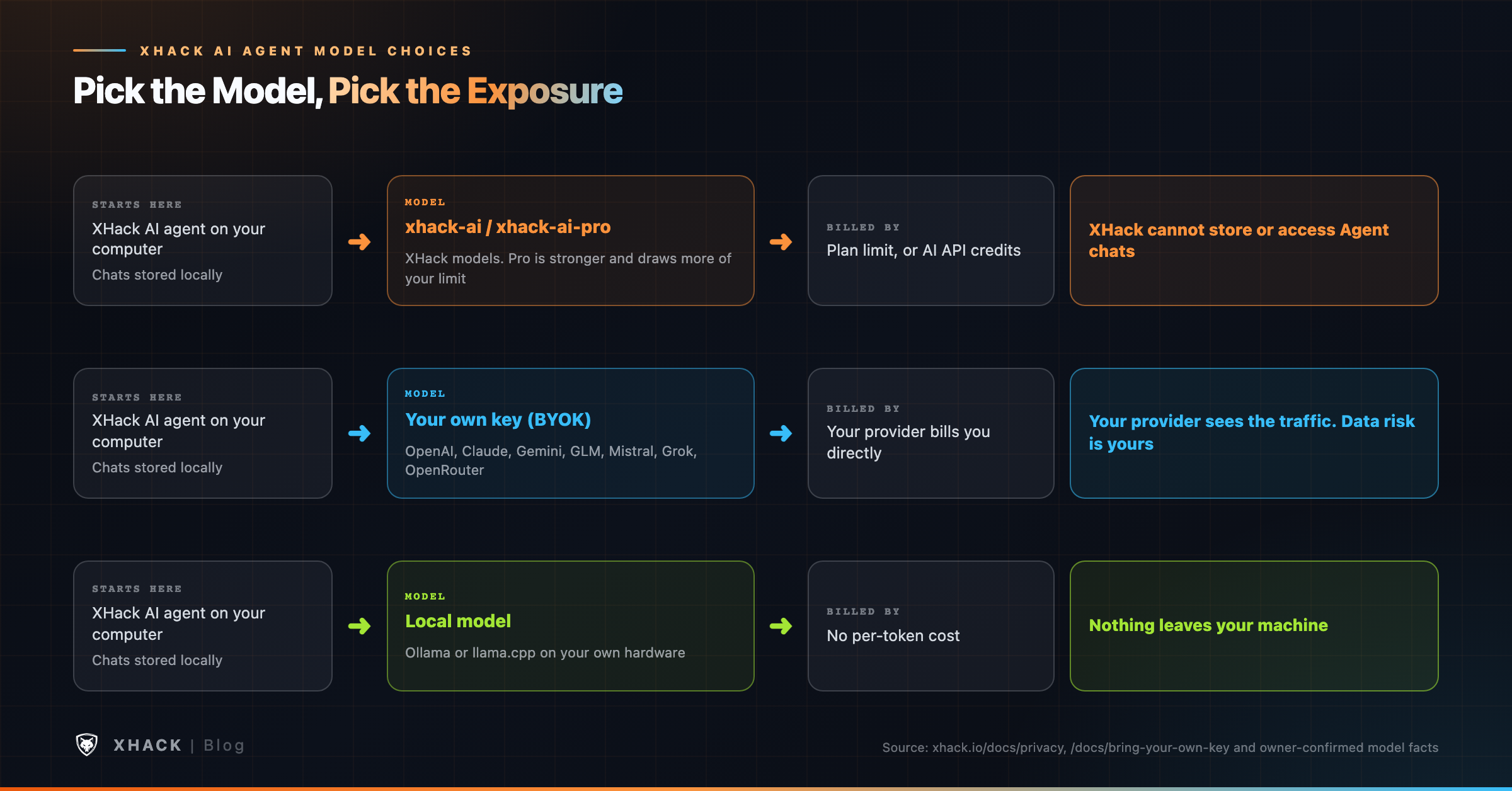
What changes your exposure is which model you pick, as the diagram shows.
| Model choice | Who processes the model traffic | Who bills you |
|---|---|---|
| xhack-ai or xhack-ai-pro | XHack’s models | Your XHack plan, or AI API credits |
| Your own key (BYOK) | Your provider, under its terms | Your provider |
| Local model (Ollama, llama.cpp) | Your own hardware | Nobody, no per-token cost |
Your laptop should not be the only place an engagement can live. The Web Console, new in agent version 2.3.0, runs the full XHack AI agent in a browser, on a laptop, a phone or a server you control. The docs say it is the same agent with every tool and sub-agent, and a finding you log in the browser is the same finding the desktop app shows, because both read the same data on your machine.
Three behaviors make it practical. Every turn runs on the machine hosting the XHack AI agent, so closing the tab or losing Wi-Fi does not stop it, and the response picks up mid-stream when you reconnect. You can run several chats at once, with a live pulse on each running session. And you get the whole workbench: tool cards, inline approvals, a context meter, file uploads, the Vulnerabilities panel, sub-agents, the Repeater, a cloud event timeline mapped to ATT&CK and autonomous mode.
To turn it on from the desktop app, open Settings, then Web Access, create a user and press Start. It is off until you do, it binds to 127.0.0.1 by default, passwords are hashed, failed logins are rate limited and logged, and provider keys are write-only, so a stolen session cannot read them. “Sign out everywhere” invalidates every session at once.
A long run is safer on a server that stays awake. The docs walk through hosting the XHack AI agent on a Linux VPS and reaching it from your phone. This is the one place the product uses commands, which the docs give as follows (copied from XHack’s guide, not run by me):
xhack create-user --username you --password "a-long-passphrase"
xhack serve                       # serves 127.0.0.1:8765
xhack serve --install-service     # keep it running as a user service
ssh -L 8765:127.0.0.1:8765 you@your-server   # from your own machine
The docs are firm about risk. Anyone who gets past the login can run commands on that server, so use a spare, throwaway VPS, keep the console on 127.0.0.1 and reach it over an SSH tunnel, treat the login like a root password and rotate it, and destroy the server when the work is done. A quick HTTPS tunnel exists for phones, and the docs call out that the address is public and only your password stands in front of it.
I wrote a small check for the mistake the docs warn about, which is binding the console to all interfaces. It reads the listeners on the port and flags anything other than loopback. I tested it on macOS with a server bound to 127.0.0.1, ::1 and 0.0.0.0, and the lsof path behaved correctly. The ss path for Linux follows the same logic, but I did not run it on a Linux box.
#!/usr/bin/env bash
# check_console_bind.sh [port]
# Exit 0 = loopback only (or nothing listening), 1 = exposed, 2 = no tool available.
port="${1:-8765}"
if command -v ss >/dev/null 2>&1; then
  listeners=$(ss -H -ltn "sport = :$port" | awk '{print $4}')
elif command -v lsof >/dev/null 2>&1; then
  listeners=$(lsof -nP -iTCP:"$port" -sTCP:LISTEN 2>/dev/null | awk 'NR>1 {print $9}')
else
  echo "need ss or lsof"; exit 2
fi
[ -z "$listeners" ] && { echo "nothing listening on port $port"; exit 0; }
status=0
while read -r addr; do
  case "${addr%:*}" in
    127.0.0.1|"[::1]"|::1) echo "OK       $addr (loopback only)" ;;
    *) echo "EXPOSED  $addr (reachable from other machines)"; status=1 ;;
  esac
done <<< "$listeners"
exit $status
Run it as ./check_console_bind.sh 8765 after you start the console. On a correct setup it prints OK and exits 0. If it prints EXPOSED, stop the service and fix the bind address before anything else.
A pentest agent in your pocket is only useful if it opens like an app. The console is a PWA, so you can add it to your home screen or desktop and it gets its own icon and window. Phones need HTTPS to install it, and web.dev lists “Be served over HTTPS” among the install criteria. Desktop is the exception when the console runs on the same machine at 127.0.0.1, and an SSH tunnel to a server looks like localhost, so a desktop can install through one.
On iPhone you need Safari, because Chrome on iOS cannot install apps. If “Add to Home Screen” is missing, you are almost certainly on HTTP or in a private window.
No toolkit covers everything, and the agent does not need to. The XHack AI agent supports the Model Context Protocol, which the protocol’s own site describes as an open-source standard for connecting AI applications to external systems. Point the XHack AI agent at an MCP server and its tools become available in chat, and you can add remote connections from the web console.
The edge case is trust. A connected tool is code you now let an AI call, so connect servers you trust and keep the XHack AI agent in a mode that asks first. The MCP specification itself says clients should show tool inputs to the user before calling a server, to avoid malicious or accidental data exfiltration.
A feature list is a list of best cases. These are the situations where the features run into the real world.
AI agents miss bugs, and the benchmarks say so. PentestEval tested 9 models on 346 tasks across 12 vulnerable scenarios and reports that “End-to-end pipelines reach only 31% success rate.” BountyBench’s top agents scored 67.5% on Exploit but 12.5% on Detect. Those tests did not include XHack, and I know of no independent benchmark that ranks the XHack AI agent against others. XHack’s terms say AI output can be incomplete, inaccurate or wrong. Validate every finding before you report it.
| Situation | What to do |
|---|---|
| Bug bounty program with AI rules | Read the policy first. HackerOne’s hackbot rules keep operators responsible, so use Manual or Allow Edits rather than Auto |
| Target you do not own | Get written authorization. The restrictions page prohibits unauthorized testing, and Auto mode will not check your contract |
| WAF or bot protection blocks you | Ask the owner to allow-list your IP instead of reaching for the stealth browser |
| Large sub-agent swarm | Watch the cost on each Agents card, and remember the 12-agent default rises only as far as your hardware allows |
| Plan limit reached mid-run | The agent stops unless you enabled fallback to credits, and credits are non-refundable |
| Sensitive client data | Use a local model, or accept that your own key’s provider sees the traffic |
| Console on a server | Throwaway VPS, loopback bind, SSH tunnel, rotated login, destroyed afterward |
| Business logic flaws | Plan to test these yourself. A refund flow or an approval chain depends on rules only your client knows |
| Fragile or production hosts | Ask the owner which hosts are delicate, use Manual mode, and get approval before touching production |
| Proprietary source code | Choose the model on purpose: XHack’s models, your own key, or a local model |
| Binary analysis | Check any claim about what a function does against the actual code or a debugger |
| Very long run | Put scope and decisions in project memory so compaction cannot blur them |
One more caveat is about this guide itself. XHack ships updates fast, and the docs and feature pages are not always in step with each other. I wrote this from the pages and facts confirmed on October 16, 2026, and where two pages disagreed I followed the current product. Check the docs for anything that has changed since.
You do not need all 40 on day one. Here is where I would start for each job.
| You are | Start with | Add next |
|---|---|---|
| A solo bug hunter | Manual mode, the built-in browser, the Repeater, JS Hunter | Sub-agents, project memory, report export |
| A consultant on a client job | Project memory per client folder, Plan mode, findings panel | Workflow Engine, skills, PDF reports |
| Testing a network or hosts | Plan mode first, then Manual mode, background tasks for scans | Sub-agents per subnet, findings panel |
| Reviewing source code | A clear scope and your model choice (local for proprietary code) | Findings panel, report export |
| Testing a mobile app | Mobile app testing with ADB and Frida | Repeater for the captured API traffic |
| Handling sensitive data | A local model through Ollama | Plan mode, then Manual |
| Investigating an account takeover | Cloud Investigation with your exported logs | SOC operations for the wider timeline |
| Running long jobs remotely | Web Console on a throwaway VPS | Time-boxed autonomous mode |
If you are weighing the XHack AI agent against other tools, our guide to autonomous AI hacking agents compares the field, and the XHack AI agent for bug bounty article covers that workflow in depth.
So yeah, here is where we talk about what XHack brings. I build it, so weigh this section as a vendor’s.
Most AI security tools do one job. XHack combines three things that are usually sold separately: an AI agent you run yourself, a security platform around it, and expert human testing when you want a person on the work. The XHack AI agent is the part this article covers, and the other two are there if you outgrow it.
What you get. The XHack AI agent runs on your own computer, with permission modes you control, sub-agents you can steer, three browsers, a built-in Repeater, mobile tooling, Cloud Investigation, a workflow builder and report export. Agent chats stay local, and XHack cannot store or access them. That keeps a client’s sensitive findings off a vendor’s servers, which matters when the findings are the product.
What it costs. The individual plans are $20 a month for Starter at an introductory launch price, $49 for Professional and $150 for Elite. The pricing page lists Unrestricted AI Access, Cloud Investigation and BYOK on Professional, and adds malware analysis tools, full API access and 24/7 expert support on Elite. Company plans are a separate track, starting at $560 a month.
The trial. There is a 7-day free trial with full access, one per customer, and it ends by itself with nothing to cancel. It requires approved identity verification first, and XHack’s billing page says whether a payment method is needed can vary, so check the signup screen before you start.
The honest part. XHack is a proprietary service, I am not quoting an accuracy figure for it, and it will not replace your judgment on scope, severity or business logic. If you want a cheap one-time scan with a cover page, we are not the right fit, and if your bug bounty program bans AI tools, nothing here changes that. When you want people instead of software, our AI VAPT services start at $2,500 for a scoped engagement.
Want to try the XHack AI agent on a target you are authorized to test? Start the trial, run one job in Manual mode and watch the Agents panel. Prefer to talk it through first? Book a free consultation, even if the answer turns out to be “you do not need us.” Brutal honesty is kind of our thing.
The XHack AI agent is a desktop app that plans, runs and documents security tests against targets you are authorized to test. It has sub-agents, three browsers, a Repeater, mobile and cloud tooling, and four permission modes, and you can also drive it from a browser through the Web Console.
No. Chats that happen in the Agent stay on your computer, and XHack cannot store or access them. You can delete them any time. If you bring your own model key, your provider processes the traffic under its own terms, so that risk is yours. The browser chat at app.xhack.io is a different product with its own storage.
Up to 12 in parallel by default, and you can force more if your hardware supports it. Each sub-agent card shows status, progress, findings and running cost, so you can pause, stop or steer one before it becomes expensive.
Yes, with a local model. The desktop agent connects to Ollama or llama.cpp, and the docs say all AI processing then stays on your machine with no internet required. Features that need the internet, such as live CVE lookups, still need a connection.
It depends on the program, not on XHack. HackerOne’s hackbot rules keep operators responsible for their tools and say hackbots must not operate in a fully autonomous manner, with the word “yet” closing the sentence. Read each program’s policy, and consider Manual or Allow Edits mode where it matters.
No. The XHack AI agent is a graphical desktop app, and you install it, sign in and describe the job in plain English. The one place commands appear is hosting the Web Console on a VPS, where the docs use a few xhack commands and an SSH tunnel.
XHack’s Capabilities page lists network penetration testing, source code review, reverse engineering and exploit development as supported work for authorized users. The detail comes from the autonomous pentesting and malware analysis pages, since these areas do not have their own step-by-step guides. Treat the output as a fast first pass that you confirm yourself, and keep every test inside a written scope.
Starter includes the autonomous agent, the exploit development pipeline, skills, image reading and chat. Professional adds Unrestricted AI Access, Cloud Investigation and BYOK, and Elite adds fully unrestricted AI, malware analysis tools, full API access and 24/7 expert support. Plans and limits change, so confirm them on the pricing page.
The XHack AI agent is most useful when you treat its controls as part of the product: pick the permission mode, set the scope in project memory, watch the cost on each sub-agent and keep the human review for what matters. The feature count is the least interesting number here.
If you want to judge it on a real job, take the 7-day trial, point it at a target you own, and count the hours it saves against the findings you still have to verify yourself.
Categories
Related articles