Table of contents
18
By Salman Khan, OSCP+, Founder of XHack, SRT (Synack Red Team member)
Read this in 30 seconds: Most “cheap bug bounty tools” posts list software prices and stop there, but a real bug bounty toolkit also needs compute, storage and a vault, and those line items are where budgets actually break.
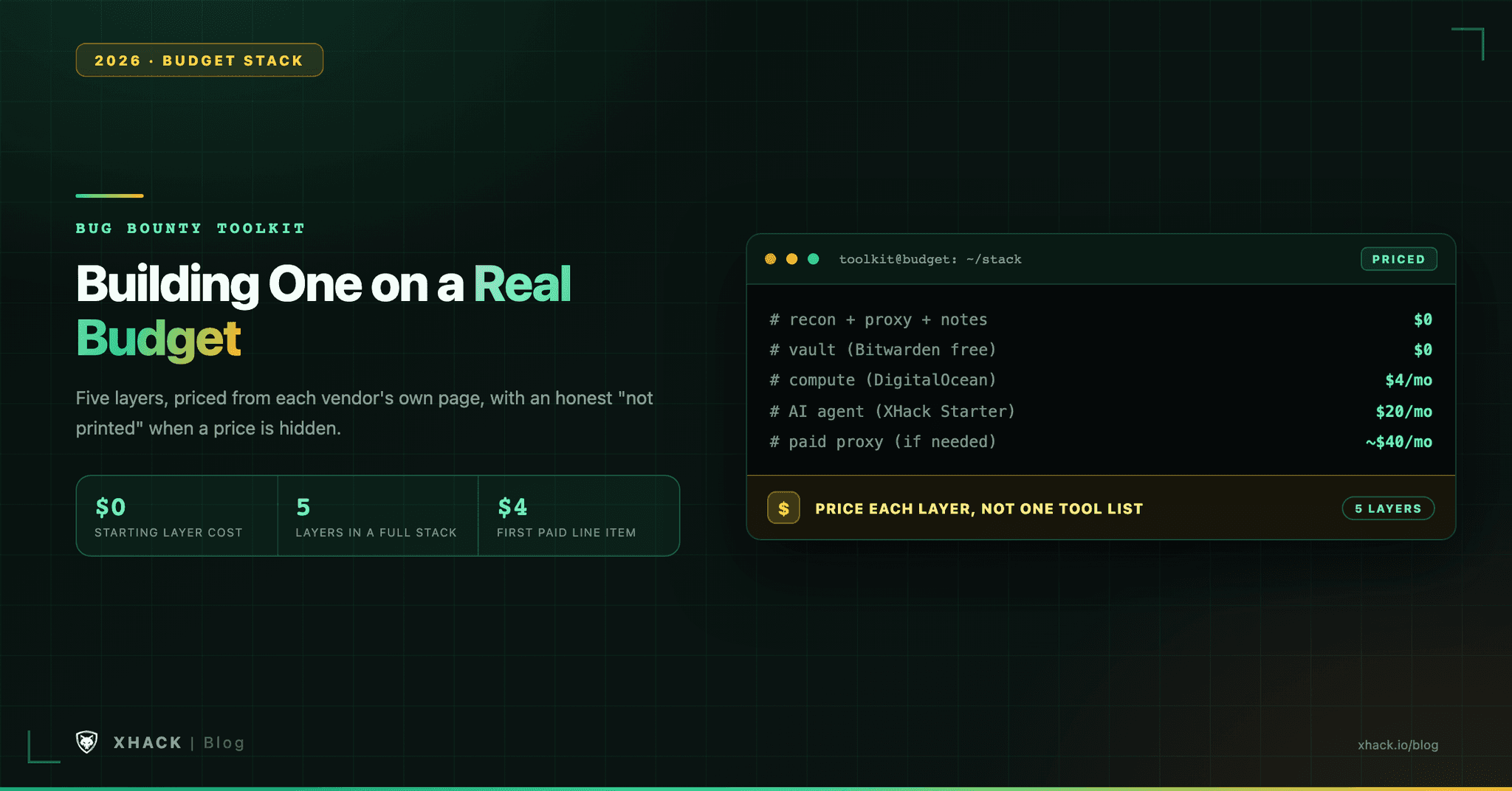
- A full stack costs $0 before it costs $4. The free recon chain, a free proxy and free notes run entirely on your own laptop; a DigitalOcean Basic Droplet at $4 a month (512 MiB RAM, 10 GiB SSD) is the first real line item, for compute that outlives your laptop being open.
- Password managers got cheaper, not more expensive. Bitwarden’s Premium plan is $19.80 a year as of January 2026, which is $1.65 a month, for 5 GB of encrypted file storage and TOTP codes.
- Caido hides its own price. Caido’s pricing page lists Basic’s limits in exact numbers (2 projects, 7 workflows, 3 plugins) but prints no dollar figure for the unlimited Individual tier anywhere on the page.
- Burp Suite Professional still has no printed price. PortSwigger’s buy page omits it; third-party guides cite $475 to $499 a year, which is roughly $40 a month if you budget it that way.
- XHack’s three tiers are the one line item with a public number. $20, $49 or $150 a month, a 7-day trial on each, and that published number is rarer in this stack than you’d expect.
A bug bounty toolkit on a budget is not one tool list, it’s five layers stacked by what you can actually afford this month, and most of what people forget to budget for is compute and storage, not software.
Every bug bounty toolkit post treats “budget” as a single number attached to one tool. That’s not how a working hunter’s stack actually gets built. You add a proxy, then a place to put evidence, then somewhere to run scans that doesn’t die when you close your laptop, then eventually AI help with the parts that eat your evenings. Each layer has a free option, a cheap option and a point where paying is the only way forward.
This article prices the whole stack, tier by tier, using the current price on each vendor’s own page where one exists, and saying so plainly when it doesn’t.
We build an AI agent for hunters, so XHack’s own pricing sits in its own clearly marked section near the end, priced the same honest way as everything else.
A bug bounty toolkit is not “which scanner.” It’s five separate jobs, and a budget bug bounty toolkit answers all five, even if four of the answers are free.
Most budget posts price layer 1 and stop. The bug bounty toolkit falls over on layers 3 through 5, because those are the ones nobody remembers to cost out until the bill arrives.
Start here regardless of your eventual budget, because every tier above this one is an addition, not a replacement.
What breaks at $0: nothing runs when your laptop is closed. A long nuclei scan against a big scope, a background interactsh listener for out-of-band findings, a recon job you want running overnight, all of that needs your machine to stay open and connected. That’s the first real budget decision, and it’s cheaper than most hunters assume.
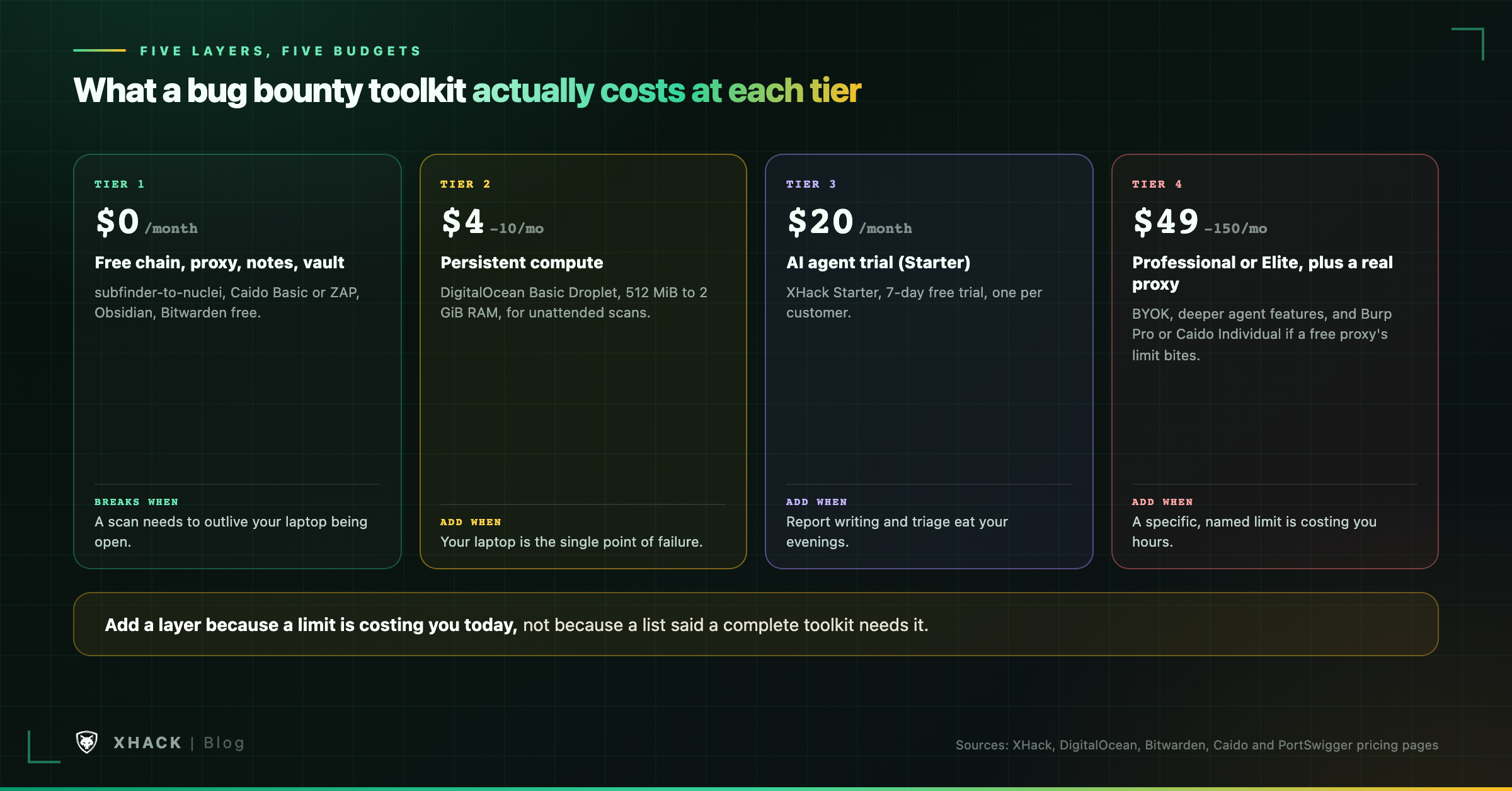
This is the smallest paid step, and it’s the one almost every bug bounty toolkit guide skips entirely.
A DigitalOcean Basic Droplet starts at $4 a month, billed per second, for 512 MiB RAM, 1 shared vCPU, 10 GiB SSD storage and 500 GiB outbound transfer, per DigitalOcean’s own pricing page. That’s enough to run your recon chain against a scoped target list, self-host interactsh for out-of-band testing instead of relying on a shared public instance, or keep a long ffuf job running without your laptop as the single point of failure.
What $4 doesn’t buy: headroom. 512 MiB is tight for anything beyond sequential CLI tools; stacking nuclei, httpx and a self-hosted interactsh instance on the same box will want closer to $6 to $12 a month for 1 to 2 GiB of RAM. Budget for the step up, not just the entry price.
This tier also changes your notes and vault math. If your scans now produce evidence on a remote box instead of your laptop, you need a habit of pulling it back to wherever your notes live, not a new tool. Nothing in layers 3 and 4 needs to change cost to support this; it’s a workflow change, not a budget one.
Running total so far: $4 to $10 a month, on top of the $0 layers above.
$20 a month is XHack’s Starter tier, and it’s the first point in this stack where the spend goes toward something other than infrastructure.
At this tier, the bug bounty toolkit looks like: the free recon chain, Caido Basic or ZAP, Obsidian for notes, Bitwarden free for the vault, optionally the $4 Droplet from the tier above, plus an AI agent trial to see whether it actually saves you hours on the repetitive parts of recon and report drafting.
What $20 buys you a trial of, not a guarantee of: time saved, not findings guaranteed. XHack’s pricing page lists a 7-day free trial, one trial per customer that ends automatically, so you can test the actual hours-saved math on your own targets before deciding whether to continue.
The honest caveat that applies to any AI you add here: Bugcrowd’s March 2026 policy post says ten consecutive invalid reports trigger an account review, and Intigriti’s triage team wrote in May 2026 that AI-generated reports “look serious” but take longer to dismiss once a triager spots the pattern. Any AI layer in your bug bounty toolkit has to make your own validation faster, not replace it.
Running total: roughly $20 to $30 a month, including a VPS, with every layer of the stack represented at least once.
$49 a month is XHack’s Professional tier, and it’s also the point where the proxy decision in layer 2 starts to cost real money if you make it.
Professional adds BYOK (bring your own key), so you can route the agent through your own model provider account instead of XHack’s included routing, useful if you already have provider credits or want a specific model.
The proxy fork in the road: Burp Suite Professional’s price isn’t printed on PortSwigger’s own buy page at all, a gap we flagged in our tools guide too. Third-party guides consistently cite $475 to $499 a year, which works out to roughly $40 a month if you amortize it, though PortSwigger’s own free trial is the only way to confirm what you’d actually be charged. Caido’s Individual tier has the same problem in reverse: it lists every limit Basic removes (unlimited projects, workflows, plugins, nightly builds, an AI assistant) in specific numbers, but the price itself doesn’t appear on Caido’s pricing page either.
If you add a paid proxy at this tier, your real total is closer to $90 a month, not $49. If Caido Basic or ZAP is still keeping up with your workload, stay there and bank the difference.
Running total: $49 alone, or roughly $90 with a paid proxy added.
$150 a month is XHack’s Elite tier, and at this budget the whole five-layer stack gets built out, not just represented.
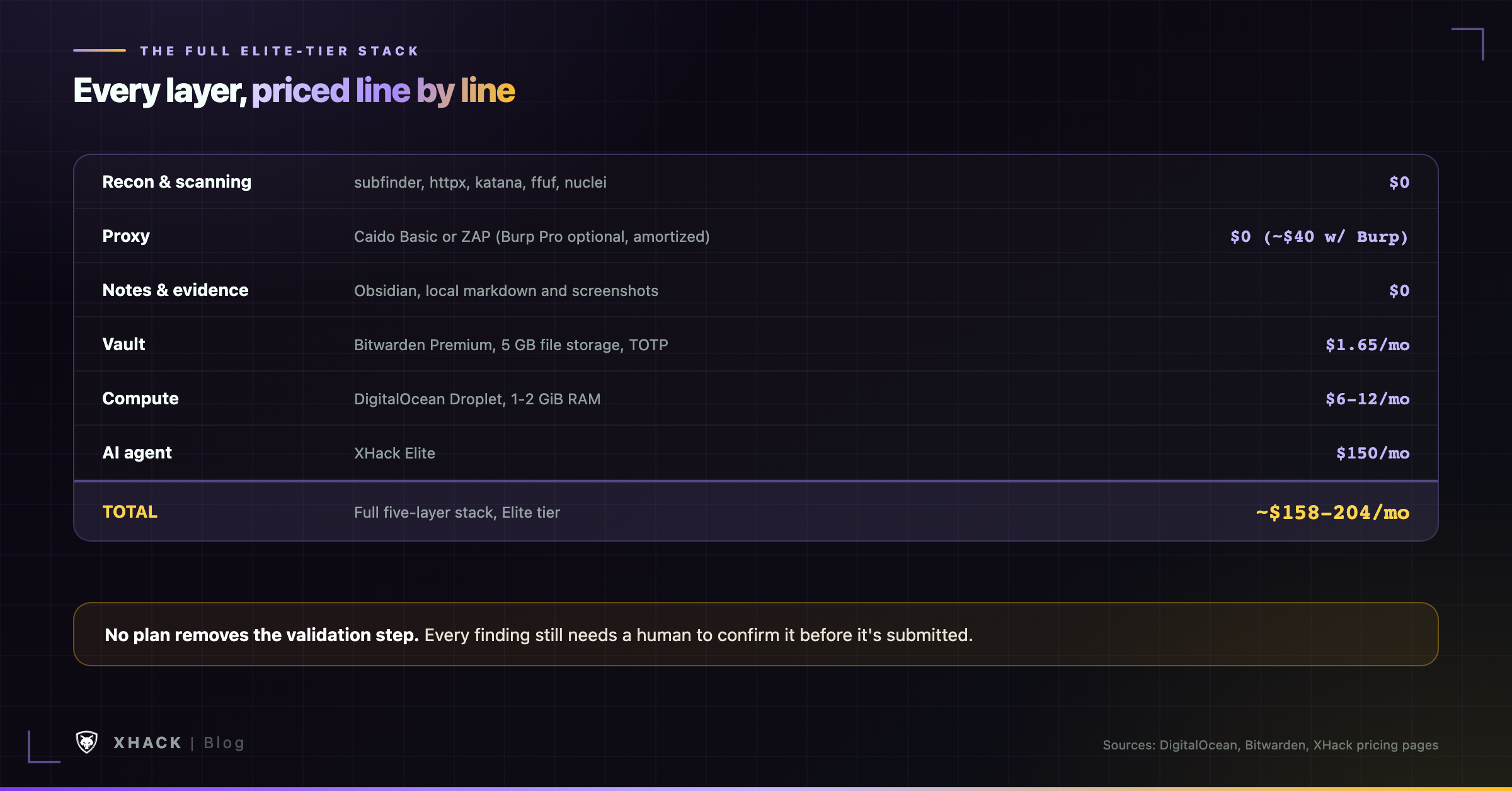
A full Elite-tier stack looks like this:
| Layer | What it is | Monthly cost |
|---|---|---|
| Recon and scanning | Free chain (subfinder, httpx, katana, ffuf, nuclei) | $0 |
| Proxy | Caido Basic or ZAP (or Burp Pro, amortized, optional) | $0 (or ~$40 with Burp Pro) |
| Notes and evidence | Obsidian, local | $0 |
| Vault | Bitwarden Premium (5 GB file storage, TOTP, emergency access) | $1.65 |
| Compute | DigitalOcean Droplet, 1-2 GiB RAM | $6 to $12 |
| AI agent | XHack Elite | $150 |
| Total | ~$158 to $204 a month |
Elite’s gap over Professional is the part that matters at this tier: more capability per plan, and per XHack’s release notes, every finding the agent logs is required to carry a CVSS v4.0 rating and a CWE reference, not just a severity guess.
What this tier doesn’t change: validation. XHack’s own terms say AI output can be incomplete, inaccurate or wrong, and no plan, Starter through Elite, removes you from being the one who confirms a finding before it’s submitted anywhere.
These rarely make a bug bounty toolkit list, and they’re the reason a “$20 a month” plan turns into $35 by the third month.
None of these break a budget on their own. All four together are the difference between the bug bounty toolkit you priced on paper and the one you’re actually paying for by month three.
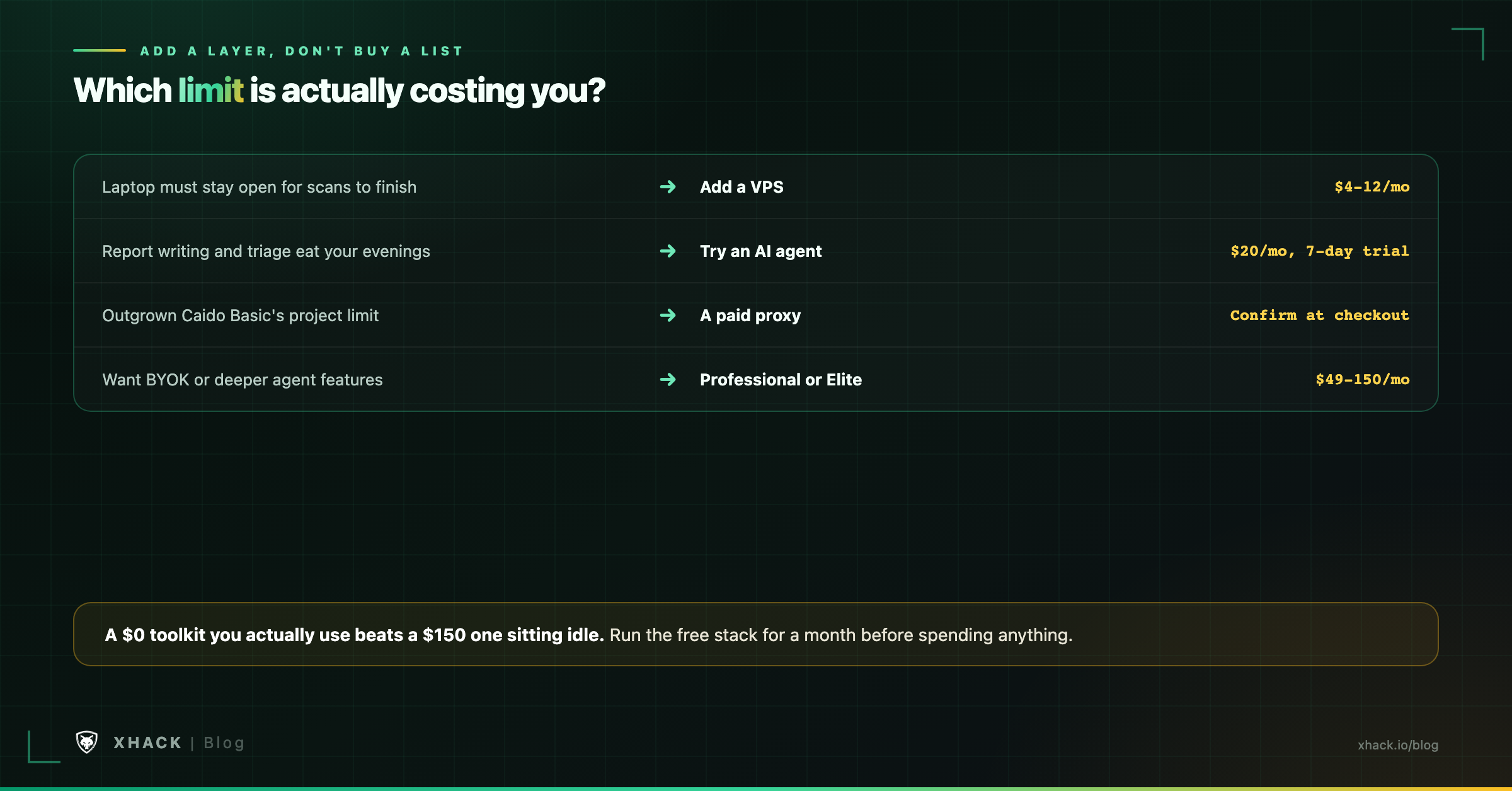
Don’t start from a target dollar amount. Start from what’s actually costing you time or risk right now, and add the layer that fixes it.
| If this is your situation | Add this layer | Approximate cost |
|---|---|---|
| You’re new and unsure you’ll stick with it | Nothing. Run the $0 stack for a month first | $0 |
| Your laptop has to stay open for scans to finish | A Droplet | $4 to $12 a month |
| Report writing and triage eat your evenings | An AI agent trial | $20 a month, 7-day trial first |
| You’ve outgrown Caido Basic’s project limit | A paid proxy, Caido Individual or Burp Pro | Confirm at checkout, no printed price on either vendor’s page |
| You want BYOK or deeper agent features | Professional or Elite tier | $49 to $150 a month |
The rule that applies at every tier: add a layer because a specific limit is costing you hours or risk today, not because a list said a tool belongs in a “complete” bug bounty toolkit. A $0 toolkit that you actually use beats a $150 toolkit sitting mostly idle.
So yeah, here’s the section where we talk about our own place in this stack. We build it, so weigh this one like a vendor’s.
XHack is the one layer in this entire bug bounty toolkit with a published, fixed number instead of a “check at checkout” answer, which matters more in this specific article than most, given how many of the other vendors above (Burp, Caido’s paid tier) don’t print theirs.
The three tiers, plainly: Starter at $20 a month, Professional at $49, Elite at $150, each with a 7-day free trial, one per customer, that ends automatically. Professional and Elite add BYOK, so your model-provider costs, if any, are yours to manage separately.
What it adds to the stack above: an agent that runs recon, discovery, exploit development and the write-up as one workflow, with up to 15 specialized sub-agents working in parallel, rather than five separate free tools you chain by hand. Every confirmed finding logs automatically with impact, proof, reproduction steps, the exact request and a recommended fix, which is the layer-3 “evidence and notes” job, automated instead of manual.
What it doesn’t replace: your own validation, your own scope discipline, and your own judgment about what a program will actually pay for. Our terms are explicit that AI output can be wrong, and nothing here changes who’s accountable for what gets submitted.
Privacy, since it matters for a bug bounty toolkit holding target data: XHack doesn’t store your data by design. Pentest chats and session data stay on your own machine, and you can delete them whenever you want.
If a $0 or $4 bug bounty toolkit is handling everything you need right now, keep running it, that’s a legitimate answer. If report writing or repetitive recon is the actual bottleneck, the trial costs nothing to find out. Start the trial or book a free consultation first if you’d rather talk it through, even if the honest answer turns out to be that you don’t need us yet.
A fully functional bug bounty toolkit costs $0 to start: the free recon chain, a free proxy like Caido Basic or ZAP, free notes in Obsidian, and Bitwarden’s free vault. The first real paid layer is compute, around $4 a month for a basic VPS, once you need scans running without your laptop open.
Only once Burp Community’s missing scanner and lack of saved projects are actually slowing you down. Its price isn’t printed on PortSwigger’s own buy page; third-party guides put it at $475 to $499 a year, roughly $40 a month amortized. Use the free trial to confirm the real checkout price before deciding.
Start with a 7-day free trial rather than committing to a monthly plan. XHack’s trial runs one per customer and ends automatically, so you can measure actual hours saved on your own targets before deciding whether $20 a month at Starter is worth it for your workflow.
No. Bitwarden’s free plan covers unlimited passwords and devices across browser, mobile and desktop apps, which is enough for most solo hunters. Premium adds TOTP codes and 5 GB of encrypted file storage for $19.80 a year, cheap enough to add once you want those two specific features.
Compute and storage that nobody prices into the “tool list,” specifically a VPS for unattended scans and the small-but-real cost of scaling it up mid-month. A hardware 2FA key and a disclosure-page domain are smaller but equally overlooked one-time or near-zero recurring costs.
Build it around free tools first, for at least a month. Every paid layer in this article solves a specific limit (no persistent compute, a proxy’s project cap, repetitive report writing), and you can’t tell which limit is actually yours until you’ve hit it.
A real bug bounty toolkit on a budget starts at $0, adds compute for about $4 a month once your laptop becomes the bottleneck, and only reaches for a paid proxy or an AI agent once a specific, named limit is actually costing you time or money. The hidden costs, compute scaling, a 2FA key, a disclosure domain, matter more to your real monthly total than any single tool’s sticker price.
Price your own stack the same way this article did: one vendor’s own page at a time, and an honest “not printed” when a vendor won’t say. Start free, add the layer that fixes today’s actual limit, and keep the receipt for what it really costs you, not what the list said it should.
Categories
Related articles