Table of contents
16
By Salman Khan, OSCP+, Founder of XHack, SRT (Synack Red Team member)
Read this in 30 seconds: A Ghidra MCP server lets an AI assistant such as Claude Code read and annotate a binary through Ghidra, instead of you pasting decompiled code into a chat. Two open-source projects do this today, GhidraMCP and ReVa, and both document a one-line setup for Claude Code.
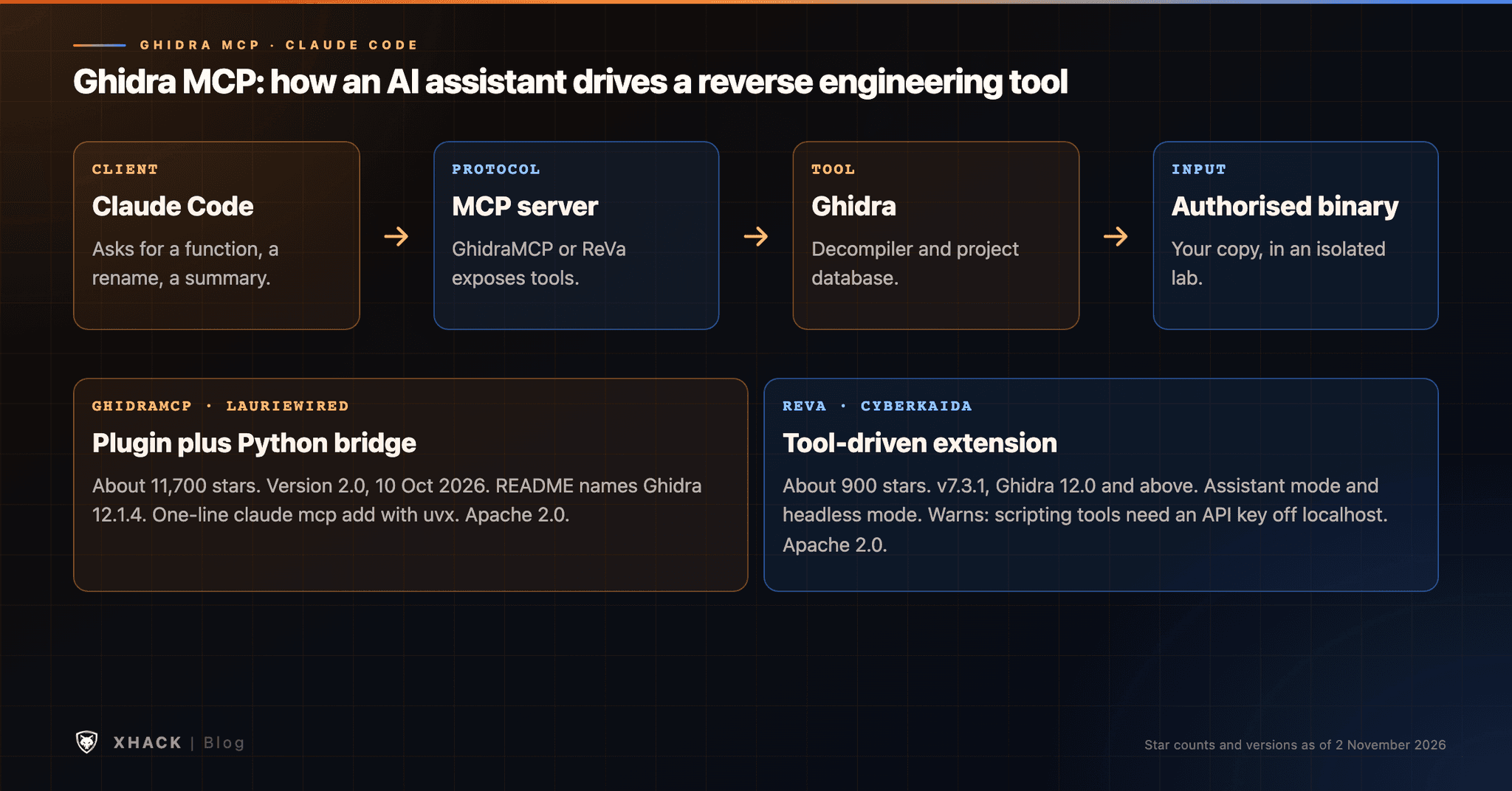
- Two projects lead, with different designs. GhidraMCP (about 11,700 GitHub stars, version 2.0 released 10 October 2026) is a plugin plus a Python bridge, and ReVa (about 900 stars, v7.3.1) is a Ghidra extension with a tool-driven design and a headless mode.
- Setup is short, but the prerequisites are not. You need a matching Ghidra version (GhidraMCP’s README says 12.1.4), Java, and a Python launcher, and a plugin installed and enabled in Ghidra first.
- The server can do real work, but it still guesses. It can decompile, rename and list functions, and ReVa’s README shows prompts such as summarising a program from
mainand renaming variables as it goes.- Security needs thought. ReVa warns that its scripting tools should not be exposed on a public interface without an API key, and Claude Code’s docs tell you to trust each MCP server before connecting it.
- Verify what the model tells you. Names and summaries are suggestions until you confirm them against the disassembly.
If you search for Ghidra MCP, you will find GitHub repositories, directory pages and a few tutorials. This guide pulls the setup, the options and the risks into one place, so you can decide whether a Ghidra MCP server is worth running for your work.
A note on method. I built this from the projects’ own READMEs and Claude Code’s documentation, read on 2 November 2026. I have not run a benchmark, so I make no claim about how much time it saves. Where I describe behaviour, it is what the maintainers document. I run XHack, so I say where our product fits and where it does not.
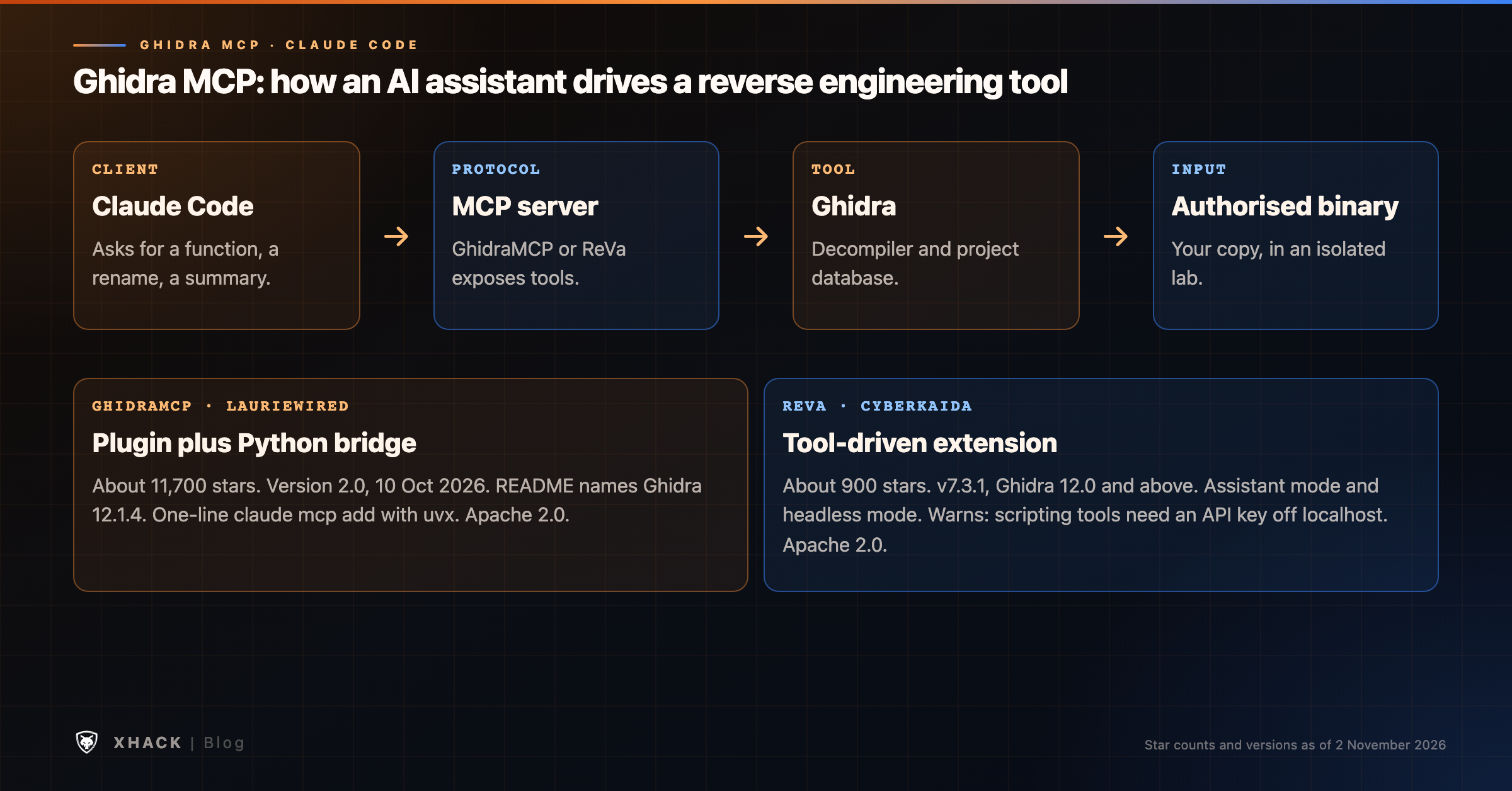
Three pieces make up a Ghidra MCP setup.
Ghidra is the reverse engineering framework released by the US National Security Agency. It is free and open source under the Apache 2.0 licence, and it includes a decompiler.
MCP, the Model Context Protocol, is an open standard that lets an AI client call tools provided by a server. Claude Code’s documentation describes it as an open source standard for AI-tool integrations that gives the assistant access to your tools, databases and APIs.
A Ghidra MCP server sits between them. It exposes Ghidra functions, such as decompiling a function or renaming a variable, as tools the assistant can call. The assistant asks, the server runs the action in Ghidra and returns the result.
The practical change is the loop. Without it, you copy code out of Ghidra, paste it into a chat, read the answer and type changes back by hand. With a Ghidra MCP server, the assistant can read a function, follow a cross-reference, rename things and keep going.
For the wider picture of AI in reverse engineering, see AI reverse engineering. This article stays on Ghidra MCP.
Two open-source projects are the main choices. Both are licensed under Apache 2.0, and the figures below come from their GitHub pages on 2 November 2026.
| GhidraMCP | ReVa (Reverse Engineering Assistant) | |
|---|---|---|
| Maintainer | LaurieWired | cyberkaida |
| Design | Ghidra plugin plus a Python MCP bridge | Ghidra extension with a tool-driven design |
| GitHub stars | About 11,700 | About 900 |
| Latest release | 2.0 (10 October 2026) | v7.3.1 (3 September 2026), repository updated 27 October |
| Ghidra version | README says 12.1.4 | 12.0 and above, Java 21 (Java 25 for Ghidra 12.2 and up) |
| Modes | Plugin with a running Ghidra, or headless through PyGhidra | Assistant mode in the Ghidra UI, or headless |
| Features listed | Decompile and analyse binaries, auto-rename methods and data, list methods, classes, imports and exports | Many small tools, with namespace and cross-references added to decompilation output |
| Claude Code | One claude mcp add command in the README | Named as the recommended client, plus a plugin marketplace with skills |
Stars measure interest, not quality. GhidraMCP is the more widely known project. ReVa says it is designed around small tools with extra context to limit what it calls context rot and to reduce hallucination, and that this lets it handle large binaries and even firmware images. Those are the maintainer’s claims, and I have not tested them.
If you are unsure, start with GhidraMCP for the simplest path and try ReVa if you work on larger projects or want headless automation.
This is an outline of the documented steps, not a replacement for the READMEs, which change with each release. Always follow the current README for your Ghidra version.
Before you start
uv (or Python 3.10 or newer), and ReVa needs the Java version for your Ghidra release.GhidraMCP
claude mcp add ghidra -- uvx --from git+https://github.com/LaurieWired/GhidraMCP ghidra-mcp --ghidra-server http://127.0.0.1:8080/ReVa, assistant mode
claude mcp add --scope user --transport http ReVa -- http://localhost:8080/mcp/messageReVa, headless mode
ReVa can also run without the Ghidra interface, which its README recommends for automation and CI pipelines. You set GHIDRA_INSTALL_DIR, install the tool with uv, and register it with claude mcp add. A project is created in the current directory.
Check that it works. Inside Claude Code, the /mcp command shows which servers are connected, as ReVa’s README notes.
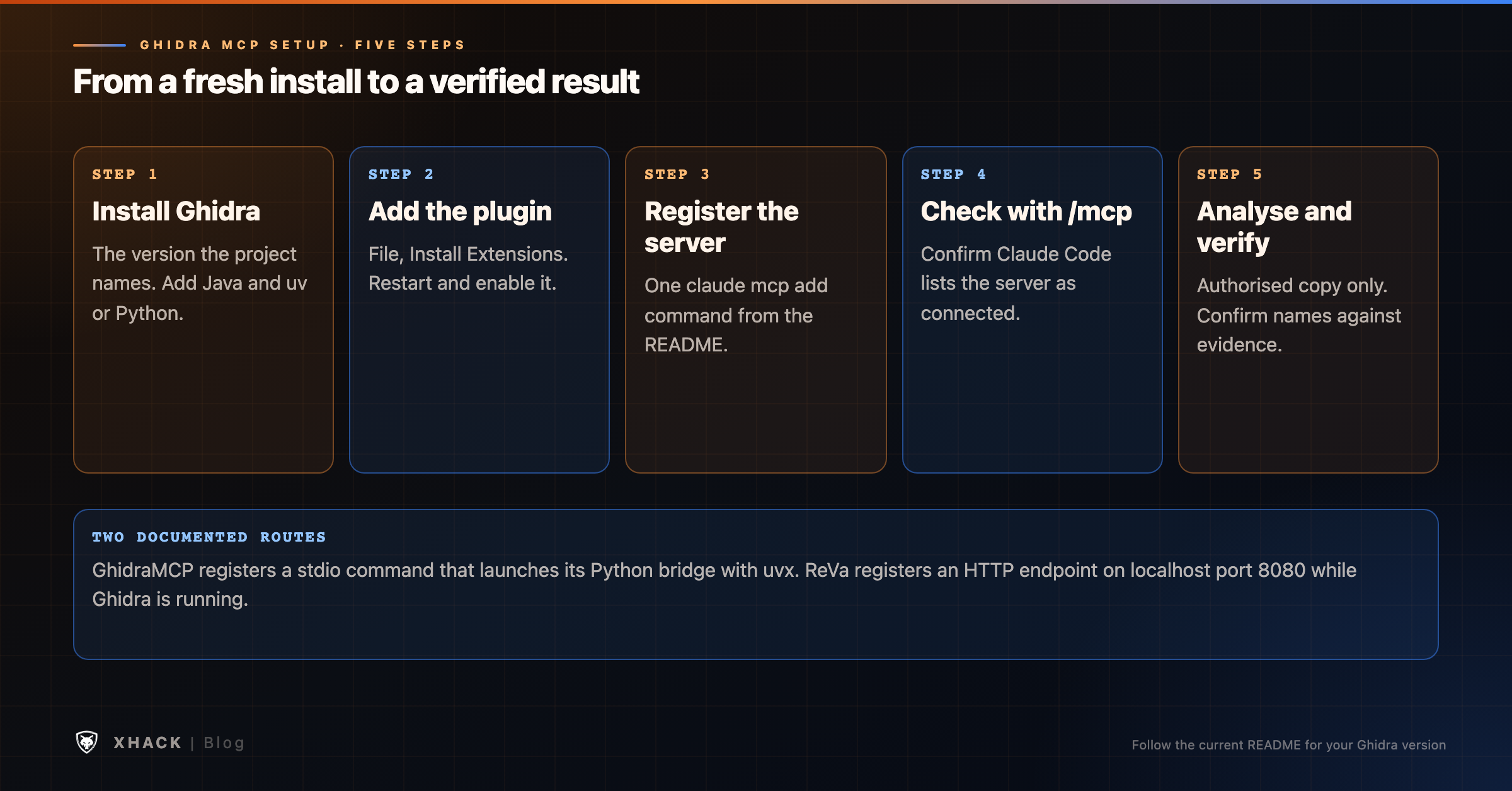
Claude Code’s documentation explains how servers are scoped. A local-scope server loads only in the project where you added it and stays private to you, a project-scope server is stored in .mcp.json and shared through version control, and a user-scope server loads in all your projects. For a reverse engineering server you use on many binaries, user scope is common, as in ReVa’s command, but pick the scope on purpose.
The projects document what they offer, and it is worth reading closely.
GhidraMCP lists decompiling and analysing binaries, automatically renaming methods and data, and listing methods, classes, imports and exports. ReVa’s README shows the kind of questions it expects:
main, examine the program in detail, rename variables as you go and summarise it.What a Ghidra MCP server does not do is remove your responsibility. Four limits matter.
It is still a language model. ReVa’s README says the model prioritises the tools’ information but can answer from training when there is none. Names and summaries can be wrong, and the same goes for any AI-assisted decompiler output (see AI reverse engineering). Check a name against strings, imports and call sites before you accept it.
Large binaries strain the context. ReVa’s design targets this, which suggests it is a real problem. Expect to guide the assistant through a big program in stages.
It acts on your project. The documented features include renaming, so the assistant changes your Ghidra database. Work on a copy, and use Ghidra’s own history to review edits.
It does not replace judgement. A model can summarise a function, but whether a finding matters, or is safe to report, is a decision for you.
This is a general workflow for authorised analysis. It does not depend on a particular sample.
That last step is the same discipline as any AI-assisted analysis: the model proposes, you confirm.
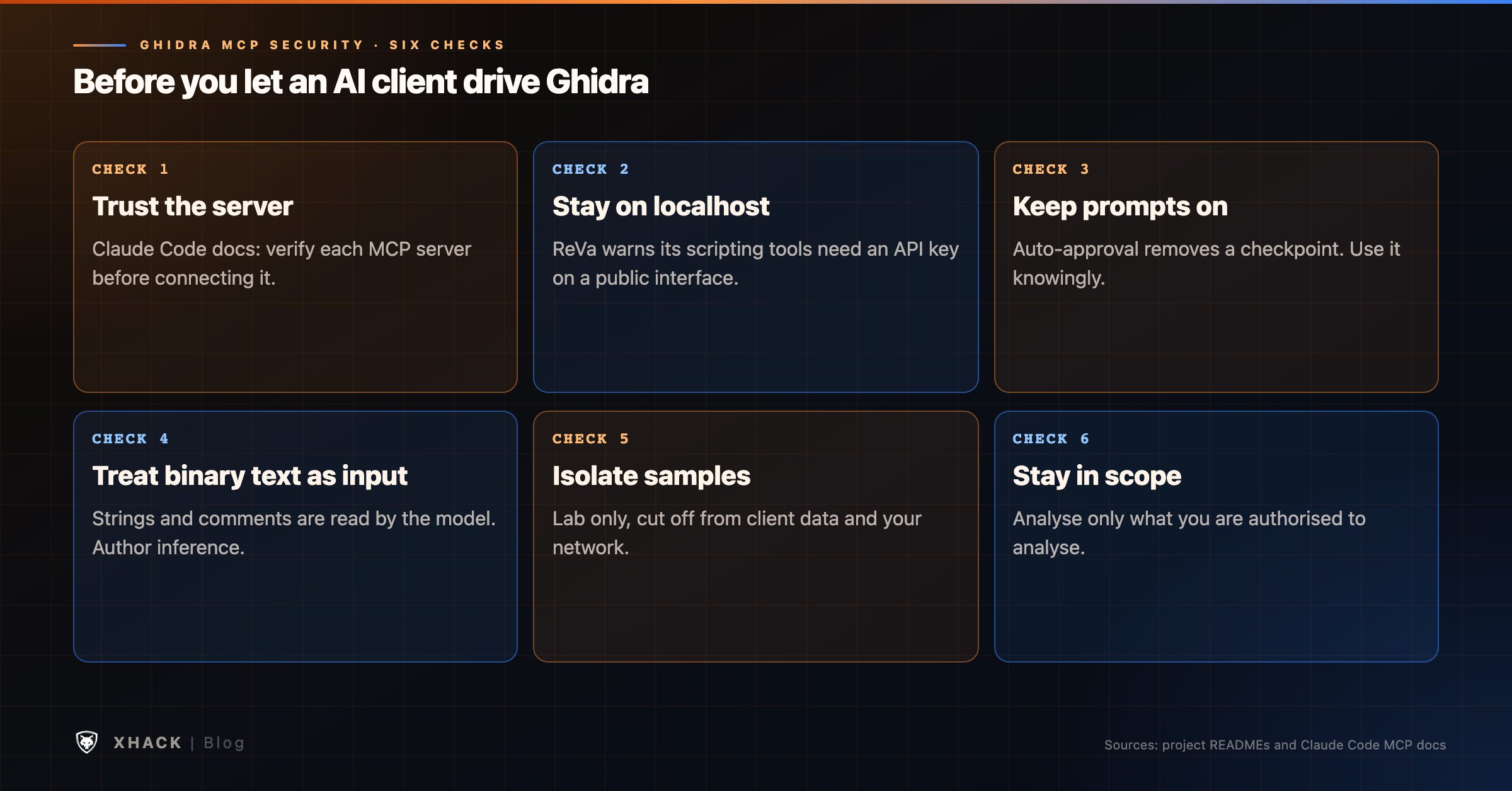
Giving an AI client the ability to drive a reverse engineering tool is a security decision. These points come from the projects’ documentation and Claude Code’s docs, plus our own reasoning where marked.
Trust each server. Claude Code’s documentation says to verify that you trust each MCP server before connecting it, and that servers fetching external content can expose you to prompt injection. A server you installed from a repository is code running on your machine.
Keep it on localhost. ReVa’s README warns that it provides access to the PyGhidra scripting environment. If you let it listen on a public interface, enable its API key authentication or disable the scripting tools. The default is to listen on localhost. The same principle applies to any Ghidra MCP server: do not expose it to a network you do not control.
Be careful with automatic approval. ReVa’s README shows how to add a permission rule so its tools run without prompts. That is convenient, and it removes a checkpoint. Consider whether you want it on a machine that holds anything sensitive.
Think about what the binary says. In our reading, a binary’s strings and comments are external content that the assistant will read. If you analyse hostile samples, text inside them could try to steer the model, so treat the model’s actions as untrusted input and keep it away from anything you cannot afford to lose. This is an inference, not something the projects document.
Isolate samples. Run unknown or malicious binaries only in a lab cut off from your network and from client data.
Stay inside scope. Analyse only software you are authorised to analyse, and follow its licence. This is not legal advice.
For the general picture of securing these servers, MCP server security covers the core risks, and MCP server vulnerabilities for bug hunters covers what researchers test.
A Ghidra MCP server is not always worth the setup.
XHack does not ship a Ghidra integration, and I have not published a tested Ghidra MCP setup for it. What it does support is the protocol. The XHack agent speaks MCP, so you can connect external MCP servers and let the agent use their tools in chat, including remote MCP connections added from the web console. The MCP connections feature page describes this. Whether a particular Ghidra server works in your setup is something to test, not something I can promise.
Where XHack is strongest for reverse engineering is mobile work: its agent page lists native APK and IPA static analysis, jadx and androguard decompilation pipelines, exported-component testing over ADB and Frida hooks. Unrestricted capability is gated behind identity verification, activity is audit-logged, and XHack does not store your agent chats.
The honest limit is that the self-serve agent is agent-driven, so you confirm what it finds, and XHack’s Terms say AI output can be wrong. XHack AI mistakes explains where our own agent gets things wrong. For malware lab workflow, see AI malware analysis, and for CTF practice, AI for CTF.
Individual plans run $20, $49 and $150 a month with a 7-day free trial, one per person, on the pricing page.
A Ghidra MCP server is a program that exposes Ghidra’s functions, such as decompiling a function or renaming a variable, as tools an AI client can call through the Model Context Protocol. GhidraMCP and ReVa are the two main open-source options.
Install Ghidra and a Ghidra MCP plugin, then register the server with claude mcp add. GhidraMCP’s README gives a one-line command that uses uvx, and ReVa’s README gives one for its HTTP server on port 8080. Use /mcp in Claude Code to confirm the connection.
Yes. GhidraMCP and ReVa are both open source under the Apache 2.0 licence, and Ghidra is free. You still need an AI client, and a hosted model or Claude Code plan is a separate cost.
It can be, with care. Trust the server you install, keep it listening on localhost, be careful with automatic tool approval, run unknown binaries only in an isolated lab, and treat the model’s output as unverified. ReVa warns that its scripting tools should not be exposed publicly without an API key.
It depends on your work. GhidraMCP is the more widely used and has the simplest documented setup. ReVa is built around small tools with extra context and supports headless automation. Try one on a binary you are allowed to analyse and judge the results yourself, because I have not benchmarked either.
XHack’s agent supports MCP connections, including remote ones from the web console, so it can use external MCP servers. We have not published a tested Ghidra setup, so test it on your own stack before you rely on it.
A Ghidra MCP server turns an AI assistant from a chat window you paste code into into something that can work inside your reverse engineering project. GhidraMCP is the simplest to start with, ReVa suits larger projects and automation, and Claude Code connects to either with one command.
The tool does not change the rules of the work. Keep it on localhost, trust what you install, work on authorised samples in isolation, and verify every name and summary before you rely on it. If your work is mobile apps, try the XHack agent’s mobile pipelines on the 7-day trial and read the verification terms first.
Categories
Related articles