Table of contents
20
By Salman Khan, OSCP+, Founder of XHack, SRT (Synack Red Team member)
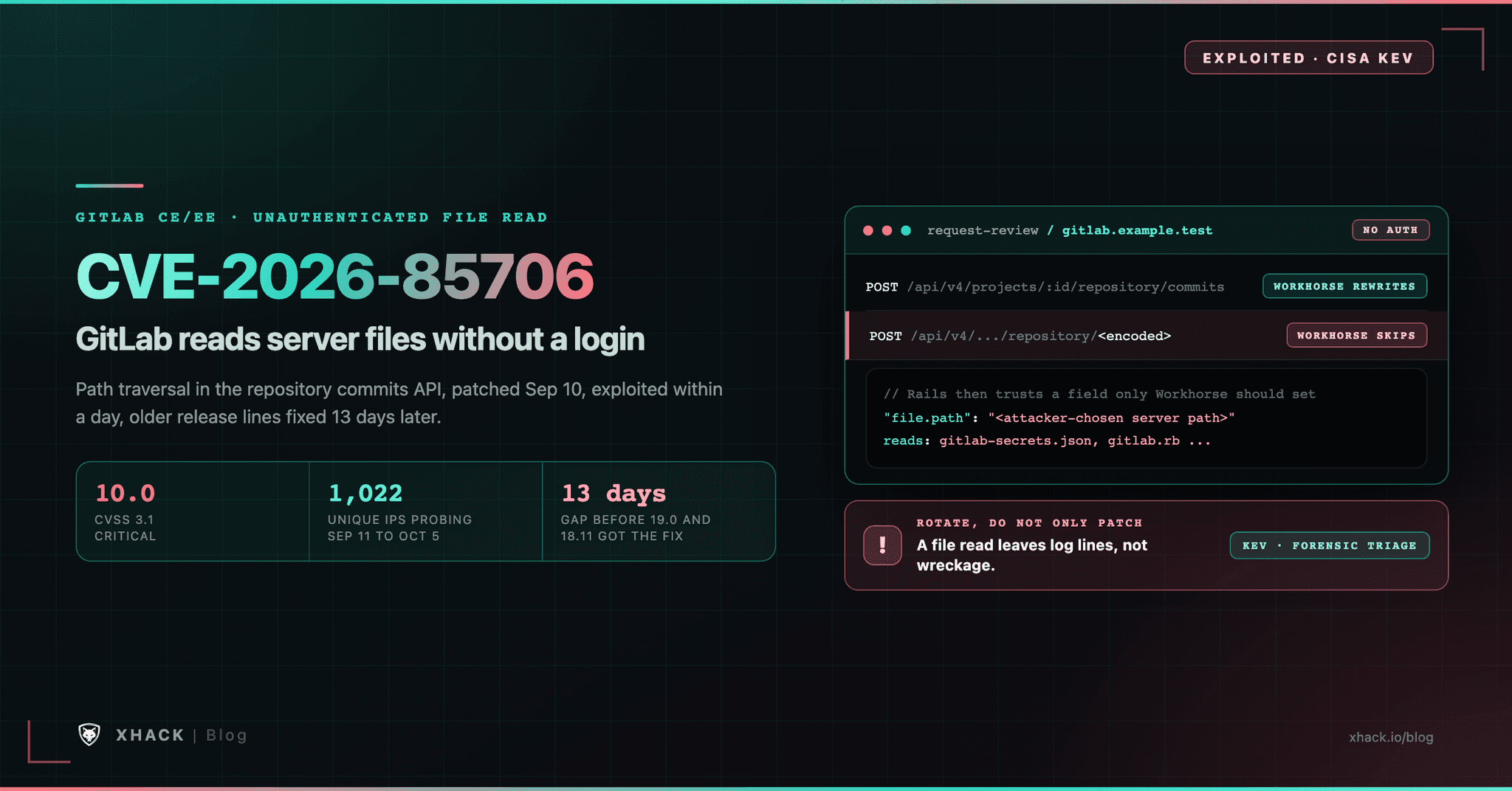
Read this in 30 seconds: CVE-2026-85706 is a CVSS 10.0 flaw in self-managed GitLab that lets an unauthenticated attacker read files from the GitLab server, and CISA lists it as exploited.
- A 10.0 that needs no account. GitLab and NVD score it CVSS 3.1 10.0 with the vector
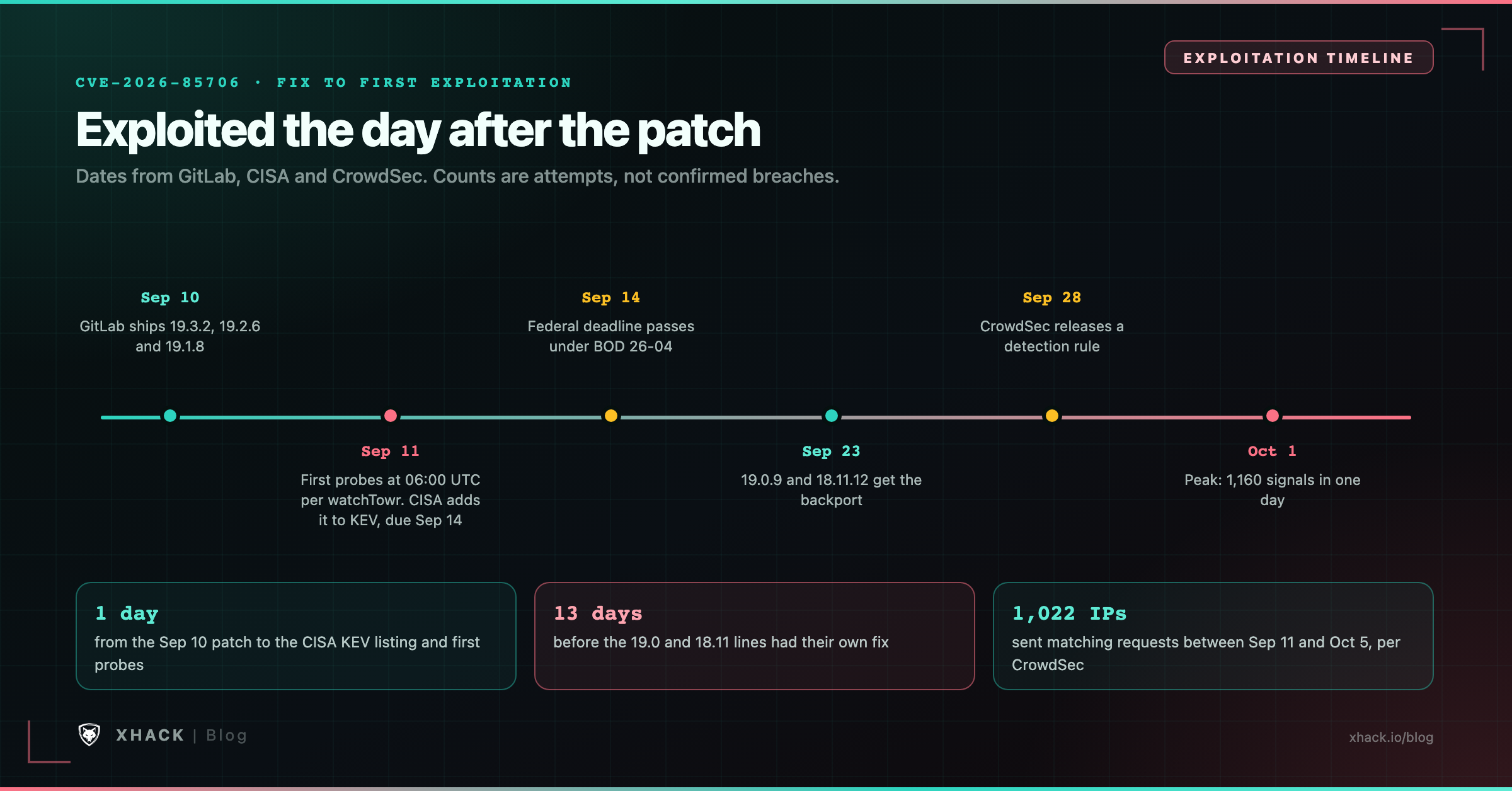
AV:N/AC:L/PR:N/UI:N/S:C/C:H/I:H/A:N. No login, no user interaction, and the files are anything the GitLab process can read.- It was exploited the day after the patch, but older lines waited 13 days. GitLab shipped 19.1.8, 19.2.6 and 19.3.2 on September 10, and CISA added the bug to its KEV catalog on September 11. The fixes for 19.0 and 18.11 only arrived on September 23.
- The root cause is two components disagreeing about one URL. CrowdSec’s analysis says GitLab’s Workhorse proxy matches the raw URL while Rails decodes it first, so one encoded character skips Workhorse and Rails trusts a
file.pathvalue it should never see. GitLab itself says only “under certain conditions.”- Patching does not un-leak secrets. The files in play include
gitlab-secrets.jsonandgitlab.rb, which hold encryption keys and service passwords. Rotate them if your instance was reachable.- Scanning is widespread, but proof of breach is thin. CrowdSec counted 1,022 unique IP addresses sending matching requests between September 11 and October 5. It cannot say which attempts worked.
A flaw in the layer that sits in front of GitLab’s own application turned an ordinary API route into a way for strangers to read the server’s files.
CVE-2026-85706 was fixed on September 10, 2026, and listed as exploited by CISA the next day. Rapid7 notes it is the only bug in that patch release known to be used in attacks, which is why it deserves its own page.
This article covers what CVE-2026-85706 is, the mechanism public researchers describe, which versions are affected and why sources disagree about them, how to check your own logs, and which secrets to rotate.
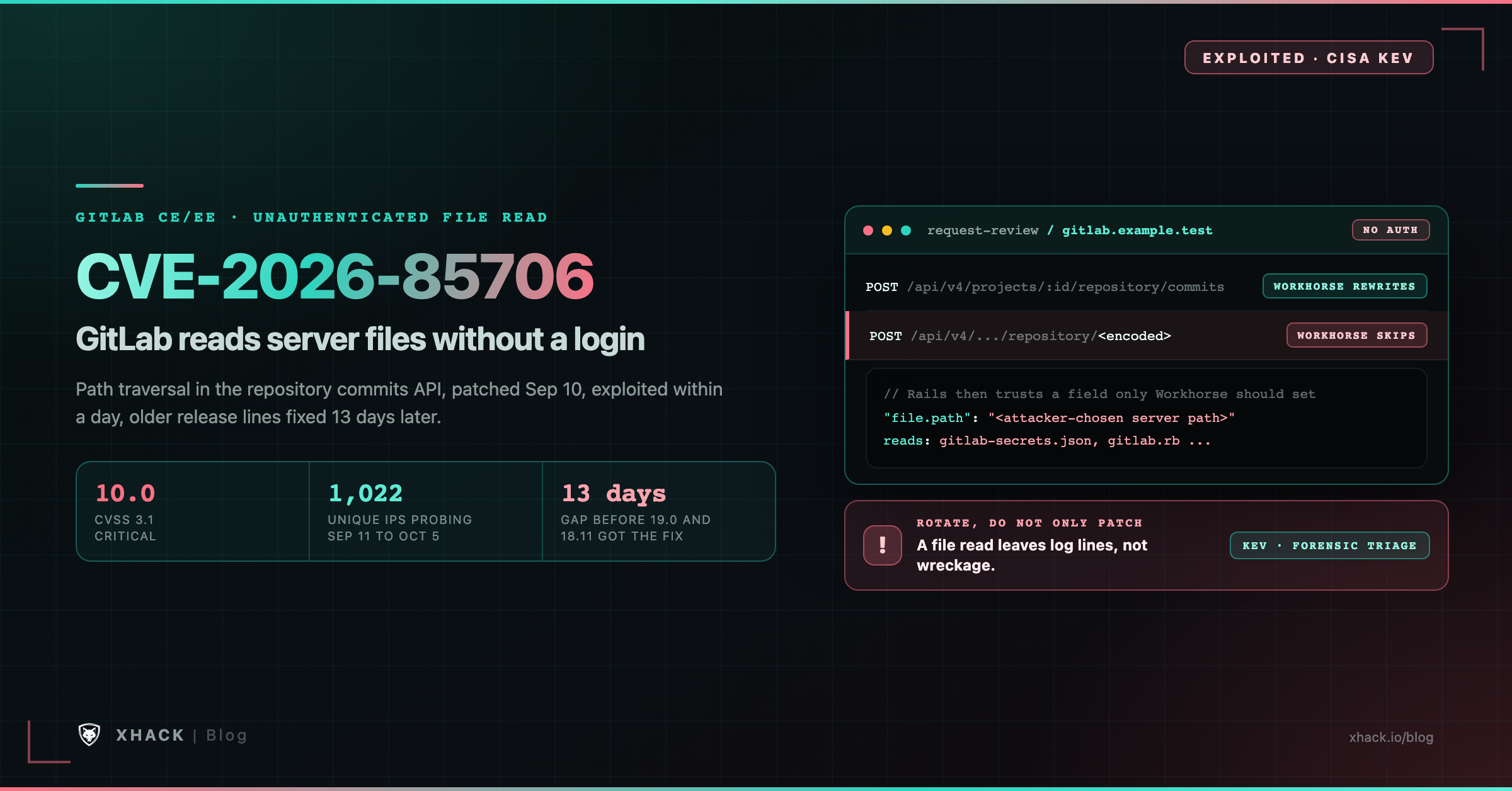
A self-managed GitLab server is not one program. Requests first hit Workhorse, GitLab’s own reverse proxy, which handles heavy work such as file uploads. Workhorse then passes the request to the Rails application, which holds the business logic and the API.
Two components that both interpret the same URL must agree on what it means. When they do not, an attacker can send a request that one component treats as harmless and the other treats as something else. This class of bug is common in layered systems, and it does not need a clever exploit chain, only a gap between two parsers.
CVE-2026-85706 sits in that gap. Per CrowdSec’s analysis, GitLab’s Workhorse component handles uploads and hands a file.path parameter to Rails. The API route involved is part of the repository commits API.
GitLab’s own description in its patch release notes reads: GitLab remediated an issue that, “under certain conditions,” let an unauthenticated user read arbitrary files from the GitLab server, because of improper path confinement and missing authentication enforcement in the repository commits API.
The key facts for CVE-2026-85706:
CVSS:3.1/AV:N/AC:L/PR:N/UI:N/S:C/C:H/I:H/A:N, set by GitLab as the CVE numbering authority. NVD published the record on September 12, 2026.Read the vector carefully. Scope is “changed” (S:C), which means the damage can reach beyond the GitLab application itself. A server that holds keys, tokens and passwords for other systems is a good example, and that is our reading of the score, not a statement from GitLab.
GitLab has not published the technical mechanism of CVE-2026-85706. It says its issue tracker makes security issues public 90 days after the patch release, which for a September 10 release is around December 9. What follows is the public analysis reported by CrowdSec and other researchers, and we label it as such. We are not showing a working request.
The mechanism, as described:
file.path parameter, the attacker’s own value survives.In CrowdSec’s words, Rails “trusted a parameter only Workhorse should ever set, and did not confine it to the repository.” That sentence is the whole bug in one line.
One more precondition appears in public reports. CrowdSec, citing watchTowr, says the attack needs at least one public project on the instance. GitLab does not define its “certain conditions” and Horizon3’s page does not say whether a public project is required, so treat this as reported, not confirmed, and do not rely on it to decide that you are safe.
A public analysis also says the response leaks file bytes only up to the first invalid percent sign, which would limit some files. We have not verified that, and a limit on one route to the data does not make leaked secrets safe.
With CVE-2026-85706, the target is any file the GitLab server process can read. CrowdSec’s report names two that public proof-of-concept tools go after, and explains why they matter.
| File | What it holds | Why it matters |
|---|---|---|
gitlab-secrets.json | Keys used to encrypt CI/CD variables and sign sessions | Stolen keys can decrypt stored variables and help forge session data |
gitlab.rb | Instance configuration | Often holds database, LDAP, SMTP and object-storage passwords |
Beyond those two files, anything readable on the host is in scope, including configuration, SSH keys and credentials the GitLab user can reach. Horizon3’s page says the same in general terms.
The practical point comes straight from CrowdSec: a file read leaves nothing on the server except log lines, and upgrading does not make a stolen key useless. If your instance was reachable and unpatched, patching closes the door but does not return what was already taken.
Yes, by CISA’s listing, but the public evidence is about scanning, not about named victims.
What the sources report:
CrowdSec’s numbers for September 11 to October 5 are 1,022 unique IP addresses and a peak of 94 in one day. Two single addresses, in Lithuania and Latvia, produced about 64% of one week’s signals. Of 959 addresses linked to the bug over 30 days, 648 are AWS servers in Dublin that behave like general scanners, and 114 matched only this CVE.
The report is careful about its limits, and we repeat them. Matching requests are attempts, not successes. Unique IPs are not unique attackers. The counts are a sample from CrowdSec’s own sensors.
Sources do not fully agree on exploitation either. Rapid7 and CISA say it is exploited, while Horizon3’s database page does not state it. CISA’s listing is the strongest source, because KEV requires evidence of exploitation.
GitLab’s advisory, updated on September 23, lists the affected ranges: all versions from 18.7 before 18.11.12, 19.0 before 19.0.9, 19.1 before 19.1.8, 19.2 before 19.2.6 and 19.3 before 19.3.2. NVD’s configuration data matches it.
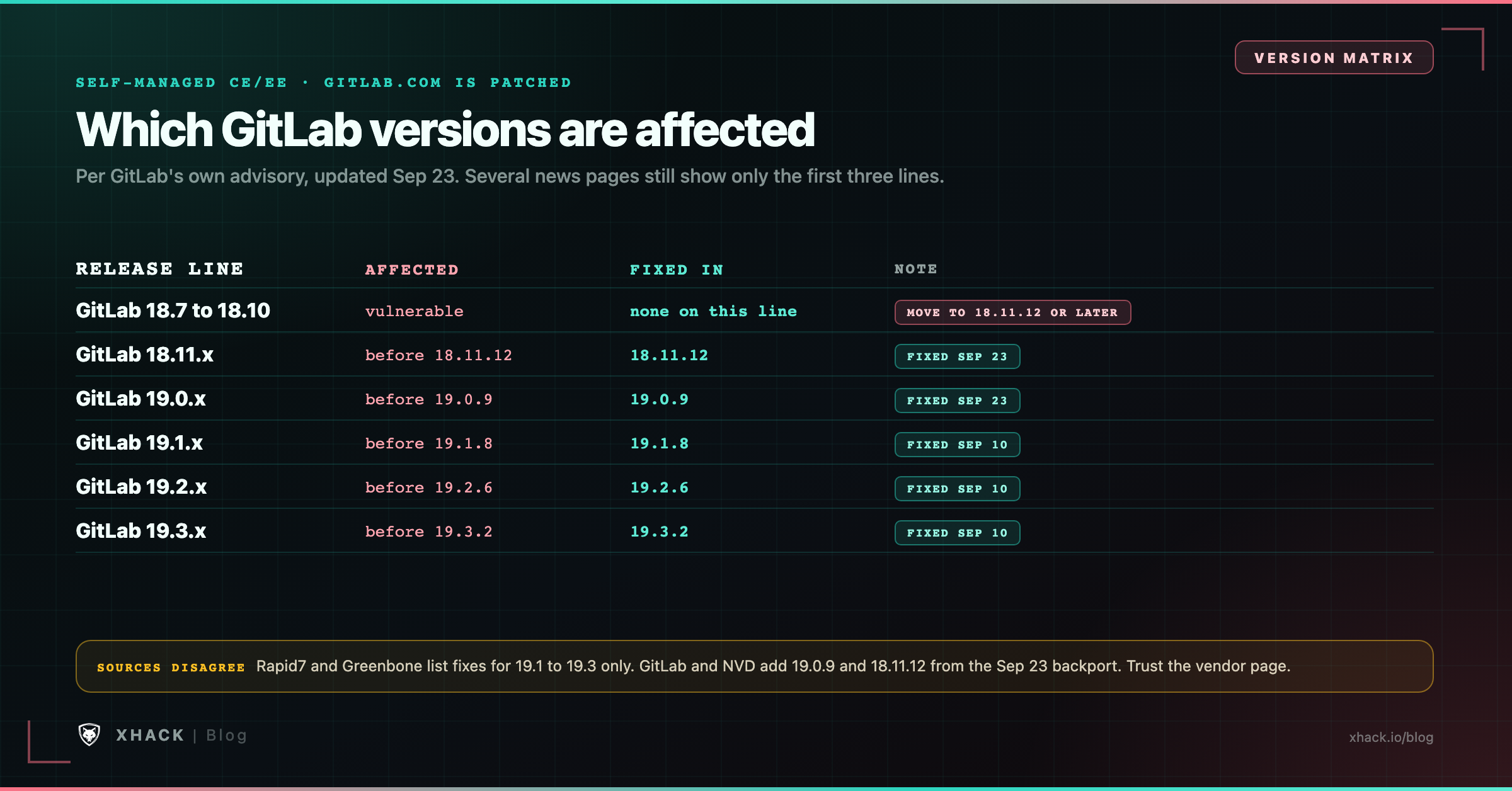
| Source | What it says about fixes |
|---|---|
| GitLab advisory (primary, updated Sep 23) | 19.3.2, 19.2.6, 19.1.8, plus 19.0.9 and 18.11.12 backports |
| NVD (primary for NVD) | Same list, with 18.11.12 and 19.0.9 |
| Rapid7 (secondary, Sep 14) | Lists only 19.1.8, 19.2.6 and 19.3.2 |
| Greenbone and several news pages (secondary) | Say there is no fix for 18.x or 19.0.x |
The secondary sources on CVE-2026-85706 are not wrong about the day they were written. They predate the September 23 backport, and some were never updated. If you run 19.0 or 18.11, the vendor page is the source to follow.
One gap remains. 18.7 through 18.10 are inside the affected range, and GitLab’s notes give no fix on those lines. CrowdSec says the same, so the safe reading is to move to 18.11.12 or later.
You are exposed if all of these are true:
Check your version on a Linux package install:
sudo gitlab-rake gitlab:env:infoYou can also read it from the Admin area. If you cannot say with certainty which version a given server runs, assume it is affected until you have checked.
Work through these steps to close CVE-2026-85706, in order:
The same release also fixes CVE-2026-87719, a CVSS 9.9 deserialization bug in GitLab EE’s GraphQL subscription serializer that needs an authenticated user with Duo Chat access, so upgrading closes more than one critical issue.
For CVE-2026-85706, GitLab has published three threat detections for self-managed customers: “GitLab LFI attempt reading gitlab.yml,” “GitLab LFI via metadata.path parameter” and “GitLab LFI file path attempt.” The names show the parameters defenders are meant to watch.
Preserve first. Copy the nginx and application logs, then search the copies. On a Linux package install, the default web log is /var/log/gitlab/nginx/gitlab_access.log.
The two searches below for CVE-2026-85706 are our suggestions, built from the public analysis. They are not published indicators of compromise:
# Requests to the API with a percent-encoded letter inside a fixed route name
grep -E '/api/v4/[^ ]*/(%[0-9A-Fa-f]{2}(epository|ommits|iles)|repository/%[0-9A-Fa-f]{2}(ommits|iles))' \
  /var/log/gitlab/nginx/gitlab_access.log*

# Requests that carry the upload-style parameters in the query string
grep -E '/api/v4/[^ ]*[?&]file\.(path|size)=' /var/log/gitlab/nginx/gitlab_access.log*
I tested both patterns against sample log lines. They flag the encoded route segments and the parameter, and they leave normal project paths such as group%2Fproject alone.
Read the results with these limits in mind:
Then look for what stolen secrets would allow. Check for sign-ins from unfamiliar addresses, new or changed access tokens, runner registrations you did not make, and CI jobs that ran code you cannot explain. If any of those line up with probing in the logs, treat it as a confirmed incident and escalate before you assume the upgrade closed it.
If an unpatched instance was reachable while CVE-2026-85706 was open, assume a determined attacker could have read configuration and key files. CrowdSec’s guidance, with our additions marked:
gitlab.rb: database, LDAP, SMTP and object storage credentials.gitlab-secrets.json: plan the rotation, because those keys decrypt data in the database. Follow GitLab’s own documentation for the procedure, since the order matters and a wrong step can lock you out.Rotate the credentials for other systems first, because those are the ones an attacker can use without touching GitLab again.
CVE-2026-85706 is not an isolated event. We checked CISA’s KEV catalog data directly. Between August 25 and September 11, 2026, it added seven entries across four developer-infrastructure products:
| Product | KEV entries in that window |
|---|---|
| Gitea | 1 (CVE-2026-60004, August 25) |
| JFrog Artifactory | 4 (August 27, September 2, and two on September 11) |
| Kestra | 1 (CVE-2026-49869, September 2) |
| GitLab | 1 (CVE-2026-85706, September 11) |
GitLab itself now has five KEV entries in total, and three of them were added in 2026: February 3, February 18 and September 11. Our write-up of the JFrog Artifactory authentication bypass covers another one from this group, and our look at the August 2026 KEV additions shows the wider pattern.
The reason these tools, and CVE-2026-85706 with them, are attractive is plain. A code host or an artifact repository holds source code, tokens and deployment credentials in one place. Compromising it is often cheaper than attacking the systems it connects to.
The lesson in CVE-2026-85706 is not the specific encoding trick. It is that two layers of the same product interpret a request differently, and nobody tested the space between them.
That is where testing time pays off. Proxy and application parsing differences, encoding handling and authentication that only exists in one layer are all things a human tester checks by hand, and an automated scanner that only follows documented routes often misses. Our AI VAPT services combine automated and human-led testing against exposed applications, including the unauthenticated surface where bugs like this live.
A pentest report documents what was tested and what was found. It does not certify that a product is free of a given bug, and it does not replace patching. If you use XHack AI on your own systems, treat each finding as a lead to verify, because an automated tool can be wrong in either direction. For background on how AI changes that work, see our guide to AI penetration testing.
CVE-2026-85706 is a CVSS 10.0 path traversal flaw in self-managed GitLab CE and EE. GitLab says that, under certain conditions, an unauthenticated user could read arbitrary files from the server because of improper path confinement and missing authentication enforcement in the repository commits API.
Yes. CISA added it to the Known Exploited Vulnerabilities catalog on September 11, 2026, with a due date of September 14 and a forensic-triage flag. CrowdSec counted 1,022 unique IP addresses sending matching requests between September 11 and October 5, but it cannot confirm which attempts succeeded.
Per GitLab’s advisory, all versions from 18.7 before 18.11.12, 19.0 before 19.0.9, 19.1 before 19.1.8, 19.2 before 19.2.6 and 19.3 before 19.3.2. GitLab.com and GitLab Dedicated were already patched.
Upgrade to 19.3.2, 19.2.6, 19.1.8, 19.0.9 or 18.11.12, or a newer release. On 18.7 to 18.10, move to 18.11.12 or later. GitLab says nothing replaces patching, and an upgrade does not undo a file that was already read.
It removes the vulnerable code, but not the consequences of an earlier read. If your instance was reachable while unpatched, rotate the secrets it stored, including database, LDAP and SMTP passwords, runner tokens and CI/CD credentials, and plan the rotation of the keys in gitlab-secrets.json.
Preserve your logs first, then search the nginx access log for percent-encoded route names under /api/v4/ and for file.path or file.size parameters. Those searches are our suggestions, not official indicators, and a clean result does not prove the instance is clean.
CVE-2026-85706 is a login-free file read on a server that keeps keys and passwords, patched on September 10 and exploited by September 11. The fix for GitLab 19.0 and 18.11 took until September 23, and many news pages still show only the first three versions.
Check your version today, upgrade to a fixed release, and preserve your logs before you do. Then rotate the secrets that a reachable, unpatched instance could have exposed, because the patch cannot take back what an attacker already read.
Categories
Related articles