Table of contents
21
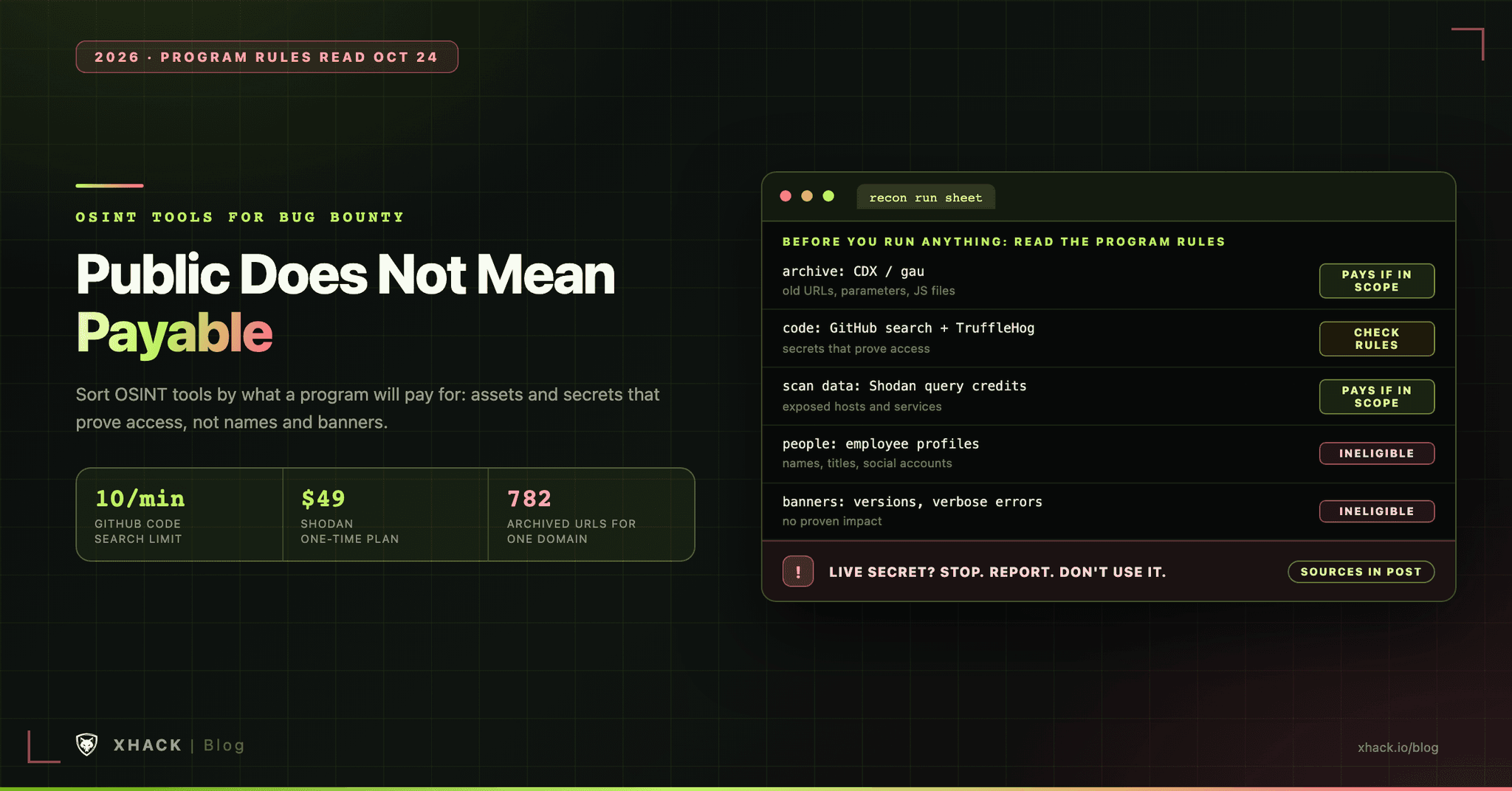
Read this in 30 seconds: OSINT tools are usually ranked by how many sources they query. For bug bounty, the better question is which findings a program will actually pay for, because OSINT tools surface a lot that programs refuse to reward.
- Programs write “no” into their own rules. HackerOne’s own program lists employee profile scraping as ineligible, and Intigriti’s own program puts “API key disclosure without proven business impact” out of scope.
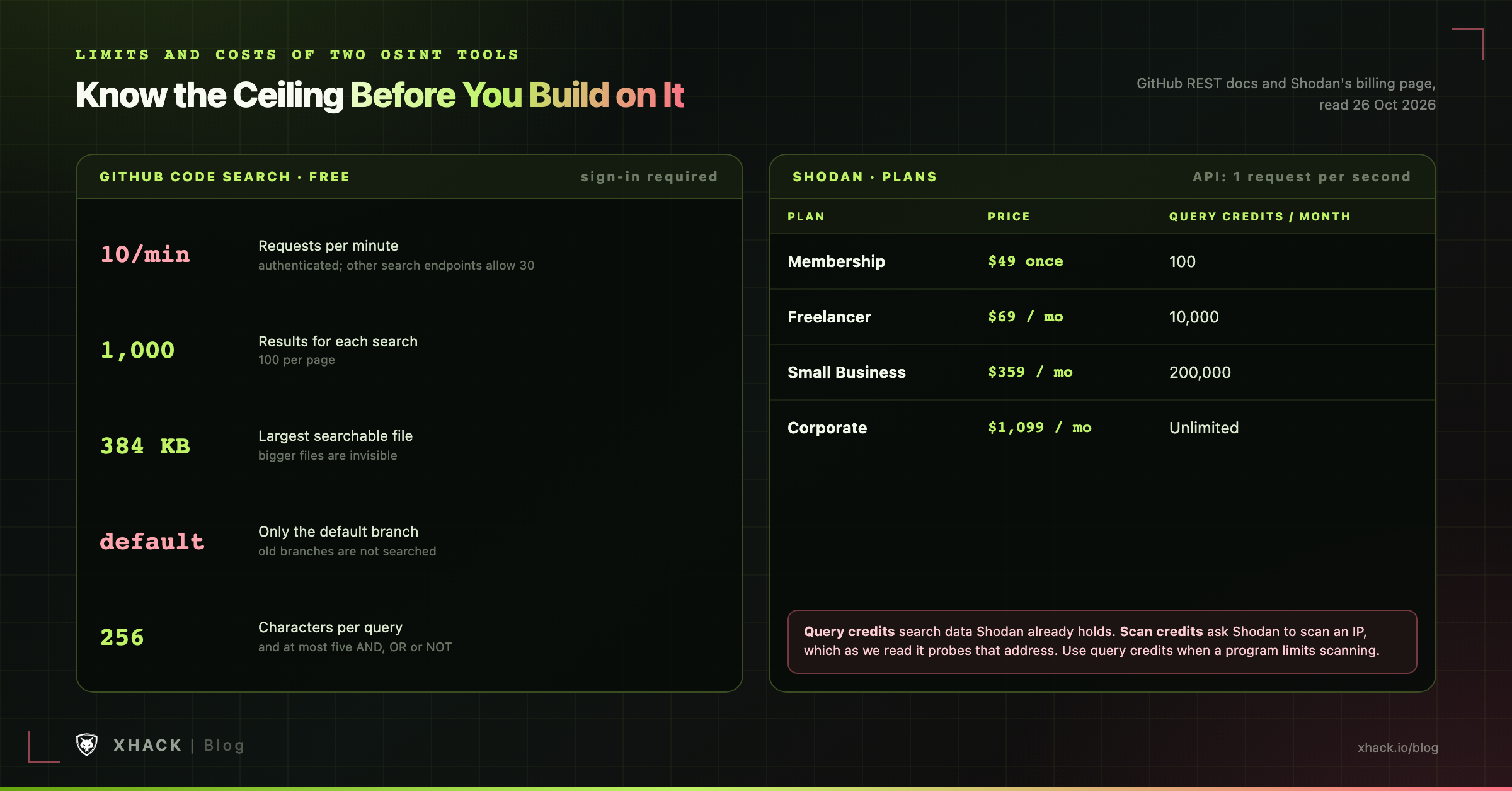
- The best free source has real limits. GitHub code search needs a sign-in, allows 10 requests a minute, returns at most 1,000 results per search and only reads default branches.
- Verifying a secret is where the legal risk starts. TruffleHog can check whether a key is live, but HackerOne’s guidance, as Truffle Security quotes it, says not to test validity beyond authenticating and to deauthenticate immediately.
- Paid scan data is cheap to try. Shodan’s $49 one-time membership gives 100 query credits a month, and the next tier is $69 a month for 10,000.
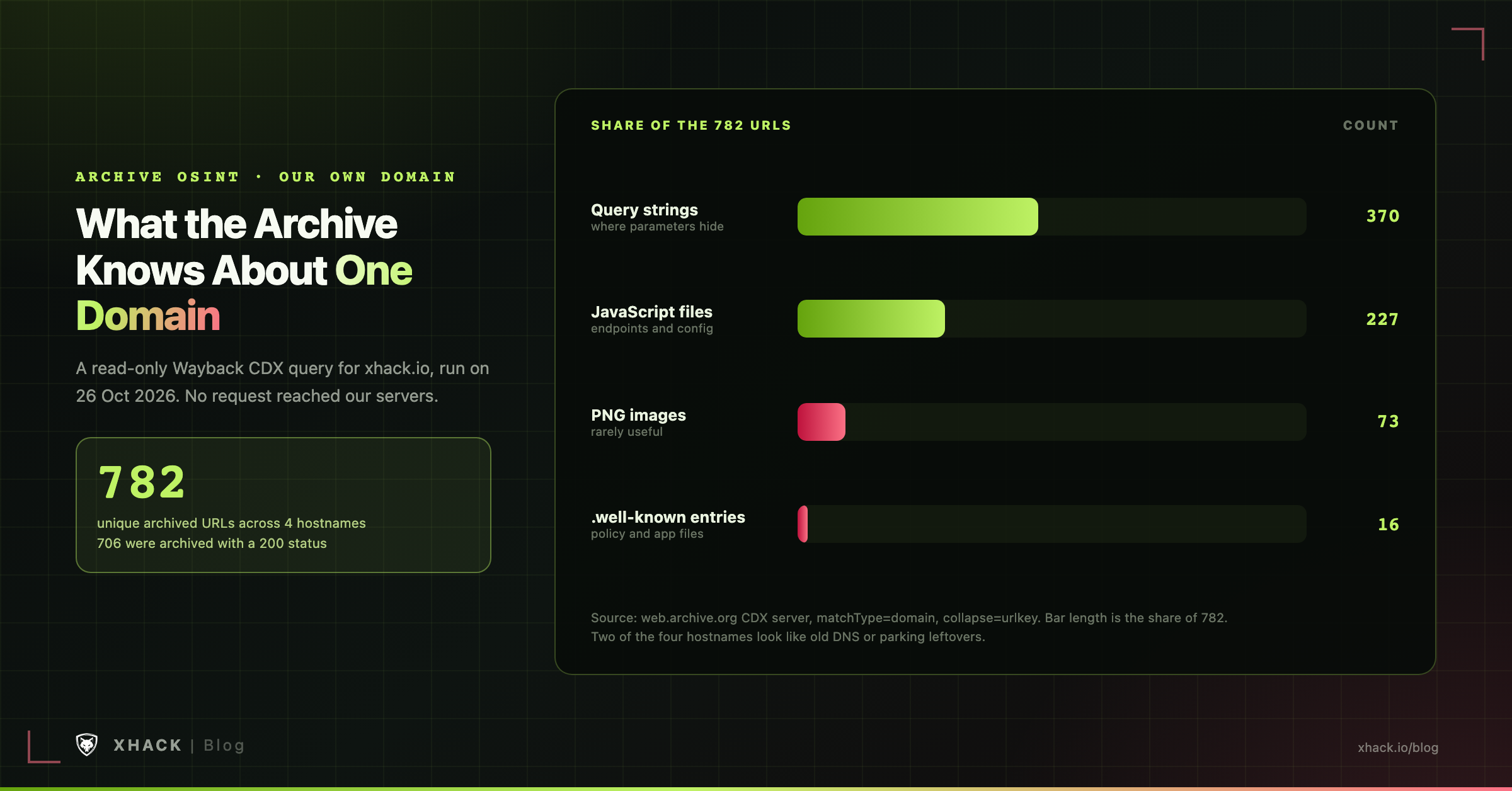
- Archives show a lot without touching the target. For our own domain, the Wayback Machine holds 782 archived URLs across 4 hostnames, 370 of them with query strings and 227 of them JavaScript files.
OSINT tools that find ten thousand things are worth less than the one tool that finds the single thing your program’s rules say it will pay for.
OSINT, short for open-source intelligence, means collecting information about a target from public sources, ideally without sending it any traffic. OSINT tools are free or cheap and the lists of them are endless. This article sorts OSINT tools by the layer of information they reach, then attaches the rules and the costs, so you can build a stack that earns something.
Public information is not the same as reportable information, and OSINT tools cannot tell the difference. Programs decide what they pay for, and several state it plainly.
We read the live program pages for HackerOne and Intigriti on October 24, 2026. Three entries matter for anyone running OSINT tools:
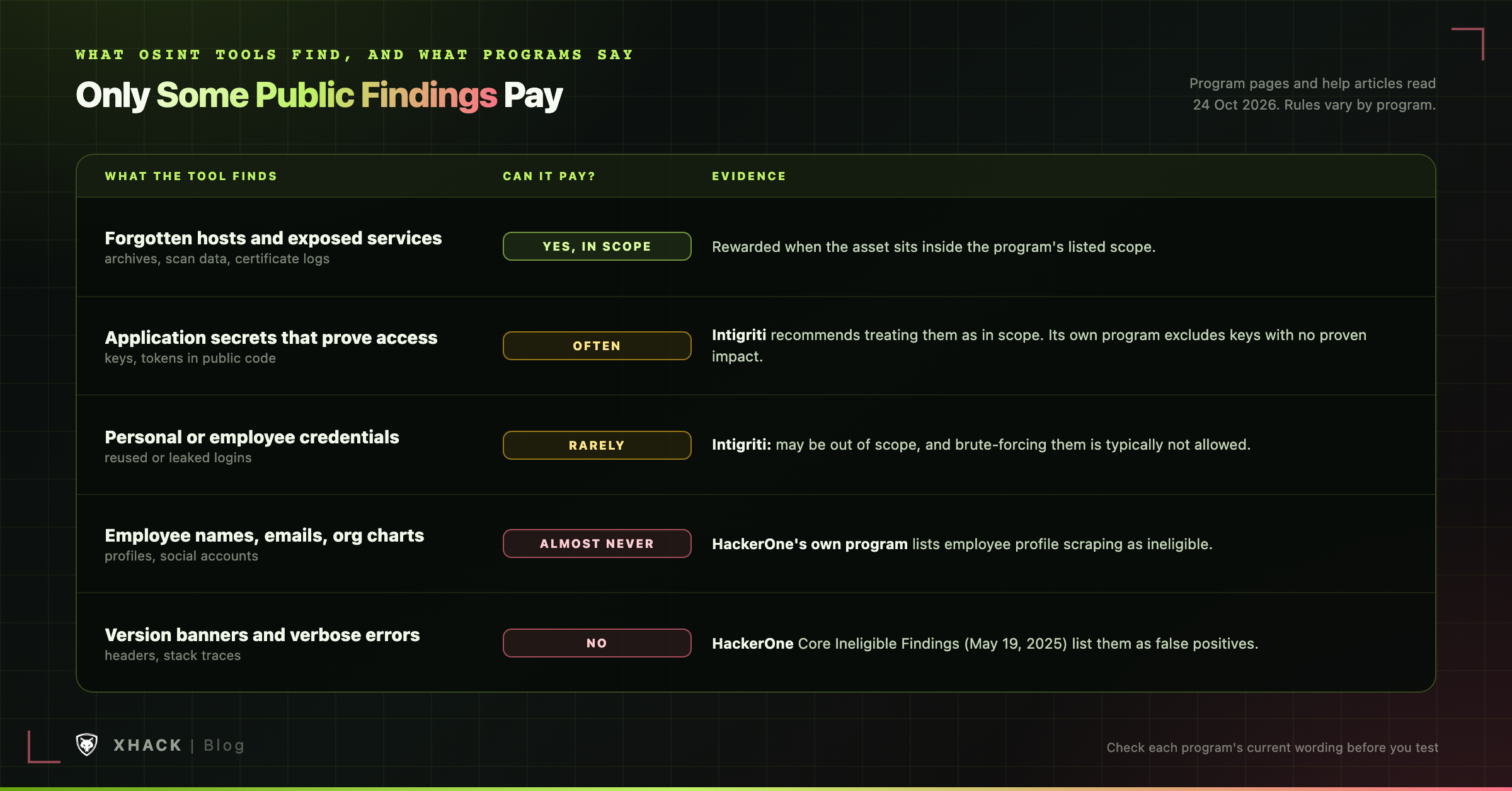
The pattern holds for every layer of OSINT tools below. Information about assets and exposed secrets that prove access can pay. Information about people almost never does, and a naked key with no demonstrated impact often earns a closed report.
| What OSINT tools find | Can it pay? | What the programs say |
|---|---|---|
| Forgotten hosts and exposed services | Yes, if in scope | Rewarded when the asset is inside the program’s scope |
| Application secrets that prove access | Often | Intigriti recommends treating application secrets as in scope |
| Personal or employee credentials | Rarely | Intigriti says they may be out of scope, and brute-forcing them is typically not allowed |
| Employee names, emails, org charts | Almost never | HackerOne lists profile scraping as ineligible |
| Version banners and verbose errors | No | HackerOne’s Core Ineligible Findings list them |
Our guide to choosing a bug bounty program covers where to find each program’s rules. Read the credentials and out-of-scope sections before you run anything below.
Among OSINT tools, code and secret scanners have the highest ceiling and the sharpest edges. A key committed to a public repository can be worth far more than a hundred forgotten hosts, and it is also where hunters most often cross a line.
GitHub’s REST search documentation gives the numbers:
AND, OR or NOT operators.So a broad search against a large company tells you where to look, not everything that exists. Narrow by organization and by file type, and expect old branches and large files to be invisible.
Both tools scan repositories for secrets. They differ in what happens next.
TruffleHog is AGPL-3.0 licensed, and its latest release was v3.99.7 on October 24, 2026. Its README shows a scan of a whole GitHub organization with trufflehog github --org=<name> --results=verified, and the tool covers sources beyond git, including S3 buckets and the filesystem. Truffle Security says it verifies a key by making one non-state-changing request and never shows sensitive data.
Gitleaks is MIT licensed, with v8.30.1 released in March 2026. Its README describes it as a tool for detecting secrets with configurable regex rules, and it does not describe checking whether a key is live.
That difference matters for your workflow. A detection tool gives you candidates to review. A verification tool tells you which are live, and “live” is exactly the state that triggers the rules in the next section.
This is the part most OSINT tool lists skip. The sources we found agree on the shape of the rules and disagree on the details:
We could not find HackerOne’s own documentation page for this rule, so confirm the current wording on the program page before you test anything. The safe default is the Intigriti and HackerOne common ground: report the exposure, show the minimum proof the program allows, and do not use the credential to look around.
Never buy credentials from a marketplace to prove a leak. Intigriti’s article says buying that data may indirectly fund criminals, and Truffle Security calls it widely seen as unacceptable.
Among OSINT tools, the Wayback Machine is the quietest: it has seen your target’s old pages, parameters and JavaScript files, and querying it sends nothing to the target. The CDX server documentation describes the useful parameters: matchType=domain covers a host and its subdomains, collapse=urlkey removes duplicate lines, and output=json returns a clean array.
The documentation lists no rate limit, but it flags expensive queries: negative limits, offset, and collapse=urlkey with prefix matching.
gau, MIT licensed with v2.2.4 as its latest release, wraps four providers: the Wayback Machine, Common Crawl, AlienVault OTX and URLScan. Its --providers flag lets you pick which ones to ask.
We ran a read-only CDX query for our own domain, xhack.io, on October 26, 2026. The count comes straight from the response:
.well-known entries.The other two hostnames, a “ww12” name and a doubled “www”, look like leftovers from old DNS or parking pages. None of this needed a single request to our servers.
Past this point, our subdomain enumeration guide covers how to turn host names into a tested list, and the recon automation guide covers running these steps at the program’s rate limit.
Shodan and similar OSINT tools scan the whole internet and let you query the results. The scans were done by someone else, which is why searching them counts as passive.
Shodan’s billing page lists these plans as of October 26, 2026:
| Plan | Price | Query credits per month | Notes |
|---|---|---|---|
| Membership | $49 one-time | 100 | 20 search pages, all filters except vulnerability and tag |
| Freelancer | $69 per month | 10,000 | 5,120 scan credits |
| Small Business | $359 per month | 200,000 | Adds the vulnerability filter |
All API plans share a limit of 1 request per second, and Shodan’s FAQ says every account includes a free API plan, though the billing page does not list its limits.
One line in Shodan’s own FAQ changes how you should read the credits. Query credits search data Shodan already has. Scan credits spend one credit per IP you ask Shodan to scan, which as we read it means Shodan probes that address for you. If a program forbids scanning or limits request rates, spend query credits only.
theHarvester, GPL-2.0 with 4.11.1 as its latest release, pulls subdomains, emails and IPs from many sources at once. Its README marks which sources need an API key: certificate search sources such as crtsh need none, while censys, github-code, hunter and securityTrails require one. The README also notes that “passive” means the target is not contacted, but the providers you choose still see the target name you query.
Employee names, job titles and social profiles make good material for phishing and a bad material for bounty reports. HackerOne’s own program lists employee profile scraping as ineligible, and its Core Ineligible Findings list social engineering as ineligible unless a program authorizes it.
Job postings are the usual exception, in our view, because they are the company’s own public statement. A listing that names an internal tool or a cloud provider tells you something about the stack without touching a person. Use it for context, and stop before you profile individuals.
| Layer | Tool | Cost | Main limit | License |
|---|---|---|---|---|
| Code search | GitHub code search | Free | 10 requests per minute, 1,000 results | n/a |
| Secrets | TruffleHog | Free | Verification can cross program rules | AGPL-3.0 |
| Secrets | Gitleaks | Free | Detects patterns, no liveness check described | MIT |
| Archives | Wayback CDX API | Free | Expensive queries flagged, no limit documented | n/a |
| Archives | gau | Free | Depends on four providers | MIT |
| Scan data | Shodan Membership | $49 once | 100 query credits per month | n/a |
| Multi-source | theHarvester | Free | Several sources need API keys | GPL-2.0 |
A solo hunter can run every row for $49 total.
Our toolkit on a budget prices the surrounding stack, from a $4 server to password storage.
Run your OSINT tools in this order once per program, before any active testing:
Our bug bounty methodology places this pass inside the full recon-to-report workflow.
When a finding is real, how you write the report decides whether it is paid.
Short warning before the pitch: we build an AI agent that does recon, so discount this section.
XHack AI is not an OSINT platform and does not replace the OSINT tools above. It does not choose a program for you, read its rules for you or submit reports. What it adds is a way to run these steps with your instructions: the Starter plan lists internet search among its features, and you can give the agent a program’s scope and request limits. It runs up to 12 sub-agents in parallel by default.
Our terms say AI output may be incomplete or wrong, so you still verify every finding yourself before it goes in a report. XHack does not store your agent chats and cannot access them, which matters when the chat contains an unreported finding. Our guide to the XHack AI agent for bug bounty goes into the detail.
Individual plans are $20 Starter, $49 Professional and $150 Elite per month. Every plan starts with a 7-day free trial: full access for a week, one per customer, and nothing to cancel when it ends.
There is no single best set of OSINT tools, but a budget stack covers four layers: GitHub code search and TruffleHog or Gitleaks for code and secrets, the Wayback CDX API and gau for archived URLs, Shodan query credits for internet scan data, and theHarvester to combine sources. Together they cost $49.
Passive collection from public sources is generally low risk, but legality depends on what you do next. Stay inside the program’s scope, avoid social engineering and employee profiling, and do not use credentials you find beyond what the program permits. Read the rules before you run anything.
Sometimes. Intigriti recommends treating application secrets as in scope and says personal or employee credentials may be out of scope, and its own program excludes API keys with no proven business impact. HackerOne’s guidance, as Truffle Security quotes it, says not to test validity beyond authenticating.
Not without checking the program’s rules first. TruffleHog can verify a key with one non-state-changing request, but HackerOne’s guidance says to deauthenticate immediately without using functionality, and the Uber case shows what happens when access goes further. When in doubt, report the exposure and stop.
Most OSINT tools here are free. GitHub code search, TruffleHog, Gitleaks, the Wayback CDX API, gau and theHarvester are free, though some of theHarvester’s sources need API keys. Shodan includes a free API plan, and its $49 one-time membership adds 100 query credits a month.
Ten minutes is enough for a first pass: rules, archive URLs, the target’s GitHub organization, a secret scan in detection mode, and a Shodan lookup. Anything longer should produce a specific lead, not a bigger list.
The best OSINT tools for bug bounty are the ones whose output a program will pay for: forgotten assets, archived endpoints and exposed secrets that prove access. Everything about people is noise at best and a policy violation at worst.
Read the program’s rules first, run the cheap layers in order, and stop the moment you find a live secret. For the surrounding workflow, our AI for bug bounty guide covers where an agent helps once the recon is done.
Categories
Related articles