Table of contents
19
By Salman Khan, OSCP+, Founder of XHack, SRT (Synack Red Team member)
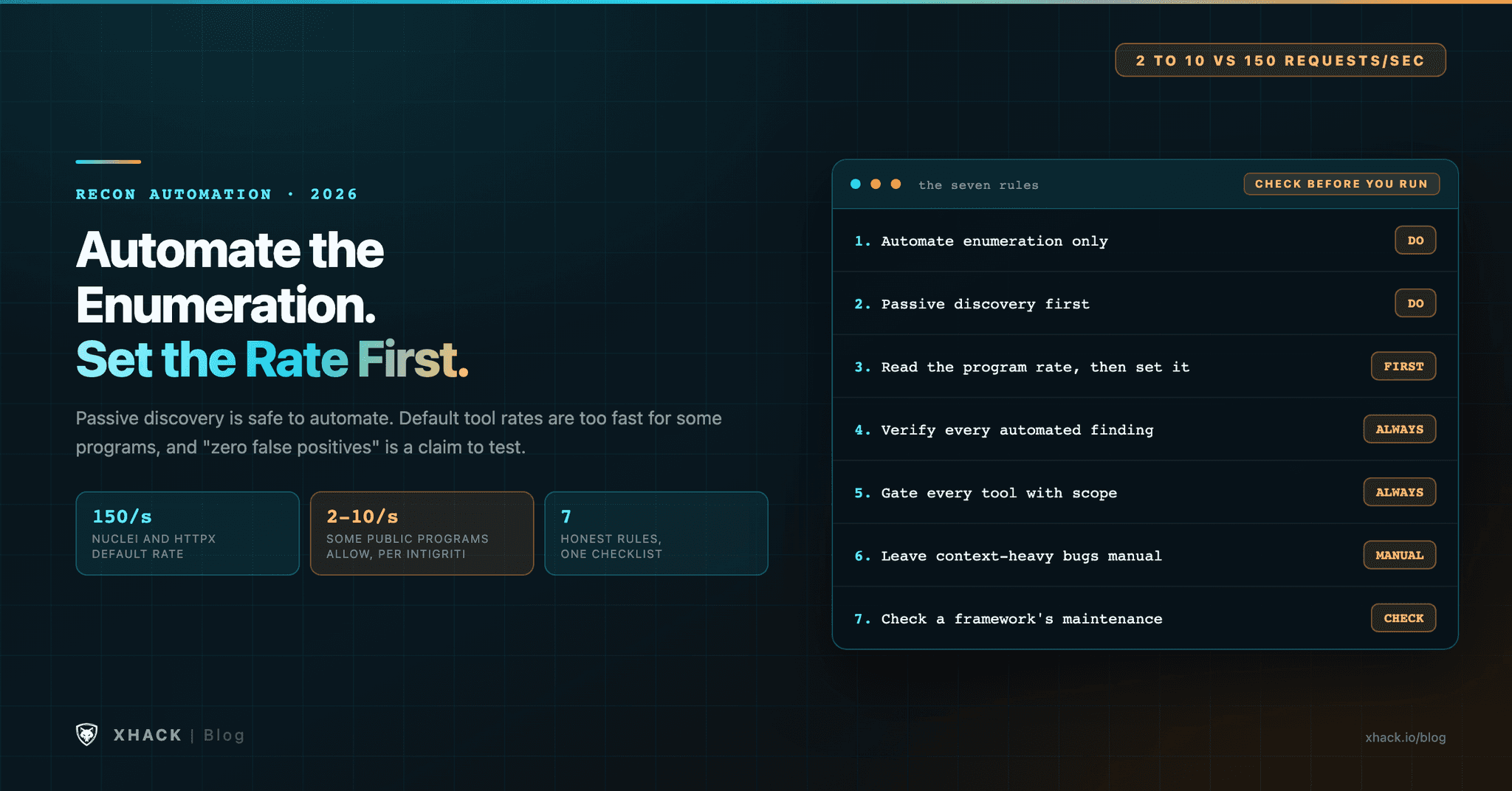
Read this in 30 seconds: Automate the enumeration you would otherwise repeat by hand, and keep the judgment for yourself. Default settings in popular recon tools run far faster than many bounty programs allow, so the first thing to automate is your own rate limit.
- Passive subdomain discovery is safe to automate. Tools such as subfinder query public sources and don’t touch the target directly.
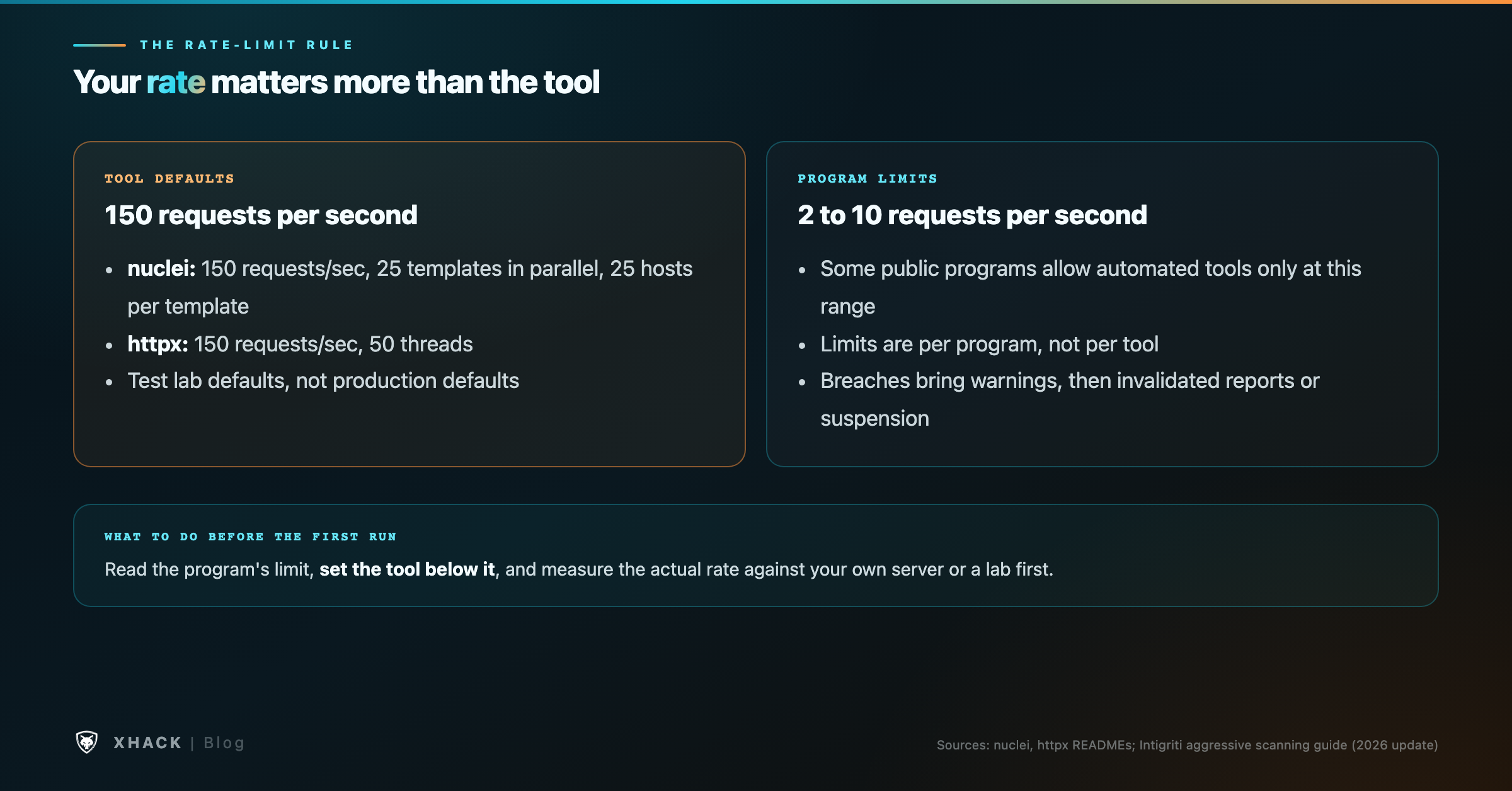
- Default request rates are too high for some programs. nuclei and httpx both default to 150 requests per second. Intigriti says some public programs allow automated tools only at 2 to 10.
- “Zero false positives” is a vendor claim. The nuclei page makes it, and we could not verify it. Every automated finding still needs a manual check.
- Automated findings are cheap to produce and expensive to triage. Keep the number of tools small enough that you can check what they report.
- Recon is not the bounty. The valuable finding usually needs context that no scanner has, so use automation to find where to look, then spend your hours there.
Most recon automation fails for the same reason: it makes the first hour faster and the next ten hours harder.
Recon is the most automated part of bug bounty hunting, and the most crowded with advice about recon tools. Search for “subdomain tools” and you find dozens of lists naming the same eight or ten utilities. Few of those lists explain which tool to run first, what settings to use, or where automation makes a hunter worse. This article is about the second and third questions.
We build XHack AI, which includes recon phases in its agent. We are not neutral on tooling, so every claim below comes either from the tool’s own documentation, from a platform’s published guidance, or from our own reading, which we label.
Enumeration is a list-building job. You want every hostname, address and endpoint that might belong to the target, and a machine is better at that than you are. Judgment is different. Deciding whether a login page is a real attack surface, or whether an endpoint’s behavior is intended, is work for a person who has read the program’s scope and understands the application.
Keep the boundary explicit. Let tools produce lists. Write the decisions yourself, in a notes file that records why each item was kept or dropped.
Passive recon means asking public sources about a domain rather than sending requests to the target. The most common example is subfinder, a passive subdomain tool. Its README describes “curated” passive sources, says the tool is built to respect the licenses and usage restrictions of those sources, and says many of them need API keys. Its latest release, v2.17.0, was published on October 8, 2026.
Amass takes a broader approach. Its GitHub page describes “in-depth attack surface mapping and asset discovery,” using open-source information gathering and active techniques. It is Apache-2.0 licensed, and it does more work per run, which means more requests and more time. Use it when you need depth, and check first whether the program allows active discovery.
Certificate transparency logs are a useful passive source, and crt.sh is the usual interface. Our own observation, not from any source: a subdomain that never received a certificate will not appear there, so a clean crt.sh list does not prove a short attack surface.
This is the rule most likely to get you removed from a program, and it is the one most often ignored.
nuclei’s README gives a default rate limit of 150 requests per second, with 25 templates running in parallel and 25 hosts per template. httpx also defaults to 150 requests per second, with 50 threads. Those defaults suit a test lab. Many production targets will not.
Intigriti’s own guidance on aggressive scanning says some public programs allow automated tools at only 2 to 10 requests per second, depending on the program. It also says that hunters who exceed a program’s limits first get a warning from community support, and that repeated violations can mean invalidated reports, removal from the program, or suspension from the platform. Intigriti’s community code of conduct says automated testing that degrades service violates program rules.
The practical version is short. Read the program’s rate limit before you run a tool. Set the tool’s rate option to a value below that limit. httpx offers a per-second limit (-rl), a per-minute limit (-rlm) and a delay between requests (-delay). nuclei offers -rl and a per-host option. Measure what you actually send. Intigriti’s guidance is to test a configuration against your own server or a lab before you point it at a live program.
Note that rate limits apply per program, not per tool. Running five tools at 5 requests per second each is 25 requests per second in total, so the limit has to cover the whole pipeline.
nuclei’s project page claims that templates reduce false positives by simulating real-world steps, and it also says “zero false positives.” The same page sells a paid cloud service and claims “50x faster scans.” We could not verify either claim, and the page does not say how it measured them.
The honest reading is that templates can be precise when they match a specific, well-written check, and imprecise when they match a loose pattern. Whether a template is good depends on the template, so check the template before you trust its result. Every finding still needs a manual check: reproduce the request, confirm the response, and confirm that the behavior is a vulnerability in this program’s scope.
httpx has a similar pattern. Its page says it is “designed to maintain result reliability” with more threads, and it offers filters for duplicate, error and login pages. Filters reduce noise. They do not tell you a finding is real.
Scope is the list of assets the program lets you test, and every recon run should start from it. The program writes the list, not you. Automation makes it easy to test things outside scope by accident, because a wildcard entry such as *.example.com can pull in hosts the program never meant to cover, and an automated pipeline will happily send requests to all of them.
Keep the scope in a file. Run every tool against a list that has been filtered through that file. If a host is not in the scope file, it is not in the pipeline. Read the program’s rules of engagement too, because they may restrict which authentication states or techniques are allowed, not only which hosts.
Some bugs are obvious to a scanner and some are not. A scanner can find a missing security header or a known default credential. It is much less useful for a broken authorization check, where the bug is that user A can read user B’s object, because the tool does not know which objects belong to whom. That needs an account pair and a manual comparison.
Business-logic flaws are harder still. A tool cannot know that a discount should not stack, that a refund should not be issued twice, or that a workflow should not skip a step. Those findings come from reading the application carefully and asking what it was meant to do.
Use automation to find where to look, then spend your time where context matters.
Frameworks that bundle many tools look attractive, and their maintenance state matters. reNgine, for example, is a web-application recon framework with a web interface, and its repository was pushed to in October 2026. Its last tagged release, v2.2.0, was published in September 2024. Two years between releases is not automatically a problem, but it is a reason to check open issues and dependency updates before you rely on a framework for a live engagement.
ReconFTW is another bundled option. Its repository was pushed to in September 2026, and its latest release, v4.1, was published in March 2026. Bundles save setup time, but they also run more tools with more default settings, so check the rate options for every component.
Attack surface mapping is a useful name for a simple part of recon: list every host, port and application that belongs to the target, and mark which ones are reachable. Subfinder and amass handle the names. httpx handles which ones answer, and what they say about themselves through status codes, titles, technology fingerprints and TLS certificates.
The mapping step is worth doing carefully, because every later step depends on it. A host you miss is a host you never test. A host you add by mistake is a host outside scope. Review the output list by hand before you start scanning, and remove anything you cannot tie to the target.
AI in recon mostly helps in two places: sorting a long list of hosts by likely interest, and summarizing what a tool produced. Both save time when the list is long.
The risk is volume. Our earlier analysis of AI-assisted reporting, in does AI actually help you win bug bounties, reported that platform hackbots had produced more than 560 valid submissions, and that 78% of them were cross-site scripting. That is one platform’s reporting, and our reading of it, so treat it as a pattern to check rather than a rule.
The same logic applies to recon. An AI that produces 500 candidate findings is not twice as useful as one that produces 250. It is twice as much triage, and triage is where hunters lose their hours. Ask any AI-assisted recon tool how many of its findings were verified by hand, and how many were rejected, before you trust its volume.
Here is a sketch of a pipeline built on the tools above. Replace example.com with a domain you are authorized to test, and check each tool’s help output for your installed version, because flags change between releases.
# 1. Passive subdomains from public sources, silent output to a file
subfinder -d example.com -silent -o subs.txt

# 2. Keep only hosts in scope (scope.txt is your own list, one host per line)
grep -Ff scope.txt subs.txt > in-scope.txt

# 3. Probe the list at a rate the program allows (here, 5 requests per second)
httpx -l in-scope.txt -silent -rl 5 -sc -title -td -o alive.txt

# 4. Scan only the live hosts, at the same rate, medium and high severity only
nuclei -l alive.txt -rl 5 -severity medium,high -o nuclei-findings.txt
Step 4 is where most hunters get in trouble. Read the template and the response for every finding before you report it. Keep the output in your notes, with the reason you believe each finding is real.
We build XHack AI, so here is exactly what the product does in recon, and what it does not.
It does not decide what is in scope, and it does not replace rule 3. Set the rate, and keep the scope file, whichever tool you use. Individual plans start at $20 a month, with a 7-day free trial and no credit card.
There is no single best tool. Subfinder is a common choice for passive subdomains, httpx for probing, and nuclei for template scanning, but the right combination depends on the program’s rules. Start with the smallest set you can explain.
Not without checking each one. Rate limits, automated-testing rules and scope vary by program. Some programs ban automated scanning outright, and others set a low request limit. Read the policy before you run anything.
Passive enumeration uses public sources and does not contact the target directly. Active enumeration sends requests to the target, so check the program’s rules before you run it. Authorization and scope are the deciding factors, not the tool.
Because a fast scan can degrade a service, and programs treat service degradation as a rule violation even when nothing was exploited. Intigriti’s guidance describes warnings, invalidated reports and suspension as possible outcomes.
No. Treat it as a claim to test. Check a sample of the tool’s findings by hand before you rely on its output.
It can help with sorting and summarizing. It does not replace verification, and its output volume is the thing to watch.
Recon automation is worth doing for enumeration and probing, which is most of your recon. It becomes a liability when it runs faster than a program allows, when its findings are not checked, or when it replaces the judgment that actually finds bugs.
Set your rate first, keep your scope file, verify every finding, and spend your hours where the context is.
Categories
Related articles