Table of contents
20
By Salman Khan, OSCP+, Founder of XHack, SRT (Synack Red Team member)
Read this in 30 seconds: JavaScript secrets are credentials and internal routes that ship to every visitor’s browser, and most hunts miss them because they only read the first script on the page. This guide shows where they hide, how XHack’s JS Hunter finds them, and how to tell a real leak from a key that is meant to be public.
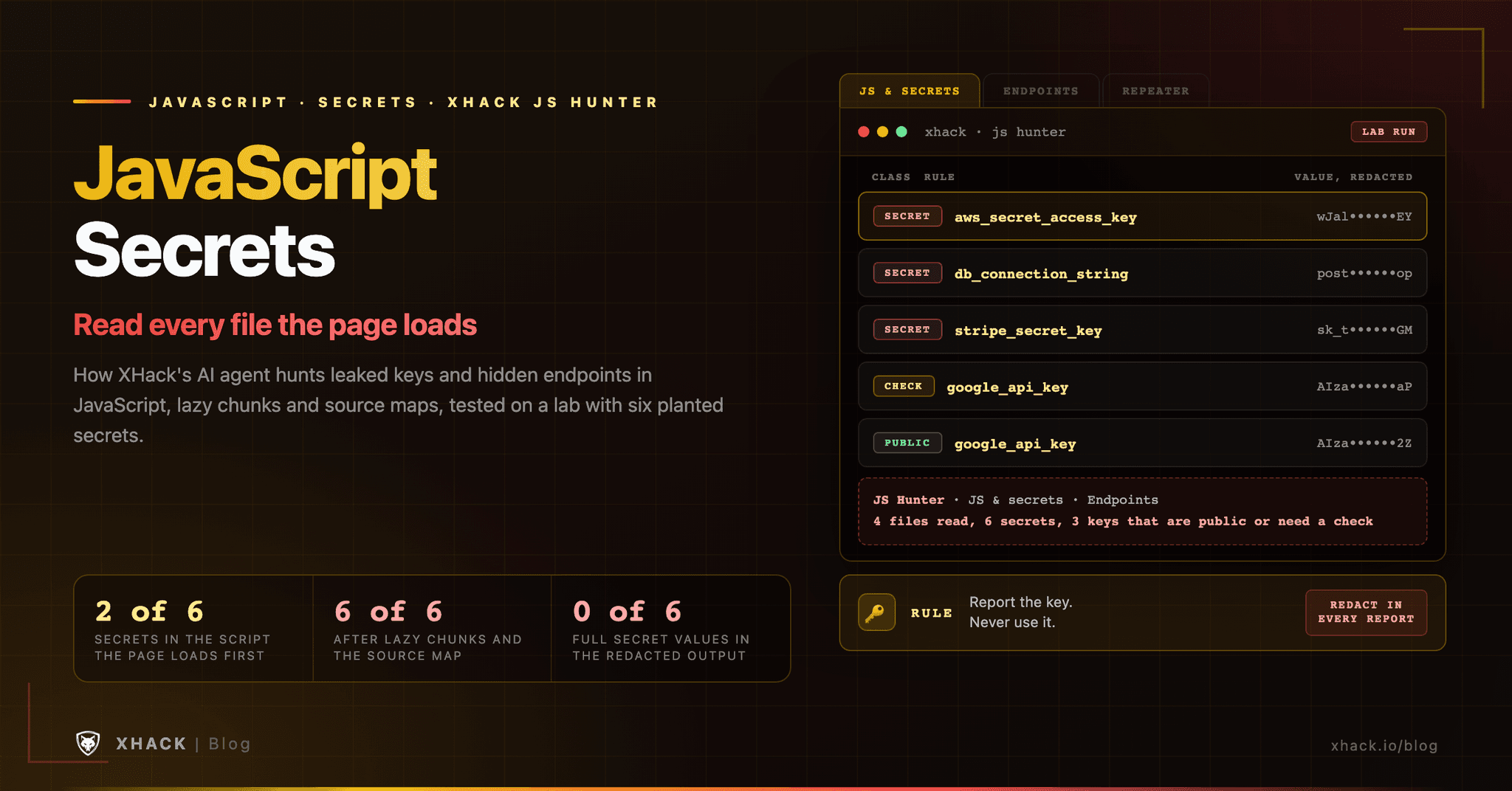
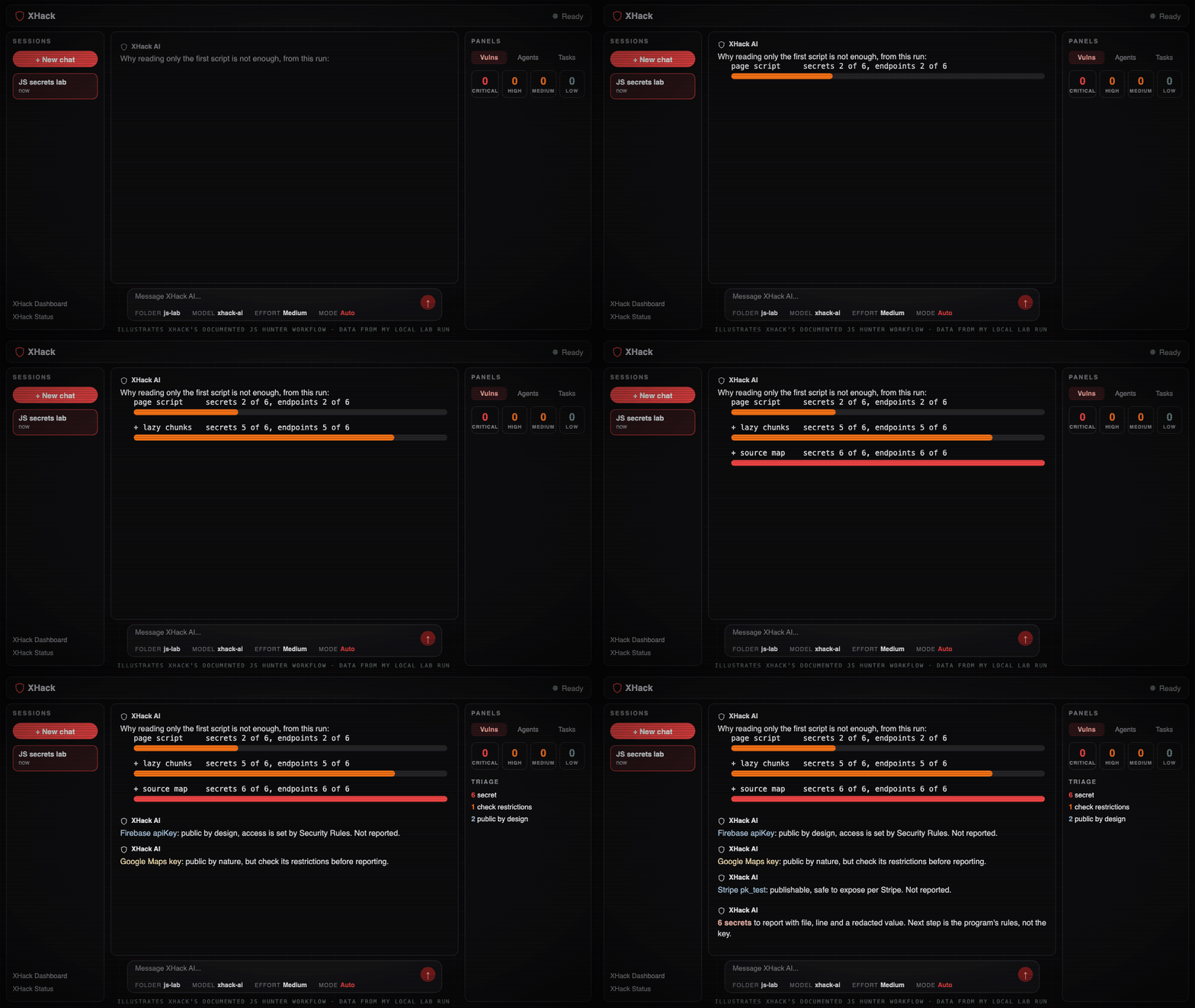
- The first script is not the whole app. In my lab, the script the page loads first held 2 of 6 planted secrets. Lazy-loaded chunks raised that to 5, and the source map to 6.
- Not every key is a secret. Firebase says its API keys do not control access to backend resources, and Stripe marks publishable keys as safe to expose. Reporting them as leaks wastes everyone’s time.
- Entropy alone is a blunt tool. A plain high-entropy check flagged 11 strings: 4 secrets, 3 keys that are public or need a check, 4 harmless strings, and it missed 2 of the 6 secrets.
- The problem keeps growing. GitGuardian counted 28.65 million new hardcoded secrets in public GitHub commits in 2025, up 34% in a year.
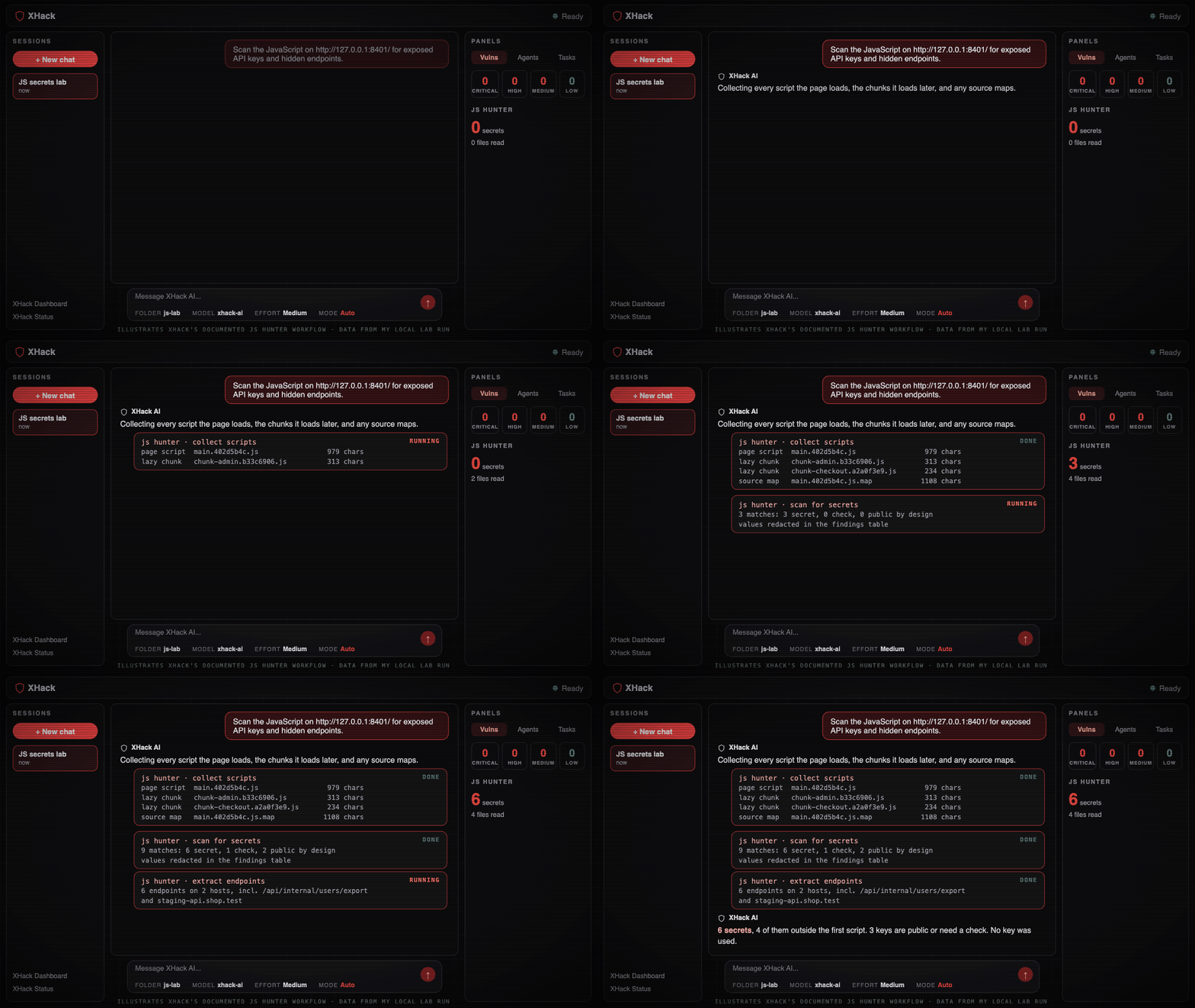
- XHack does this from one prompt. Its JS Hunter reads every script a site loads, flags secrets in a redacted table and maps endpoints by host.
JavaScript secrets are the bugs a company hands you before you send a single request. Every visitor downloads the same bundles, and anything a developer pasted into them, an AWS key, a database URL, an internal admin route, ships to everyone. The catch is that modern sites split their code into many files and load most of them later, so the secret is rarely in the file you look at first.
This guide covers JavaScript secrets with XHack as the worked example. It explains where they hide, how XHack’s JS Hunter reads and sorts them, how to separate a real leak from a key that is supposed to be public, and what a local lab with six planted secrets showed when I read it one layer at a time. Every lab number comes from measure.py, which runs on 127.0.0.1 with fake keys.
A JavaScript secret is any value in client-side code that grants access by itself. That covers cloud keys, payment secret keys, database connection strings, chat webhooks and long-lived tokens. If the value lets someone act as the company without logging in, it should never reach a browser.
Two things make JavaScript secrets a steady source of findings. Build tools bundle configuration into code, so a value meant for a server can end up in a client bundle with one wrong import. And the code is public by definition: there is no access control on a file the browser has to download to render the page.
The scale is large. GitGuardian’s State of Secrets Sprawl 2026 counted 28.65 million new hardcoded secrets added to public GitHub commits in 2025, a 34% increase on the year before. That figure covers source repositories, not shipped bundles, but the same habit of pasting a key into code is what puts secrets into JavaScript.
JavaScript secrets hide in the files the page loads later, not the one it loads first. A modern front end ships a small main bundle and fetches the rest on demand. These are the places to read, and each one is in the lab:
sourceMappingURL line at the end of a bundle points to a .map file. If it is served, its sourcesContent holds the original source, with comments and all.firebaseConfig or window.__ENV__ set in a script tag or injected at build time.Source maps deserve their own warning. On 4 November 2025, Apple shipped its redesigned App Store website with JavaScript source maps enabled in production, according to Escape’s write-up, and people downloaded the front-end source within hours. A comment that was stripped from the minified bundle is still in the map.
JS Hunter is XHack’s built-in tool for JavaScript secrets and endpoints, and the AI agent runs it from one plain-English request. XHack’s documentation describes it this way:
The prompt can be this short:
Scan the JavaScript on http://127.0.0.1:8401/ for exposed API keys and hidden endpoints.
Read lazy chunks and source maps too. Do not use any key you find.
In the app, JS Hunter has two tabs. JS & secrets shows the secret findings (severity, rule, redacted match, how often it appears) above the list of JS files with their size and source. You can paste a .js URL into the bar at the top to add one by hand, and files the agent saw in the network log but has not fetched yet show as detected, with a button to fetch them. Endpoints groups every route by host.
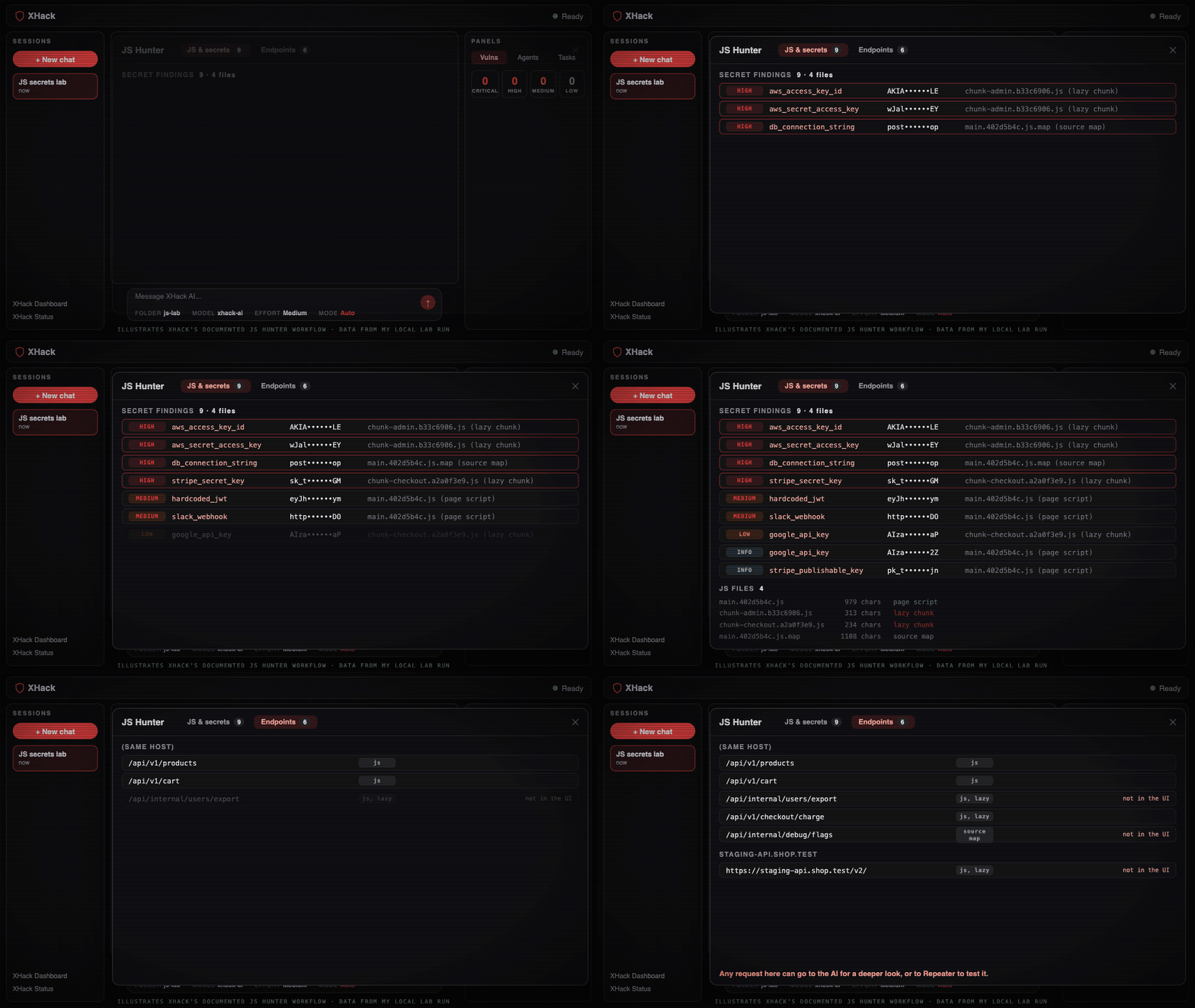
The animations put my lab’s real output into the XHack console and the JS Hunter layout to illustrate the documented workflow. They are not a recording of an XHack session, and each one says so in its footer.
The most important call with JavaScript secrets is deciding whether a key is a secret at all. Some keys are designed to sit in client code, and treating them as leaks is the fastest way to a closed report. I sort every match into three classes.
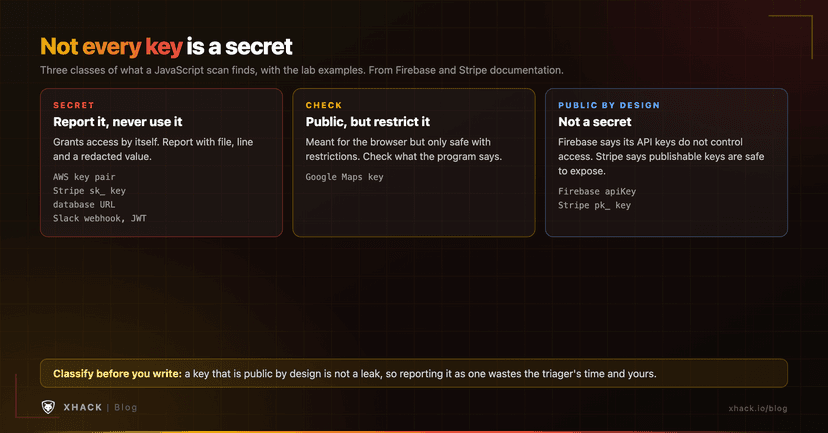
sk_ secret key, a Postgres connection string, a Slack webhook and a hardcoded admin JWT.pk_ keys as safe to expose. The real question for these is whether the rules behind them are open, which is a different finding.The rule of thumb: the key’s format tells you what it is, and the provider’s documentation tells you whether it is supposed to be public.
I built a small shop front end with JavaScript secrets planted at different depths, then read it one layer at a time. build_site.py writes the site and a ground-truth file, lab_site.py serves it on 127.0.0.1, and js_hunt.py is a small hunter that reads the page, follows the lazy chunks the main bundle names, fetches the source map and scans everything. Ten unit tests cover it.
Every value is fake. The AWS pair is the example pair from AWS’s own documentation, and the rest are random strings in the right format, generated at build time so no key-shaped value sits in the source code.
| Layer read | JavaScript secrets found | Endpoints found |
|---|---|---|
| The script in the page (main bundle) | 2 of 6 | 2 of 6 |
| Plus the two lazy chunks | 5 of 6 | 5 of 6 |
| Plus the source map | 6 of 6 | 6 of 6 |
The AWS key pair and the Stripe secret key existed only in chunks the page loads later. The database connection string existed only in a comment in the source map. A hunt that stopped at the first script would have reported the Slack webhook and the JWT, and missed the four findings that matter most.
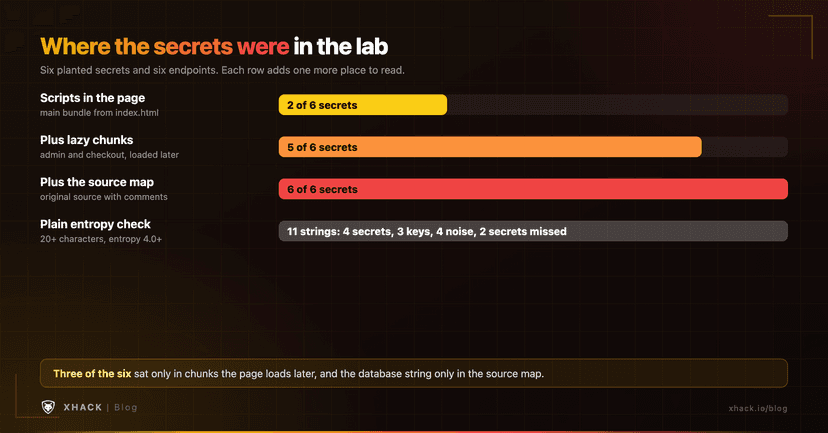
A high-entropy check finds random-looking strings, and a bundle is full of random-looking strings that are not JavaScript secrets. I compared it with named rules on the same four files.
The entropy check (any quoted string of 20 or more characters with Shannon entropy of 4.0 or higher) flagged 11 strings. Four were planted secrets. Three were the Firebase, Maps and publishable Stripe keys, which it cannot tell apart from secrets. The other four were harmless: two chunk file names, an integrity hash and an embedded image. It also missed 2 of the 6 secrets: the AWS access key ID, which is too short and too regular, and the database URL, which sat unquoted in a comment.
Named rules found all 6 JavaScript secrets, put the Maps key under CHECK and the Firebase and publishable Stripe keys under PUBLIC BY DESIGN, and flagged nothing else as a secret. That is the case for a large rule set like the one XHack’s documentation describes: a rule knows what it matched, so the triage starts with the right label.
The routes in JavaScript are often worth more than the JavaScript secrets themselves. The lab hid six endpoints, and three of them never appear in the visible interface: an internal user export, an internal debug-flags route that existed only in a source-map comment, and a staging API host.
XHack’s JS Hunter documentation calls this attack surface mapping: endpoints from the JavaScript and the network log, grouped by host, with the option for the AI to probe whether each is reachable. An internal export route is a lead for broken access control. A staging host is a new asset, which ties into recon: XHack’s Programs recon already collects JavaScript files, so a new bundle on a program is a reason to run JS Hunter again.
Finding a key is the finding. Using it is a different act, and usually not one you are allowed to take. Logging into a cloud account or a database with a leaked credential can expose real customer data, and most programs treat that as out of bounds. Read the program’s rules on credential validation before you do anything beyond noting the key.
A good report on JavaScript secrets has these parts:
XHack’s JS Hunter redacts values in its findings table by design, and the prompt above tells the agent not to use any key it finds. Keep both habits when you write the report yourself.
The fix is to move the secret to a server, then make sure the old one is dead. In order:
Most weak reports about JavaScript secrets fail in one of a few ways.
The lab proves the method, not how often real sites leak JavaScript secrets. I planted the secrets, so I chose where they went. Real bundles are far larger, chunk names are often built at runtime, and some code is only fetched after login, which a crawler that follows names in the bundle will not reach. My rule set is a small example, not a full one.
I also did not record a live XHack session. The XHack sections follow its documentation, and the animations put the lab’s real data into the XHack layout. To run XHack’s JS Hunter on the same lab, start python3 lab_site.py, open an XHack chat on the same machine and give it the prompt above.
So yeah, here is the part about XHack, and I am biased, it is my company. XHack combines three things most providers sell separately: an AI pentesting agent, a security operations platform, and human penetration testers for the work an agent should not do alone.
For JavaScript secrets, the agent side is JS Hunter: every script a site loads, read in full, scanned against a large rule set, with values redacted and endpoints grouped by host. Findings go to the AI or to Repeater with one click, and the agent can work through a target with up to 12 sub-agents by default and three browsers. For the wider hunting workflow, see our overview of the XHack AI agent for bug bounty, and for keeping an agent inside a program’s rules, our guide to bug bounty scope.
Privacy matters here more than most places, because the findings are other people’s keys. XHack does not store your data, and your agent chats and session data stay on your own computer, where you can delete them whenever you want.
Individual plans run $20, $49 and $150 a month, with a 7-day free trial. Nothing is charged for the trial period itself, and what you need to start depends on the requirements at the time, so check the sign-up page. If you want people to test your own applications instead, managed work starts from $2,500. If you want a cheap one-time scan with a cover page, we are not the right fit. Prefer to talk it through first? Book a free consultation, even if it turns out not to be us. Brutal honesty is kind of our thing.
JavaScript secrets are credentials or sensitive values shipped in client-side code, such as cloud keys, payment secret keys, database connection strings, webhooks and tokens. Because every visitor downloads the same files, anything in them is public. The fix is to keep the value on a server and rotate any key that has already shipped.
Read every file the page loads, not just the first one. Follow the chunk names in the main bundle, fetch any source map it references, then scan with named rules and check each match against the provider’s documentation. XHack’s JS Hunter does all of this from one request and redacts the values it finds.
Not by itself. Firebase’s documentation says its API keys are not used to control access to backend resources; Security Rules and App Check do that. The finding worth reporting is open Security Rules or a missing restriction, not the key. Check the program’s rules before you report it.
Usually not, and most programs do not want you to. Using a credential can expose real data. Report the file, the line, a redacted value and what the key type can reach according to the provider, and say that you did not use it. If a program allows a minimal validation step, follow its exact wording.
A source map can contain the original source, comments included, that the minified bundle stripped out. In my lab, a database connection string existed only in a source map comment. Companies should stop serving source maps in production, and hunters should check for them.
JavaScript secrets are easy to miss because they are spread across files the page loads later, and easy to over-report because many keys are meant to be public. The lab made both points concrete: reading one script found 2 of 6, reading every layer found 6 of 6, and three of the matches were keys that should not be reported as leaks at all.
For JavaScript secrets, read every layer, classify before you write, redact every value, and never use what you find. If you want that done from one prompt, ask XHack’s agent to scan a site’s JavaScript and let JS Hunter do the reading, then check what it found against the program’s rules.
Categories
Related articles