Table of contents
20
By Salman Khan, OSCP+, Founder of XHack, SRT (Synack Red Team member)
Read this in 30 seconds: Blind SSRF is a server-side request you cannot see in the response, so the only proof is a callback to a server you control. This guide shows how XHack’s built-in Collaborator catches that callback, how the AI agent runs the whole test by itself, and how to read what comes back.
- The response tells you nothing. In my seven-spot lab, every vulnerable spot answered 200, 201 or 202, exactly like a harmless request.
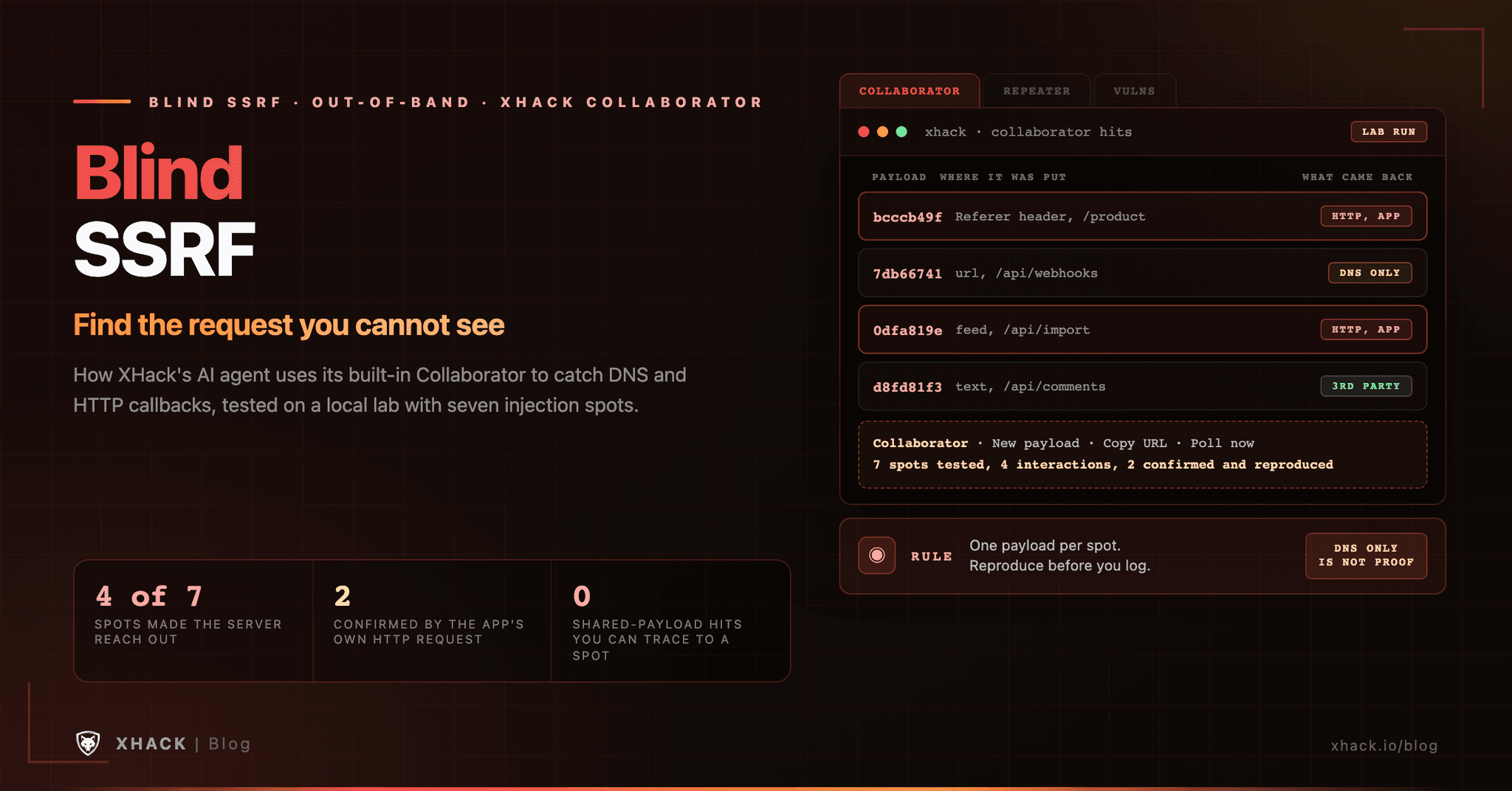
- A callback does, but not every callback is a bug. Of 4 spots that produced an interaction, 2 were the app’s own HTTP request, 1 was DNS only and 1 came from a third-party preview bot.
- DNS only is a lead, not proof. PortSwigger says a DNS lookup with no HTTP request typically means network filtering blocked the request after the name was resolved.
- Timing and attribution decide the result. A poll at 1 second saw 2 spots and a poll at 6 seconds saw 4. One shared payload produced 7 hits that I could not trace to a single spot.
- XHack’s agent does this end to end. Its docs say the AI uses Collaborator by itself when you ask for blind SSRF, and every finding is reproduced before it is logged.
Blind SSRF is the bug you only find by looking somewhere other than the page. The server fetches a URL you gave it, throws the result away, and returns its usual answer. Nothing in the response changes, so scanners that read responses and hunters who read pages both walk past it.
This guide covers blind SSRF with XHack as the worked example. It explains where blind SSRF hides, how XHack’s Collaborator catches the callback, how the XHack AI agent runs the test without being walked through it, and what a local lab with seven injection spots showed when I tested each one. Every lab number below comes from oast_probe.py, which runs entirely on 127.0.0.1.
Server-side request forgery means you make the server send a request for you, and blind SSRF is the version where you never see the reply. PortSwigger’s Web Security Academy defines blind SSRF as an application that can be made to issue a back-end HTTP request to a supplied URL while the response from that request is not returned to you.
That one-way nature cuts both ways. PortSwigger says the impact of blind SSRF is often lower than SSRF where you can read the response, because you cannot simply pull data back. It also says that in some situations blind SSRF can be taken as far as remote code execution, because the server is still a foothold inside a network you cannot reach.
The category matters to programs too. The OWASP Top 10 for 2025 lists CWE-918, Server-Side Request Forgery, under A01 Broken Access Control, which in the 2021 edition had its own entry. Folding it in reflects the usual impact: a blind SSRF lets an outsider use the server’s network position, which is an access control failure.
Blind SSRF lives in features that fetch something later, in the background, for a reason the user never sees. These are the usual places, and each one is in the lab:
The common thread is a delay. Many of these fetches run after the response has already been sent, which is why the page gives nothing away and why a check that only reads responses cannot find it.
Collaborator is XHack’s built-in callback catcher, and it is the tool that makes blind SSRF visible. XHack’s documentation describes it as unique callback URLs that catch DNS and HTTP interactions, for finding blind SSRF, XXE, blind injection and other out-of-band bugs. It works in the desktop app, in the web console and through your private XHack link.
The manual flow, as XHack documents it:
Settings lets you choose the callback server, and Clear empties the list. The docs add two rules that the lab below backs up with numbers: only put callback URLs into systems you are allowed to test, and use one payload per test spot, so you know exactly which hit came from where.
You do not have to place payloads by hand. XHack’s documentation says that when you ask the AI to test for blind SSRF or other out-of-band issues, it uses Collaborator by itself, from placing the payload to reading the hits. A prompt can be as short as this:
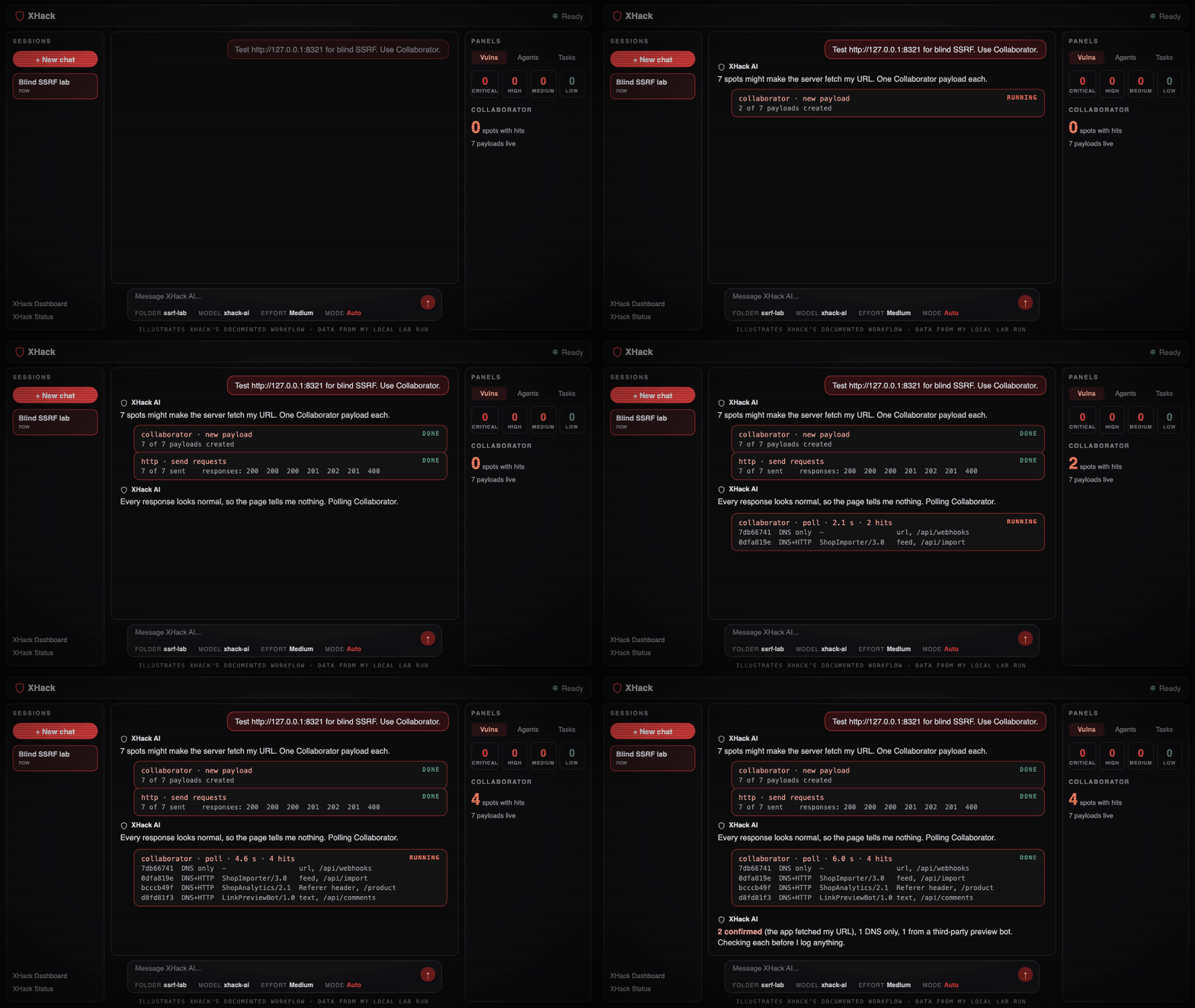
Test http://127.0.0.1:8321 for blind SSRF. Use Collaborator.
One payload per input, poll for at least 10 seconds, and reproduce anything before you log it.
The animation at the top of this article shows that flow in the XHack web console layout: the agent maps the inputs, creates one payload per spot, sends the requests, notices that the responses say nothing, polls Collaborator and sorts the hits. The tokens, response codes and callbacks in it are the real ones from my lab run. The console around them illustrates the documented workflow, not a recorded XHack session.
Three XHack features shape how that run behaves:
I built a small shop API with blind SSRF on purpose, then tested every input with its own payload. The lab has three parts, all bound to 127.0.0.1: lab_app.py (the vulnerable app), oob_catcher.py (a local DNS and HTTP catcher standing in for a callback server so the lab needs no internet) and oast_probe.py (the tester). Seven unit tests cover the catcher, the verdicts and each sink.
The app’s sinks behave like real ones. The analytics job fetches the Referer header 2.5 seconds after the page loads. The webhook test ping can resolve names but its outbound HTTP is blocked, as an egress firewall would do. The importer fetches a feed after 0.4 seconds. A separate link-preview bot fetches URLs in comments after 4 seconds. The avatar endpoint is the safe control: it allows one host and refuses everything else.
| Spot | Response | DNS | HTTP | Verdict |
|---|---|---|---|---|
| Referer header, /product | 200 | 2.5 s | 2.5 s | Confirmed, the app’s analytics job |
| id parameter, /product | 200 | none | none | Nothing in 6 s |
| User-Agent header, /product | 200 | none | none | Nothing in 6 s |
| url, /api/webhooks | 201 | 0.1 s | none | DNS only, HTTP blocked |
| feed, /api/import | 202 | 0.4 s | 0.4 s | Confirmed, the app’s importer |
| text, /api/comments | 201 | 4.0 s | 4.0 s | Third party, LinkPreviewBot |
| url, /api/avatar (control) | 400 | none | none | Refused, nothing in 6 s |
Look at the response column. The two confirmed spots answered 200 and 202, the same as any normal request. The only thing that set them apart was the callback.
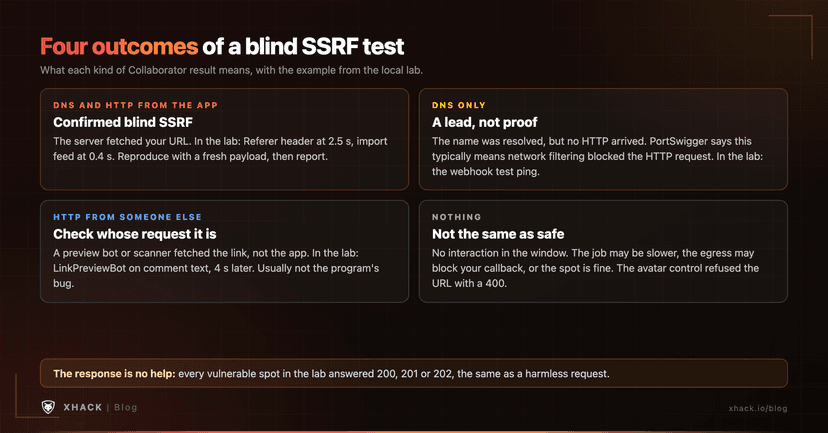
A callback is evidence, and the kind of callback decides what it proves. Every test ends in one of four ways, and only one of them is a finding you can report without more work.
When you poll decides what you see, and how many payloads you use decides whether you can tell the hits apart. I ran two experiments on the same lab.
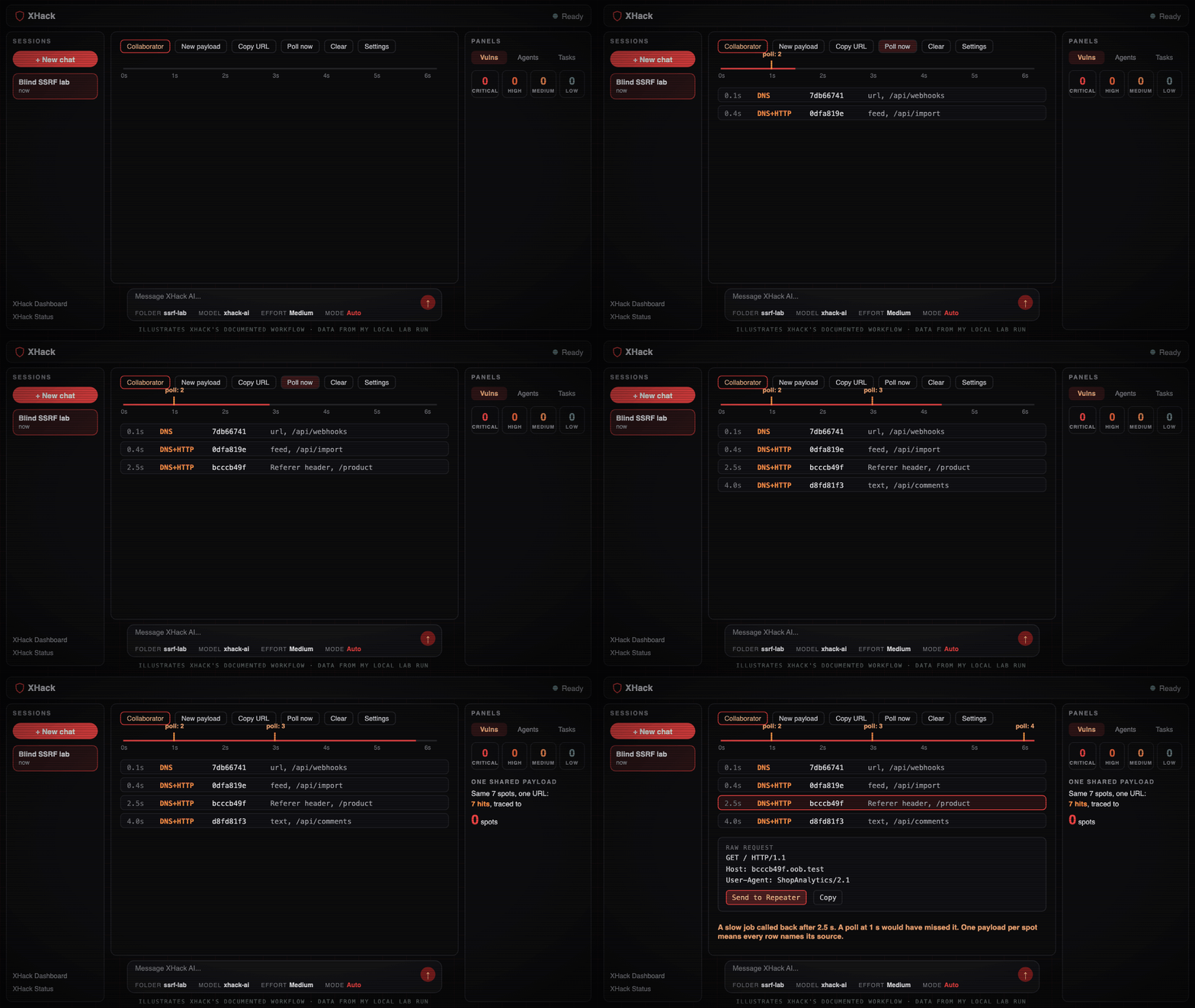
The first was timing. If I had polled once, after 1 second, I would have seen 2 spots with a hit. After 3 seconds, 3 spots. After 6 seconds, all 4. The analytics job, one of the two confirmed spots, only called back after 2.5 seconds, so a quick poll would have missed a real bug. Real background jobs can take minutes, so leave a listener running rather than polling once.
The second was attribution. I sent the same seven requests again with one shared payload. That produced 7 hits, 4 DNS and 3 HTTP, and none of them could be traced to a single spot, because the hit carries the payload and nothing about where you put it. That is why XHack’s docs say to use one payload per test spot.
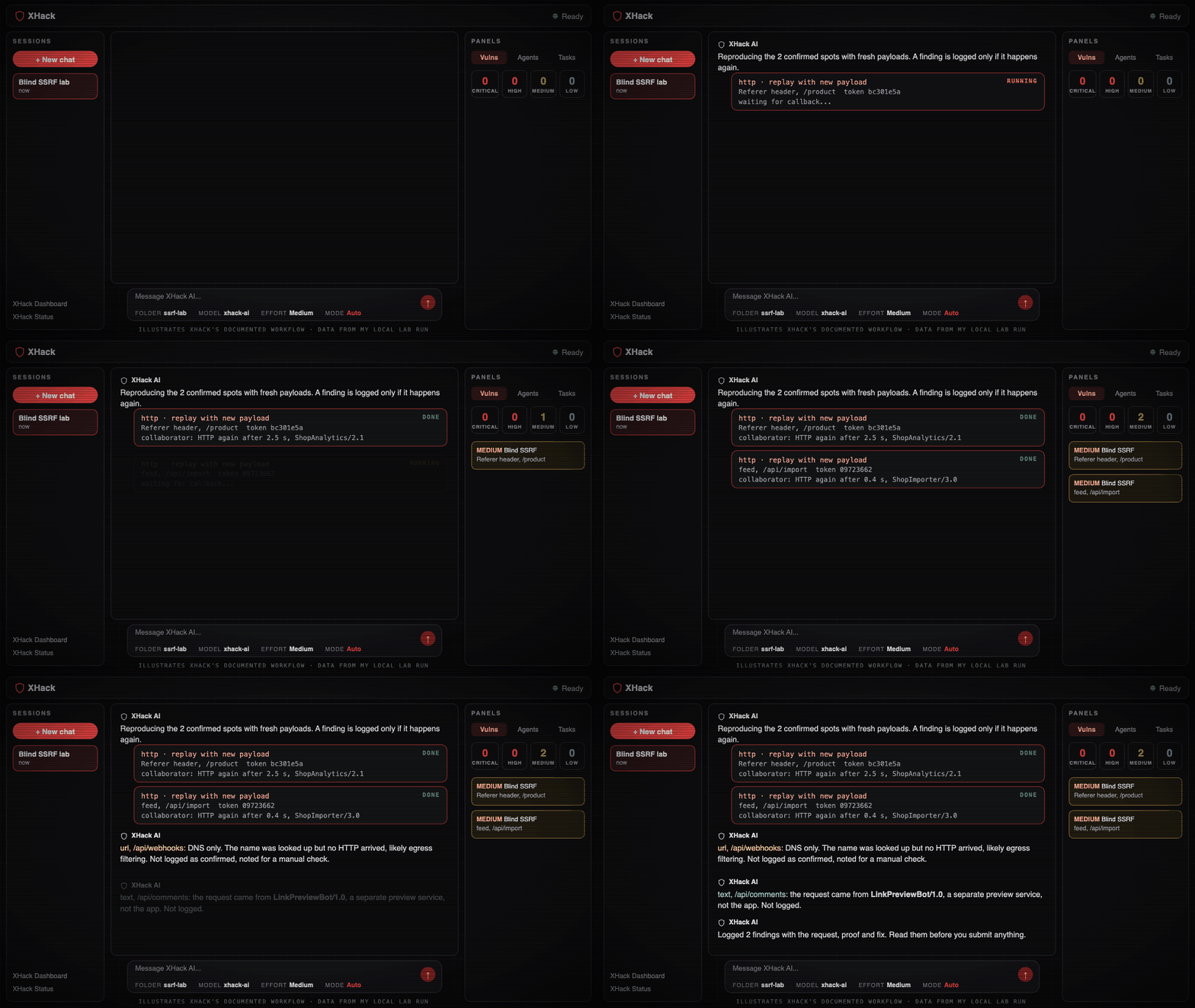
A single callback can be a coincidence, so the second one is the finding. For each confirmed spot I sent the same request again with a fresh payload. The Referer spot called back over HTTP after 2.5 seconds again, and the import spot after 0.4 seconds again, each from the app’s own User-Agent. Both are reproducible. The DNS-only webhook and the third-party preview were not logged as confirmed findings.
This matches how XHack logs findings: the docs say the agent reproduces every finding before it records it, so a hit that does not come back never reaches the Vulnerabilities panel. From there the agent can write a report ready to submit to HackerOne or Bugcrowd, and the docs are clear that you read it before you submit, because you are the one submitting it.
Severity is a judgment call. PortSwigger notes that the blind variant often has lower impact than SSRF where you can read the response, so a callback alone is usually rated lower than a proven path to internal data. Report what you proved, and do not sweep internal address ranges unless the program allows it.
The fix is to decide where the server may go, then enforce it at the address the server actually connects to. The OWASP SSRF Prevention Cheat Sheet separates two cases: an application that should only call identified, trusted applications, and one that must reach arbitrary external addresses. The first is far easier to defend.
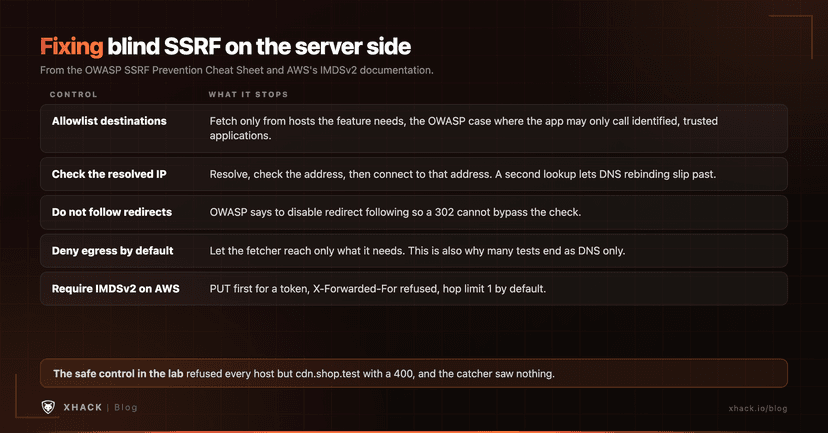
Most reports of this kind that go nowhere fail on attribution or proof.
The lab proves the method, not the hit rate you will see on real programs. I wrote the vulnerable app, so I chose its delays, its egress rule and its preview bot. Real jobs can be much slower, queues can drop requests, and egress rules vary.
I also did not record a live XHack session for this article. The XHack sections follow its documentation, and the animations put the lab’s real data into the XHack console layout to illustrate that workflow. To run the lab against XHack itself, start the app with python3 lab_app.py --system-dns so it resolves real callback domains, open an XHack chat on the same machine, and give the agent the prompt above. It will use Collaborator’s own callback server instead of my local catcher.
So yeah, here is the part where I talk about XHack, and I am biased, it is my company. XHack combines three things most providers sell separately: an AI pentesting agent, a security operations platform, and human penetration testers for the work an agent cannot do alone.
For blind SSRF, the agent side is what you have just read, and our overview of the XHack AI agent for bug bounty covers the rest of the hunting workflow. Collaborator is built in, so callback URLs, the DNS and HTTP hit list, the raw request and Send to Repeater all sit in the same place as the chat. Ask for a blind SSRF test and the AI places the payloads, polls and sorts the hits itself, with up to 12 sub-agents by default and three browsers when a target needs them. Findings are reproduced before they are logged, then exported as JSON, Markdown, HTML or a branded PDF.
Privacy matters when your callbacks reveal a client’s internal network. XHack does not store your data, and your agent chats and session data stay on your own computer, where you can delete them whenever you want.
Individual plans run $20, $49 and $150 a month, with a 7-day free trial. Nothing is charged for the trial period itself, and what you need to start depends on the requirements at the time, so check the sign-up page. Exploitation features unlock after identity verification. If you want people to test your own infrastructure instead, managed work starts from $2,500. If you want a cheap one-time scan with a cover page, we are not the right fit. Prefer to talk it through first? Book a free consultation, even if it turns out not to be us. Brutal honesty is kind of our thing.
Blind SSRF is a server-side request forgery where the server fetches a URL you supply but never shows you the result. The page looks the same whether the bug is there or not, so you prove it with an out-of-band callback: the server contacts a server you control, and that contact is the evidence.
Put a unique callback URL into each input that might be fetched, then watch a callback server for DNS and HTTP interactions. PortSwigger calls out-of-band techniques the most reliable detection method. In XHack, Collaborator creates the payloads and lists the hits, and the AI agent can run the whole test on its own.
Not on its own. A DNS lookup shows the name you supplied reached a resolver, but no HTTP request arrived. PortSwigger says this pattern typically means network filtering blocked the request after the lookup. Treat it as a lead, look for an HTTP callback from the app, and say exactly what you saw if you report it.
XHack’s documentation says that when you ask the AI to test for blind SSRF or other out-of-band issues, it uses Collaborator by itself, from placing the payload to reading the hits. It reproduces every finding before it logs it. You still choose the target, the permission mode and what gets submitted.
Allowlist the destinations a feature needs, validate the resolved IP address and connect only to it, turn off redirect following, and deny outbound traffic by default. On AWS, require IMDSv2. The OWASP SSRF Prevention Cheat Sheet covers each control, and the lab’s allowlisted endpoint produced no callback at all.
Blind SSRF is easy to miss because the page never changes, and the lab made that concrete: every vulnerable spot returned an ordinary success code. What separated them was the callback, and what turned a callback into a finding was attribution, timing and a second hit.
Use one payload per spot, wait longer than feels necessary, treat DNS only as a lead, check whose User-Agent arrived, and reproduce before you report. If you want that done for you, ask XHack’s agent to test for blind SSRF and let it run Collaborator itself, then read what it logs before you submit.
Categories
Related articles