Table of contents
20
By Salman Khan, OSCP+, Founder of XHack, SRT (Synack Red Team member)
Read this in 30 seconds: Recon monitoring is a daily or weekly comparison of what a program exposes today against what it exposed last time, and the hard part is not finding changes but ignoring the ones that do not matter. This guide shows what to alert on, what to throw away, and why the checking step needs no AI.
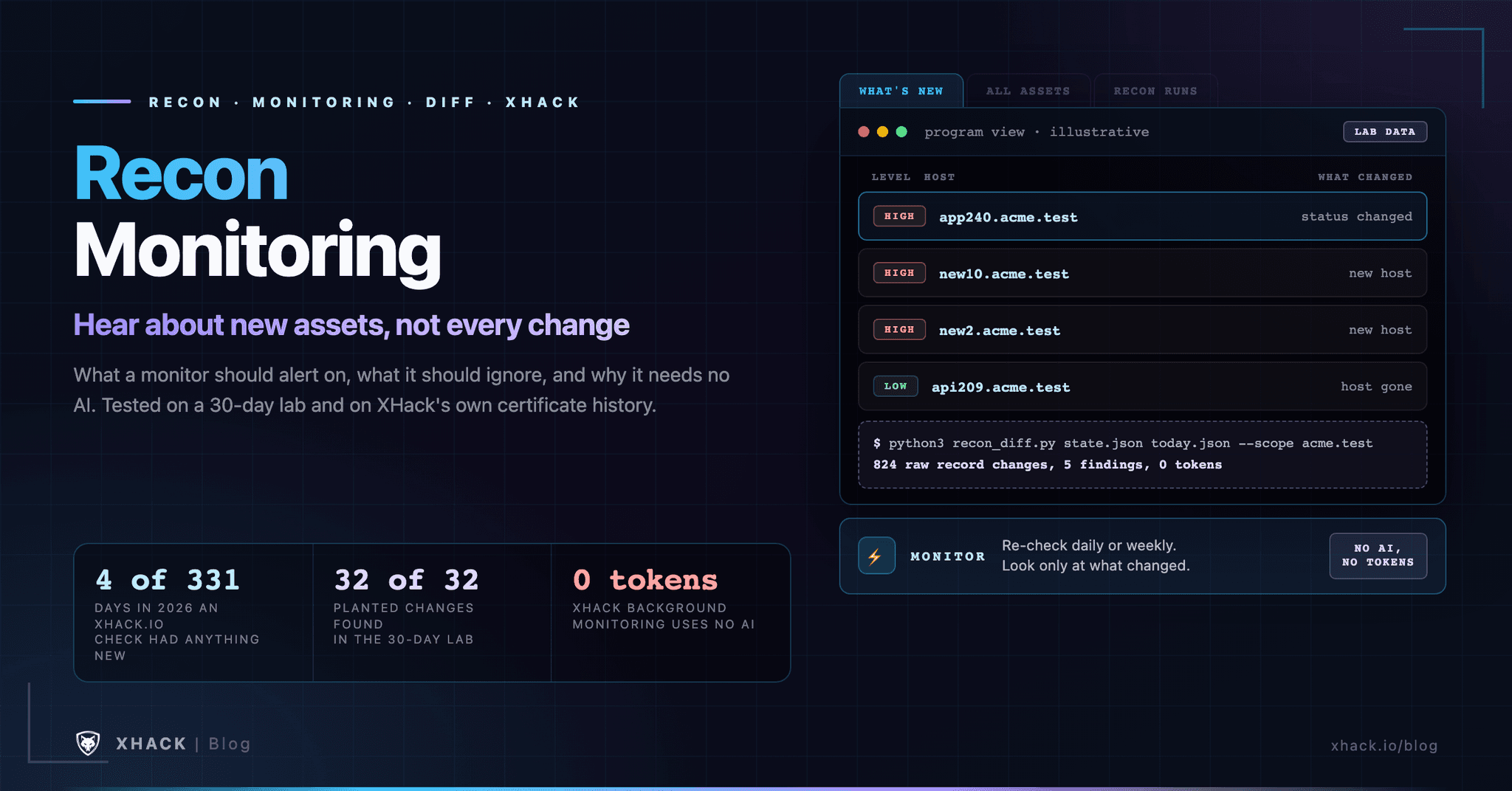
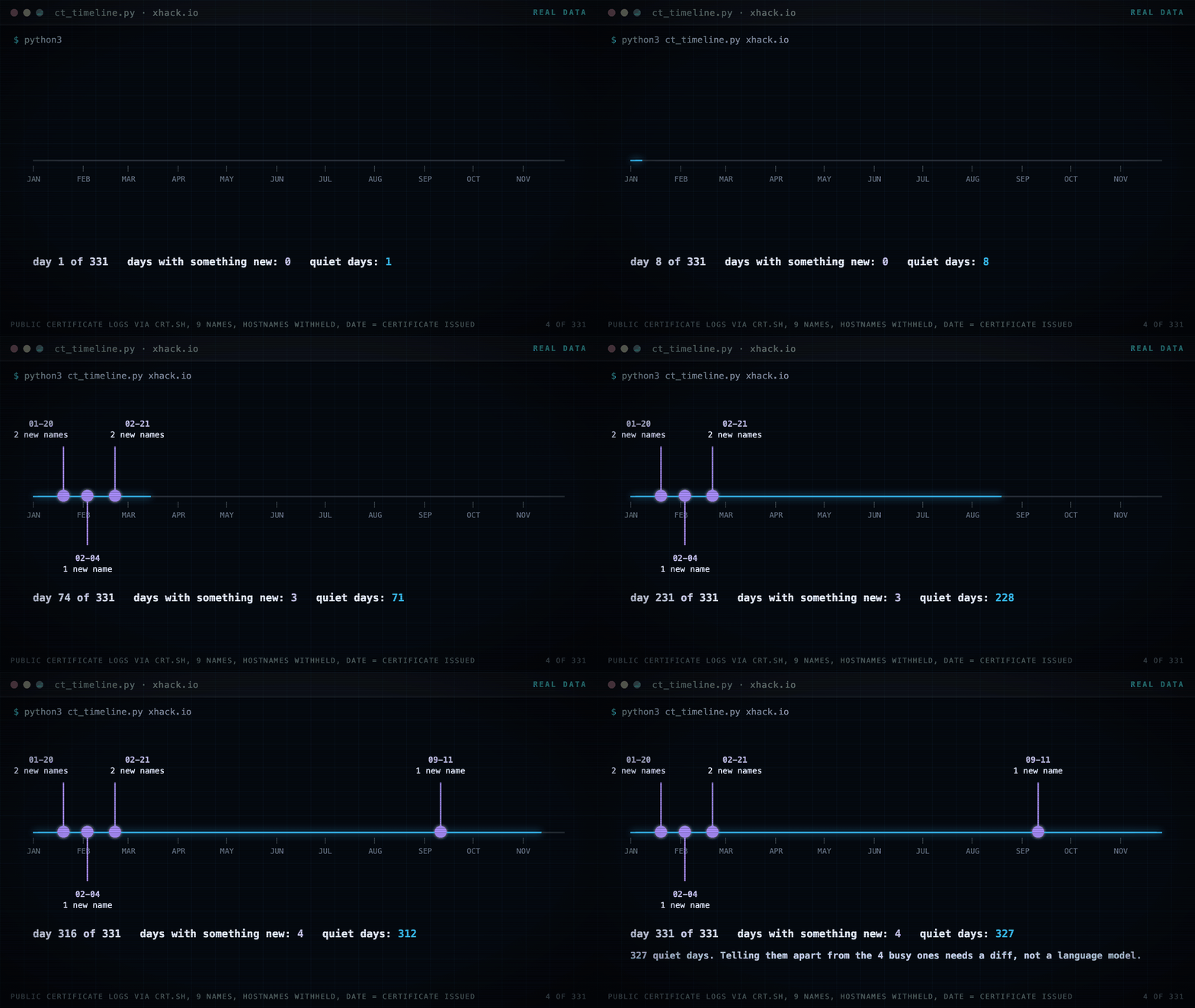
- Most days have nothing new. I pulled the public certificate history of xhack.io: 89 certificate rows, 9 distinct names, and in 2026 only 4 of 331 days introduced a new name.
- A plain diff drowns you. On a 30-day lab history, a line-by-line diff of raw records flagged about 825 changed lines a day, while the normalised diff flagged 1.4 a day and found 32 of 32 planted changes.
- The noise is boring. Timestamps, CSRF tokens, build hashes in JavaScript file names and rotating CDN addresses make almost every page look changed, and a Bugcrowd LevelUp guide warns that monitoring noise has no easy fix.
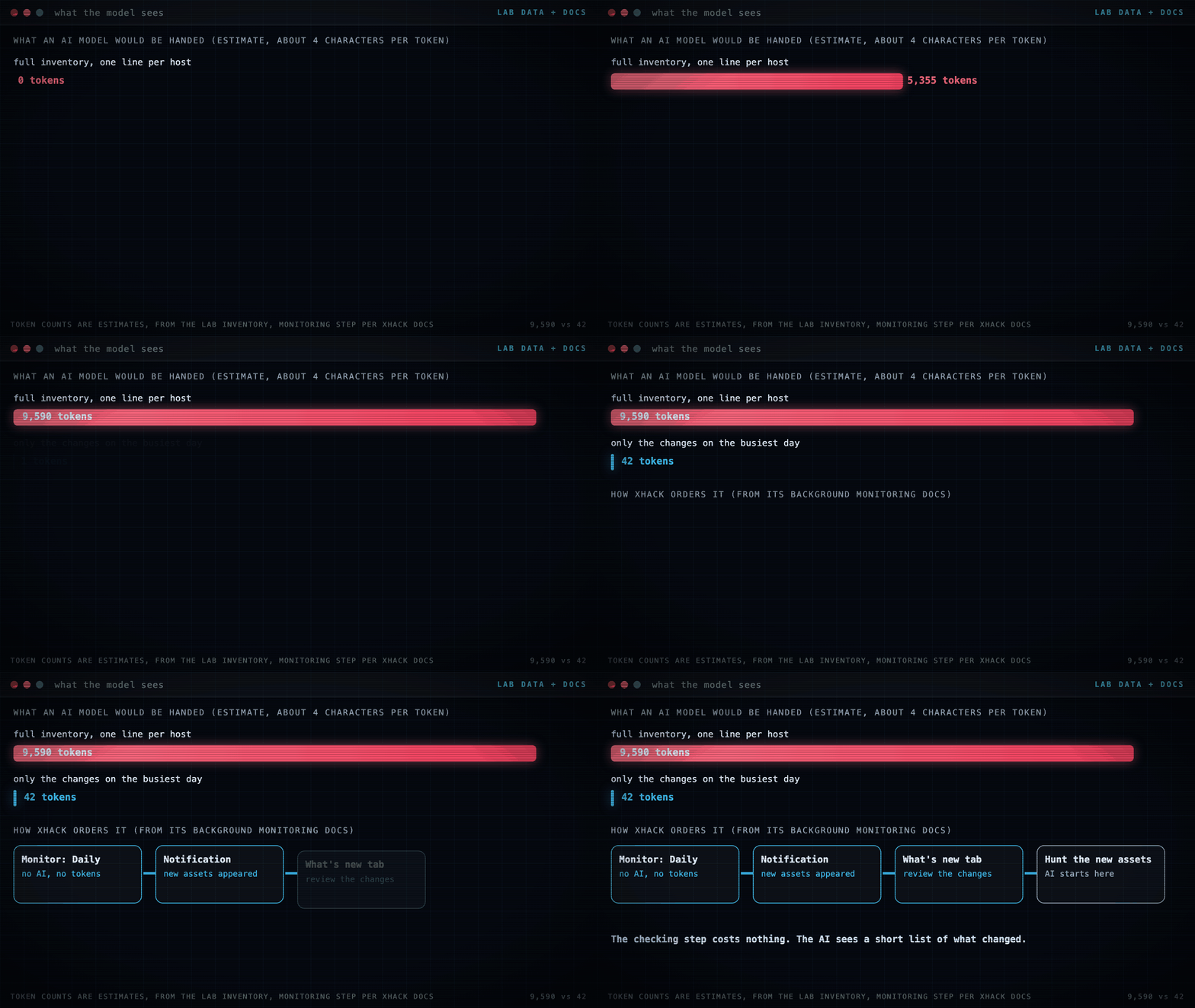
- The check is deterministic, so it costs no tokens. XHack documents its background monitoring as using no AI and no tokens, and in my lab the changes fit in about 42 tokens against about 9,590 for the full inventory (an estimate).
- The AI belongs after the diff. Hand a model the short list of what changed, not the whole program.
Recon monitoring works when it tells you about the handful of things that changed overnight instead of the hundreds that merely look different. A one-off recon run gives you a long list and a snapshot of one afternoon. A new subdomain that appears next Tuesday never reaches you, unless your tooling compares today against yesterday.
This guide treats recon monitoring as an engineering problem, with XHack as the worked example. It covers what to watch, a real change history from our own domain, how XHack’s Programs view handles the schedule, and a small diff engine (recon_diff.py, standard library only, 17 passing tests) that I ran against a 30-day synthetic history with known events. By the end you will know which changes deserve a human, which deserve silence, and where an AI model should enter.
Recon monitoring means repeating the same reconnaissance on a schedule and keeping only the difference. A Bugcrowd LevelUp guide by researcher Paolo Arnolfo calls it “recon over time”: continuous tracking of a program’s assets to spot differences and new hosts when they come online, as opposed to scanning once and never looking back. The guide’s claim is that this gives you an edge over hunters who run point-in-time scans.
That edge comes from one fact. Programs change, and recon monitoring exists to catch that. A team ships a staging host, points a name at a new vendor, or switches a login page from 403 to 200 on a Wednesday afternoon, and the first person to notice usually has the least competition. The same guide adds a caution that fits anyone chasing it: if you do what everyone else is doing, you get many duplicates.
Recon monitoring covers five kinds of change, ranked here by how often they lead somewhere:
If you already automate enumeration, our guide to recon automation for bug bounty hunters covers what to automate. This article covers what happens after the tools run, which is deciding what the output means.
Quiet is the normal state for recon monitoring, and that is the whole case for a diff. To see a real one, I asked crt.sh for every certificate ever logged for our own domain. Certificate transparency is a public system for logging and monitoring TLS certificate issuance, and Let’s Encrypt, which issued 82 of our 89 certificate rows (Google Trust Services issued the other 7), says it submits every certificate it issues to CT logs. One request, no contact with our servers.
The recon monitoring results, counts only:
We are withholding the hostnames, as we did in our subdomain research, because the pattern is the point.
Three honest limits apply. The date is when the certificate was issued, which is a proxy for when a host went live and not a measurement of it. The wildcard certificate hides every host behind it, so this view undercounts our real surface. And certificate logs only show names that got a certificate. A real recon monitoring setup would also resolve and probe, which is what the rest of this article is about.
In XHack, recon monitoring is a setting on a program, not a script you maintain. This section follows XHack’s own documentation, so treat it as a description of the documented workflow and not as a measurement.
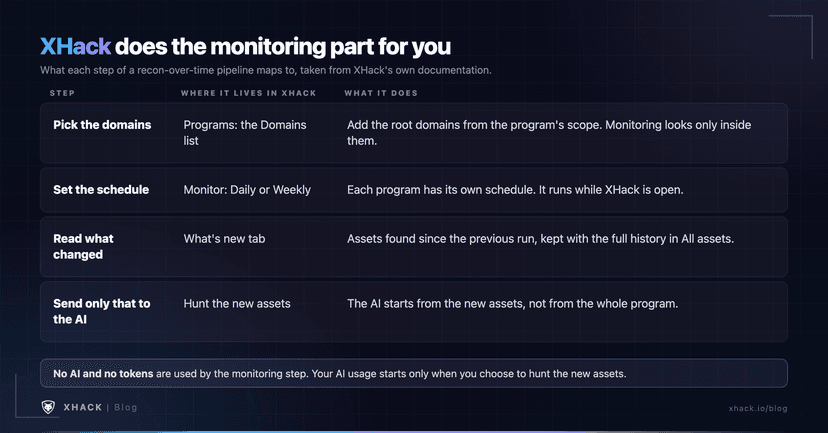
Two details from the documentation matter when you plan recon monitoring. The background check uses no AI and no tokens, so it does not touch your AI usage, and the AI starts only when you choose to hunt the new assets. And because it runs while XHack is open, a laptop that sleeps all night checks when it wakes, so leave XHack running if you want the daily timing to mean something.
The obvious way to monitor, comparing today’s output with yesterday’s, produces an alert for nearly every host. The reason is that pages are not static. The same Bugcrowd guide warns that some kinds of scanning produce a lot of noise and gives an example: if you track HTTP titles, one of your requests may get a 429 for reasons that belong to the host, not to you. It says there is no easy solution but that scripting can reduce noise significantly.
ProjectDiscovery’s attack surface walkthrough shows the same problem from the tooling side. It strips the timestamp and curl-command keys from nuclei output before comparing, because otherwise the lines are never unique and it cannot notify only on new findings. That is normalisation, done by hand for one field.
Five sources of noise do most of the damage:
app.3f9a1c.js becomes app.8b21de.js after every deploy, with no new code.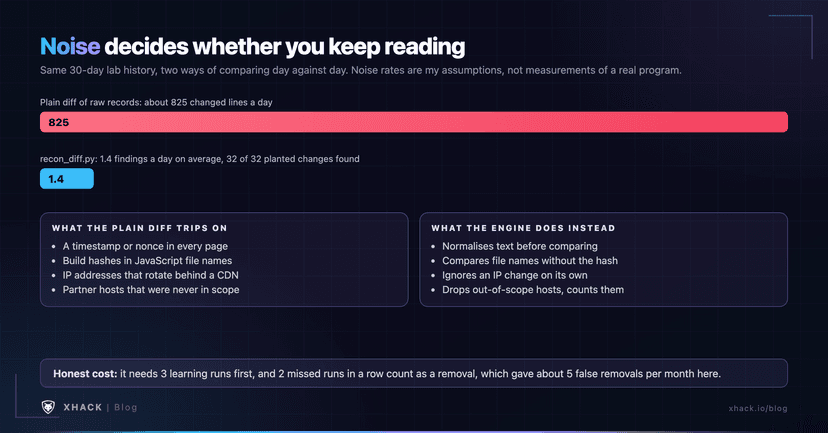
Seven small rules turn noisy recon monitoring into a short list. I wrote them into recon_diff.py, which reads one JSON snapshot per run and keeps a state file between runs. It uses no model and no network, so the same input always gives the same output.
| # | Check | What it prevents |
|---|---|---|
| 1 | Learning runs. The first 3 snapshots build the baseline and raise no alerts. | A host that flapped during the first run looking “new” later. A single baseline run made 9 false new hosts in my first version. |
| 2 | Scope filter. Hosts outside the listed root domains are dropped and counted. | Alerting on, and later probing, something you have no right to touch. |
| 3 | Normalise text. Timestamps, UUIDs, tokens, nonces and long hex strings are replaced before comparing. | Every dynamic page looking changed. |
| 4 | Strip build hashes. app.3f9a1c.js and app.8b21de.js are the same file. | A redeploy reading as a new JavaScript file. |
| 5 | Ignore IP-only changes. Addresses are not compared. | CDN rotation. |
| 6 | Flap suppression. A host must be missing 2 runs in a row to count as gone. | A single timeout reading as a removal. |
| 7 | Rank by level. HIGH, MEDIUM and LOW, so the digest reads top down. | A new host sitting between forty trivial lines. |
Run it like this against any pair of snapshots:
python3 recon_diff.py state.json today.json --scope example.comThe first three runs print learning run N of 3 and nothing else. After that it prints one line per finding and a count of hosts and out-of-scope hosts dropped. The 17 unit tests cover each check, and I broke the code on purpose twice (a one-run removal rule and a broken build-hash pattern) to confirm the tests fail when they should.
Recon monitoring alert levels decide whether you act the same day or read it on Friday. The engine assigns them by what the change usually means, and you should change them to fit how you hunt.
HIGH: a new host, a changed CNAME, or a 403, 404, 502 or 503 turning into a 200 or redirect. A new host is the main prize because nobody has tested it yet. A changed CNAME can mean the host now points at a service that nobody has claimed, but the CNAME change itself proves nothing. You still have to check whether the target answers and whether the provider allows a takeover claim, and you must stay inside the program’s rules while you do.
MEDIUM: a new JavaScript file or any other status change. A new file path on a host you already know is where new endpoints appear, and the next step is reading it for routes, not testing anything.
LOW: a content change, a title change or a confirmed removal. These are worth a look in a weekly review, not an alert at midnight.
With 32 planted changes and my assumed noise rates, the engine caught all 32 and raised about one false alert a week. The history is synthetic: 791 in-scope hosts, 20 out-of-scope partner hosts in every snapshot, 30 daily snapshots, and a seed so you can reproduce it. I planted 12 new hosts, 3 CNAME changes, 4 status flips from 403 to 200, 5 new JavaScript files, 6 content edits and 2 removals. The noise (timestamps, tokens, build hashes, rotating IPs and random one-run outages) uses rates I chose, not rates measured on a real program.
| Measure | Plain diff | recon_diff.py |
|---|---|---|
| Alerts per day, mean | about 825 | 1.4 |
| Alerts per day, range | 820 to 830 | 0 to 5 |
| Days with zero alerts | none | 6 of 27 |
| Planted changes found the same day | all, buried | 32 of 32 |
| Alerts that were not planted changes | not countable | 5 (all “host gone”) |
Five more seeds with the same noise rates gave the same shape. The engine found 31 or 32 of the 32 changes on the day they happened, and the missed one was found a day later, because the host was down on the day it changed. Other alerts per run ranged from 3 to 7, all of them false “host gone” alerts caused by two outages in a row. Raising the removal rule from 2 missed runs to 3 would cut those and delay real removals by a day, which is a fair trade if removals matter little to you.
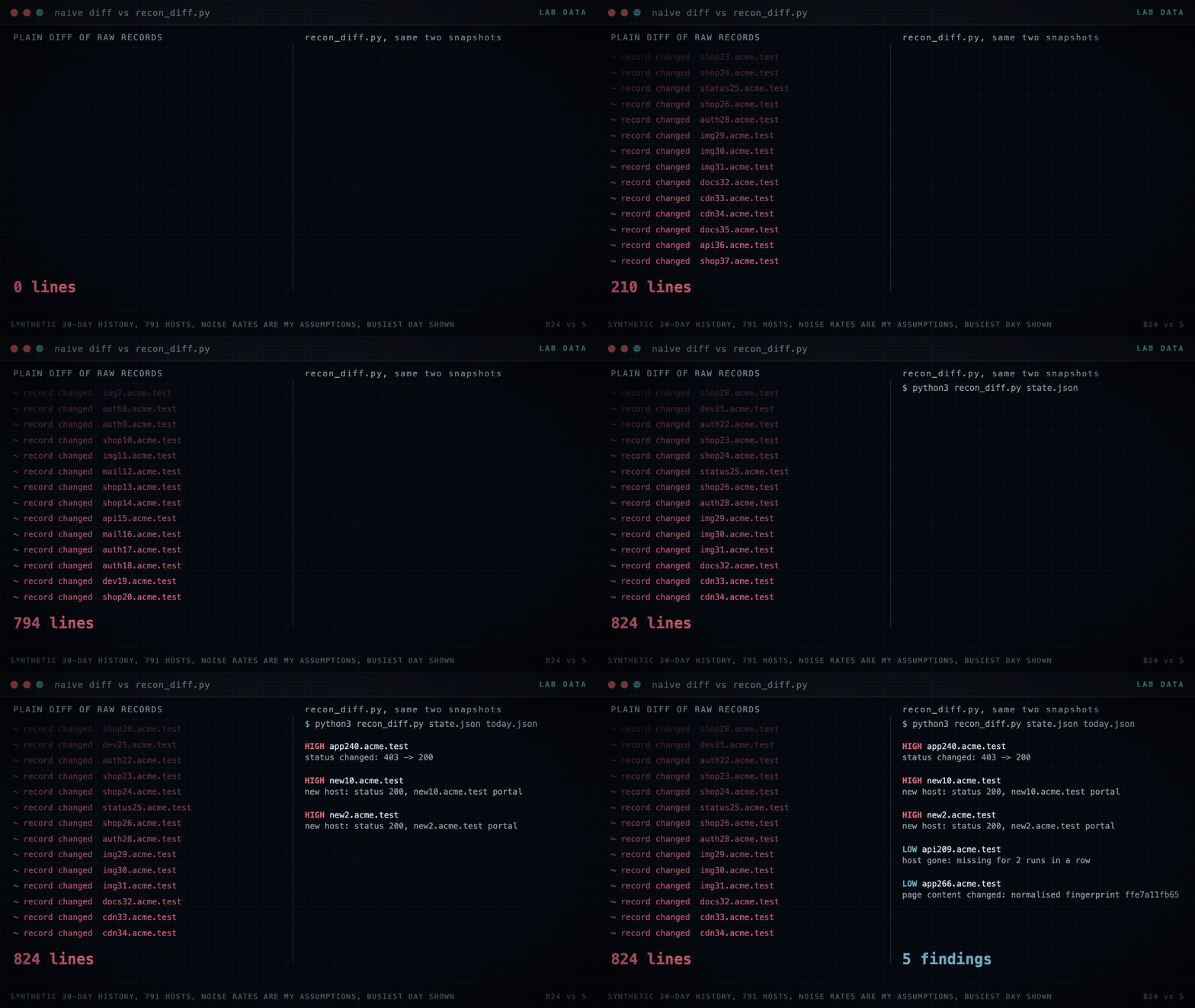
In recon monitoring, the AI should read the diff, not produce it. Deciding that a host is new is set arithmetic, and asking a language model to do that over thousands of assets every day would cost tokens to get a less reliable answer than a hash comparison. Judgment is the part a model is good at: what a new host is likely to be, what an unfamiliar JavaScript path suggests, which finding to hunt first.
The size difference makes the point. The full inventory of my lab, one line per host, is about 9,590 tokens by a rough four-characters-per-token estimate. The changes from the busiest day are about 42 tokens. These are estimates from my lab, not billing figures, and a real program will differ, but the ratio explains why XHack puts the AI step behind the diff: the documentation says monitoring uses no AI and no tokens, and Hunt the new assets is the step where the AI starts.
How often you check sets the best case for how fast you hear. If a change happens at a random moment and you check every 24 hours, you hear about it 12 hours later on average and 24 hours later at worst. A weekly check averages 3.5 days and tops out at 7. That is arithmetic, not a measurement, but it is why busy programs get a daily schedule.
Certificate logs add their own lag. A CT log promises to include a certificate within a fixed Maximum Merge Delay, as the original certificate transparency RFC describes (it has since been obsoleted by RFC 9162). A name can therefore be live before it is searchable, and a monitor built only on certificate logs will always be somewhat behind.
Three rules keep monitoring on the right side of a program:
Most failed recon monitoring setups fail in the same few ways.
The lab proves the design works, not that real programs behave like it, so treat these recon monitoring numbers as a test of the method. The history is synthetic and the noise rates are my guesses. Real sites have noise I did not model, such as A/B tests, personalised banners, rate-limit pages and geo redirects. The body check works on the first 20,000 characters of the page, so a change deep in a long document will be missed. The learning-run count of 3 and the removal rule of 2 are defaults I picked, and you should tune both.
I also did not test XHack’s background monitoring in this article. The XHack sections follow its documentation. If you run the same lab against a program in XHack and compare its What’s new tab with the planted changes, you will have a real answer that I do not.
So yeah, here is where we say what XHack brings, and I am biased, it is my company. XHack combines three things most providers sell separately: an AI pentesting agent, a monitoring and operations platform, and human penetration testers who do the work an agent cannot.
For recon monitoring, the agent side is what you have just read. Background monitoring checks the domains on your program daily or weekly with no AI and no tokens, shows what is new, and lets you send just those assets to the AI with one click. The agent then hunts them with up to 12 sub-agents by default and three browsers, in the permission mode you choose.
Privacy matters here because recon data is your list of targets. XHack does not store your data, and your agent chats and session data stay on your own computer, where you can delete them whenever you want.
Individual plans run $20, $49 and $150 a month, with a 7-day free trial. Nothing is charged for the trial period itself, and what you need to start depends on the requirements at the time, so check the sign-up page. If you would rather have people test your own infrastructure, managed work starts from $2,500. If you want a cheap one-time scan with a cover page, we are not the right fit. Prefer to talk it through first? Book a free consultation, even if it turns out not to be us. Brutal honesty is kind of our thing.
Recon monitoring is repeating reconnaissance on a schedule and reporting only what changed since the last run. It watches for new hosts, changed CNAMEs, status changes, new JavaScript files and content changes on the assets a program lists as in scope, so you can test new surface before other hunters do.
Run recon monitoring daily for programs that ship often and weekly for quiet ones. A daily check hears about a change 12 hours later on average and a weekly check 3.5 days later, so frequency sets your best-case speed. Check the program’s rate limit and automation policy before you schedule anything, and start with passive sources.
No, recon monitoring does not need AI. Comparing two snapshots is a deterministic job that costs nothing to run. XHack documents its background monitoring as using no AI and no tokens. The AI earns its cost afterwards, judging what a new host or JavaScript path is likely to be and choosing what to hunt.
Recon monitoring depends on the program, so read the policy. Passive sources such as certificate logs touch no target. Active probing is covered by the program’s scope and rules, including any rate limit or ban on automated tools. Stay inside the listed domains and stop if a rule is unclear.
Normalise before you compare in recon monitoring. Strip timestamps, tokens, build hashes and IP addresses, filter to the program’s scope, run a few learning runs before alerting, and require a host to be missing twice before calling it gone. In my 30-day lab, those rules cut about 825 daily changed lines to 1.4 findings.
Recon monitoring pays off because most days are quiet and a few are not, and the job of recon monitoring is to make the few days impossible to miss. On our own domain that meant 4 busy days in 331. In the lab it meant 1.4 findings a day instead of 825.
Start recon monitoring with the cheap version: a schedule, a scope filter, three learning runs and a normalised diff. Then let the AI read the short list. If you would rather not maintain the plumbing, XHack’s Programs view runs the schedule and keeps the history, and you decide what to hunt.
Categories
Related articles