
Cloud Investigation, Fully Autonomous Forensic Investigation
Fully autonomous forensic investigation for your cloud and SaaS logs. Upload your audit logs, tell us what you suspect, and an AI investigator works through every file on its own to reconstruct who got in, how, what they touched, and whether they are still there.
Upload Your Logs. Get the Whole Story.
When an account is compromised, the answer is buried somewhere in tens of thousands of log lines. Reading them by hand takes days, so most teams check the obvious sign-ins, reset a few passwords, and hope. Attackers count on that.
Cloud Investigation is a fully autonomous forensic investigation for your cloud and SaaS logs. You upload the logs and describe what you suspect. From there it runs on its own: an AI investigator reads every file, forms theories, tests each one against the evidence, follows every lead, and hands you a forensic report that explains the whole incident in plain language.
No playbook to configure, no queries to write, and no analyst needed to drive it.
Start in Under a Minute
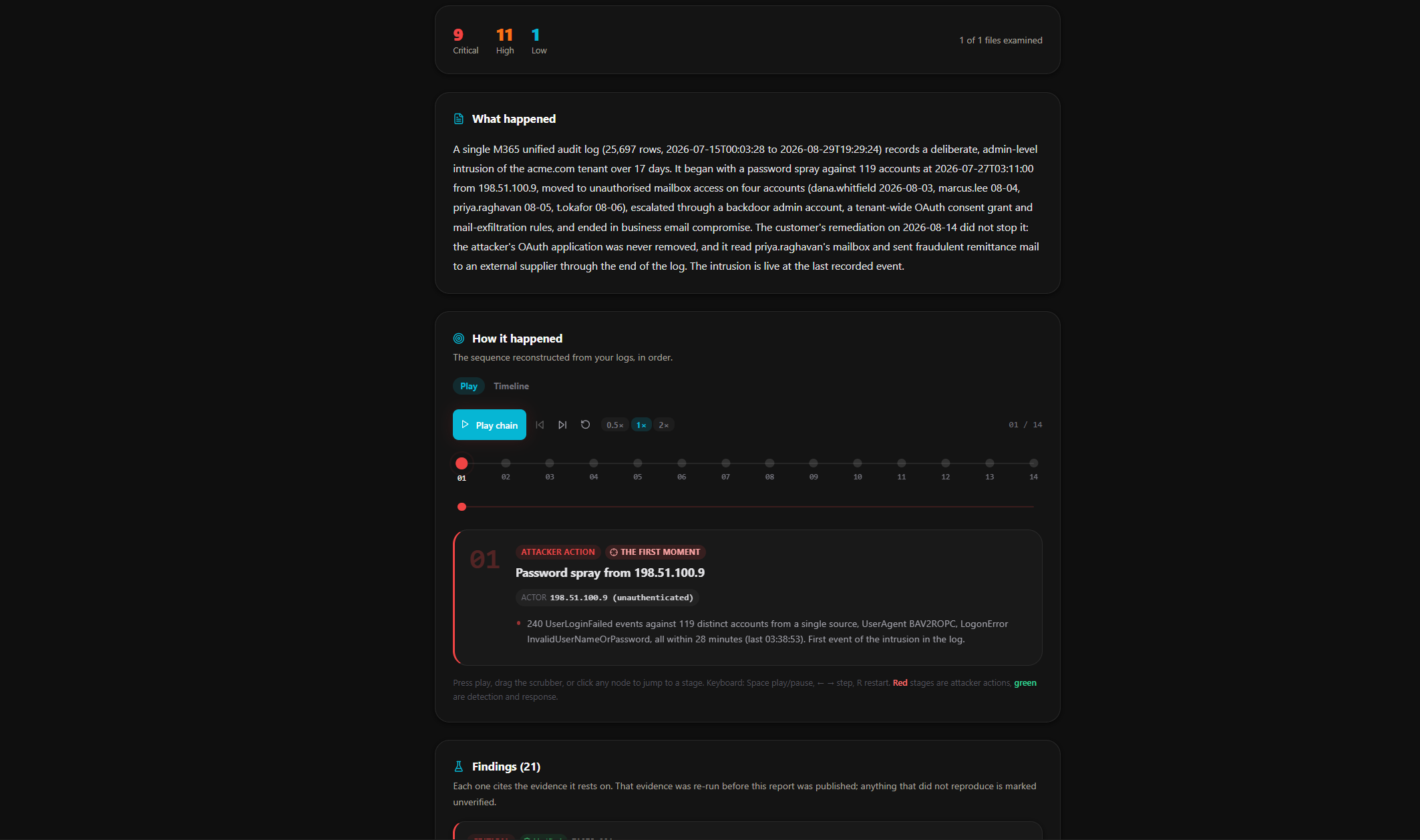
Drop in your logs as zip archives or loose files. Only a title is required. Everything else you tell it is a head start: it changes what gets looked at first, never what gets looked at. Every file is swept either way, and anything found outside what you suspected is still reported.
The form asks the questions a colleague would ask:
- What do you think happened?
- How serious does it look, and which cloud is it?
- When did you notice it?
- Which accounts or resources are you worried about?
- Have you already done anything about it?
That last one matters more than it looks. Telling it what you have already done stops your own response, a password reset or a rule you removed, being read as the attacker's activity.
What It Can Find
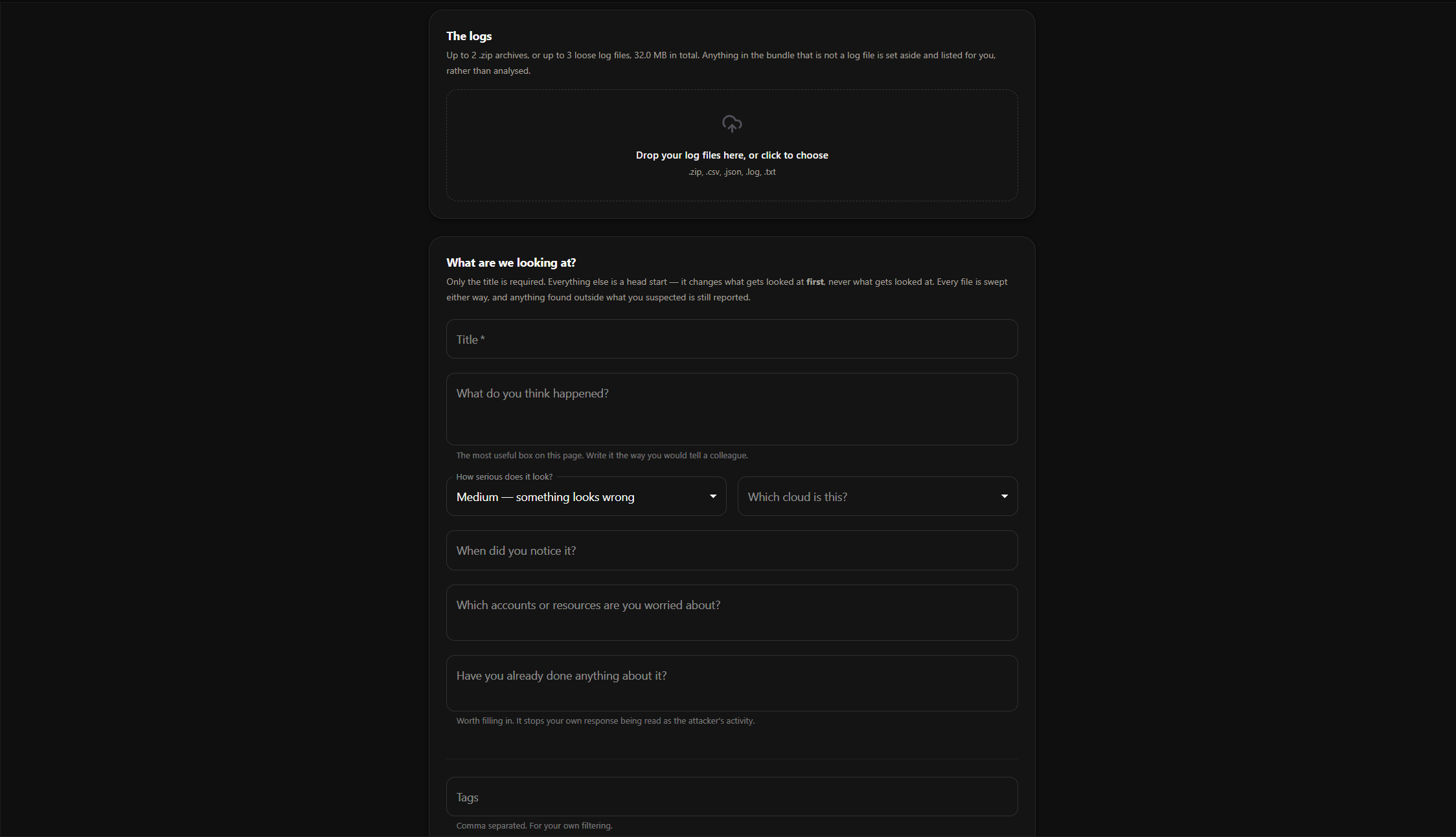
The investigation reconstructs each stage of an attack, not just the first sign-in.
How the attacker got in. Stolen sessions, password spraying, phishing and MFA tampering.
Everything they did once inside. Mailbox access, file downloads and searches for payment details.
How they spread. Internal phishing, compromised colleagues and admin accounts taken over.
How they stayed hidden. Mail rules that bury security alerts, deleted evidence and attempts to switch off audit logging.
How data left. Forwarding rules, transport rules and external sharing.
Persistence that survives your cleanup. Access that outlasts a password reset, such as rogue OAuth app permissions.
Whether they are still in. Activity after the point you thought the incident was over.
It also separates real threats from noise. A failed login storm that achieved nothing is reported as exactly that, not mistaken for the breach.
Watch It Work, Live
You do not have to stare at a spinner. While the investigation runs on its own, you can follow every step it takes.
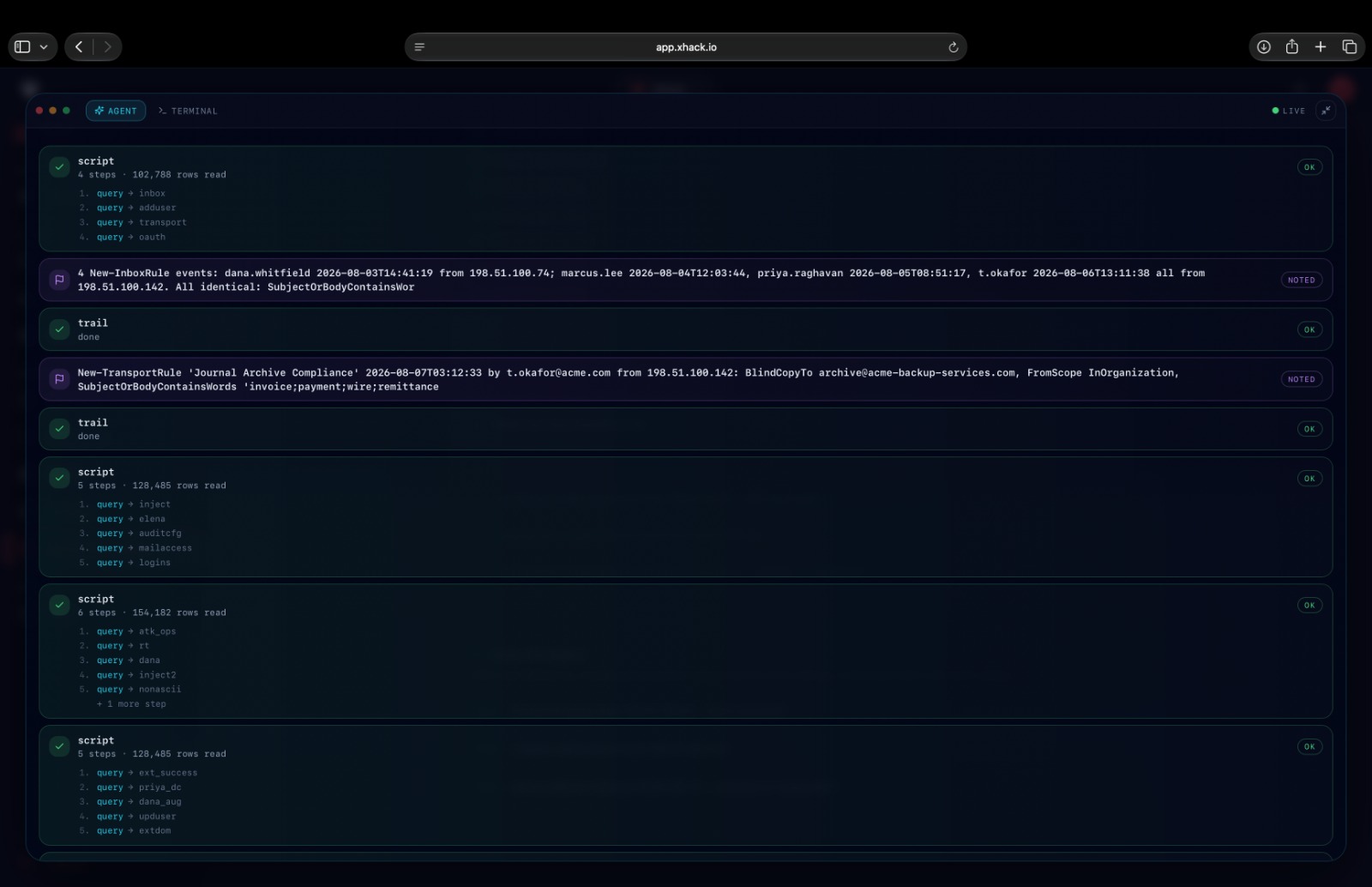
Agent view shows each script the AI runs, how many rows it read, and the notes it records as evidence turns up.
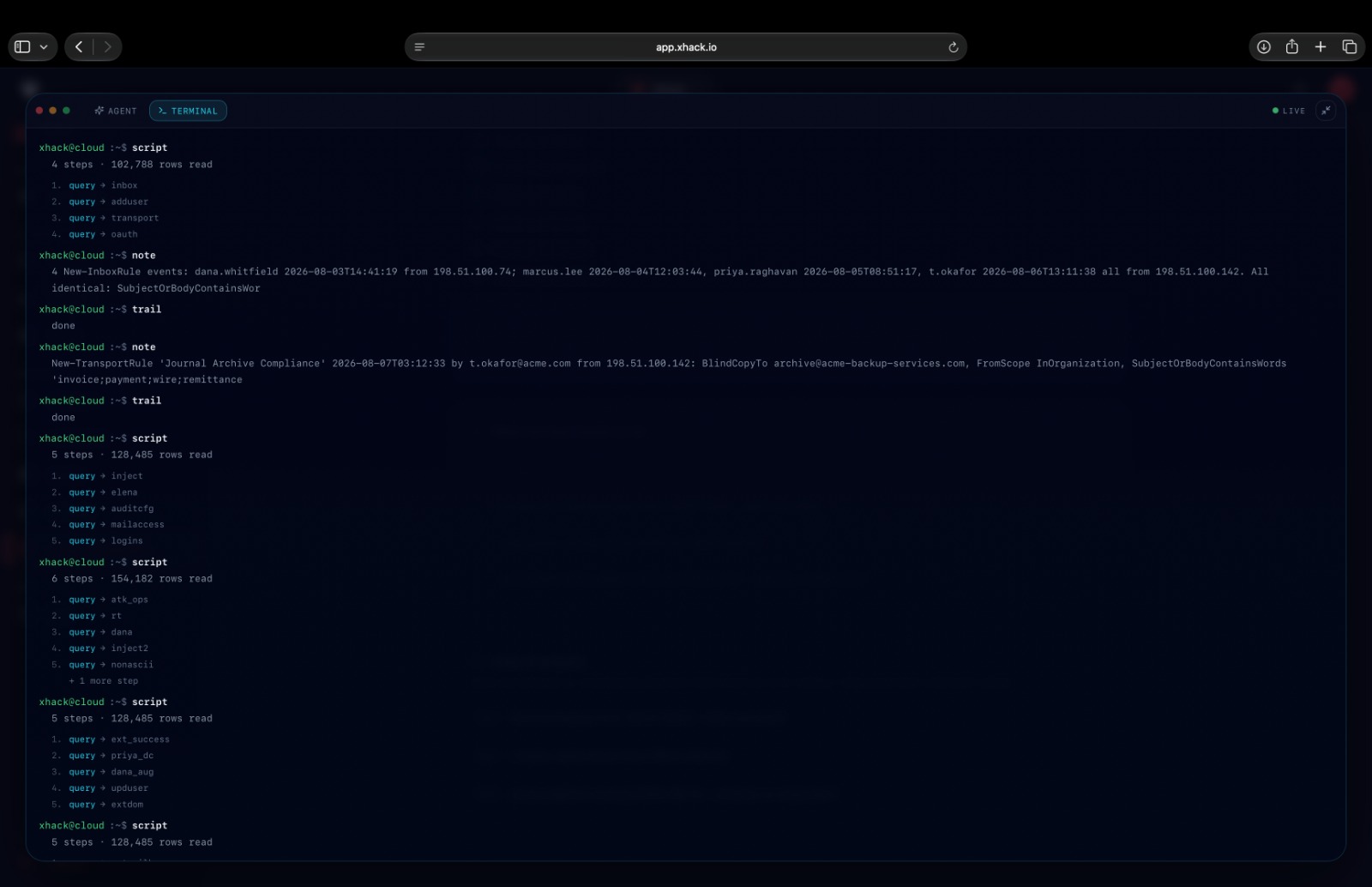
Terminal view shows the same run as a raw terminal: every script, every query inside it, and every note, in order.
Live progress tracks the run from reading the logs through to writing the report, and fullscreen mode lets you follow along on a second screen.
Suspicions the AI later rules out stay visible, marked as dropped, so you can see exactly how it reached its conclusions. Or walk away entirely, and get an email when it is done.
How It Happened, Stage by Stage
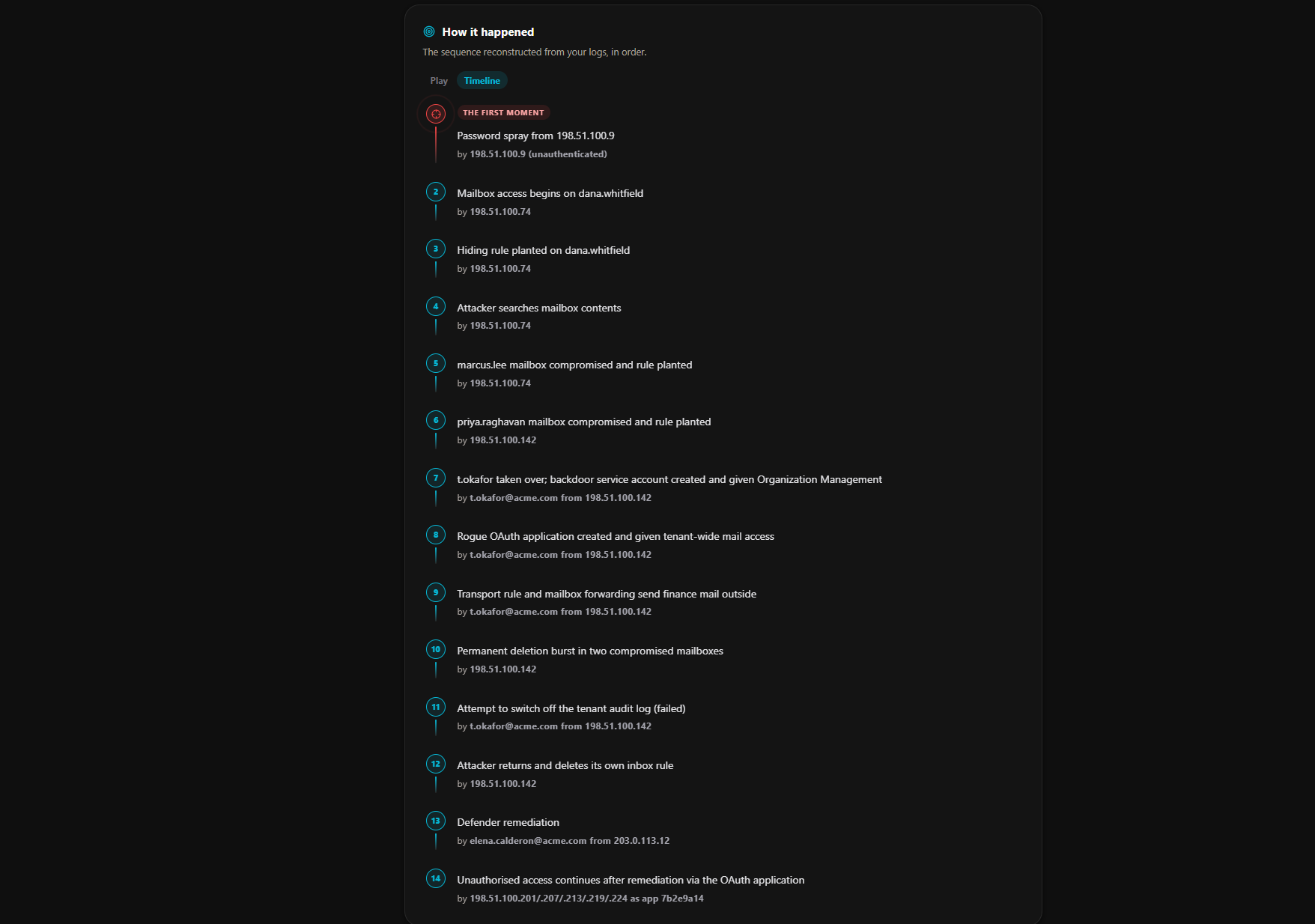
The report reconstructs the intrusion in order and names the actor behind every step, from the first moment of the attack to activity that continued after your remediation.
Play the chain back one stage at a time, or read it as a timeline. Attacker actions and your own response are shown apart, so it is always clear who did what.
Every Finding Is Double-Checked
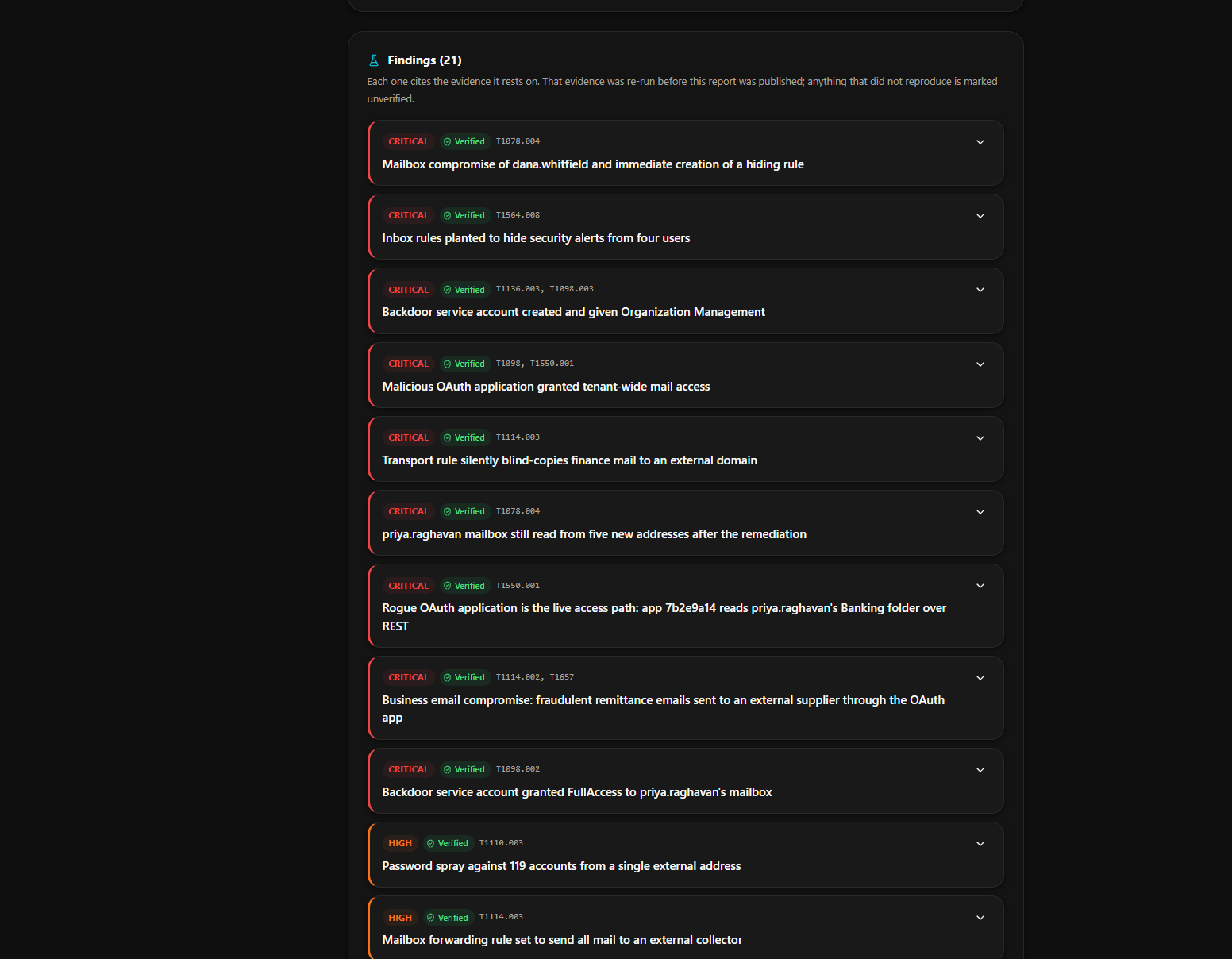
Each finding cites the evidence it rests on. Before the report is published, that evidence is re-run and a second, independent AI checks it against the claim. If a finding does not fully hold up, it is clearly marked Unverified, never quietly passed off as fact.
Findings carry their severity and the MITRE ATT&CK techniques they map to. Expand any one to see the evidence behind it.
You always know the difference between what was proved and what was only suspected.
Nothing Gets Skipped
The investigation cannot report "nothing found" until it has actually examined every file you uploaded. If a file could not be read, for example an image or an unsupported format, the report tells you so rather than silently ignoring it.
The severity counts at the top of the report are computed from the record, not written by the analysis, and the report states how much of the evidence was swept.
What You Get
A complete forensic report, downloadable as PDF or HTML and ready to share with your team, leadership, insurer or legal counsel.
- An executive summary written for leadership
- The first moment of the intrusion, and everything after it
- Every finding with its severity, the evidence behind it, and how to fix it
- A full attack timeline, step by step, mapped to MITRE ATT&CK
- An attacker profile covering their infrastructure and behaviour
- The blast radius: which accounts, mailboxes and data were affected
- Indicators of compromise ready to block
- Prioritised remediation steps
- An honest list of what could not be determined, and why
Read a sample report (PDF), produced from demo logs for a fictional company, or browse it alongside our other sample reports in the document library.
What You Can Do
- Upload logs as individual files or zipped bundles
- Describe the incident in your own words
- Watch the investigation live, or walk away and get an email when it is done
- Cancel a run at any time
- Rate each finding as accurate or not, and add notes for your team
- Download the report as PDF or HTML
- Get notified by email, or through webhooks into your own tools
What It Works With
- Microsoft 365 and Entra ID audit logs
- AWS CloudTrail
- Google Workspace activity
- Firewall and network logs
- Server and SSH logs
- CSV, JSON, JSON Lines, key-value and plain-text log formats
Logs in unfamiliar formats are learned on the spot. The AI works out the structure itself, so there is nothing to convert first.
Your Data Stays Yours
Every investigation runs in its own isolated environment, created for that run and destroyed when it ends. Your uploaded files are deleted as soon as the investigation finishes, whatever the outcome. Only the report and its findings are kept.
Investigations are private to your workspace. Text an attacker planted in your logs cannot steer the investigation: log content is treated as evidence, never as instructions.
Who It Is For
- Security teams who need answers in hours, not days
- IT administrators handling a suspected account takeover without a dedicated SOC
- MSPs and consultants running incident response for clients
- Businesses that need a clear, evidence-backed account of an incident for leadership, insurance or compliance
Availability
Cloud Investigation is included on the Researcher Professional and Researcher Elite plans, and on every company plan: Starter, Premium and Elite. Usage limits apply and vary by plan. Need more capacity? Talk to us.
See the full product page at Cloud Investigation, take the platform tour, or compare plans.
Try it on your own stack
Run this against a target you own and judge it on what it finds, not on a description.
Start an InvestigationQuestions about this?
You get a researcher on the call, not a sales engineer reading the same page back to you.
Contact supportMore in Security platform
Capabilities that sit alongside this one.