Table of contents
20
By Salman Khan, OSCP+, Founder of XHack, SRT (Synack Red Team member)
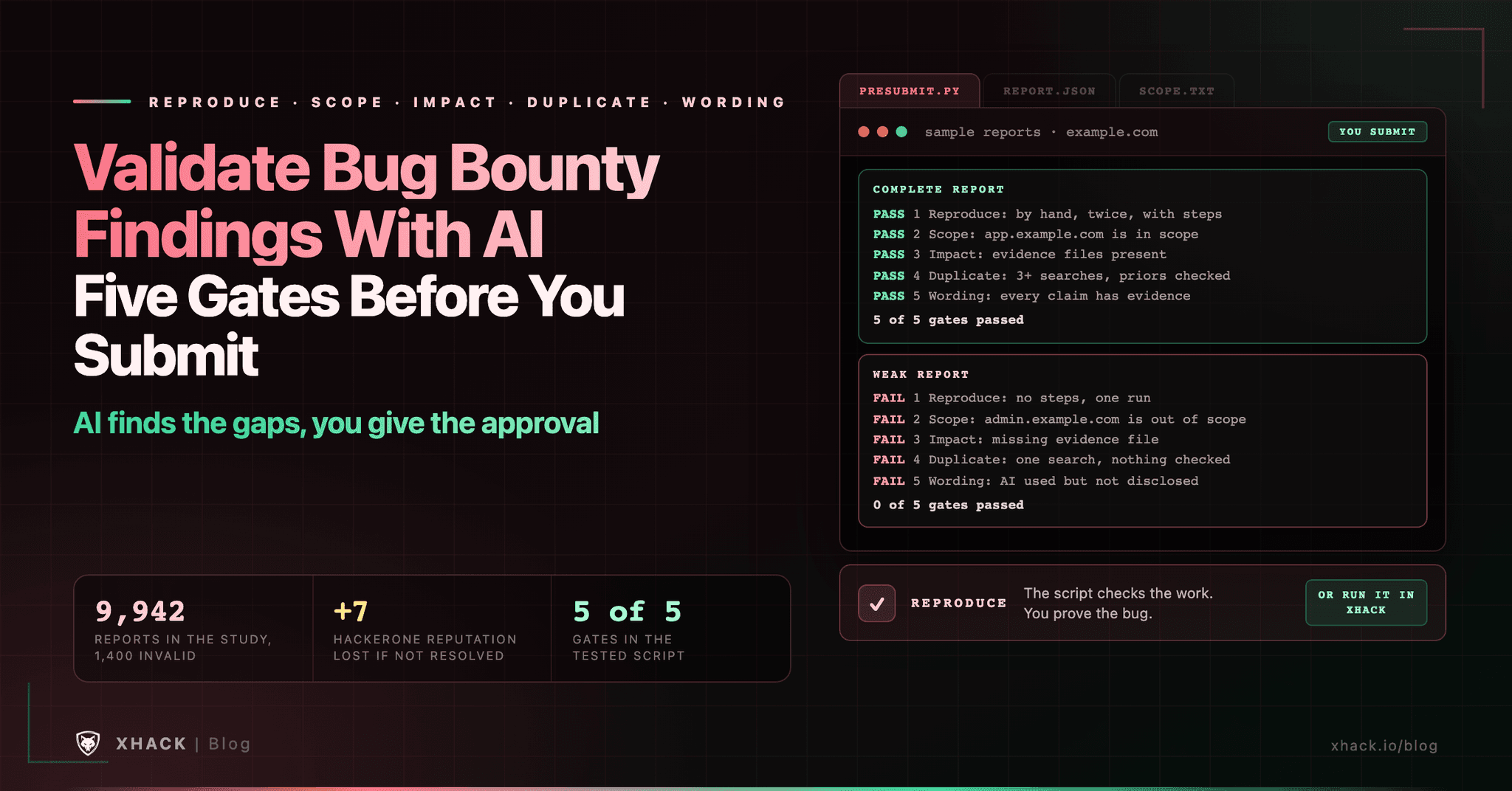
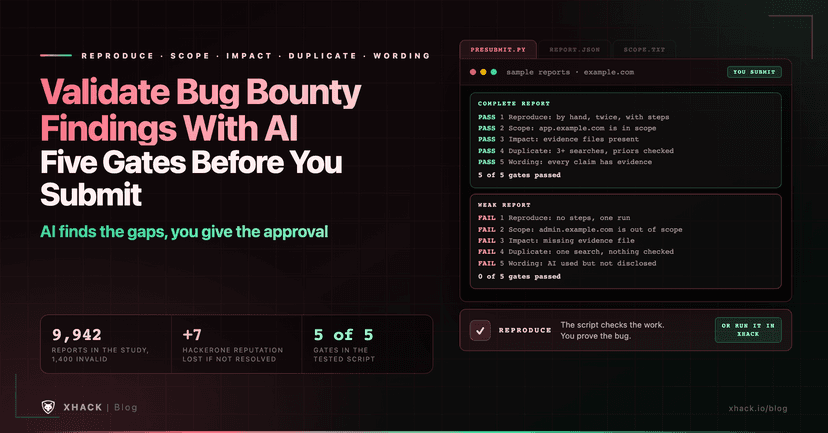
Read this in 30 seconds: To validate bug bounty findings before you submit them, you need five gates: reproduce it by hand, confirm the asset is in scope, prove the impact, search for duplicates and write only what you can evidence. AI can help with each gate, but it cannot be the judge, because the one large study I found shows language models tend to over-accept reports. I read the platform documentation and the research on 10 November 2026 and built a script that checks the gates, tested on a good and a bad sample report.
- A language model is a weak way to validate bug bounty findings on its own. An arXiv study of 9,942 disclosed bug bounty reports, 1,400 of them invalid, found that models including GPT-5, DeepSeek and a fine-tuned RoBERTa had strong overall accuracy but consistently struggled to spot the invalid reports, and tended to over-accept.
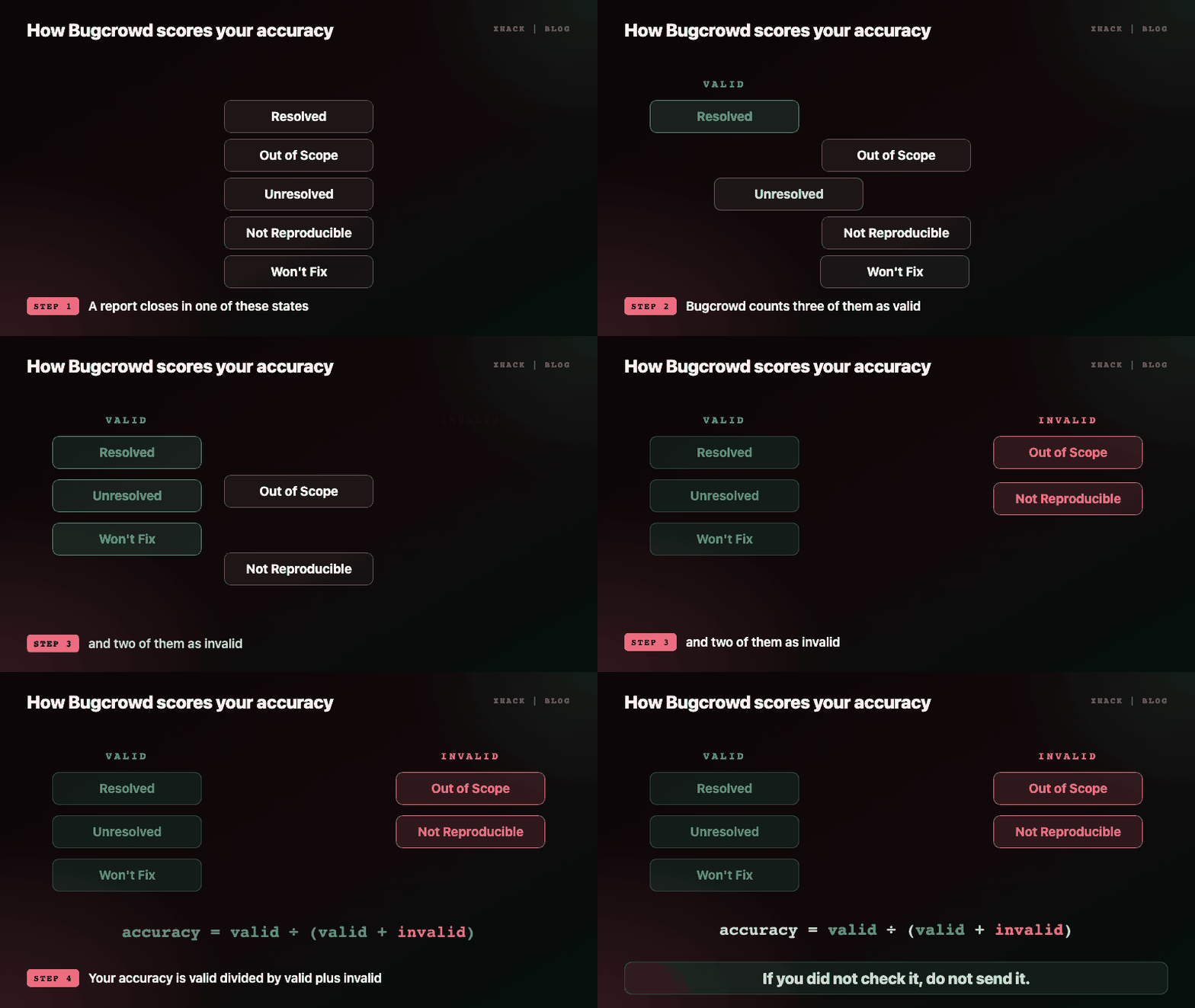
- Failing to validate bug bounty findings costs you standing. On HackerOne, the +7 reputation for a report is deducted if it closes in any state other than Resolved, and on Bugcrowd, Out of Scope and Not Reproducible count as invalid in your accuracy score of valid divided by valid plus invalid.
- “Similar” is not “duplicate”, but a real duplicate earns nothing. Bugcrowd says a duplicate is only a duplicate if fixing the parent removes the need to fix the later report, and HackerOne defines a duplicate as an issue already reported, so search before you submit.
- The five gates to validate bug bounty findings are checkable. My
presubmit.pyfails a report with no hand reproduction, an out-of-scope asset, missing evidence files, too little duplicate searching or an undisclosed AI use, and passed a complete sample 5 of 5 while failing a weak one 0 of 5.- XHack helps you validate bug bounty findings with a validation layer in the agent. It routes findings through a validation layer and captures screenshot evidence, from $20 a month with a 7-day trial, and you still reproduce every finding yourself.
If you want to validate bug bounty findings with AI, you probably have an agent that produces candidate bugs faster than you can check them. That is exactly the situation that gets hunters into trouble, because the cost of an unvalidated report lands on you, not on the agent.
This guide to validate bug bounty findings gives you a pre-submit checklist with a gate for each question a triager will ask, shows where AI helps and where it misleads, and includes a tested script that refuses to give a green light until the work is done. It is for programs and systems you are authorised to test, and it contains no attack techniques.
You validate bug bounty findings to protect your reputation, your payouts and your access, because every platform scores you on what you submit. The mechanics are in the platforms’ own documentation.
So the rule to validate bug bounty findings is simple: if you did not check it, do not send it.
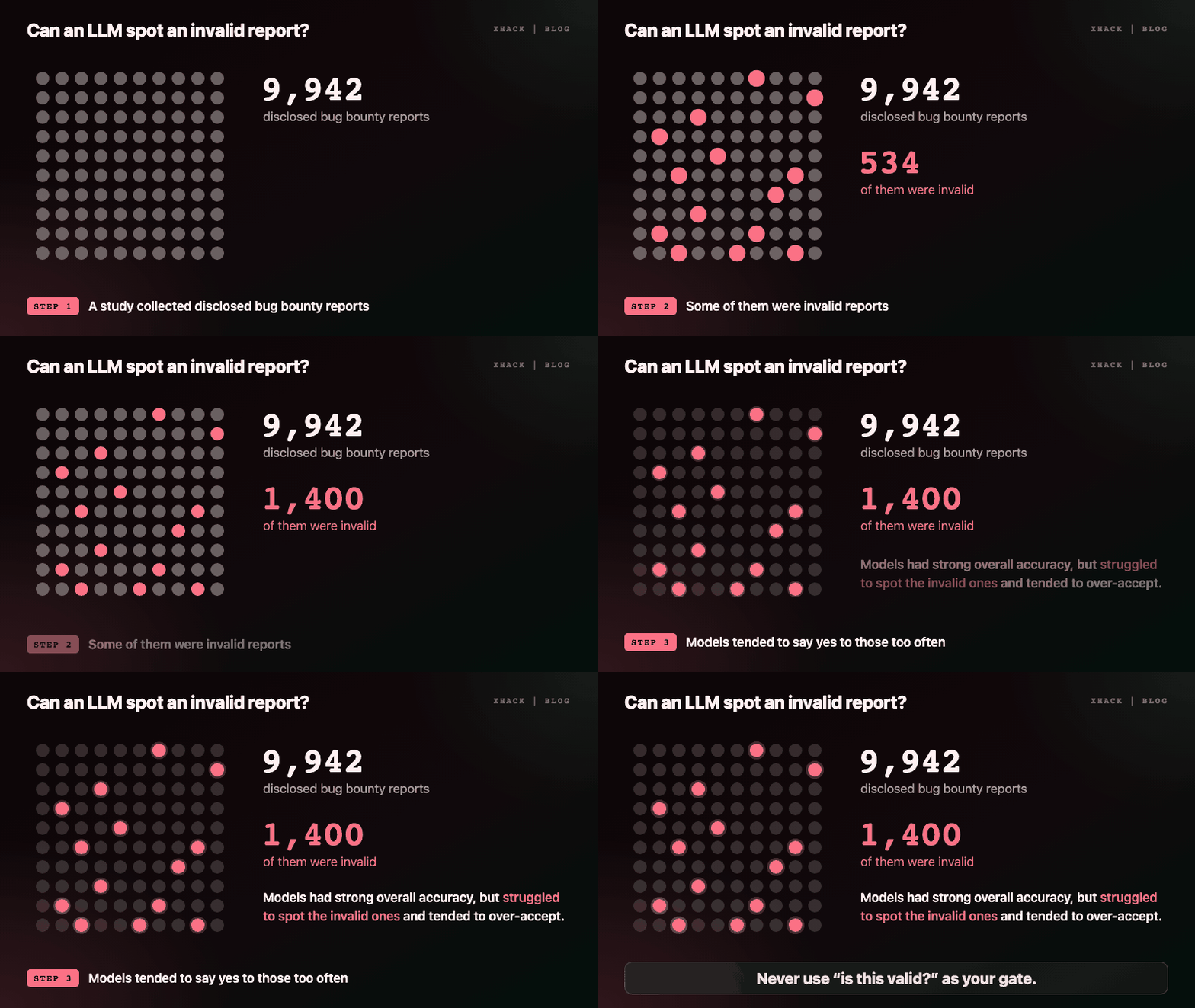
To validate bug bounty findings, an LLM can read your report and your evidence quickly, but the best public evidence says it is biased towards saying yes. The arXiv study “From Reviewers’ Lens”, submitted 23 November 2025, collected 9,942 disclosed bug bounty reports including 1,400 invalid ones and tested whether models could identify the invalid ones.
The authors report that models such as GPT-5, DeepSeek and a fine-tuned RoBERTa reached strong overall accuracy but consistently struggled to detect the invalid cases, with a tendency to over-accept reports. Adding a taxonomy of rejection reasons for information disclosure bugs to a retrieval-augmented setup substantially improved consistency and reduced the bias. The authors also found that reporters with higher reputations tended to get more favourable outcomes in borderline cases.
The lesson for how you validate bug bounty findings is practical. Asking a model “is this report valid?” will often return “yes”, so do not use that answer as your gate. Ask it for specific, checkable things instead, such as which claim lacks evidence or which step a reader could not follow, and verify what it says. Our best LLM for bug bounty guide explains how to measure a model on your own tasks.
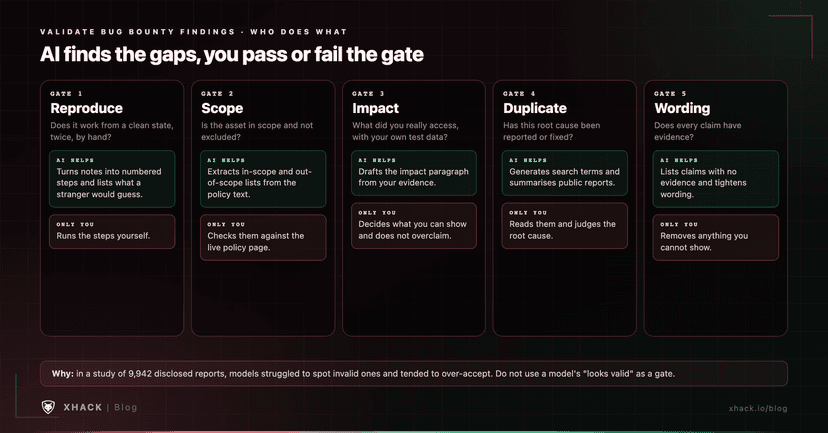
Each gate to validate bug bounty findings is a question a triager will ask, so answer it first. The table shows how AI helps with each and what only you can do.
| Gate | The question | How AI helps | What only you can do |
|---|---|---|---|
| 1. Reproduce | Does it work from a clean state, twice, by hand? | Turn your notes into numbered steps, and read them as a stranger would | Actually run the steps yourself |
| 2. Scope | Is this asset in scope, and not on the exclusions? | Extract in-scope and out-of-scope lists from the policy text | Confirm against the live policy page |
| 3. Impact | What did you really access or change, with your own test data? | Draft the impact paragraph from your evidence | Decide what you can demonstrate, and not overclaim |
| 4. Duplicate | Has this root cause been reported or fixed? | Generate search terms and summarise public reports | Read the reports and judge whether it is the same root cause |
| 5. Wording | Does every claim have evidence? | Tighten wording and list claims without evidence | Remove anything you cannot show |
To validate bug bounty findings, run it by hand twice from a clean state, and write the exact steps. A finding that worked once on a cluttered session is often “Not Reproducible”, which Bugcrowd counts against your accuracy. Ask an AI to read your steps and list anything a new reader would have to guess, then fix those gaps.
Before you validate bug bounty findings, read the policy page and copy the in-scope and out-of-scope assets into a file. A model can extract them from the policy text for you, and you then compare them with the live page, because policies change. Out of Scope is an invalid state on Bugcrowd, so this gate protects your accuracy.
To validate bug bounty findings at this gate, state what you accessed or changed, using accounts and data you created, and attach evidence. Use the program’s rating scale and do not claim more than you showed. An unevidenced “critical” is the fastest way to a downgrade and a bad reputation with that triager.
To validate bug bounty findings against duplicates, search the program’s known issues, disclosed reports and changelogs with several different terms before you write the report. HackerOne defines a duplicate as a vulnerability that has already been reported. Bugcrowd’s guidance adds a useful test: a report is only a duplicate if fixing the original removes the need to fix the later one, and “similar is not the same”, so ten injection points in different parameters are not one bug. That cuts both ways, so describe what is different about yours if it resembles another.
When you validate bug bounty findings in writing, every sentence in the report should be a claim you can point to evidence for. Cut hedges and hype, keep the report short, and avoid long machine-written explanations, which programs such as curl and Apple warn against in their guidance. Follow each program’s AI disclosure rules, and when a program is silent, our policy guide explains why a one-line disclosure is the safer habit. Our bug bounty report writing guide covers the structure of the report itself.
A script to validate bug bounty findings cannot decide whether your finding is real, but it can refuse to say “ready” until you have done the work a triager will check. presubmit.py reads a small JSON file describing your report and prints a pass or fail for each gate.
"""Pre-submit gate check for a bug bounty report you wrote about a program you are allowed to test.
It does not judge whether your finding is real. It checks that you did the work a triager will ask for.
Usage: python3 presubmit.py report.json
Exit code 0 = every gate passed, 1 = at least one gate failed.
"""
import fnmatch, json, sys
from pathlib import Path

def load_scope(path):
    inn, out = [], []
    for line in Path(path).read_text().splitlines():
        line = line.strip()
        if not line or line.startswith("#"):
            continue
        (out if line.startswith("!") else inn).append(line.lstrip("!"))
    return inn, out

def gates(r, base):
    res = []
    # 1 Reproduce
    rep = r.get("reproduced", {})
    ok = rep.get("by_hand") is True and rep.get("times", 0) >= 2 and len(r.get("steps", [])) >= 1
    res.append(("1 Reproduce", ok, "reproduced by hand at least twice, with numbered steps" if ok
                else "reproduce it by hand twice from a clean state and write the steps"))
    # 2 Scope
    inn, out = load_scope(base / r["scope_file"])
    asset = r.get("asset", "")
    hit_out = any(fnmatch.fnmatch(asset, p) for p in out)
    hit_in = any(fnmatch.fnmatch(asset, p) for p in inn)
    ok = hit_in and not hit_out
    res.append(("2 Scope", ok, f"{asset} is in scope" if ok else
                f"{asset} is {'listed out of scope' if hit_out else 'not matched by any in-scope entry'}"))
    # 3 Impact
    imp = r.get("impact", {})
    files = imp.get("evidence", [])
    missing = [f for f in files if not (base / f).exists()]
    ok = len(imp.get("statement", "")) >= 40 and files and not missing
    res.append(("3 Impact", bool(ok), "impact stated with evidence files present" if ok else
                "state what you accessed or changed, and attach evidence files that exist" +
                (f" (missing: {', '.join(missing)})" if missing else "")))
    # 4 Duplicate
    dup = r.get("duplicate_search", {})
    ok = len(dup.get("queries", [])) >= 3 and len(dup.get("checked", [])) >= 1
    res.append(("4 Duplicate", ok, "searched with 3+ queries and checked prior reports" if ok else
                "search known issues, disclosed reports and changelogs with 3+ queries and list what you checked"))
    # 5 Wording
    bad = [c["text"] for c in r.get("claims", []) if not (base / c.get("evidence", "")).is_file()]
    ai = r.get("ai", {})
    ai_ok = (not ai.get("used")) or ai.get("disclosed") is True
    ok = not bad and ai_ok and r.get("claims")
    why = []
    if bad: why.append(f"claims without evidence: {len(bad)}")
    if not ai_ok: why.append("AI was used but not disclosed")
    if not r.get("claims"): why.append("list each claim with its evidence file")
    res.append(("5 Wording", bool(ok), "every claim has evidence and AI use is disclosed" if ok else "; ".join(why)))
    return res

if __name__ == "__main__":
    if len(sys.argv) != 2:
        sys.exit("usage: presubmit.py <report.json>")
    p = Path(sys.argv[1])
    r = json.loads(p.read_text())
    results = gates(r, p.parent)
    for name, ok, msg in results:
        print(f"{'PASS' if ok else 'FAIL'}  {name}: {msg}")
    failed = sum(1 for _, ok, _ in results if not ok)
    print(f"\n{5 - failed} of 5 gates passed")
    sys.exit(1 if failed else 0)
The JSON file lists your steps, how many times you reproduced it, the asset and a scope file, the impact statement and evidence files, the duplicate searches you ran, each claim with its evidence file, and whether you used AI and disclosed it. The scope file has one pattern per line, with a leading ! for out-of-scope entries.
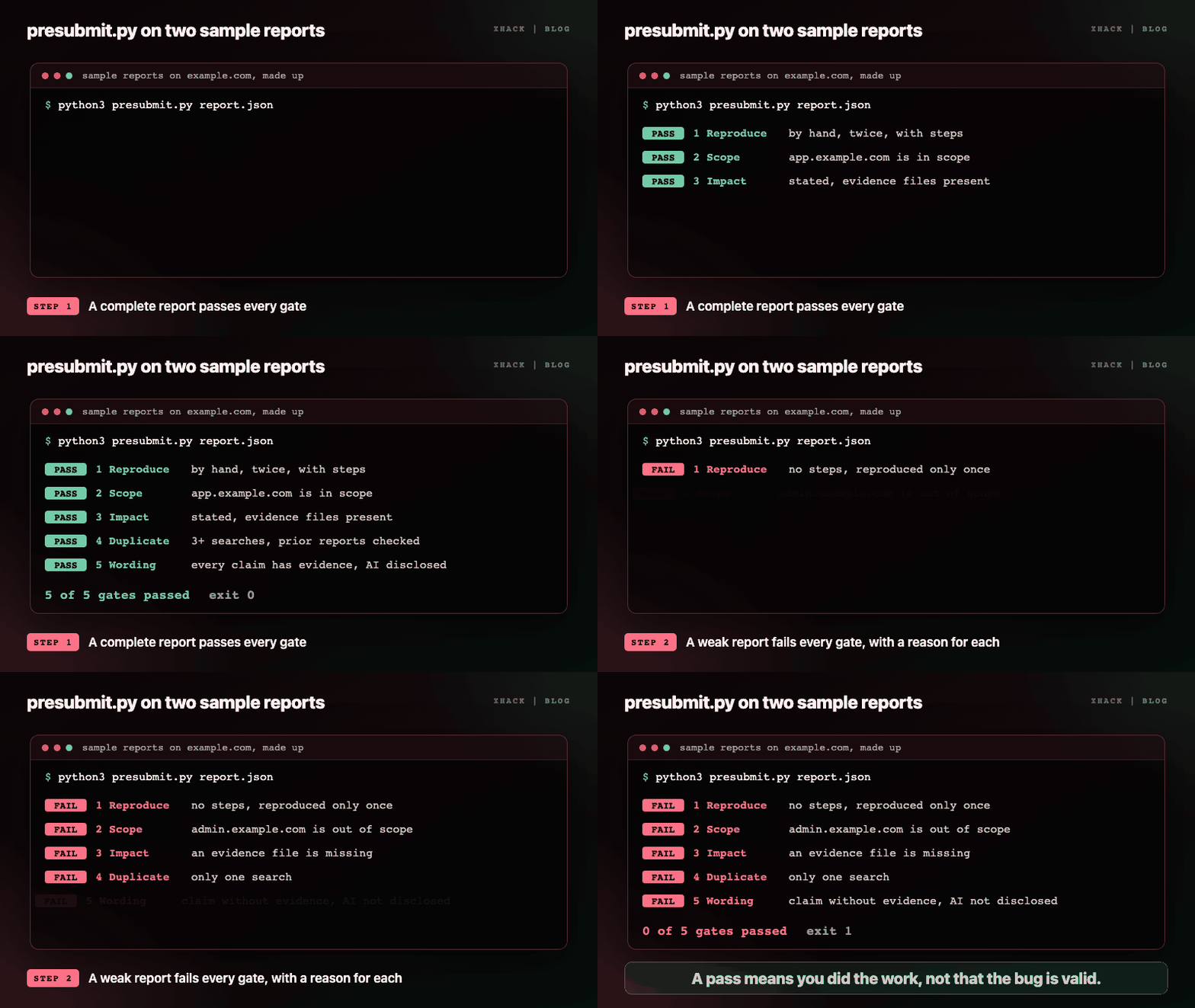
I tested it with two sample reports on example.com, which I made up. The complete one passed all five gates and exited 0. The weak one, with no steps, a single reproduction, an out-of-scope asset, a missing evidence file, one search and an undisclosed AI use, failed all five gates and exited 1, with a reason for each.
Two notes. The AI-disclosure check is a default for programs that require disclosure, so remove it if yours does not. And a pass means “you did the work”, not “the bug is valid”.
The best use of AI to validate bug bounty findings is as a hostile triager that has to cite your evidence. Because models over-accept, give the prompt a job that cannot be answered with “looks good”:
You are a triager for this program. Here is the policy, my report and my evidence list.
For each claim in the report, name the evidence file that supports it, or say "no evidence".
List every step a reader could not follow without guessing.
List reasons you might close this as Not Applicable, Out of Scope, Not Reproducible or Duplicate.
Do not rate the severity and do not say whether the bug is valid.
Then act on the output yourself. If the model says a claim has no evidence, remove the claim or add the evidence. If it lists a plausible closure reason, check it against the policy. Our Claude Code bug bounty guide covers running an agent safely for this kind of work.
So yeah, here is where we talk about our own product. I am biased, it is my company, and I think XHack is the strongest all-in-one option to validate bug bounty findings and turn candidates into evidence, with you still making the final call.
XHack combines three things most providers sell separately: an autonomous AI agent, a continuous security platform and human testers. For validation, two parts matter.
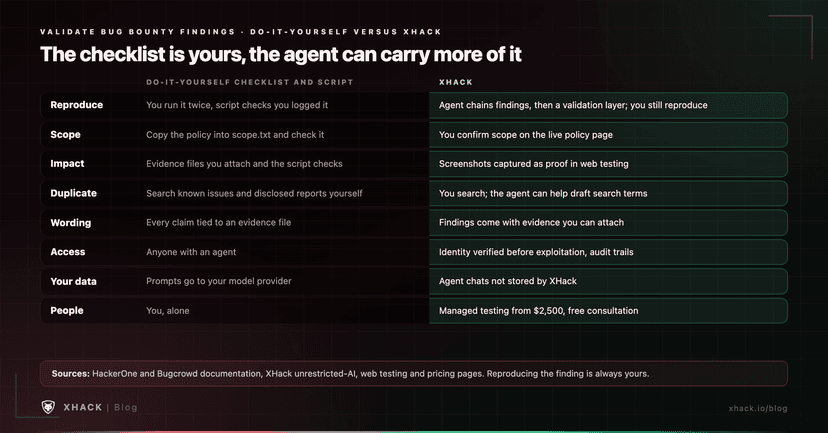
Individual plans are $20, $49 and $150 a month, with a 7-day free trial, one per person. See the pricing page and the agent for bug bounty guide. Whatever tool finds it, reproduce the finding yourself before you submit, because brutal honesty is kind of our thing.
Run five gates: reproduce it by hand twice from a clean state, confirm the asset is in scope, prove the impact with your own test data, search for duplicates with several terms and make sure every claim has evidence. To validate bug bounty findings with AI, use the model for drafting steps, extracting scope and listing unevidenced claims, and keep the decisions yourself.
Not on its own. A study of 9,942 disclosed reports found that models such as GPT-5 and DeepSeek had strong overall accuracy but struggled to spot invalid reports and tended to over-accept them. Use AI to find gaps in the report and not to give it a green light.
Search the program’s known issues, disclosed reports and changelogs with several different phrasings before you submit. HackerOne treats a report of an already-reported vulnerability as a duplicate, and Bugcrowd says it is only a duplicate if fixing the original removes the need to fix the later report, so describe what makes yours different if it looks similar.
It can cost you standing. On HackerOne the +7 reputation for a report is deducted if it closes in a state other than Resolved, and low reputation limits how many reports you can submit. On Bugcrowd, Out of Scope and Not Reproducible reports count against your accuracy. Some programs also sanction repeated unvalidated AI-generated reports.
It depends on the program. Several platforms and projects require or expect disclosure of AI assistance, and others are silent. Read the policy, and when it is unclear a one-line disclosure is the safer habit, as our AI bug bounty policy guide explains.
No. The script only checks that you did the preparation a triager looks for: reproduction, scope, evidence, duplicate searching and disclosure. Whether the finding is real is something only you can establish by reproducing it, and the triager decides what happens next.
To validate bug bounty findings, check five gates before every submission and let AI find the gaps, not give the approval. Reproduce it twice by hand, check the scope against the live policy, prove only the impact you can evidence, search for duplicates and cut every claim you cannot show.
Platform rules and scoring change, so re-read the program’s page each time you validate bug bounty findings.
Categories
Related articles