Table of contents
19
By Salman Khan, OSCP+, Founder of XHack, SRT (Synack Red Team member)
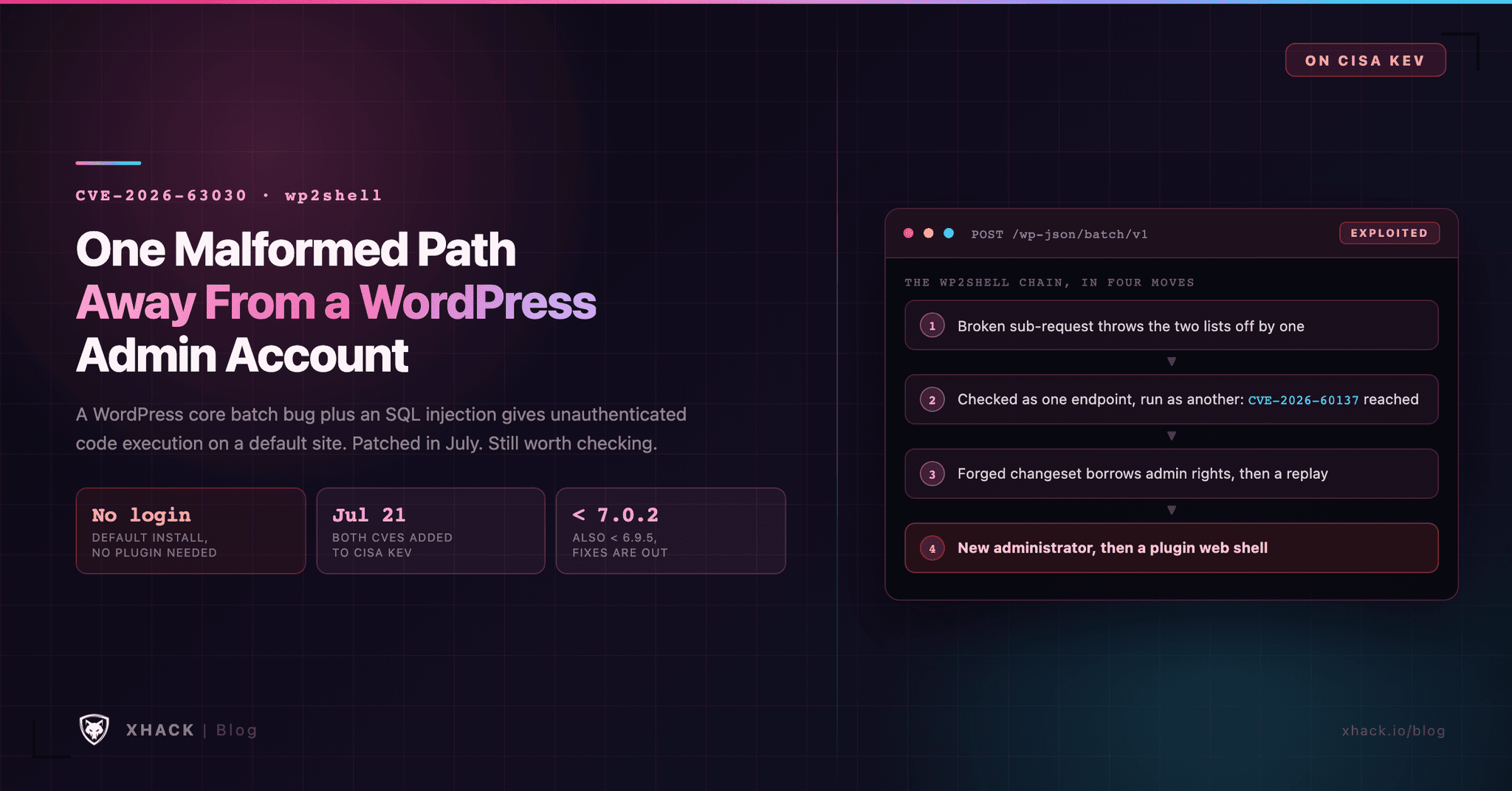
Read this in 30 seconds: CVE-2026-63030 is a WordPress core bug that, chained with a second one, lets anyone on the internet take over a default site with no login. It was patched in July. It is still worth your time in September.
- Two bugs, one chain. CVE-2026-63030 (a REST batch flaw) and CVE-2026-60137 (an SQL injection) together give unauthenticated code execution on WordPress 6.9.0 through 7.0.1. Neither needs a plugin.
- The fix is out, and forced. WordPress shipped 7.0.2, 6.9.5 and 6.8.6 on July 17 and turned on forced auto-updates. CISA listed both bugs as exploited on July 21.
- A researcher says an AI found it for about $25. Adam Kues of Searchlight Cyber says he pointed GPT-5.6 Sol Ultra at the WordPress source and had a working chain in roughly ten hours.
- Patching does not remove an intruder. GreyNoise reported on September 21 that one actor used CVE-2026-63030 and its partner bug against at least 49 organizations in 29 countries. One government target lost 18,566 records.
- Your to-do for CVE-2026-63030 is two checks. Confirm the version, then look for administrator accounts and plugins you did not create.
Most WordPress bugs live in a plugin you can remove. This one lives in the core, and it works by making WordPress check one request and run another.
CVE-2026-63030 sits in the REST API’s batch endpoint, the part of WordPress that lets a client send several API calls in a single request. CVE-2026-63030 makes the checking step and the running step disagree about which call is which. That disagreement is what opens the door for CVE-2026-60137, and together the two are known as wp2shell.
Here is how it works, what the attacks looked like, and how to check your own site today.
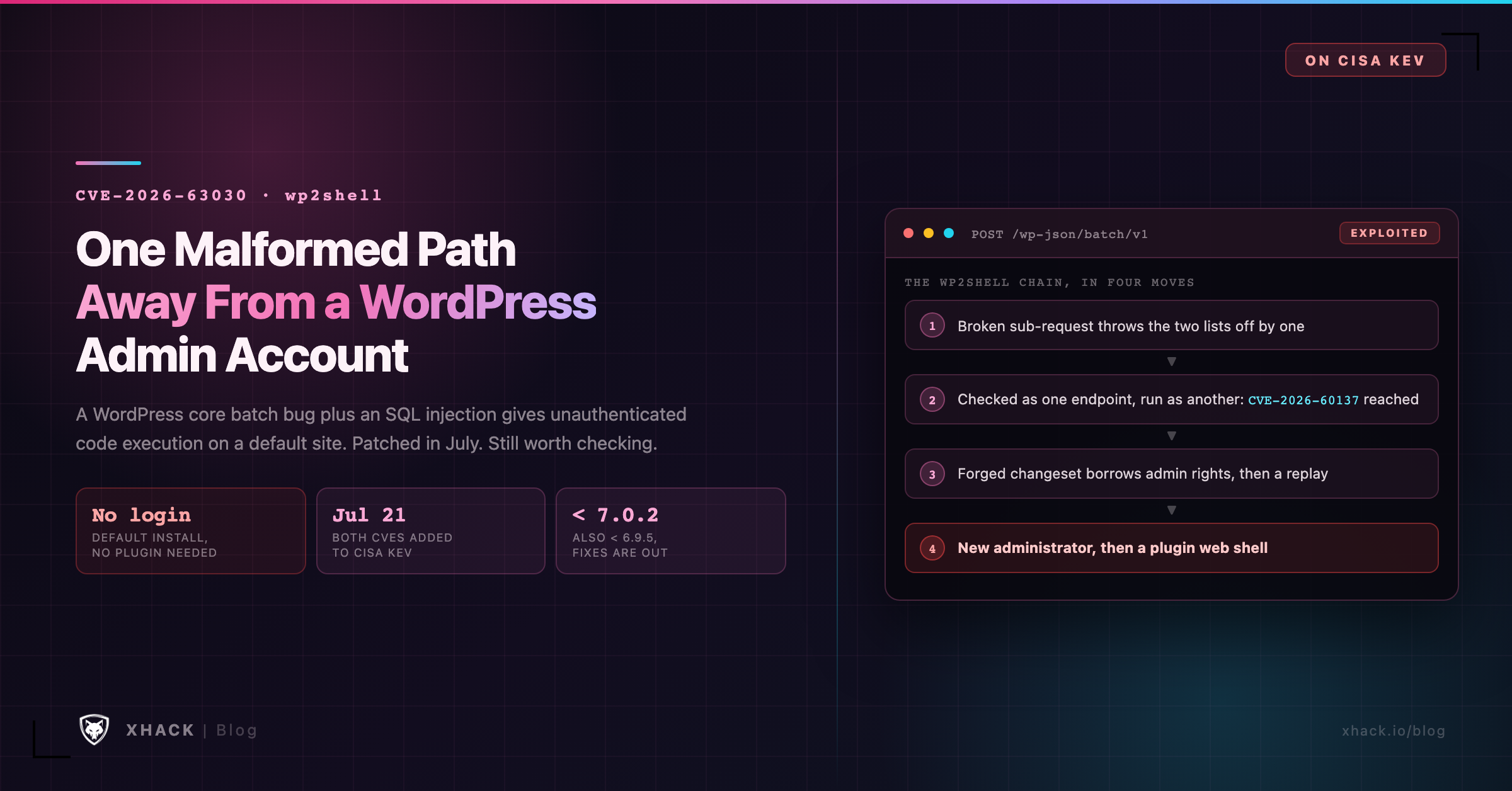
WordPress exposes a REST API at /wp-json/. One of its routes, /wp-json/batch/v1, accepts a list of sub-requests in a single POST. It is meant to save round trips: instead of ten separate calls, a client sends one.
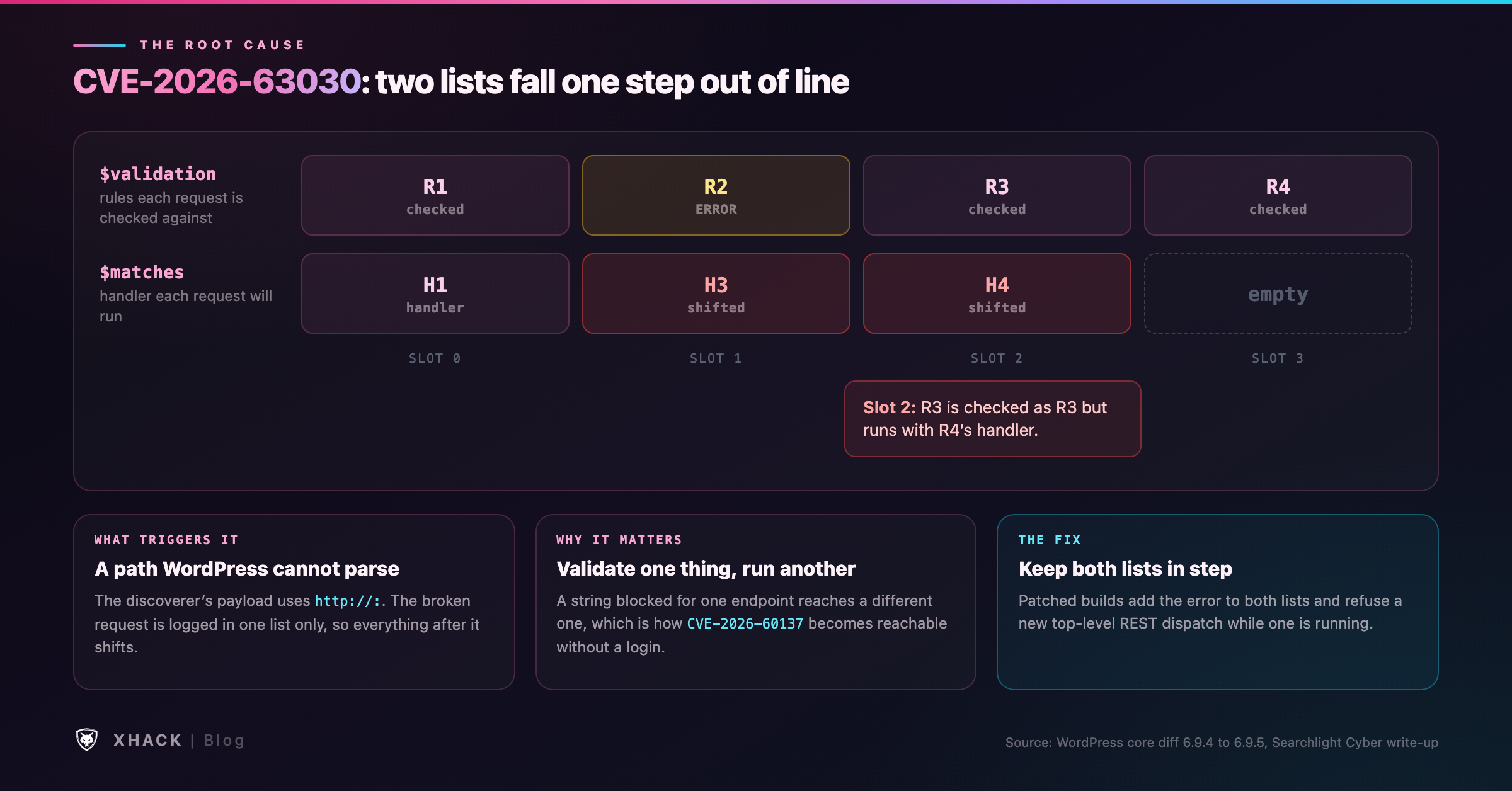
The server handles that list in two passes. First it looks at every sub-request, works out which handler each one belongs to, and validates its parameters. Then it runs them.
That design is fine as long as both passes agree on which request is which. CVE-2026-63030 is what happens when they do not.
Here is the description NVD records for CVE-2026-63030:
“WordPress 6.9.x before 6.9.5 and 7.0.x before 7.0.2 is affected by a REST API batch endpoint route confusion issue which, combined with the author__not_in WP_Query SQL Injection (CVE-2026-60137), could allow an attacker to perform SQL Injection and achieve Remote Code Execution.”
In plain words, the bug is a bookkeeping error. The file is class-wp-rest-server.php, in a method called serve_batch_request_v1(). Simplified, the validation loop did this:
foreach ( $requests as $single_request ) {
    if ( is_wp_error( $single_request ) ) {
        $validation[] = $single_request;   // recorded here...
        continue;                          // ...but never added to $matches
    }
    $matches[]    = $this->match_request_to_handler( $single_request );
    $validation[] = /* result of validating it */;
}
If a sub-request is broken, WordPress notes the error in one list and forgets to add a matching entry to the other. From that point on, the two lists are off by one. Request number 2 gets checked against its own rules, but it is run using the handler that was matched for request number 3.
Searchlight Cyber’s write-up shows that a path which fails URL parsing, http://:, is enough to cause the break. You may see other write-ups describe a triple-slash prefix instead. We could not find that string in the primary sources, but the mechanism is the same: a path WordPress cannot parse.
The official fix for CVE-2026-63030 is small. It makes the broken-request branch add to both lists, and it stops WordPress starting a new top-level REST dispatch while one is already running.
The second bug is in WP_Query, the code that builds most of WordPress’s database queries. It handles a setting called author__not_in, and it cleans the value with absint() only when the value is an array. Send a plain string and the cleaning step is skipped, so the string lands in the SQL query as written.
On its own that is hard to reach. The REST API declares the matching parameter as a list of integers and rejects anything else. That is why NVD describes CVE-2026-60137 as exploitable “when a plugin or theme passes untrusted input to the parameter.”
CVE-2026-63030 removes that limit. Because a request can be checked against one endpoint and run against another, an attacker can slip a string past a check that would have blocked it. That is the whole point of the chain, and it is why the pair is dangerous on a stock install.
The scores show how differently people read these two bugs:
| CVE | WPScan (CNA) | CISA (ADP) |
|---|---|---|
| CVE-2026-63030 | 9.8 Critical | 7.5 High |
| CVE-2026-60137 | 5.9 Medium | 9.1 Critical |
Both come straight from NVD’s record. Each scorer imagined a different situation, one counting the full chain and one counting the bug alone. In the real world the chain is what attackers use, so treat both as critical.
The full chain is long, and it is the interesting part. This is the outline from the discoverer’s own account, with the exploit details left out:
Bitdefender’s MDR team says a full run takes about two minutes. Its advisory also notes that when a run fails partway, it can leave behind a rogue admin account without a web shell. That is why an admin you did not create is a sign of compromise by itself.
The most unusual part of this story is how the bug was found. Adam Kues of Searchlight Cyber says he gave OpenAI’s GPT-5.6 Sol Ultra a clean copy of the WordPress source and told it not to use changelogs, git history or the internet to diff against a patched version.
His account, in his own numbers:
Those figures are his, from his own post, and we have not reproduced them. The post’s title also says exploit brokers pay $500,000 for a WordPress RCE. It gives no source for that number, so treat it as a hook and not a fact.
What is safe to say is that one researcher and one subscription found a chain in mature, heavily reviewed code that had shipped to a very large share of the web. Bug hunters should expect the same tools to be pointed at every popular open-source project. We cover that shift in our guide to AI exploit development.
| Date | What happened |
|---|---|
| Jul 17, 2026 | WordPress 7.0.2, 6.9.5 and 6.8.6 released, with GitHub advisories and NVD records |
| Jul 17, 2026 | The first public exploit repository is created on GitHub, the same day |
| Jul 21, 2026 | CISA adds both CVEs to KEV. Due dates: July 24 (CVE-2026-63030) and August 4 (CVE-2026-60137) |
| Jul 22, 2026 | First exploit against the government target in GreyNoise’s report |
| Sep 21, 2026 | GreyNoise publishes its report on that campaign |
WordPress pushed the fix instead of waiting for site owners to act. The release post says: “Due to the severity, the WordPress.org team have enabled forced updates via the auto-update system for sites running affected versions.”
The scale explains why. Censys counted about 62.8 million WordPress instances on July 20. Only around a quarter showed a version, and about 7.74 million of those sat in the range affected by the full chain. Wiz found that 60% of organizations using WordPress had a vulnerable instance at disclosure. A day later that was 50%, so patching was fast, but not complete.
CISA’s own triage on the NVD record marks CVE-2026-63030 as exploited, automatable and total technical impact.
The most useful thing published since July is GreyNoise’s report, released September 21. It follows one actor. GreyNoise says it is a suspected Chinese speaker and that the activity is the same as or related to a group Acronis calls “Red Heron.”
The headline numbers: at least 49 organizations in 29 countries, mostly small businesses and government bodies, hit through CVE-2026-63030 and CVE-2026-60137. The same actor also attacked 996 Zyxel GS1900 switches through CVE-2026-7273, a bug CISA added to its exploited list on September 21.
One government target shows the whole path. All times are from GreyNoise’s log, counted from the first exploit at 01:27 UTC on July 22:
The activity ended about four hours and ten minutes after it began. GreyNoise says the victims were running unpatched systems.
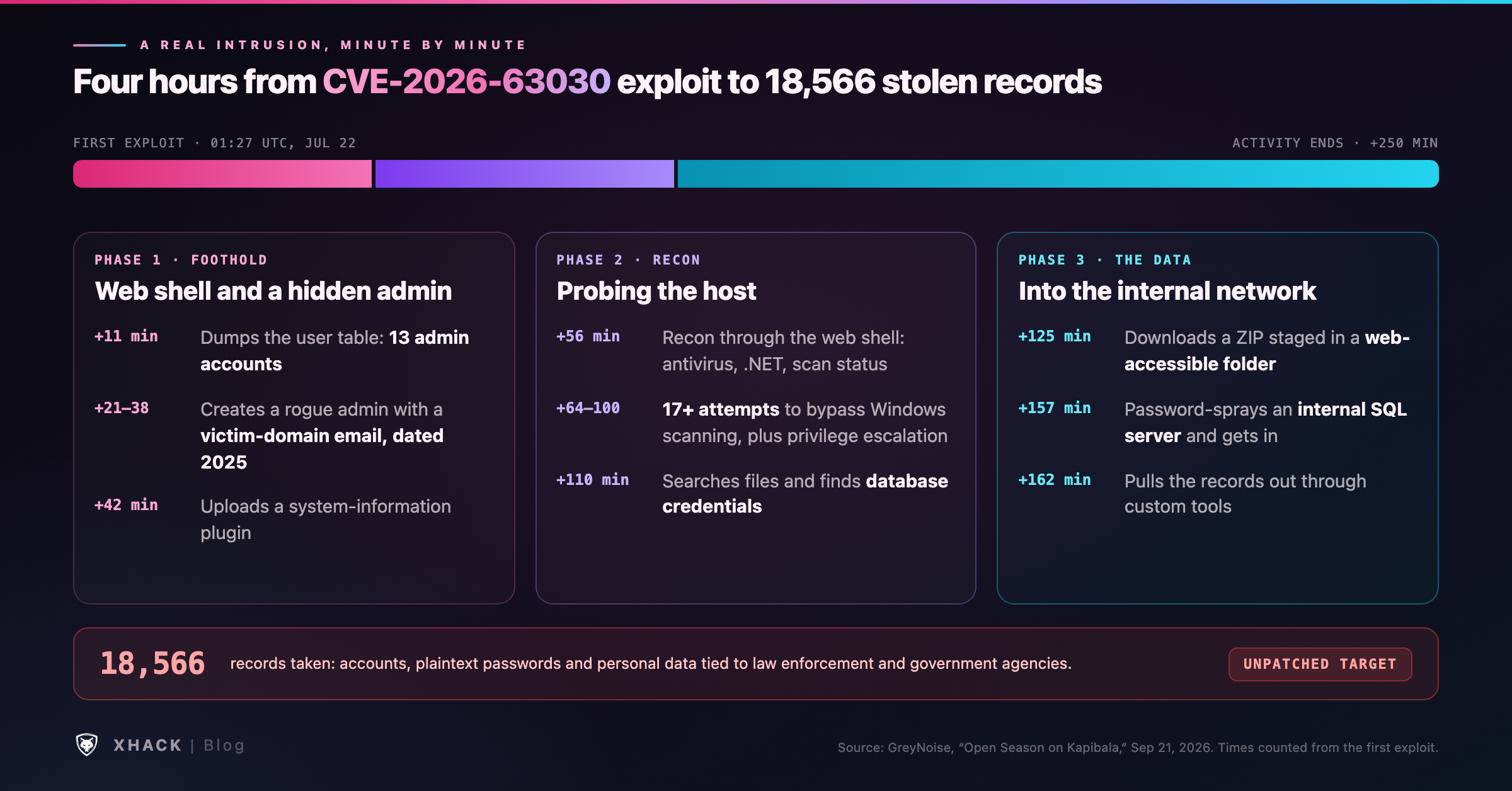
Look at what that means. The web server was not the goal. It was the foothold. The real damage came from a database password sitting in a file and an internal server that accepted a password spray.
Start with the version. These are the versions CVE-2026-63030 affects, and where it is fixed:
| Branch | Affected | Fixed in |
|---|---|---|
| 7.0 | 7.0.0 to 7.0.1 | 7.0.2 |
| 6.9 | 6.9.0 to 6.9.4 | 6.9.5 |
| 6.8 | 6.8.0 to 6.8.5 (SQL injection only) | 6.8.6 |
| 7.1 beta | Before beta 2 | 7.1 beta 2 |
WordPress says versions before 6.8 are not affected. The full unauthenticated chain exists from 6.9 on, because the batch flaw was introduced in 6.9. Version 6.8 has only the SQL injection, which needs a plugin or theme to reach it.
Check yours from the command line:
wp core versionOr open Dashboard, then Updates. Then ask two more questions:
Start with the accounts, because the attacker in GreyNoise’s report went there first:
wp user list --role=administrator --fields=ID,user_login,user_email,user_registeredLook for any admin you do not recognize, and read the registration dates closely. GreyNoise’s attacker backdated its account to 2025, so an old date is not proof of a legitimate user. Also look at emails that use your own domain but belong to no one you know.
Then check the code on disk:
wp core verify-checksums
wp plugin verify-checksums --all
wp plugin list
The first two compare files against WordPress.org’s known-good copies. The third helps you spot a plugin nobody installed. Bitdefender reported dropper folders named with a fun-proof- prefix under wp-content/plugins/.
Next, the logs:
/wp-json/batch/v1 and also ?rest_route=/batch/v1. Both reach the same handler.wp2shell and rezwp2shell.Finally, look for the odd things: unexpected PHP files under wp-content/, ZIP archives in web-accessible folders, and changes to active_plugins, siteurl or home in the wp_options table. Eye Security also lists leftover oembed_cache and customize_changeset rows as database clues.
/wp-json/batch/v1 and to ?rest_route=/batch/v1 at your WAF or reverse proxy. Searchlight Cyber and Censys both recommend this as a stopgap. It is a stopgap only, so update anyway.If you run Windows-hosted WordPress, note the Windows-specific steps in GreyNoise’s timeline. The attacker tried to bypass Windows security scanning, which means endpoint protection on the web server matters as much as the WordPress version.
The lesson we take from CVE-2026-63030 is about the second half of the story, not the first. Patching stops new attackers. It does nothing about the one who got in during the weeks between disclosure and your update.
So the useful testing is a compromise assessment as much as a vulnerability check. We would confirm the version and whether the batch route answers from outside, then audit administrators, plugins and file integrity, and then look at what the WordPress host can reach on your internal network. That last check is where GreyNoise’s victim lost 18,566 records.
We would not run a public exploit against a production site. Those exploits are built to create admin accounts and upload plugins, which is exactly what you are trying to find. The discoverer points to wp2shell.com for a vulnerability check. We have not vetted it, so read any tool before pointing it at production.
That is the kind of testing our human testers and AI agents do on web applications and the servers behind them, and your data stays on your own machine while we do it. A checklist for the wider process is in our penetration testing checklist.
CVE-2026-63030 is a bug in the WordPress core REST API batch endpoint. A failed sub-request is recorded in one internal list but not another, so requests are validated against one handler and run against a different one. Chained with the SQL injection CVE-2026-60137, it gives an unauthenticated attacker remote code execution on default sites.
wp2shell is the name for the exploit chain that combines CVE-2026-63030 and CVE-2026-60137. Neither bug alone gives unauthenticated code execution on a default install, but together they do, on WordPress 6.9.0 through 7.0.1.
WordPress 6.9.0 to 6.9.4 and 7.0.0 to 7.0.1 are affected, and the fixes are 6.9.5 and 7.0.2. Version 6.8.x is exposed only to the SQL injection, and is fixed in 6.8.6. WordPress says versions before 6.8 are not affected.
Yes. CISA added CVE-2026-63030 and CVE-2026-60137 to its Known Exploited Vulnerabilities catalog on July 21, 2026. GreyNoise reported on September 21 that one actor used the chain against at least 49 organizations in 29 countries.
It should have, for most sites. WordPress.org enabled forced updates through the auto-update system for affected versions. Sites that disable or pin core updates may have missed it, so check the version yourself, and check for signs of compromise from the days before the update.
Look for administrator accounts you did not create, unfamiliar plugins, unexpected PHP files and requests to the batch route. Run wp user list --role=administrator and wp core verify-checksums. Remember that the attack body does not appear in normal access logs, so a quiet log does not prove a clean site.
CVE-2026-63030 is a small bookkeeping error with a large blast radius: two lists that fall out of step, and a whole authentication system that trusts the wrong one. It was fixed in July, and WordPress pushed the fix to sites without waiting to be asked.
The part that is still open is the gap before the patch. Check your version, check your administrators, and check what your web server can reach. If you find nothing, you have lost ten minutes. If you find a rogue admin, you found it before the attacker finished.
Categories
Related articles