Table of contents
17
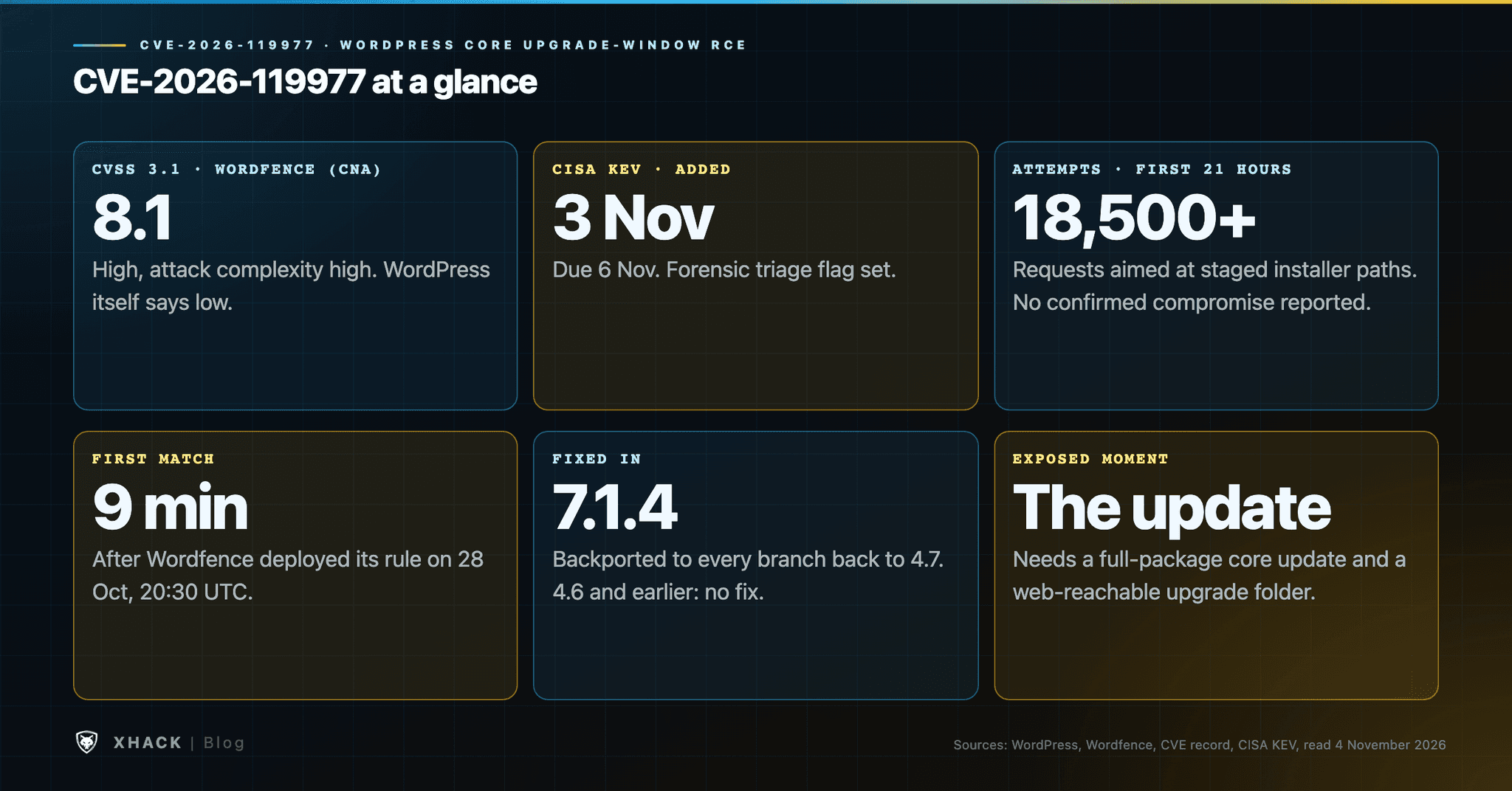
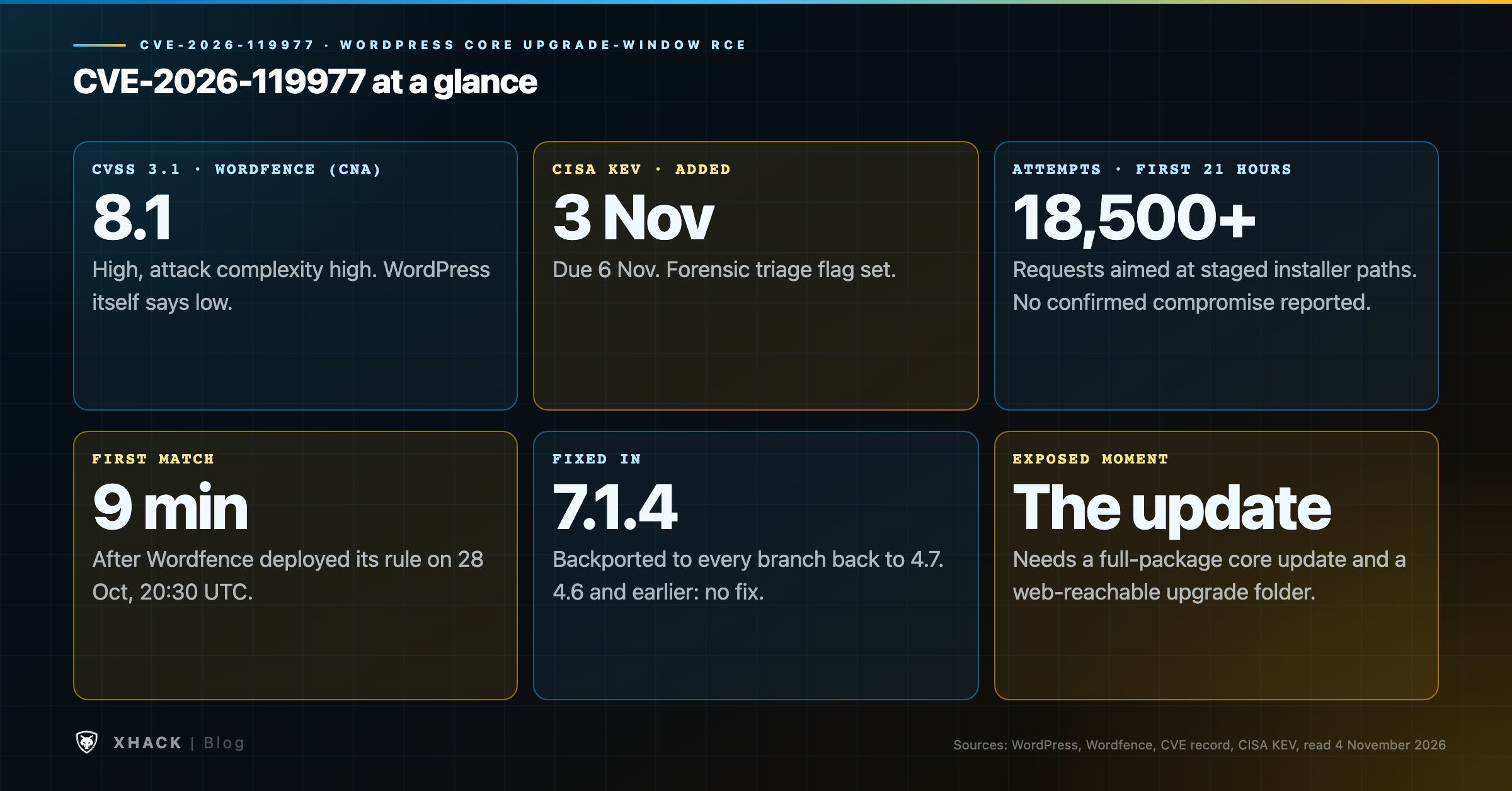
Read this in 30 seconds: CVE-2026-119977 is a race condition in how WordPress Core unpacks its own updates. While a full core update is being extracted, an unauthenticated visitor may be able to reach a staged copy of the WordPress installer and run code on the server. CISA added it to the Known Exploited Vulnerabilities catalog on 3 November 2026.
- The severity labels disagree. WordPress’s own advisory says “low” with no score. Wordfence, which assigned the CVE, scores it CVSS 8.1 High with high attack complexity. CISA’s added data says exploitation is “active”.
- Attempts are documented, compromises are not. Wordfence recorded more than 18,500 requests aimed at the staged installer paths in the first 21 hours after it shipped a firewall rule, and says it has not reported a successful compromise.
- CISA wants evidence kept. The catalog entry is due 6 November and carries the forensic triage flag, so preserve logs before you clean anything.
- The patch window is the exposed window. The fix lives in the new files, so the update that installs 7.1.4 is still run by the old, vulnerable code. Patchstack advises blocking web access to
wp-content/upgrade/before updating.- The fix goes back to WordPress 4.7. Every branch from 4.7 to 7.1 has a CVE-2026-119977 patch, and 4.6 and earlier get nothing.
The bug is narrow, the attack surface is huge, and the safest way to patch it is not the way most people will do it.
WordPress runs a large share of the web, and it also updates itself. That is normally a feature. CVE-2026-119977 turns the update process into the target, which is why a flaw that WordPress itself labels low severity ended up on CISA’s exploited list within a week.
This guide covers what CVE-2026-119977 is, why three sources give three different severities, what the attack telemetry shows and what it does not, how to update without walking into the window, and how to check whether anyone tried. It is built from WordPress’s advisory, the CVE record, CISA’s catalog, and Wordfence’s and Patchstack’s own analyses, all read on 4 November 2026.
Most WordPress vulnerabilities live in plugins and themes; CVE-2026-119977 lives in the part of Core that replaces WordPress itself. When WordPress updates, it downloads a package, unpacks it into a working folder under wp-content/upgrade/, and then copies the new files over the live ones. Most of the time that folder holds almost nothing, and a stray visitor has no reason to look at it.
During a full-package core update, though, that working folder briefly contains a complete copy of the new WordPress, installer included. If the web server will serve that folder, anyone who knows or can guess the path can request files from the copy while it exists. That is the whole premise of CVE-2026-119977.
It is also why the usual WordPress defences fit badly here. A security plugin protects a running WordPress. This request targets a file in a temporary copy, and, as we will see, it may never touch the live site’s code at all. If your WordPress hygiene is “keep plugins updated and add a firewall plugin”, this is the case that plan was not built for. For a different flavour of core-level WordPress risk, see our write-ups of the wp2shell chain and CVE-2026-87902.
CVE-2026-119977 is an unauthenticated, high-complexity remote code execution bug in WordPress Core 4.7.0 through 7.1.3, caused by a time-of-check time-of-use race during complete-package core upgrades. The facts as the sources state them:
AV:N/AC:H/PR:N/UI:N/S:U/C:H/I:H/A:H, scored by Wordfence. NVD lists the record as undergoing analysis and shows only that score, with none of its own.The vendor description of CVE-2026-119977 is short. WordPress’s advisory, GHSA-4w3m-c66w-69mg, published on 29 October, says that during a core update using a complete package, the new files were extracted to a predictable directory inside the web-served upgrade folder, and that an unauthenticated attacker who wins a race against that extraction could reach remote code execution.
| Branch | Affected | Fixed in |
|---|---|---|
| 7.1 | 7.1.0 to 7.1.3 | 7.1.4 |
| 7.0 | 7.0.0 to 7.0.7 | 7.0.8 |
| 6.9 | 6.9.0 to 6.9.10 | 6.9.11 |
| 6.8 | 6.8.0 to 6.8.11 | 6.8.12 |
| 6.7 | 6.7.0 to 6.7.10 | 6.7.11 |
| 6.6 | 6.6.0 to 6.6.10 | 6.6.11 |
| 6.5 | 6.5.0 to 6.5.13 | 6.5.14 |
| 6.4 | 6.4.0 to 6.4.13 | 6.4.14 |
| 6.3, 6.2, 6.1, 6.0 | up to 6.3.13, 6.2.14, 6.1.15, 6.0.17 | 6.3.14, 6.2.15, 6.1.16, 6.0.18 |
| 5.9 down to 5.0 | every release before the fixed version | 5.9.20, 5.8.19, 5.7.21, 5.6.23, 5.5.24, 5.4.25, 5.3.27, 5.2.30, 5.1.28, 5.0.31 |
| 4.9, 4.8, 4.7 | every release before the fixed version | 4.9.35, 4.8.34, 4.7.39 |
| 4.6 and earlier | not listed | no fix; WordPress says these no longer receive security updates |
The branch figures come from WordPress’s GitHub advisory. The older-branch fixes are a courtesy: WordPress states that only the most recent version is actively supported.
The attacker does not need an account, a plugin bug or a password; they need to be polling the right path at the right second. We are keeping this at the level the vendors published and not describing how to build an exploit.
Wordfence lists four conditions for a successful attack. The site must be running a full-package core update, which contains the installer files. The web server must give the public access to the staging tree under wp-content/upgrade/. The staging path must be predictable or discoverable. And the attacker needs enough time to finish before WordPress cleans up the temporary files. In Wordfence’s lab, the vulnerable directory normally stayed available for only seconds.
Patchstack’s analysis adds the code-level picture. Before 7.1.4, the extraction folder name came from the package name, so it was predictable. The cleanup routine also deleted everything in wp-content/upgrade/, including the index.php file that stops the folder from being listed. The extracted copy includes wp-admin/setup-config.php, which Patchstack says boots on its own without the site’s configuration.
What 7.1.4 changes to fix CVE-2026-119977, per Wordfence and Patchstack: the working folder name gets 16 random characters, the index.php guard is kept and recreated if missing, and wp-config.php is added to the files a core update never copies out of the working directory. Patchstack notes that last change is not mentioned in the release post.
Why your firewall plugin may not see CVE-2026-119977. Both vendors say the same thing from different angles. Wordfence says the request goes directly to a PHP file without loading WordPress first, so its firewall needs Extended Protection enabled to run before direct PHP requests. Patchstack puts it more bluntly: a PHP firewall cannot block this, because the extracted copy loads WordPress from its own files and the official zip ships no mu-plugins directory. The practical consequence is that a web-server rule is the more dependable block.
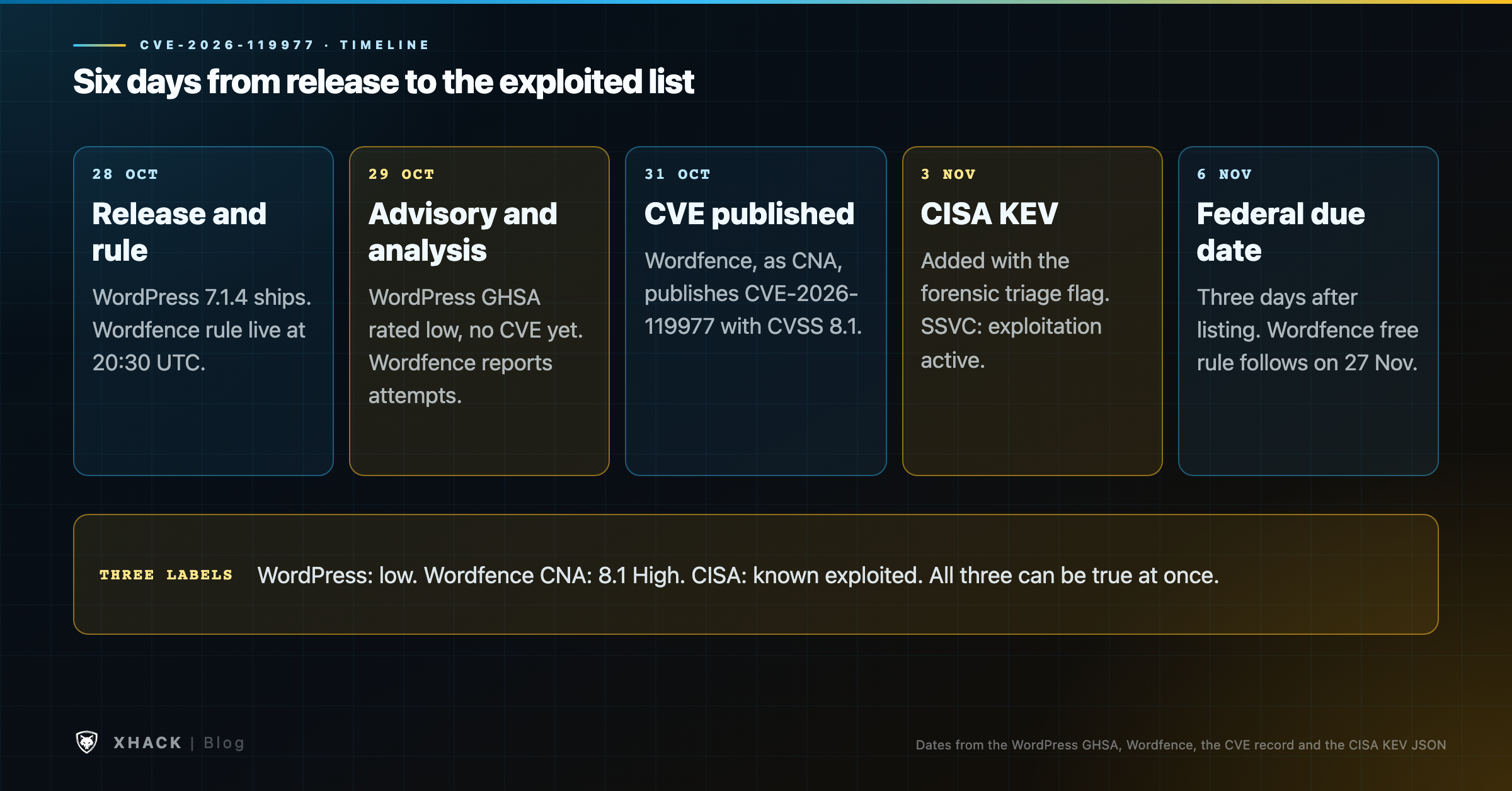
CVE-2026-119977 is rated low by the vendor, 8.1 by the CNA and “active” by CISA, and all three can be right at once.
| Source | What it says | Why |
|---|---|---|
| WordPress (GitHub advisory, 29 October) | Severity “low”, no CVSS score; the CVE field read “no known CVE” when published | The attack needs a narrow timing window and a reachable staging folder |
| Wordfence (CNA, CVE record) | CVSS 3.1 8.1 High, attack complexity high | The impact is code execution on the server if the race is won |
| Patchstack | Scored attack complexity high; says it “would not call it practical to exploit” | The window is tiny, but it needs no account and returns on every update |
| CISA (KEV, 3 November) | Known exploited, forensic triage Yes; SSVC exploitation “active”, automatable “no” | Evidence of exploitation was available to CISA; its public entry does not say what |
| NVD (4 November) | Undergoing analysis; shows Wordfence’s 8.1 only | No NVD score yet |
The high attack complexity and the impact are both true. The mistake would be to read “low” or “high complexity” as “ignore CVE-2026-119977”. Patchstack’s own reasoning is that CVE-2026-119977 still needs no account and no interaction, the sink dates back to WordPress 2.8, and the window returns on every update, including unattended ones. At WordPress’s scale, a small probability per update multiplies into a large number of chances.
There is real probing of CVE-2026-119977, it started within minutes, and there is no public report of a successful compromise. Wordfence published its analysis on 29 October. It deployed a firewall rule for paying customers at 20:30 UTC on 28 October, about three hours after the release, and the first matching request arrived nine minutes later.
In the first 21 hours Wordfence recorded more than 18,500 requests targeting staged setup-config.php installer paths. Two of the largest sources repeatedly polled small groups of sites for about 14.5 hours, which is behaviour consistent with waiting for the brief upgrade window. Other sources tried many staging-directory and version-name variations, and Wordfence notes that not every request used the exact vulnerable path. SecurityWeek, updated on 4 November, repeats that Wordfence has not reported successful compromises.
A few honest caveats:
The cleanest sequence for CVE-2026-119977 is to close the web path first, then update, then confirm. This is where Wordfence and Patchstack differ in emphasis, and where a short disagreement is worth understanding.
Wordfence’s post tells owners to update promptly, because that also fixes the other 21 vulnerabilities in the release. Patchstack tells owners to block web access to wp-content/upgrade/ and confirm the folder is not listable. A reader pointed out under Wordfence’s post that telling people to update immediately, while probes are waiting for update windows, sounds like a chicken-and-egg problem, and the Wordfence analyst agreed the web-server block is the best course for anyone able to do it, while explaining why the post favoured a simple “update now” message for a broad audience.
Here is the reasoning behind blocking first. The fix is in the new WordPress files, and the update that installs them is carried out by the old code, which still uses the predictable folder. That is our reading, and Patchstack’s advice to block the path before updating is consistent with it. It follows that the window you want to protect is the one you are about to open yourself.
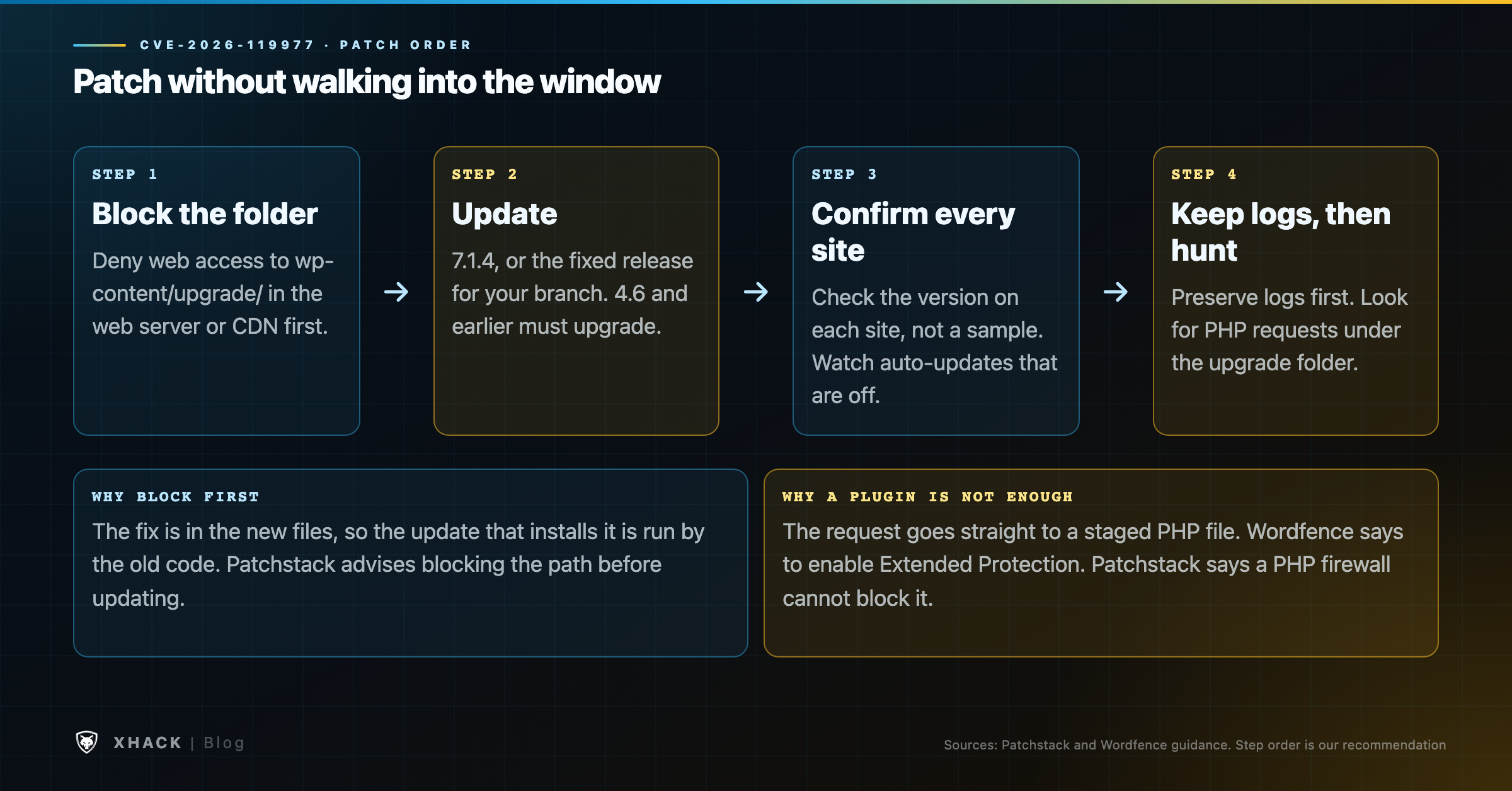
wp-content/upgrade/ before updating. Do it in the web server or virtual host, or at your CDN, not in a file inside the folder, because WordPress deletes the contents of that folder. WordPress itself works on the filesystem and should not need web access to it, but test on one site first. Generic examples:location ^~ /wp-content/upgrade/ { return 403; }RedirectMatch 403 ^/wp-content/upgrade(/|$)index.php, according to Patchstack, so a web-server deny rule costs nothing and protects the next update too.Look at the logs first, and look before you clean up, because CISA flagged this entry for forensic triage. Copy your web server logs and the contents of wp-content/upgrade/ somewhere safe before you change anything. Wordfence and Patchstack have published no IP addresses or file hashes for this bug, so the signals below are behavioural: requests to PHP files beneath wp-content/upgrade/, repeated polling around update times, unfamiliar administrator accounts, unexpected plugins, and PHP files you did not place.
# Requests to PHP files under the upgrade folder (adjust the log path)
zgrep -h -E 'wp-content/upgrade/.*\.php' /var/log/nginx/access.log* | head -50

# Top sources hitting the upgrade folder
zgrep -h 'wp-content/upgrade/' /var/log/nginx/access.log* | awk '{print $1}' | sort | uniq -c | sort -rn | head

# Anything left behind in the upgrade folder
find wp-content/upgrade -type f -name '*.php' -ls 2>/dev/null

# Core files that do not match the official checksums
wp core verify-checksums

# Administrator accounts and installed plugins
wp user list --role=administrator --fields=ID,user_login,user_registered
wp plugin list --fields=name,status,version
Pay particular attention to log lines around the times your site ran a core update. If you find hits, treat the site as potentially compromised: rotate administrator and database credentials, review users and plugins, and restore from a known-good backup if file checks fail. A hit on its own only proves someone knocked.
CVE-2026-119977 is mostly about patch hygiene and exposure, and that shapes how we would test for it. At XHack we treat it as an external-exposure question: from the internet, with no account, can a visitor reach wp-content/upgrade/ or any other staging or backup path on a WordPress estate? That is the kind of unauthenticated surface check that belongs in a penetration test, and it is cheap to run across many sites.
It is also a reminder of what a test report on CVE-2026-119977 is and is not. A report tells you what was reachable on the day, and it does not certify that you are safe while updates keep arriving. Our AI VAPT services combine human testers with our AI agent for this sort of broad, repeatable check, and managed engagements start at $2,500. If you would rather talk it through first, book a free consultation, even if that turns out not to be us. Brutal honesty is kind of our thing.
Probing is documented, and CISA lists it as known exploited. Wordfence recorded more than 18,500 requests aimed at staged installer paths in the first 21 hours after its firewall rule went live, and CISA added CVE-2026-119977 to its catalog on 3 November. No public source reports a confirmed compromise, and CISA has not said what evidence it used.
It depends on whether you are patched. The CNA scores it at CVSS 8.1 High with high attack complexity, WordPress calls it low, and Patchstack would not call it practical to exploit. The impact is code execution without an account, but only during a narrow window. For patched sites with the upgrade folder blocked, the risk is small.
CVE-2026-119977 affects WordPress 4.7.0 through 7.1.3. Fixes are 7.1.4, 7.0.8, 6.9.11, 6.8.12 and so on down to 4.7.39 for older branches. WordPress 4.6 and earlier get no fix, and WordPress says they no longer receive security updates, so those sites need to move to a supported release.
Blocking it first is the safer sequence for CVE-2026-119977, according to Patchstack, because the update that installs the fix is still run by the old code. Wordfence favours updating immediately and notes that blocking is best where you can do it. If you manage your own server or CDN, deny web access to the folder, then update.
Not reliably, for CVE-2026-119977. Wordfence says the request goes straight to a PHP file without loading WordPress, so its firewall must run in Extended Protection mode, and Patchstack says a PHP firewall cannot block it at all. Treat a web-server deny rule as the dependable control and the plugin as a second layer, and install the update either way.
Preserve your logs, then search them for CVE-2026-119977 requests to PHP files under wp-content/upgrade/, repeated polling around update times, new administrator accounts, unexpected plugins and PHP files you did not place. No indicator list has been published for CVE-2026-119977. Run wp core verify-checksums, and rotate credentials if anything looks wrong.
CVE-2026-119977 is a bug about timing, and the timing is yours: the update you run to fix it is the moment it matters. The vendor says low, the CNA says 8.1, and CISA says exploited, and the sensible reading is that probing is real while a successful attack is still hard. Close the web path to wp-content/upgrade/, update to a fixed release, confirm every site, and keep the logs from the week this was disclosed. Do that and a flaw in the updater costs you one afternoon instead of a rebuilt server.
Categories
Related articles