Table of contents
20
By Salman Khan, OSCP+, Founder of XHack, SRT (Synack Red Team member)
Read this in 30 seconds: AI APK reverse engineering is easy to demo and hard to trust, because the demos show an agent reading decompiled code and none of them publish how often it is right. I read the tool documentation and the one academic study I could find on 9 November 2026, and tested a triage script on a real APK. This guide covers apps you own or have written permission to test.
- The cheap half of AI APK reverse engineering is automatable, the AI half is unmeasured. A 60-line script pulls manifest flags, permissions, exported components, URLs and secret-like strings, while the most popular jadx connector (3,000 GitHub stars, v6.5.0 from 19 October 2026) is a developer beta whose README shows demo videos but no accuracy figures.
- The one study is small and old. A 2025 paper tested four small open-source code models on 118 malware APKs and found that renaming functions with model-suggested names improved one family of scores, but it did not test frontier agents or ordinary app security.
- Frida and a device stay in the loop of any AI APK reverse engineering workflow. Static reading produces hypotheses, and runtime behaviour, native code and anti-tampering checks still need hands-on confirmation.
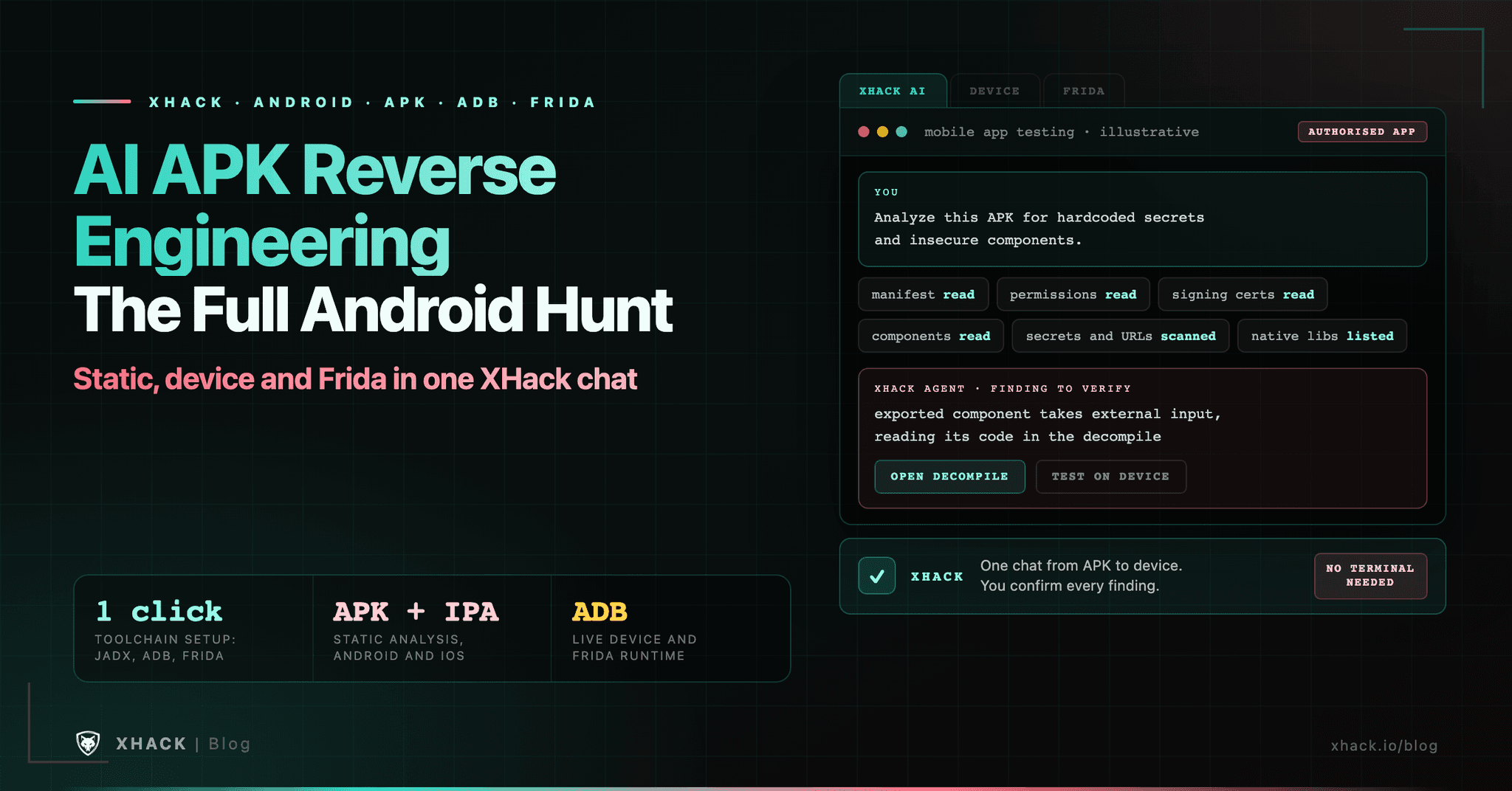
- XHack covers the full Android hunt in one place. Its mobile testing takes an APK or IPA, connects to a device over adb, runs Frida and installs jadx, platform-tools and Frida in one click, from $20 a month with a 7-day trial.
- Your decompiled code leaves your machine. Neither jadx MCP README says what is sent to the model provider, and the server warns that binding it to a network address exposes every tool without authentication.
If you searched for AI APK reverse engineering, you want to know what an agent can really do with an Android app, and what it cannot. The honest answer is that AI APK reverse engineering speeds up the reading, not the proving.
This AI APK reverse engineering guide separates the two, and shows where XHack, which wraps the whole Android toolchain in one chat, fits against the do-it-yourself stack. It lists what an APK contains and which parts an agent reads well, what the tooling costs and how it connects, what the evidence says, and a workflow where you verify every claim yourself. I did not run the MCP servers myself, so what I say about them comes from their READMEs and repository pages, and XHack’s feature page is the source for what it does.
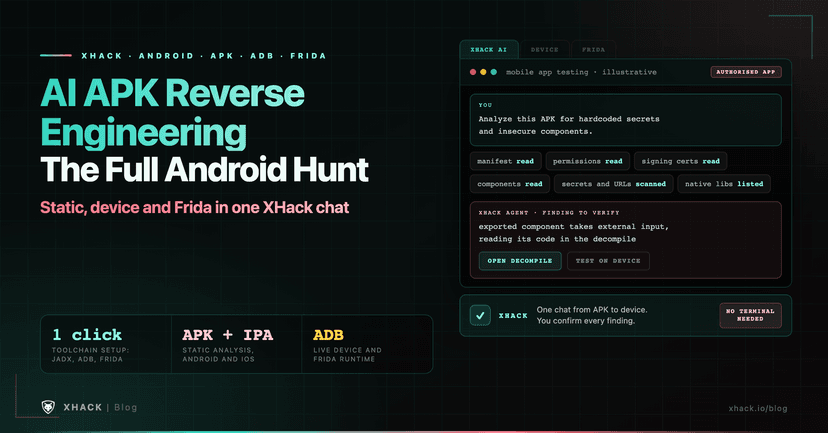
AI APK reverse engineering means using a language model to read and explain the contents of an Android app package, after a decompiler has turned its compiled code back into readable Java or Kotlin. The model does not unpack the app. A tool such as jadx does that, and the model reads the output.
An APK is a zip file, and each part of it is read by a different tool. That split decides where an agent helps.
| Part of the APK | What it holds | How an agent reads it |
|---|---|---|
| AndroidManifest.xml | Permissions, components, flags such as debuggable | Very well, it is short and structured |
| classes.dex | Compiled app code | Through a decompiler such as jadx, then as source |
| resources and assets | Strings, layouts, config files | Well, with a script to list them first |
| lib/ native libraries | Compiled C and C++ as .so files | Poorly, it needs a native tool such as Ghidra |
| Signature | Who signed the app and with which scheme | Facts for a script, not a model |
Obfuscation changes the picture for AI APK reverse engineering. Android’s own documentation says R8 shortens the names of classes, fields and methods to shrink the app, so a release build often decompiles into names like a.b.c. That is the case where an agent that suggests meaningful names saves the most time, and also where it is most likely to guess wrong.
An agent can automate the reading and the bookkeeping, but not the decision that something is a vulnerability. The table splits the work by who should do it.
| Task | Automate it? | Where a human stays |
|---|---|---|
| List permissions, exported components, debuggable and backup flags | Yes, with a script | Deciding which exposures matter |
| Find embedded URLs and secret-like strings | Yes, with a script | Confirming a key is live and in scope |
| Read a class and explain what it does | Yes, with an agent | Checking the explanation against the code |
| Suggest names for obfuscated methods | Yes, with an agent | Treating names as guesses |
| Follow a call path with cross-references | Yes, with an agent | Confirming the path is reachable |
| Confirm behaviour on a running app | Partly | A device, Frida and your judgment |
| Write the report | Draft only | Reproduction steps you ran yourself |
The pattern in AI APK reverse engineering is that every row an agent can do is a row where you can check its answer quickly. For the rest, the bug bounty report writing guide covers what a finding needs before you submit it.
The standard toolkit for AI APK reverse engineering is free and open source, and the OWASP Mobile Application Security Testing Guide lists most of it. The table shows what I read from each project’s GitHub page on 9 November 2026.
| Tool | Job | Licence | Latest release read |
|---|---|---|---|
| jadx | Decompile APK, DEX, AAB and XAPK to Java; includes a deobfuscator | Apache-2.0 | v1.5.6, 10 July 2026 |
| Apktool | Decode resources and smali, rebuild | Apache-2.0 | v3.0.3, 20 July 2026 |
| Androguard | Python analysis of APKs and DEX | Apache-2.0 | v4.1.4, 5 June 2026 |
| Frida | Runtime instrumentation on a device | See repository | 17.26.2, 7 November 2026 |
| objection | Runtime exploration built on Frida | GPL-3.0 | 1.12.5, 2 June 2026 |
| MobSF | Automated static and dynamic scanner | GPL-3.0 | v4.6.4, 31 October 2026 |
| XHack | The stack above plus an agent, in one chat, for Android and iOS | Commercial, from $20 a month | Feature page read 9 November 2026 |
The first six are open source and you assemble them yourself. XHack is the competitor that does the assembling, which the section below covers. The MASTG tools page lists jadx, Apktool, Frida, objection, MobSF, drozer, adb, radare2, Ghidra, Bytecode Viewer and Apkleaks among its Android tools. For the native-library half, our Ghidra MCP guide and the IDA Pro AI guide cover the equivalent agent setups.
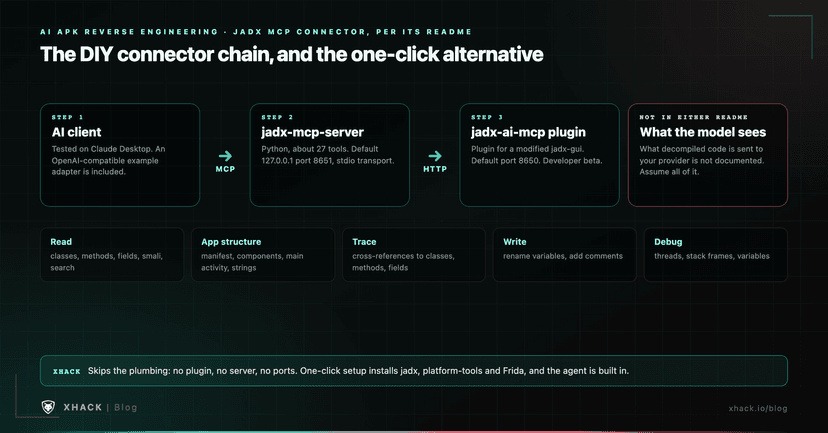
Two open-source projects connect jadx to an AI client for AI APK reverse engineering through the Model Context Protocol, and both are early software. The popular one is zinja-coder’s pair: a plugin for a modified jadx-gui and a Python server that sits between your AI client and the plugin.
| Item | What I read |
|---|---|
| jadx-ai-mcp (plugin) | Apache-2.0, about 3,000 stars, v6.5.0 on 19 October 2026; README calls it a developer beta |
| jadx-mcp-server | Apache-2.0, about 840 stars, no tagged releases; roughly 27 tools |
| Chain | AI client, then MCP server, then HTTP to the jadx plugin, then jadx-gui |
| Defaults | Server on 127.0.0.1 port 8651, plugin on port 8650, stdio transport |
| Tested client | Claude Desktop; other clients are untested, with an OpenAI-compatible example adapter |
The tools fall into groups: reading class and method source, searching, manifest and resource access, cross-references, comments and variable renaming, and debugger views. Two warnings in the server README matter. If you bind it to a non-local address it serves every tool over plain HTTP with no authentication, and it says anyone on the network can then read the decompiled code. And neither README says what is sent to your model provider, so assume the decompiled source you ask about leaves your machine.
Smaller alternatives exist, including a pure-Java jadx server (34 stars, no licence listed) and an Apktool MCP server from the same author (709 stars). Our MCP server security guide covers why an unauthenticated local tool server is a risk worth treating seriously.
There is almost no published accuracy data for AI APK reverse engineering on app security, and the closest study is about malware, small models and 2025. Here is what I could find and what each source leaves out.
| Source | What it shows | What it leaves out |
|---|---|---|
| Cama benchmark, April 2025 | 4 small open-source code models on 118 malware APKs, 13 families, 7.5 million functions | Frontier agents, ordinary apps, vulnerabilities |
| jadx MCP READMEs | Demo videos and sample prompts | Any accuracy or false-positive data |
| Androidmeda (open source, 381 stars) | A tool that uses an LLM to deobfuscate and flag issues; I did not test it | Published evaluation |
The Cama authors report that renaming functions with model-suggested names improved their fidelity scores for both models they tested, while a semantic-relevance score fell slightly. They also say that reliable ground truth at the function level is scarce, which makes any score noisy. I would read that as a hint that name suggestions help, not as proof.
So treat every claim an agent makes about an obfuscated method in AI APK reverse engineering as a hypothesis. The best LLM for reverse engineering guide walks through a public benchmark for the same problem on native binaries and why a model’s confidence is not a measure of accuracy.
The safest AI APK reverse engineering workflow gives the agent a compact, scripted summary first and makes you verify each claim in the decompiler. Use apps you own or that a program’s written scope covers, and keep the APK and the decompiled output off shared drives.
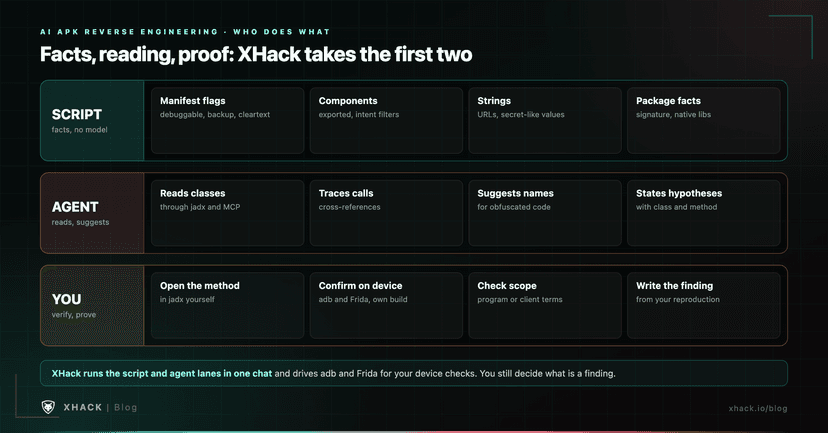
This script uses Androguard, which you install with pip install androguard. I ran it on a sample APK that ships with Android Studio on my own machine, and the secret patterns I tested with synthetic strings.
"""Summarise an APK you are authorised to test into compact JSON for an AI agent.
Needs: pip install androguard
Usage: python3 apk_triage.py app.apk > triage.json
"""
import json, re, sys
from loguru import logger
logger.disable("androguard")  # androguard logs every parse step at DEBUG
from androguard.core.apk import APK
from androguard.core.dex import DEX

ANDROID = "{http://schemas.android.com/apk/res/android}"
SECRET_PATTERNS = {
    "google_api_key": re.compile(r"AIza[0-9A-Za-z_\-]{35}"),
    "aws_access_key_id": re.compile(r"AKIA[0-9A-Z]{16}"),
    "private_key_block": re.compile(r"-----BEGIN [A-Z ]*PRIVATE KEY-----"),
    "generic_assignment": re.compile(r"(?i)(api[_-]?key|secret|token|passwd|password)\s*[=:]\s*\S{8,}"),
}
URL = re.compile(r"https?://[^\s\"'<>]{4,}")

def components(a):
    manifest = a.get_android_manifest_xml()
    out = []
    for tag in ("activity", "activity-alias", "service", "receiver", "provider"):
        for el in manifest.iter(tag):
            exported = el.get(ANDROID + "exported")
            has_filter = el.find("intent-filter") is not None
            if exported == "true" or (exported is None and (has_filter or tag == "provider")):
                out.append({"type": tag, "name": el.get(ANDROID + "name"),
                            "exported_attr": exported, "has_intent_filter": has_filter,
                            "permission": el.get(ANDROID + "permission")})
    return out

def main(path):
    a = APK(path)
    app = a.get_android_manifest_xml().find("application")
    flag = lambda k: app.get(ANDROID + k) if app is not None else None
    urls, hits = set(), []
    for raw in a.get_all_dex():
        for s in DEX(raw).get_strings():
            s = str(s)
            urls.update(URL.findall(s))
            for name, rx in SECRET_PATTERNS.items():
                if rx.search(s):
                    hits.append({"pattern": name, "sample": s[:12] + "..."})
    return {
        "package": a.get_package(),
        "min_sdk": a.get_min_sdk_version(), "target_sdk": a.get_target_sdk_version(),
        "permissions": sorted(a.get_permissions()),
        "debuggable": flag("debuggable"), "allowBackup": flag("allowBackup"),
        "usesCleartextTraffic": flag("usesCleartextTraffic"),
        "networkSecurityConfig": flag("networkSecurityConfig"),
        "signature_schemes": {"v1": a.is_signed_v1(), "v2": a.is_signed_v2(), "v3": a.is_signed_v3()},
        "native_libs": sorted(f for f in a.get_files() if f.startswith("lib/") and f.endswith(".so")),
        "possibly_exported_components": components(a),
        "urls_in_dex": sorted(urls)[:50],
        "secret_like_strings": hits[:20],
    }

if __name__ == "__main__":
    print(json.dumps(main(sys.argv[1]), indent=2))
On that sample watch-face app it reported a package of androidx.wear.watchface.samples.app, target SDK 31, six permissions, backups allowed, all three signature schemes, no native libraries, four possibly exported components and no secret-like strings. That is a clean result for a sample, and a clean result is the point: the script tells the agent what to look at, and finds nothing to invent.
The possibly_exported_components list errs towards inclusion. It includes components with an intent filter but no explicit exported flag, because the default depends on the app’s target SDK, so check each one in the manifest.
Static reading cannot tell you what an app does at runtime in AI APK reverse engineering, so runtime work, native code and anti-tampering checks stay with you. The OWASP guide pairs static analysis with dynamic testing for the same reason.
Sending decompiled code to a hosted model for AI APK reverse engineering is a disclosure, so decide whether you are allowed to make it. A client’s unreleased app, or a program that forbids sharing its materials, can rule it out.
So yeah, here is where we talk about our own product. I am biased, it is my company, and I think it is the strongest single option in this guide for a full Android hunt, for reasons you can check on its feature page.
The do-it-yourself stack above works, but you install and version-match jadx, Apktool, Androguard, adb and Frida, wire an early-stage connector, and write the glue yourself. XHack’s mobile app testing does that in one conversation.
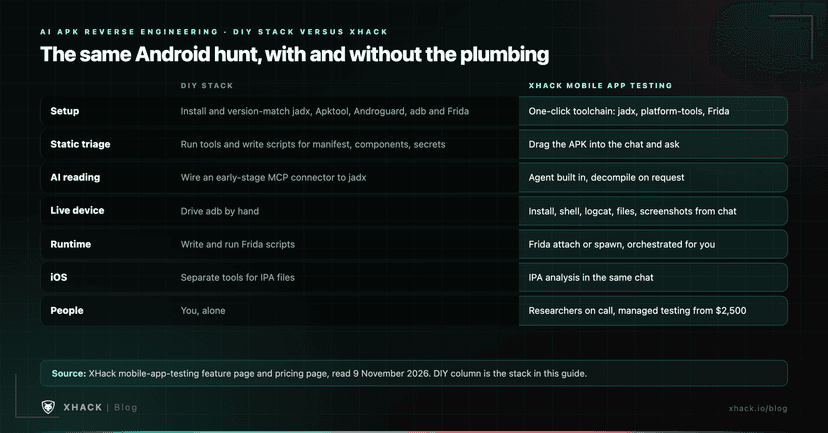
Here is what the full Android hunt covers, according to XHack’s own page:
That is the part of AI APK reverse engineering that costs most hunters their first day, and with XHack it is a click. The same agent can then test the web and API side that the app talks to, so one engagement runs from the APK to its backend instead of across four disconnected tools.
XHack combines three things most providers sell separately: an autonomous AI agent, a continuous security platform and human testers. The agent runs up to 12 sub-agents by default, and it does not store your agent chats, which stay on your own computer and can be deleted at any time. That answers the data question the jadx connectors leave open.
Individual plans are $20, $49 and $150 a month, with a 7-day free trial, one per person, and exploitation unlocks after identity verification. See the pricing page, and the agent for bug bounty guide for the web side. If you want people to run a mobile engagement, managed testing starts at $2,500, and a free consultation is open even if we turn out not to be the right fit. You still verify each finding yourself, because that rule applies to every tool in this guide, and brutal honesty is kind of our thing.
For decompiling alone, jadx is the standard free choice. For the full Android hunt in one place, I think XHack is the best option, and I am biased: it combines APK triage, decompiling, adb device control, Frida and one-click toolchain setup behind one agent, for Android and iOS. The do-it-yourself stack is free in licence cost but costs you setup time and leaves the data question open.
Yes, with limits. AI can read and explain an APK once a decompiler such as jadx has turned it into Java or Kotlin, but it does not unpack the app itself. In AI APK reverse engineering the model handles explanation, naming suggestions and cross-reference tracing, while scripts and standard tools handle the manifest, resources and signatures. In AI APK reverse engineering its explanations are hypotheses, so verify each one in the decompiled code.
You need a decompiler, usually jadx, and optionally Apktool for resources and smali, Androguard for scripting, and Frida with adb for runtime work on a device. The OWASP MASTG lists these among its Android tools. To connect an agent, jadx has open-source MCP projects, and the most popular is a developer beta with no published accuracy data.
Nobody has measured AI APK reverse engineering well on ordinary apps. The closest study, from April 2025, tested four small open-source code models on 118 malware APKs and found that suggested names improved some scores, but the authors note that reliable ground truth is scarce. Treat agent claims as leads and confirm each against the code.
AI APK reverse engineering is legal or not depending on the app, the licence and your authorisation, and this is not legal advice. Analysing an app you own or one that a bug bounty program or client contract explicitly puts in scope is the usual safe case. Having an APK does not authorise testing the app or its servers, so read the scope first.
Those protections are part of what a mobile engagement must be scoped for, and they sit outside what static reading can answer. I do not cover bypass techniques here. If your program or client allows that testing, the OWASP MASTG is the place for the methodology, and you should supervise any agent doing it.
For AI APK reverse engineering, use a local model if the app or its contract forbids sending code to a third party, and accept the capability trade-off. Neither jadx MCP README documents what is sent to a provider, so assume decompiled code you query leaves your machine when you use a hosted model.
AI APK reverse engineering is a speed-up for reading, not a replacement for proving. Script the facts, give the agent a short summary, ask checkable questions, and confirm every claim in the decompiler and on a device you control.
Re-check the AI APK reverse engineering tools before you rely on them, because jadx, Frida and the MCP connectors all release often. And keep to apps you are allowed to test, because that is the line between a research workflow and a problem.
Categories
Related articles