
XHack
Author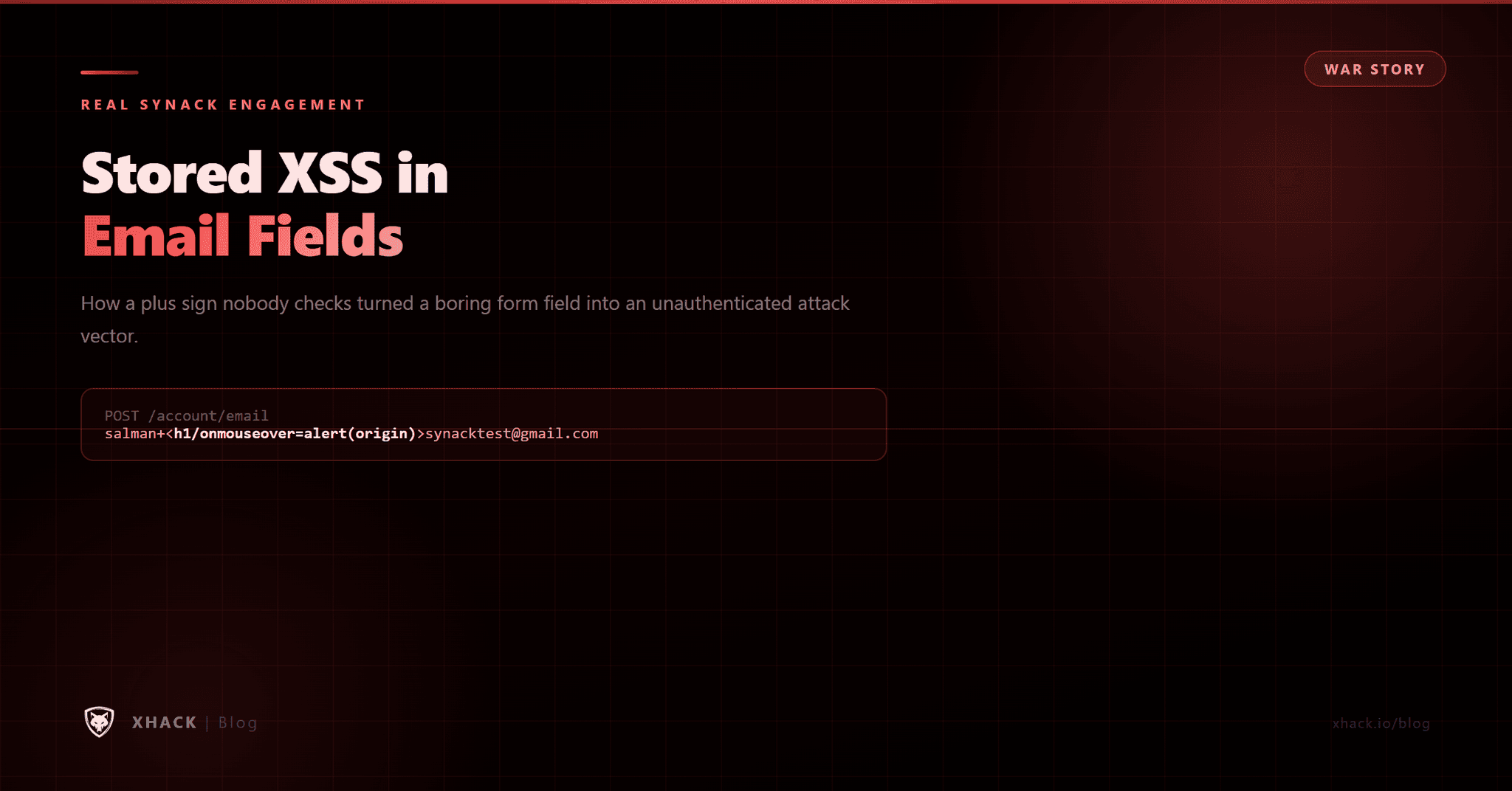
Table of Contents
16
By Salman Khan, OSCP+, Founder of XHack, SRT (Synack Red Team member)
Read this in 30 seconds: Stored XSS in Email Fields, I was closing out a Synack engagement, already mentally packed up for the day, when I decided to test one more field: the email input on account settings. Everyone assumes email fields are safe because they’re “structured” and “validated.” They’re not, because most apps forget that the email spec allows a `+` character for subaddress tagging, and they store whatever comes after it without checking what’s actually in there.
I used that gap to plant an HTML payload inside my own email address, then delivered it to a victim through a completely clean invitation link with no visible payload anywhere. When the victim opened it, my profile rendered their email into the page unencoded, and the script fired the second their mouse crossed it. No login required. No warning. Stored XSS, unauthenticated, from a field nobody thinks to test.
Twenty minutes before quitting time, I almost skipped the one field that mattered.
I’d already gone through the usual suspects: file uploads, bio fields, display names, every input that practically begs for an XSS payload. Nothing. Standard engagement, mostly clean app, I was ready to write it up and go home.
Then I looked at the email field and thought, eh, might as well.
That “might as well” turned into the best finding of the engagement, and it’s the reason I’m writing this up for the XHack blog instead of just filing it and moving on. Not because the technique is groundbreaking (it isn’t, the trick is over two decades old), but because of what it says about where real vulnerabilities actually hide. It’s the same lesson I keep relearning every time I write up a broken-access-control bug like BOLA or IDOR: the field or endpoint that “obviously” isn’t the problem is usually exactly where the problem is. Everyone hammers the rich text editor. Nobody looks twice at the email field, because it feels safe. That assumption is exactly why this bug existed across three separate layers of defense at once.
Ask any pentester or developer where they’d expect to find XSS, and the email field is nowhere near the top of the list. It’s structured. It has a well-known format. There’s an unspoken assumption baked into how most people build and test software: an email address can’t really be dangerous, it’s just a string with an `@` in it.
I believed that too, right up until this engagement.
Here’s the part almost nobody remembers: RFC 5321, the actual email specification, allows a `+` character in the local part of an address for subaddress tagging. You’ve used this yourself without thinking about it. Send something to `you+newsletters@gmail.com` and it still lands in your inbox, exactly the way `you@gmail.com` would. Gmail, Outlook, and most major providers support this natively.
The catch is what happens on the receiving end, inside the application. Most apps store the full address, including everything after the `+`, exactly as submitted. Then, somewhere down the line, they render that string back onto a page without stopping to ask what’s actually hiding inside it. The validation logic checks the shape of an email address. It doesn’t check the content riding along inside a technically-valid subaddress tag. That gap is the entire vulnerability.
The target was a content platform where artists manage their profiles, releases, and account settings, the kind of app where an email field feels like the last place worth testing.
Under account settings, there’s an email field with an edit button. I clicked edit, typed in a valid-looking address, flipped on Burp intercept, and hit save. Once the request hit Burp, I swapped both the email and confirmation parameters for something the front-end would never have allowed through on its own:
“`
salman+<h1/onmouseover=alert(origin)>synacktest@gmail.com
“`
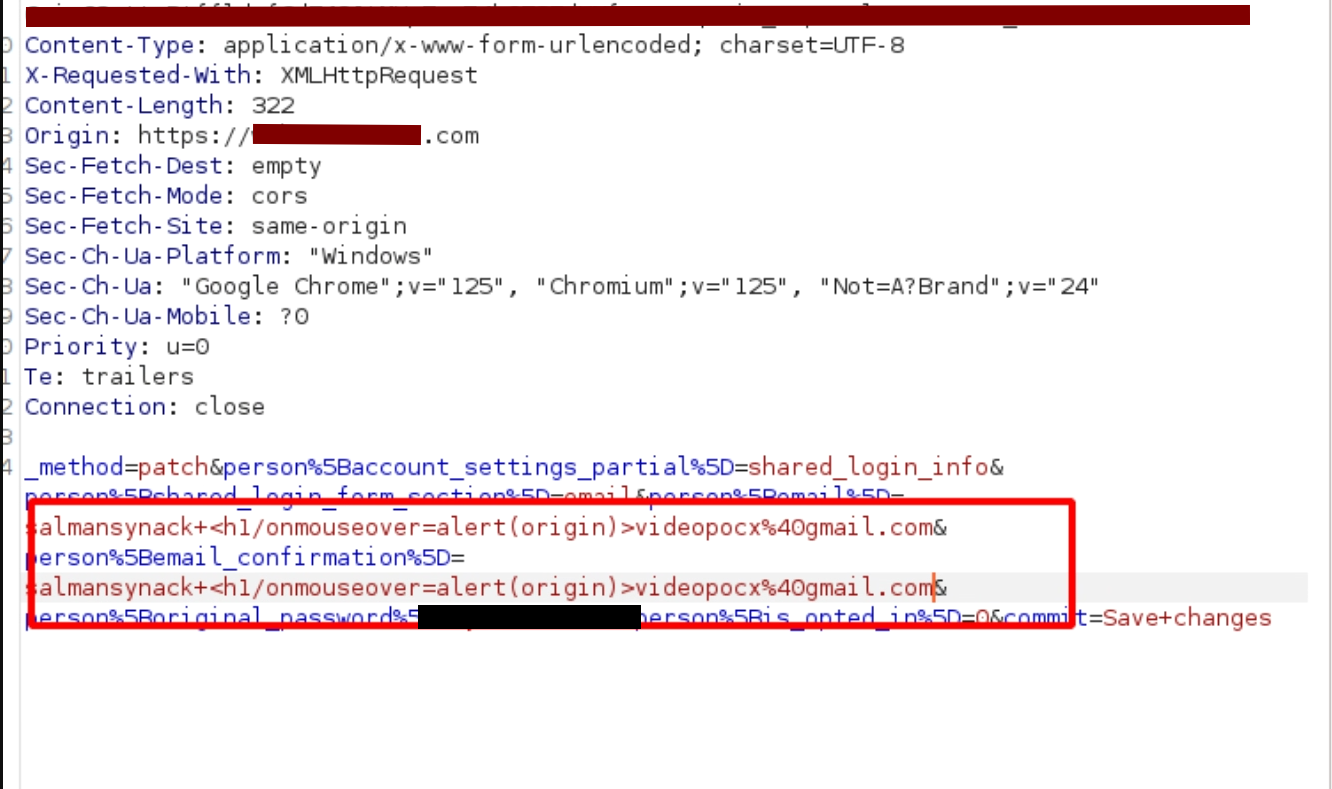
The front-end validation had already done its job and stepped out of the way by the time this request reached Burp, because the browser only checks input before it leaves the browser. Once you’re editing the raw HTTP request, that check is meaningless. The server accepted the payload without complaint. My account’s email field now permanently contained a live XSS trigger, and as far as the application was concerned, it was just another valid subaddress.
A poisoned field sitting in your own account doesn’t prove anything on its own. I needed to show it could actually hit someone else, without them doing anything unusual.
Since my profile email was already poisoned, I went looking for any feature that would render it somewhere a second user could see. I found one fast: a “request another artist to connect” option, which asks for an email address to send an invitation to.
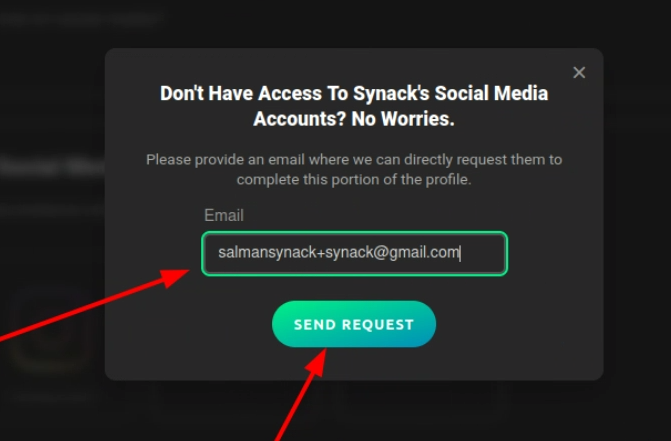
I entered a normal, clean email address. No payload, nothing suspicious, just a regular inbox I controlled for testing. Hit send. The invited address received a completely ordinary-looking invitation email with a link containing an ID and a key parameter. Nothing in that email would raise a single eyebrow.
But the moment that link is clicked, the invitation page renders the inviting user’s profile, which is to say, my profile, complete with my poisoned email sitting in the page HTML, completely unencoded. The victim sees what looks like a normal profile page. Then their cursor drifts over the email area, and the script fires.
I opened the invitation link in an incognito window to rule out any session or caching weirdness on my end. The alert popped the instant my mouse passed over the email region, no click required, no warning, no login prompt anywhere in the flow.
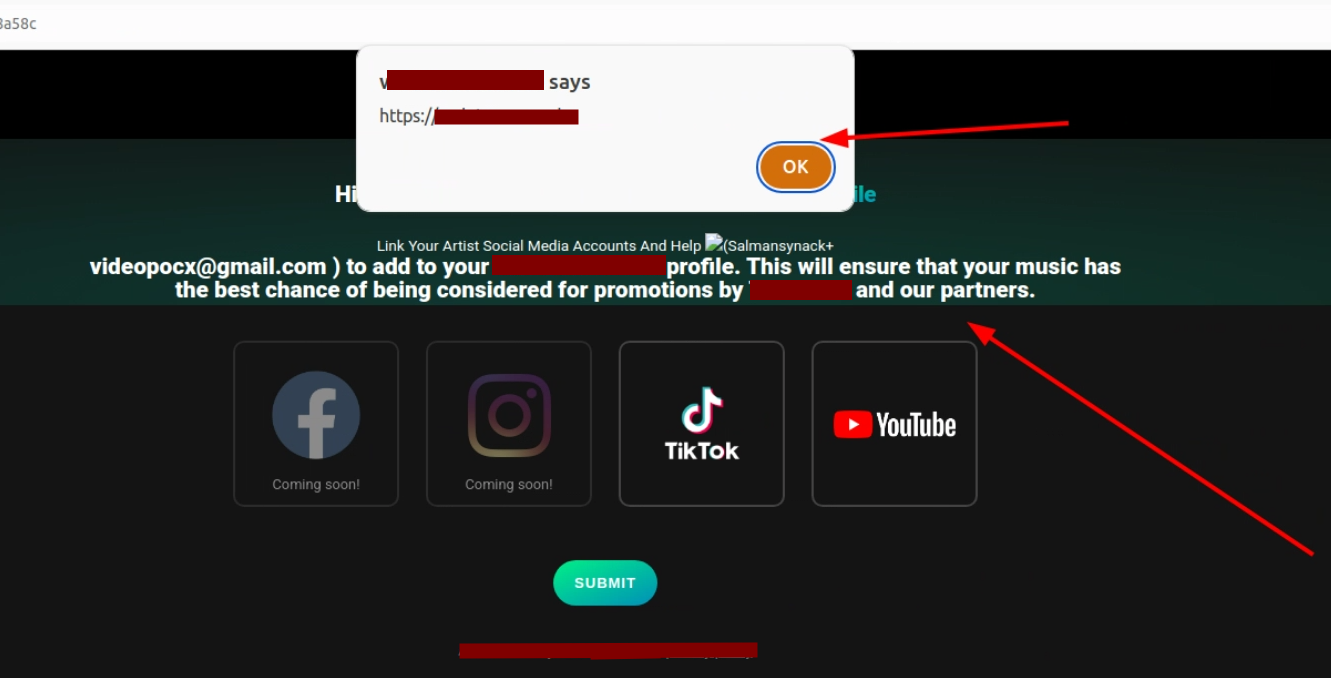
Stored XSS, delivered from an email field, on a page that needed absolutely nothing from the victim except opening a link that looked completely legitimate.
A stored XSS behind a login wall is bad. This one skipped the login wall entirely. The invitation page required no authentication, no account, no active session. Just a URL that anyone on the internet could open. And because the invitation could be sent to any valid email address, the attack surface wasn’t scoped to one email provider or one type of user. Gmail, Outlook, Yahoo, a corporate mailbox, it didn’t matter. Whoever opened the link got hit.
Walk the full chain end to end: I create an account, inject a payload into my own email field, build out an artist profile, then use the “connect” feature to send perfectly clean invitation emails to any address I choose. The victim gets a normal-looking invite. They click it. The page renders my profile, payload and all. They’re compromised, and their own email never touched the payload at any point, so they have zero warning until their browser is already running my JavaScript.
Swap `alert(origin)` for something with actual teeth: session hijacking, credential harvesting, a convincing phishing overlay sitting on top of a page the victim already trusts. At that point you’ve built a watering hole attack out of a profile settings page. The attacker controls both the payload and how it gets distributed. The victim’s only job is clicking one link that looks like every other invitation email they’ve ever gotten.
What makes this finding sting is that it should never have survived a single review pass, let alone three.
Client-side validation checked the email format, and stopped there. It only runs in the browser, which means Burp bypasses it in about two seconds flat. This isn’t security, and it never was. I genuinely don’t know why applications are still leaning on browser-side validation as a control in 2026.
Server-side validation checked structure, not content. Does the string have an `@`? Does the domain look plausible? Fine, ship it. It never inspected what was actually sitting inside the subaddress tag. My payload showed up as `+<h1/onmouseover=alert(origin)>`, and the regex saw a technically valid `+` tag and waved it through. The `+` character genuinely is valid per spec. The HTML payload hitching a ride on it was never something that regex was built to catch.
Output encoding didn’t exist at all. The application pulled the raw email string straight out of the database and dumped it into the page HTML, letting the browser interpret whatever was inside. OWASP’s XSS Prevention Cheat Sheet has covered this exact fix for years: encode `<` as `<`, `>` as `>`, and every other HTML-significant character at the point of output. That’s the whole fix. One line, in one template.
I want to be straight about this part, because I think it matters more than the technical mechanics. I didn’t find this through some clever methodology or a deep dive into email RFCs mid-engagement. I found it because I was bored, had about twenty minutes left, and decided to poke at a field that felt like a waste of time.
I’d read something months earlier about edge cases in email parsing (honestly can’t tell you where anymore) and the plus-addressing trick was just sitting somewhere in the back of my head, unused. My first standard XSS attempt in the email field got shut down by front-end validation, and that’s usually where most people move on to the next field. I almost did exactly that. Then I thought: what if I use the plus trick specifically to get past the client-side check with Burp?
Two minutes later, I had stored XSS on an unauthenticated page.
I almost didn’t test that field. I almost called it a day. Twenty minutes of “might as well try it” turned into a high-severity finding that reached every single visitor to an unauthenticated page, not just logged-in users, not just one email provider, everyone.
If there’s one takeaway worth carrying into your own testing or your own application’s threat model, it’s this: the boring fields are where the good bugs live. Everyone pounds on the rich text editor and the file upload because they look dangerous. Nobody looks twice at the email field because it feels safe. Test it anyway. Especially when it feels safe.
So yeah, here’s where I talk about what XHack brings to the table, and this finding is a genuinely good example of why.
This bug survived three layers of review because every layer assumed the email field was low-risk and treated it as an afterthought. That’s a human judgment failure as much as a technical one, and it’s exactly the kind of blind spot XHack is built to close. The autonomous XHack AI agent doesn’t get bored twenty minutes before quitting time. It enumerates every input on every form, including the ones a rushed manual review or a checkbox scanner would skip, and it doesn’t assume a field is safe just because it looks structured.
But the autonomous side alone wouldn’t have caught the full impact here either. Finding that the `+` trick bypasses validation is one thing. Realizing that the poisoned email then gets rendered, unauthenticated, on an invitation page reachable by anyone, and chaining that into a real watering-hole scenario, that’s the kind of multi-step business logic reasoning that still needs a human thinking like an attacker, not just a tool flagging a pattern. That’s the human-led half of what XHack does: real offensive experience connecting a technical quirk to an actual, provable impact.
Findings like this also don’t just disappear into a PDF once the engagement ends. They feed into XHack’s ongoing monitoring, so a regression, someone reintroducing unencoded output six months later during a refactor, doesn’t sit undetected for another year until the next scheduled test.
If you want a cheap one-time scan that checks the obvious fields and calls it a day, we’re genuinely not the right fit. If you want full VAPT testing that actually looks at the field nobody else bothers with, that’s the whole point. Free consultations are on the table, even if it turns out XHack isn’t the right fit for what you need. Brutal honesty is kind of our thing.
Plus addressing is a feature defined in RFC 5321 that lets you append `+anything` to the local part of an email address (before the `@`) for subaddress tagging, commonly used for filtering or tracking where an email came from. It matters for security because most applications store this “anything” portion without inspecting its content, assuming that if a string looks like a technically valid email, it’s safe to store and later display. Attackers can hide an XSS payload, a SQL fragment, or other malicious content inside that tag, and it will pass most format-only email validation without issue.
Because email fields are almost never treated as untrusted input. Developers and testers alike assume the format validation an email address requires makes it inherently safer than a free-text bio or comment field, so output encoding often gets skipped specifically for email display. That assumption creates a blind spot at exactly the layer meant to stop this class of bug, which is how this finding survived client-side validation, server-side regex validation, and the output layer simultaneously.
An attacker plants a payload in their own account’s email field, then uses any feature that sends a legitimate-looking invitation, notification, or shared link containing that profile to another user. The victim’s own inbox never sees the payload, only a clean, ordinary-looking message. When the victim opens the resulting page and their browser renders the attacker’s profile, the payload executes in the victim’s browser session, with the potential to hijack sessions, harvest credentials, or serve a convincing phishing overlay, all without the victim ever logging in or taking any unusual action.
Output encoding is the fix that matters most: encode `<`, `>`, and other HTML-significant characters at the point where any user-controlled string, including email addresses, gets rendered into a page. Never trust format-only validation to double as a security control, since a string can be a perfectly valid email address per RFC 5321 while still carrying an executable payload inside a subaddress tag. Server-side validation should also flag unusual characters inside the local part specifically, not just confirm the overall shape of the address.
Most signature-based and pattern-matching scanners would likely miss this, because the payload doesn’t look like a typical XSS attempt in a typical field, it’s hiding inside a technically valid email subaddress, in a field scanners often deprioritize. This is a case where the multi-step reasoning behind a genuinely autonomous AI hacking agent, actually enumerating overlooked fields and testing edge-case encodings, matters more than a scanner running a fixed payload list against the “usual” inputs.
The whole chain came down to one detail almost everyone gets wrong: a field that looks safe because it’s structured isn’t automatically a field that’s actually validated. RFC 5321 gave this bug its opening, three broken layers of defense let it through, and twenty bored minutes at the end of an engagement are the only reason it got found at all.
If there’s a pattern worth taking from this beyond the specific bug, it’s that the interesting vulnerabilities rarely live in the places everyone’s already staring at. They live in the field everyone assumes is fine. Test that one. Especially that one.
