
Read this in 30 seconds: A proper pentest has 7 phases: scoping, rules of engagement, reconnaissance, vulnerability assessment, exploitation, post-exploitation, and reporting. Most “penetration testing checklist” articles give you a generic bullet list with zero context. This guide walks through every phase with real deliverables, specific tools, gotchas that waste hours, and the exact documents you need at each stage. Plus a downloadable-ready checklist you can use on your next engagement.
90% of penetration tests fail before a single packet is sent.
Not because the pentesters lack skill. Because the scoping was garbage.
Wrong IP ranges. Undefined rules of engagement. No emergency contacts. Testing windows that overlap with a production deployment. And my personal favorite: “just test everything” as the entire scope document.
I’ve seen pentest reports that cost $50k deliver less value than a free Nessus scan because nobody spent 2 hours getting the scoping right. The exploitation is the fun part. But the boring paperwork before and after is what separates a penetration testing checklist that works from one that ends up in a legal dispute.
But here’s the catch.
Every penetration testing checklist online is either a 50-item bullet list with no explanation, or a 200-page framework document that nobody reads. There’s nothing in between for the people who actually run engagements.
So I built one. A complete penetration testing checklist that covers every phase, every deliverable, and every mistake I’ve made or seen others make across years of engagements.
Phase 1: Pre-Engagement and Scoping – Where Most Pentests Go Wrong
This is the most important section of any penetration testing checklist. Skip it and everything downstream falls apart.
Pre-engagement is where you define what gets tested, how it gets tested, and what happens when something breaks. It’s also where legal protections get established for both sides.
The Scoping Checklist
Here’s what needs to be nailed down before anyone touches a keyboard:
| Item | Details | Why It Matters |
|---|---|---|
| Test type | Network, web app, API, cloud, mobile, social engineering, physical | Determines methodology, tools, and team composition |
| Target inventory | Exact IPs, URLs, domains, environments | “Test everything” is not a scope. Get specific. |
| In-scope vs out-of-scope | What CAN and CANNOT be touched | Miss this and you end up taking down production |
| Testing approach | Black box, grey box, or white box | Black box = no info. White box = full access. Grey box = credentials provided |
| Environment | Production, staging, development | Never test production without explicit written approval |
| Testing window | Specific dates and hours | Avoid deployment days, maintenance windows, peak traffic |
| Point of contact | Technical + management contacts | When (not if) something breaks, who do you call? |
| Sensitive data handling | How to handle PII, credentials, sensitive files found | Legal requirement in most jurisdictions |
| Compliance requirements | PCI DSS, HIPAA, SOC 2, ISO 27001, CMMC 2.0 | The penetration testing checklist must align with compliance frameworks |
| Deliverables | Report format, presentation, retesting | Define expectations upfront to avoid arguments later |
Documents You Need Before Starting
Every item on your penetration testing checklist should have paper backing it up:
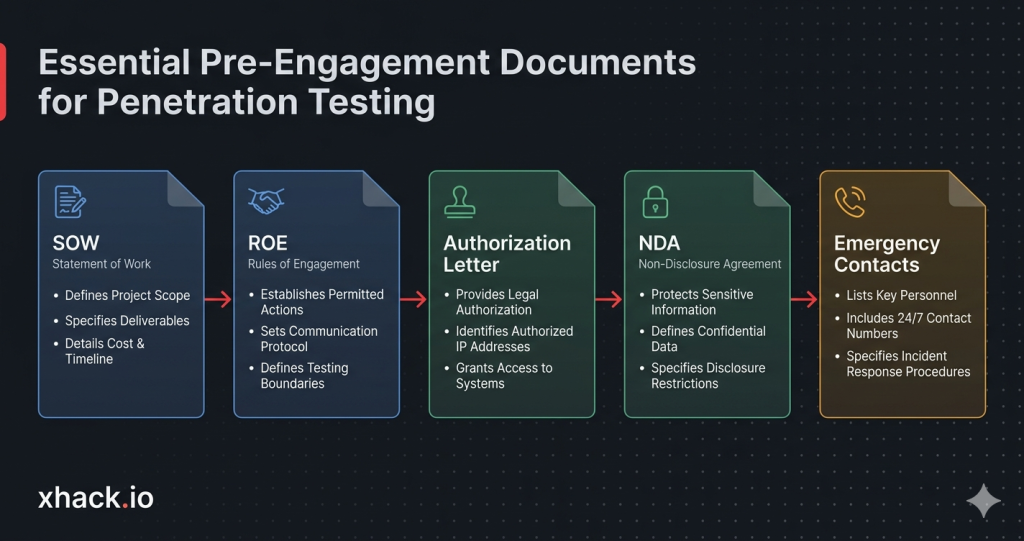
1. Statement of Work (SOW) – The contract. Defines scope, timeline, cost, and deliverables. Both parties sign it.
2. Rules of Engagement (ROE) – The “how” document. What methods are allowed, what’s off-limits, escalation procedures, and communication channels.
3. Authorization Letter / Get Out of Jail Free Card – Written authorization from the asset owner explicitly permitting the test. Without this, you’re committing a crime. Not exaggerating.
4. Non-Disclosure Agreement (NDA) – Protects both sides. The client’s data stays confidential. The pentester’s methodology stays proprietary.
5. Emergency Contact Sheet – Names, phone numbers, and escalation paths for when things go sideways at 2 AM.
Let’s be real. I’ve seen engagements start without an authorization letter. I’ve seen scopes defined over Slack messages that disappeared. I’ve seen pentesters take down a production database because nobody told them the staging server shared the same database.
Get the paperwork right. Every time.
Phase 2: Rules of Engagement – The Boundaries That Keep You Out of Jail
The Rules of Engagement (ROE) is the single most important document in your penetration testing checklist that isn’t the actual report. It defines the boundaries of what you can do, when you can do it, and what happens if something goes wrong.
What the ROE Must Cover
Testing boundaries:
- Allowed attack vectors (network, social engineering, physical, wireless)
- Explicitly forbidden actions (DoS attacks, data exfiltration of real PII, modifying production data)
- Whether credential stuffing or brute force is permitted
- Whether social engineering against specific individuals is in scope
Communication protocols:
- How to report a critical finding in real time (don’t wait for the final report if you find active compromise)
- Daily/weekly status updates during the engagement
- Who gets notified if a real attacker is discovered during testing
- Encrypted communication channels (Signal, PGP email, not plain text Slack)
Escalation procedures:
- What happens if a system crashes during testing
- Who authorizes escalation from grey box to white box mid-engagement
- When to stop testing and call in the incident response team
Legal protections:
- Compliance with Computer Fraud and Abuse Act (CFAA) or equivalent local laws
- Data handling and destruction policies
- Insurance requirements (professional liability, cyber insurance)
ROE Mistakes That Ruin Engagements
| Mistake | What Happens | How to Avoid It |
|---|---|---|
| No DoS clause | Pentester runs aggressive scans, app crashes, client blames tester | Explicitly state whether stress testing is allowed |
| Shared infrastructure not documented | Pentester tests client’s cloud instance, accidentally hits another tenant | Map all shared services in scoping |
| No real-time critical reporting | Pentester finds active ransomware on day 1, doesn’t tell client until report | Define “stop everything and call” criteria |
| Testing window too narrow | 3-day window for a 500-host network = rushed, incomplete results | Match scope complexity to testing duration |
| No third-party notification | Client’s infrastructure runs on AWS/Azure, cloud provider flags the test as an attack | Notify cloud providers and get testing authorization |
This phase of the penetration testing checklist isn’t glamorous. But it’s the difference between a successful engagement and a lawsuit. Every penetration testing checklist that skips ROE details is setting you up for failure.
Phase 3: Reconnaissance – Gathering Intel Before Firing a Single Shot
Now we get to the fun part. Reconnaissance is where you map the target’s attack surface before touching anything exploitable.
Your penetration testing checklist for recon should split into two categories: passive (they can’t detect you) and active (they might notice).
Passive Reconnaissance Checklist
Passive recon means gathering information without directly interacting with the target’s systems. No packets sent. No logs generated.
Domain and infrastructure intel:
- WHOIS lookups for domain registration details
- DNS enumeration (MX, NS, TXT, CNAME records)
- Subdomain discovery via Certificate Transparency logs
- Historical DNS data via SecurityTrails or similar
- Shodan/Censys for exposed services and banners
- Google dorking for sensitive files, login pages, error messages
People and organizational intel:
- LinkedIn scraping for employee names, roles, email formats
- GitHub/GitLab repos for exposed credentials, API keys, internal documentation
- Job postings revealing technology stack and security tools in use
- Breach databases for compromised credentials (with proper authorization)
- Social media profiling for social engineering targets
Technology fingerprinting:
- Wappalyzer or BuiltWith for web technology stack
- SSL/TLS certificate analysis for infrastructure mapping
- Public cloud metadata (S3 buckets, Azure blobs, GCP storage)
Active Reconnaissance Checklist
Active recon means you’re sending packets to the target. This is where your penetration testing checklist crosses into detectable territory.
Network scanning:
- Full port scan with Nmap (TCP + UDP top ports)
- Service version detection (-sV)
- OS fingerprinting (-O)
- Script scanning for known vulnerabilities (–script vuln)
- Network topology mapping
Web application scanning:
- Directory and file brute forcing (Gobuster, feroxbuster, dirsearch)
- Virtual host enumeration
- Web crawling and sitemap analysis
- API endpoint discovery
- Technology-specific scans (WordPress via WPScan, Joomla via JoomScan)
Email and authentication probing:
- Email verification (does the address exist without sending)
- SPF, DKIM, DMARC configuration analysis
- Authentication endpoint enumeration
- Password policy fingerprinting (lockout threshold, complexity)
Recon Output: What You Should Have
By the end of reconnaissance, your penetration testing checklist should produce:
| Deliverable | Contents |
|---|---|
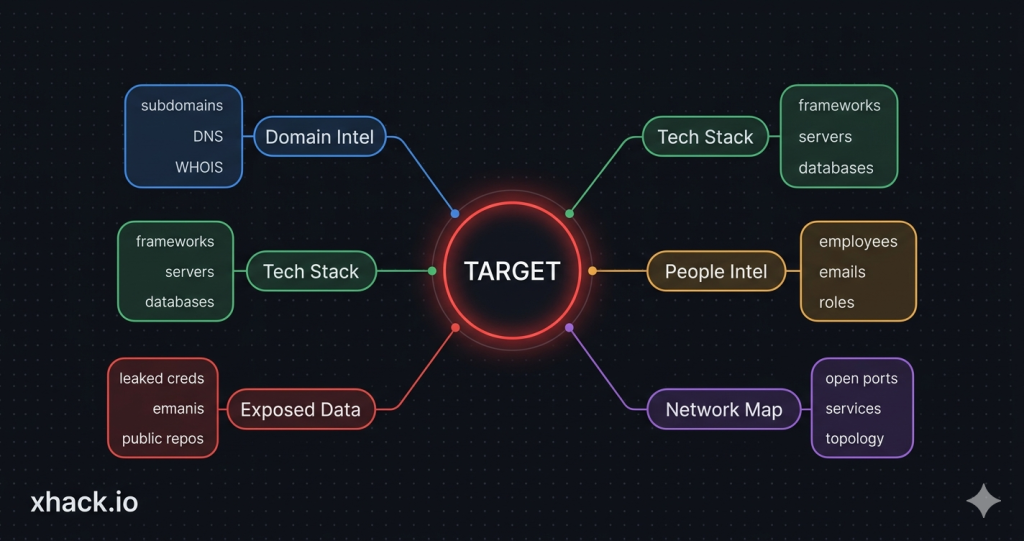
| Asset inventory | All discovered IPs, domains, subdomains, services |
| Technology stack map | Web frameworks, server OS, databases, third-party services |
| People map | Key employees, email formats, social engineering targets |
| Exposed data | Leaked credentials, open repos, exposed files |
| Attack surface diagram | Visual map of entry points and relationships |
Phase 4: Vulnerability Assessment – Finding the Cracks
This phase of the penetration testing checklist is where you move from “what exists” to “what’s broken.”
Vulnerability assessment sits between reconnaissance and exploitation. You’re identifying weaknesses but not exploiting them yet. Think of it as marking the doors before you try picking the locks.
Automated Scanning
Run the scanners first. They catch the low-hanging fruit fast:
Network vulnerability scanning:
- Nessus, OpenVAS, or Qualys for comprehensive CVE detection
- Scan all in-scope IPs and ports identified during recon
- Include credentialed scans where grey/white box access is provided
- Cross-reference results with known exploitable CVEs (CISA KEV catalog)
Web application scanning:
- Burp Suite Pro for web app vulnerability detection
- OWASP ZAP as a secondary scanner
- Nikto for web server misconfiguration checks
- SQLMap for automated SQL injection detection
- Nuclei with community templates for known vulnerabilities
Cloud configuration scanning:
- ScoutSuite for multi-cloud security auditing
- Prowler for AWS-specific checks
- AzureHound/BloodHound for Azure AD attack paths
Manual Vulnerability Analysis
Here’s the thing. Scanners miss business logic flaws every single time. This is where manual analysis on your penetration testing checklist separates a real pentest from a glorified vulnerability scan.
What scanners miss:
- Authentication bypass through workflow manipulation
- IDOR (Insecure Direct Object Reference) vulnerabilities
- Business logic flaws (applying discounts twice, accessing other users’ data)
- Race conditions in payment or inventory systems
- Chained vulnerabilities that are low-risk individually but critical together
- API authorization issues (endpoint accessible without proper role)
Vulnerability Prioritization
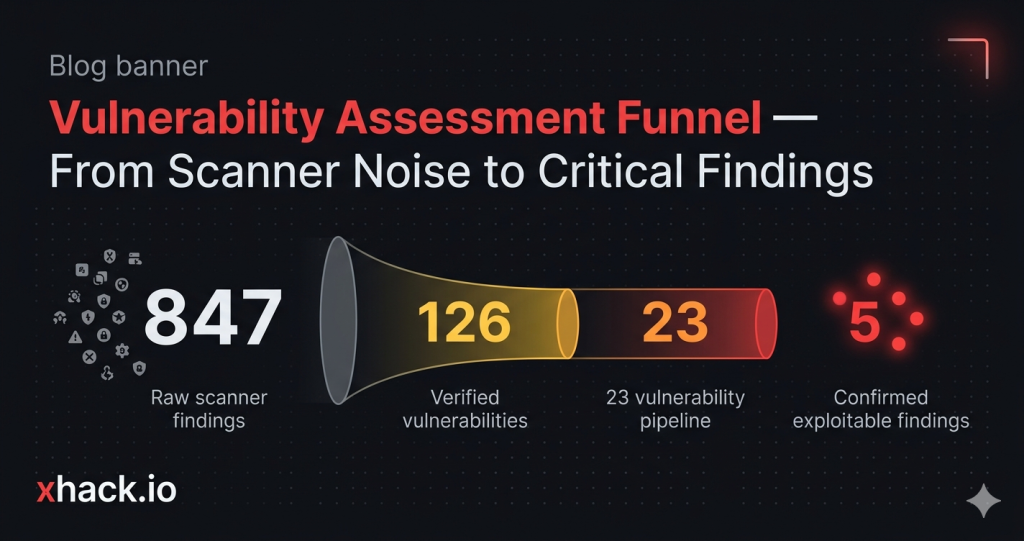
Not all vulnerabilities are equal. Your penetration testing checklist needs a prioritization framework:
| Priority | Criteria | Action |
|---|---|---|
| Critical | RCE, SQLi with data access, auth bypass to admin | Exploit immediately, notify client in real time |
| High | Privilege escalation, sensitive data exposure, SSRF | Exploit during engagement, include in findings |
| Medium | XSS (stored), CSRF, information disclosure | Document and attempt exploitation |
| Low | Missing headers, verbose errors, outdated libraries (no known exploit) | Document in report, deprioritize testing |
| Informational | Best practice violations, configuration suggestions | Include in appendix |
Phase 5: Exploitation – Proving the Impact
This is the phase everyone thinks about when they hear “penetration testing.” It’s also the phase that requires the most discipline on your penetration testing checklist.
Exploitation isn’t about showing off. It’s about proving business impact. “We got a shell” means nothing to a CISO. “We accessed 50,000 customer records through an API endpoint that bypasses authentication” gets budgets approved.
Exploitation Methodology
For each vulnerability:
- Verify the vulnerability is real – Don’t trust scanner output blindly. Confirm manually.
- Assess potential impact – What’s the worst case if this gets exploited?
- Attempt exploitation – Use the least destructive method possible
- Document everything – Screenshots, commands, timestamps, affected systems
- Map to MITRE ATT&CK – Tag each successful exploit with technique IDs
Common Exploitation Vectors by Test Type
Network penetration testing checklist – exploitation targets:
- Default/weak credentials on services (SSH, RDP, databases, admin panels)
- Unpatched services with public exploits (EternalBlue, Log4Shell, etc.)
- LLMNR/NBT-NS poisoning for credential capture
- Kerberoasting and AS-REP roasting in Active Directory
- SMB relay attacks
- SNMP community string abuse
Web application exploitation targets:
- SQL injection for data extraction
- Remote Code Execution via file upload, deserialization, SSTI
- Server-Side Request Forgery (SSRF) for internal network access
- Authentication bypass and session manipulation
- Insecure Direct Object References (IDOR)
- Cross-site scripting (XSS) for session hijacking
Cloud exploitation targets:
- Overprivileged IAM roles and policies
- Public S3 buckets/Azure blobs with sensitive data
- Metadata service exploitation (IMDS v1)
- Cross-tenant attacks via misconfigured sharing
- Container escape from Kubernetes pods
The Golden Rule of Exploitation
Never exceed the scope. Never destroy data. Never modify production systems without explicit approval.
If you find a SQL injection, extract enough data to prove impact (2-3 rows, redacted). Don’t dump the entire database. If you get admin access, screenshot the dashboard. Don’t change passwords or create backdoors.
The penetration testing checklist for exploitation is as much about restraint as it is about skill. Document everything. Prove impact. Move on.
Phase 6: Post-Exploitation and Lateral Movement – How Deep Does the Rabbit Hole Go?
Post-exploitation answers the question every executive really wants answered: “If someone gets in, how bad can it get?”
This phase of the penetration testing checklist takes an initial foothold and tests how far an attacker could go inside the network.
Post-Exploitation Checklist
From your initial foothold:
- Identify the compromised system’s role and network position
- Enumerate local users, groups, and privileges
- Check for stored credentials (browser passwords, SSH keys, config files)
- Map network connections and accessible subnets
- Identify domain membership and trust relationships
Privilege escalation:
- Check for kernel/OS exploits (Linux: kernel, SUID binaries; Windows: service misconfigs, unquoted paths)
- Search for cleartext credentials in files, memory, registries
- Token manipulation and impersonation
- Exploit misconfigured services running as SYSTEM/root
Lateral movement:
- Use captured credentials to access additional systems
- Test RDP, SSH, WinRM, PSExec access to other hosts
- Attempt Kerberos ticket attacks (Golden Ticket, Silver Ticket, Pass-the-Ticket)
- Map and access file shares, databases, internal applications
- Test network segmentation (can you reach the database server from the web server?)
Data access and impact assessment:
- Identify sensitive data accessible from compromised systems
- Test access to backup systems, source code repositories
- Check for access to cloud management consoles
- Assess ability to deploy ransomware (without actually deploying it)
- Document the complete attack chain from initial access to final impact
Mapping to MITRE ATT&CK
Every action in your post-exploitation penetration testing checklist should map to ATT&CK techniques:
| Action | ATT&CK Technique | Tactic |
|---|---|---|
| Credential dumping from memory | T1003.001 – LSASS Memory | Credential Access |
| Scheduled task for persistence | T1053.005 – Scheduled Task | Persistence |
| RDP to another server | T1021.001 – Remote Desktop | Lateral Movement |
| Disabling Windows Defender | T1562.001 – Disable Tools | Defense Evasion |
| Database dump of customer table | T1213 – Data from Information Repositories | Collection |
This ATT&CK mapping makes your penetration testing checklist findings directly actionable for the client’s SOC and detection engineering teams. Without this mapping, your penetration testing checklist report is just a list of problems without a defense roadmap.
Phase 7: Reporting – The Deliverable That Justifies Everything
The report is the product. Not the exploitation. Not the cool shell screenshots. The report.
This is the most underrated section of any penetration testing checklist. A technically brilliant pentest with a terrible report delivers zero value. A competent pentest with an exceptional report changes an organization’s security posture.
Report Structure
Every penetration testing checklist report should contain these sections:
1. Executive Summary (1-2 pages)
- Written for non-technical leadership (CISO, CTO, board)
- Overall risk rating with justification
- Top 3-5 critical findings in plain English
- Strategic recommendations
- No jargon, no CVE numbers, no technical details
2. Scope and Methodology (1-2 pages)
- What was tested (IPs, URLs, applications)
- Testing approach (black/grey/white box)
- Tools and methodologies used
- Testing timeline and any limitations encountered
3. Findings Summary Table
| # | Finding | Severity | CVSS | Status | ATT&CK ID |
|---|---|---|---|---|---|
| 1 | SQL Injection in /api/users | Critical | 9.8 | Exploited | T1190 |
| 2 | Default admin credentials on Jenkins | High | 8.1 | Exploited | T1078.001 |
| 3 | Missing network segmentation | High | 7.5 | Confirmed | T1021 |
| 4 | Stored XSS in comment field | Medium | 6.1 | Exploited | T1189 |
| 5 | Verbose error messages | Low | 3.7 | Confirmed | T1592 |
4. Detailed Findings (per vulnerability)
Each finding needs:
- Description of the vulnerability
- Evidence (screenshots, request/response, commands)
- Steps to reproduce
- Business impact assessment
- Remediation recommendation with priority
- MITRE ATT&CK technique mapping
- CVSS score with vector string
5. Attack Narrative
Walk through the complete attack chain as a story. “We started with phishing email X, gained credentials for user Y, escalated to admin Z, and accessed database containing 50k customer records.” This narrative is what executives remember and what gets budgets approved.
6. Remediation Roadmap
Prioritized list with timelines:
- Immediate (fix within 48 hours): Critical findings
- Short-term (fix within 30 days): High findings
- Medium-term (fix within 90 days): Medium findings
- Long-term (include in roadmap): Low and informational
7. Appendix
Raw scan data, full tool output, methodology details, and compliance mapping.
The Master Penetration Testing Checklist – All Phases Combined
Here’s the complete penetration testing checklist condensed into a single reference table. This is the penetration testing checklist you’ll actually use on engagements. Bookmark this, print it, tattoo it on your forearm. Whatever works.
Pre-Engagement
- Statement of Work signed by both parties
- Rules of Engagement document finalized
- Written authorization letter obtained
- NDA executed
- Scope defined with exact targets (IPs, URLs, domains)
- In-scope and out-of-scope explicitly documented
- Testing window and schedule confirmed
- Emergency contacts and escalation procedures established
- Third-party/cloud provider notifications sent
- Compliance requirements identified and mapped
- Testing approach agreed (black/grey/white box)
- Deliverables and report format defined
Reconnaissance
- Passive DNS and WHOIS enumeration complete
- Subdomain discovery via CT logs and brute force
- Shodan/Censys scan for exposed services
- Google dorking for sensitive files and pages
- Employee enumeration (LinkedIn, social media)
- GitHub/GitLab scanned for leaked credentials
- Technology stack fingerprinted
- Full Nmap port scan (TCP + UDP) complete
- Service version detection complete
- Web directory brute forcing complete
- Attack surface diagram created
Vulnerability Assessment
- Automated vulnerability scan (Nessus/Qualys/OpenVAS) complete
- Web application scan (Burp Suite/ZAP) complete
- Cloud configuration audit complete (if applicable)
- Manual testing for business logic flaws
- IDOR and authorization testing
- API endpoint security testing
- Vulnerability findings prioritized by risk
Exploitation
- Each vulnerability manually verified before exploitation
- Exploitation attempted with least destructive method
- All exploits documented with screenshots and timestamps
- Business impact assessed for each successful exploit
- MITRE ATT&CK technique IDs mapped to each exploit
- Client notified of critical findings in real time
Post-Exploitation
- Privilege escalation attempted from initial foothold
- Lateral movement tested to adjacent systems
- Credential harvesting and reuse tested
- Network segmentation validated
- Sensitive data access documented
- Complete attack chain mapped end-to-end
- All artifacts and backdoors cleaned up
Reporting
- Executive summary written in plain English
- Findings summary table with severity, CVSS, ATT&CK mapping
- Detailed finding pages with evidence and reproduction steps
- Attack narrative telling the complete story
- Remediation roadmap with prioritized timelines
- Appendix with raw data and tool outputs
- Report delivered within agreed timeline
- Presentation/debrief scheduled with client
Post-Report
- Remediation support provided during fix window
- Retesting scheduled after client applies fixes
- Retesting report delivered confirming fix status
- Lessons learned documented for next engagement
- Findings fed into SOC detection rules (XHack SOC or equivalent)
FAQ: Penetration Testing Checklist Questions Answered
How long does a full penetration testing engagement take?
A typical penetration testing checklist engagement runs 2-4 weeks depending on scope. Simple web app tests can finish in 1 week. Large enterprise network assessments with hundreds of hosts need 3-4 weeks minimum. The breakdown is usually 1-2 days for scoping, 2-3 days for recon, 3-5 days for vulnerability assessment and exploitation, 2-3 days for post-exploitation, and 3-5 days for reporting. Rushing any phase produces incomplete results.
What’s the difference between a vulnerability scan and a penetration test?
A vulnerability scan runs automated tools that check for known CVEs and misconfigurations. It produces a list of potential issues but doesn’t prove exploitability or business impact. A penetration test uses that scan as a starting point, then adds manual testing, exploitation, post-exploitation, and attack chaining to demonstrate real-world impact. Your penetration testing checklist should always include both automated scanning and manual exploitation.
How often should a penetration testing checklist be executed?
At minimum, run a full penetration testing checklist engagement annually with quarterly vulnerability assessments between tests. If your environment changes frequently (cloud-native, CI/CD deployments, regular feature releases), quarterly full pentests are recommended. Compliance frameworks like PCI DSS require annual testing at minimum. Between formal engagements, use continuous vulnerability scanning and AI-powered monitoring tools like XHack SOC to maintain visibility.
What credentials and access should I provide for a grey box test?
For a grey box penetration testing checklist engagement, provide standard user credentials for each application in scope, VPN access if testing internal infrastructure, API documentation and keys, network diagrams showing segmentation, and a list of known technologies and versions. Don’t provide admin credentials unless specifically testing admin functionality. The goal is simulating a compromised employee or post-phishing scenario, not an insider with full access.
How do I know if my pentest provider is actually following a proper checklist?
Ask for their methodology documentation before the engagement starts. A legitimate provider should reference established frameworks like PTES (Penetration Testing Execution Standard), OWASP Testing Guide, OSSTMM, or NIST SP 800-115. They should provide a detailed scope document, ROE, and sample report. If they can’t produce these artifacts, or if their “report” is just a scanner export with a cover page, find a different provider. A proper penetration testing checklist is the bare minimum for a professional engagement.
Conclusion
That’s a wrap on the complete penetration testing checklist from scoping through reporting.
The penetration testing checklist isn’t complicated. But it requires discipline. The phases that feel boring (scoping, ROE, documentation) are the ones that determine whether your engagement delivers real security improvement or just a PDF that collects dust.
Run the penetration testing checklist properly. Map everything to MITRE ATT&CK. Feed your findings into continuous monitoring through XHack SOC or equivalent tools. And for the love of everything secure, get the authorization letter signed before you start.
Security operations are evolving from annual checkbox pentests to continuous security validation. The organizations that treat their penetration testing checklist as a living process, not a yearly chore, are the ones that actually get harder to breach.
Got a better penetration testing checklist workflow? Think I missed a critical phase? Hit me up on X. I respond to everything, even the people who think annual pentests are “good enough.”